

Please go through the articles given below to understand about Azure functions.
- Introduction to Serverless computing using Azure Functions
- Create First Azure Function App
- Create Azure Timer Function using C#
- Explore Storage Account of Azure Functions – File Share
- Explore Storage Account of Azure Functions – Table Service
Introduction
Webhooks are user-defined HTTP callbacks. They are usually triggered by some event, such as pushing code to a repository or a comment being posted to a blog. When the event occurs, the source site makes HTTP request to the configured URL for the Webhook.
Ref
https://en.wikipedia.org/wiki/Webhook
Few real-world cases are given below, where you might have to develop Webhooks.
- In a Blog site, you would like to send an e-mail to the end user as soon as a comment is posted. You might call a Webhook which is responsible to send an e-mail.
- In an e-commerce site, you might want to invoke a third-party payment gateway to process the credit card for the payment. The third-party gateway provider might provide you a Webhook to which you might pass an amount and other related details for processing.
Please login to your Azure subscription and navigate to your Azure Function app. Subsequently, it will be displayed, as shown below. Click New Function and choose the GenericWebHook-CSharp template.
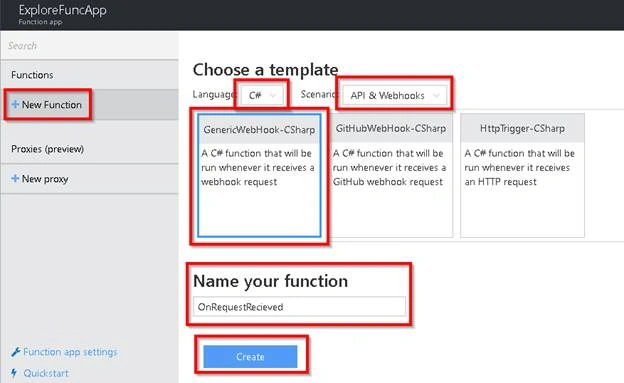
For this example, I have given OnRequestRecieved as the name of the function and clicked on Create button, which would take you to Develop tab, as shown below.
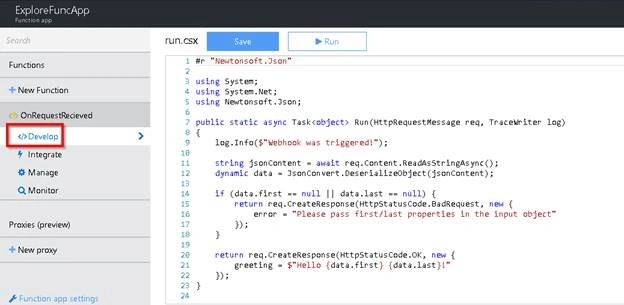
If you are a .NET developer, you will understand that the function given above Run accepts the input parameters first and last from the request object and sends a response Hello <<first>> <<last>> greeting as a response, if the request object has first and last parameters, else it throws an error.
We will test the Function named Run using Postman App. You can download the app at https://www.getpostman.com/
To test Azure function, you need to grab the URL of Azure function by clicking on Get function URL link, which is shown below.
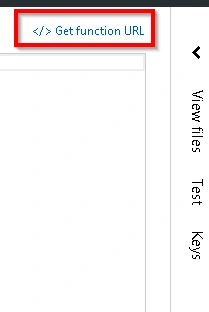
Clicking on Get function URL will open the URL in a small popup, as shown below.
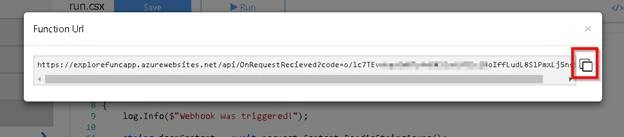
Below is the structure of Azure Function.
https://<<FunctionAppname>>.azurewebsites.net/api/<<Functioname>>
You can copy the complete URL by clicking on the icon, which is highlighted in the sreenshot given above.
Let’s open Postman and test our function, as shown below.
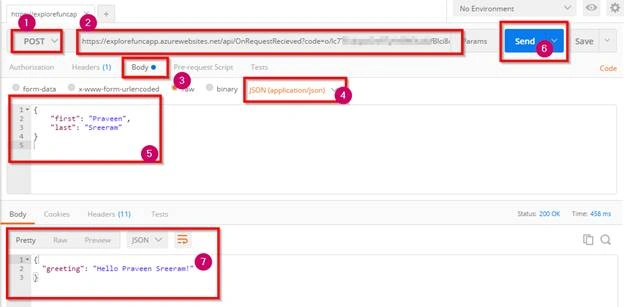
Points to note,
- Choose Post method.
- Paste the URL of the Function app.
- Select Raw.
- Choose JSON.
- Provide the input in JSON format with the fields first and last.
- Click Send button.
- Review the response.
We have created an Azure Generic Webhook Trigger and validated, using Postman. However, in real-time, you might provide your Webhook URL to some third-party Applications (or one of your Applications, which can invoke the Webhook triggers), which would automatically invoke your Webhook, which is based on some events.
Summary
In this article, we have learned the following.
- What is a Webhook.
- A few Real-world cases of using Webhook.
- How to create a Webhook trigger, using Function apps.
- Structure of the Webhook trigger URL.
- How to test Webhook trigger using Postman.
Join the conversation! Your thoughts help the community grow.