

Introduction
In this article, you will learn how to create an image slideshow automatically. This can be done by using “Carousel View”.
What is Carousel View
- Carousel View has the ability to show items in 3D or linear arrangements.
- On-demand loading for efficient data utilization -- no need to pre-populate a large number of items at the same time.
- UI Virtualization helps reduce loading time and app’s live memory.
Steps for Creating Image Slider
- We will have to install a NuGet package which will help us to create “Image Slider” in Xamarin. Forms. The name of the NuGet package is given below.
“Forms.CarouselView”.
- After installing the NuGet package, add the following library in your library files which will help you to work with Carousel View.
xmlns:forms1="clr-namespace:Xamarin.Forms;assembly=Xamarin.Forms.CarouselView"

- Now, it’s time to type some lines of code.
Type the following code in the XAML file, which is defined below.
- <StackLayout>
- <Label Text="Carousel View" HorizontalOptions="Center" VerticalOptions="CenterAndExpand" />
- <forms1:CarouselView x:Name="MainCarouselView">
- <forms1:CarouselView.ItemTemplate>
- <DataTemplate>
- <Image Source="{Binding .}"></Image>
- </DataTemplate>
- </forms1:CarouselView.ItemTemplate>
- </forms1:CarouselView
- lt;/StackLayout>
- Type the following code in your “cs” file.
This code will be written under the “Initialize component();”- var images = new List<string>
- {
- "https://image.shutterstock.com/image-photo/beautiful-abstract-grunge-decorative-navy-260nw-539880832.jpg","http://localhost:62212/Uploads/back2.png","http://localhost:62212/Uploads/heart.png"
- };
- MainCarouselView.ItemsSource = images;
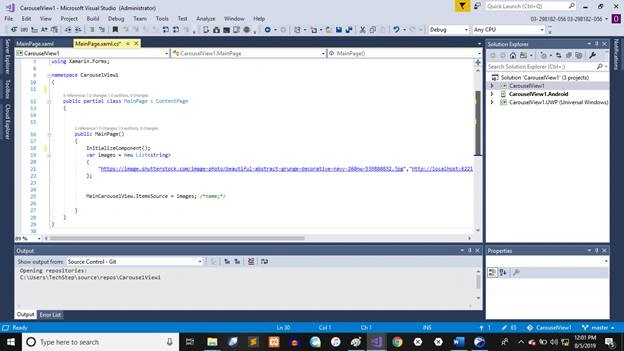
We’ll give some “Image Addresses” in our code on which we want to apply the Image Slider.
- Now, if we want our Image Slider to work automatically, we’ll have to type some more code in our “cs” file, as defined below.
This code will help us to work with image slider automatically.- Device.StartTimer(TimeSpan.FromSeconds(5), (Func<bool>)(() =>
- {
- MainCarouselView.Position = (MainCarouselView.Position + 1) % images.Count;
- return true;
- }));

With the help of this code, we can get an output on Android successfully. But if we want to get output on UWP, we have to do some extra settings for getting the output.
- Settings for UWP
- Go to your UWP project.
- Type the following code in your “Xaml” File of the UWP project.
- <Application.Resources>
- <DataTemplate x:Key="ItemTemplate">
- <Platform:ItemControl HorizontalAlignment="Stretch" VerticalAlignment="Stretch"></Platform:ItemControl>
- </DataTemplate>
- </Application.Resources>
- The code will be typed inside the <Application> Tag of the “Xaml” file of UWP project.
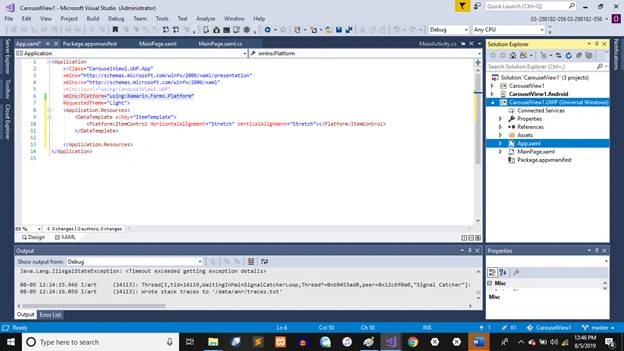
Add the following library in “Library Files”.
xmlns:Platform="using:Xamarin.Forms.Platform"
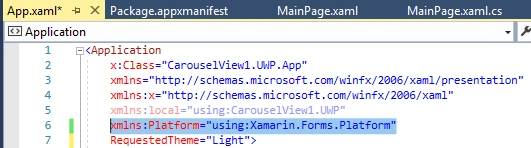
Now, with the help of this setting, we will be able to see the output on UWP.
Output

Mohanad ObaidPosted Jul 17, 2020, 2:53 PM
And you should use the following code in XAML : <controls:CarouselViewControl x:Name="mmlist" Orientation="Horizontal" InterPageSpacing="10" VerticalOptions="FillAndExpand" HorizontalOptions="FillAndExpand"> <controls:CarouselViewControl.ItemTemplate> <DataTemplate> <Image Source="{Binding imgPath}" WidthRequest="300" HeightRequest="300"/> </DataTemplate> </controls:CarouselViewControl.ItemTemplate> </controls:CarouselViewControl>
Mohanad ObaidPosted Jul 17, 2020, 2:52 PM
Hi the plugin has been updated , so you need to install the following plugin ( CarouselView.FormsPlugin )
Mohammad AssafPosted Feb 18, 2020, 10:29 AM
Hello, I cant found "Forms.CarouselView" library. Please help. Thank you for your article