

Introduction
This article will help beginner and developers who want to work with AngularJS and jQuery for People Picker columns.
Objective
Post a "Person" and "Group" column in SharePoint list with autocomplete input of HTML using Angular.js and jQuery with REST call.
Step 1
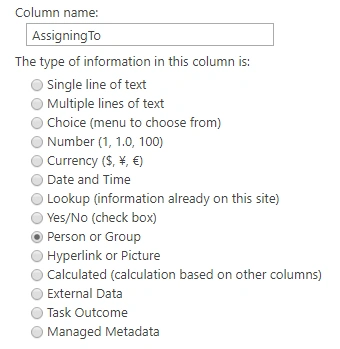
Create a SharePoint list with a single person and group column as shown below. Keep ‘Allow multiple selections:’ as ‘No’.
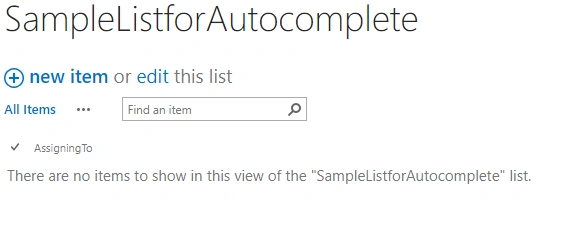
Then, the created list looks as below.
Step2
Create a page in SharePoint and include a content editor with the following HTML.
HTML code
- <body ng-app="myApp" ng-controller="MainCtrl">
- <label for="tags">Assigned To: </label>
- <input id="Persons" ng-model="SelectedPerson"/><br/><br/>
- <input type="button" ng-click="AddToList()" value="Submit"/>
- </body>
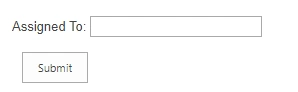
Result
Step 3
Build a script for autocomplete input.
We have mainly 3 steps to build the script as follows.
- Function for getting all the people from SharePoint site on page load.
Code
- $.ajax
- ({
- url: _spPageContextInfo.webAbsoluteUrl + "/_api/web/siteusers",/*Get all the peoples from the site*/
- type: "GET",
- headers:
- {
- "Accept": "application/json;odata=verbose"
- },
- success: function(data)
- {
- AllpeoplePickerUsers = data.d.results; /*set the all peoples with all their properties to a global variable*/
- for (var i = 0; i < AllpeoplePickerUsers.length; i++) {
- var property = AllpeoplePickerUsers[i].Title;
- peoplePickerUsers.push(property); /*splitting the all titles to another global variable to display names in auto-complete input*/
- }
- },
- error: function(error)
- {
- alert(JSON.stringify(error));
- }
- });
- Link the people to autocomplete-input on page load itself.
Code
- $( function() {
- $( "#Persons" ).autocomplete({/* setting the all names to the autocomplete input using Id*/
- source: peoplePickerUsers/* peoplePickerUsers contains the names of site peoples*/
- });
- } );
- Then, submit the selected person to the SharePoint list on button click.
Code
- $scope.AddToList=function(){ /*On-click function*/
- for(var i=0;i<AllpeoplePickerUsers.length;i++){/*Since we have name in input, so we are passing the respected user id here*/
- if ($scope.SelectedPerson=== AllpeoplePickerUsers[i].Title) /*$scope.SelectedPerson is selected name from html input*/
- {
- CurPersonId=AllpeoplePickerUsers[i].Id;/*Setting Id to a global variable*/
- }
- }
- var datavalue = "{__metadata:{'type':'SP.Data."+listName+"ListItem'},AssigningToId:'"+CurPersonId+"'}";/*Add Id to column name like AssigningTo+Id and Building the body of data to post to the SharePoint list*/
- $http({
- url: _spPageContextInfo.webAbsoluteUrl + "/_api/web/lists/GetByTitle('"+listName+"')/items",
- method: "POST",
- headers:
- {
- "Accept": "application/json;odata=verbose",
- "Content-Type": "application/json;odata=verbose",
- "X-RequestDigest": $("#__REQUESTDIGEST").val(),
- "X-HTTP-Method": "POST"
- },
- data: datavalue /* passing the body of data here*/
- })
- .then(function(response) {
- alert("success");
- },
- function(response) {
- alert("failed");
- });
- }
Step 4
Include the following jQuery and Angular.js references in the page header.
References
- <script src="https://code.jquery.com/jquery-1.12.4.js"></script>
- <script src="https://code.jquery.com/ui/1.12.1/jquery-ui.js"></script>
- <script src="https://code.angularjs.org/1.3.0/angular.js"></script>
Finally, the overall code looks like below.
CODE
- <html>
- <head>
- <meta http-equiv="Content-Type" content="text/html; charset=utf-8" />
- <title>AutocompleteByAJS</title>
- <link rel="stylesheet" href="https://code.jquery.com/ui/1.12.1/themes/base/jquery-ui.css"/>
- <link rel="stylesheet" href="https://jqueryui.com/resources/demos/style.css"/>
- <script src="https://code.jquery.com/jquery-1.12.4.js"></script>
- <script src="https://code.jquery.com/ui/1.12.1/jquery-ui.js"></script>
- <script src="https://code.angularjs.org/1.3.0/angular.js"></script>
- </head>
- <body ng-app="myApp" ng-controller="MainCtrl">
- <label for="tags">Assigned To: </label>
- <input id="Persons" ng-model="SelectedPerson"/><br/><br/>
- <input type="button" ng-click="AddToList()" value="Submit"/>
- </body>
- <script type="text/javascript">
- var app = angular.module('myApp', []);
- var peoplePickerUsers =[];
- var AllpeoplePickerUsers =[];
- var CurPersonId
- var listName="SampleListforAutocomplete";
- app.controller('MainCtrl',function($scope,$http) {
- $.ajax
- ({
- url: _spPageContextInfo.webAbsoluteUrl + "/_api/web/siteusers",
- type: "GET",
- headers:
- {
- "Accept": "application/json;odata=verbose"
- },
- success: function(data)
- {
- AllpeoplePickerUsers = data.d.results;
- console.log(AllpeoplePickerUsers);
- for (var i = 0; i < AllpeoplePickerUsers.length; i++) {
- var property = AllpeoplePickerUsers[i].Title;
- peoplePickerUsers.push(property);
- }
- },
- error: function(error)
- {
- alert(JSON.stringify(error));
- }
- });
- $( function() {
- $( "#Persons" ).autocomplete({
- source: peoplePickerUsers
- });
- } );
- $scope.AddToList=function(){
- for(var i=0;i<AllpeoplePickerUsers.length;i++){
- if ($scope.SelectedPerson=== AllpeoplePickerUsers[i].Title)
- {
- CurPersonId=AllpeoplePickerUsers[i].Id;
- }
- }
- var datavalue = "{__metadata:{'type':'SP.Data."+listName+"ListItem'},AssigningToId:'"+CurPersonId+"'}";
- // alert(datavalue);
- $http({
- url: _spPageContextInfo.webAbsoluteUrl + "/_api/web/lists/GetByTitle('"+listName+"')/items",
- method: "POST",
- headers:
- {
- "Accept": "application/json;odata=verbose",
- "Content-Type": "application/json;odata=verbose",
- "X-RequestDigest": $("#__REQUESTDIGEST").val(),
- "X-HTTP-Method": "POST"
- },
- data: datavalue
- })
- .then(function(response) {
- alert("success");
- },
- function(response) {
- alert("failed");
- });
- }
- });
- </script>
- </html>
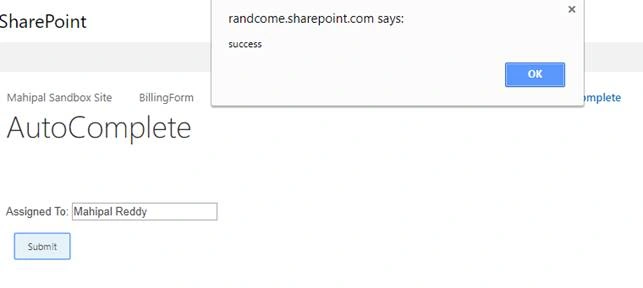
Let’s see the results on screen,
Auto-complete
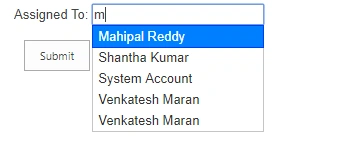
Pick the user from the input element and click Submit.
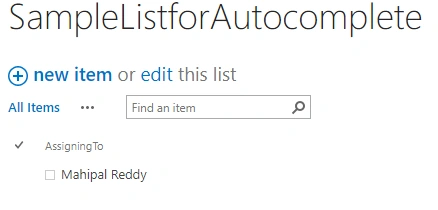
Go back to the SharePoint list.
Conclusion
This will be useful when someone wants to work on the People Picker column or to get the list of all the site's members.
Shiv SharmaPosted Aug 14, 2018, 5:26 AM
Hi Mahipal, What about Groups? If we want to search SharePoint Groups?
Mahesh BabuPosted Oct 31, 2017, 7:32 PM
Thanks for posting....
Ragavendar SPosted Oct 6, 2017, 4:10 AM
Very nice thanks for the share
Vinodh NarayananPosted Oct 6, 2017, 1:51 AM
Good one keep going\