

Introduction
It is important to restrict unauthorized access to particular
operations/actions of an application. I did an experiment while I was working on a
project that needed to restrict an unauthorized person from performing Crud operations.
The authorization is based on the user role.
OK, Let's get started. Here are the steps; I hope you will enjoy it.
Contents
- SQL Database
- Create a new Database
- Run the DB-script
- ASP.NET MVC Application(Web Api)
- MVC, WebAPI Project
- Install AngularJS
- Authentication &
- Authorization
Create New Database
- /****** Object: Database [ApiSecurity] Script Date: 7/3/2016 11:50:11 AM ******/
- CREATE DATABASE [ApiSecurity] ON PRIMARY
- ( NAME = N'ApiSecurity', FILENAME = N'C:\Program Files\Microsoft SQL Server\MSSQL12.MSSQLSERVER\MSSQL\DATA\ApiSecurity.mdf' , SIZE = 3072KB , MAXSIZE = UNLIMITED, FILEGROWTH = 1024KB )
- LOG ON
- ( NAME = N'ApiSecurity_log', FILENAME = N'C:\Program Files\Microsoft SQL Server\MSSQL12.MSSQLSERVER\MSSQL\DATA\ApiSecurity_log.ldf' , SIZE = 1024KB , MAXSIZE = 2048GB , FILEGROWTH = 10%)
- GO
MVC Application
Install AngularJS for client side scripting from NuGet package installer.
First, we need to login for the authentication check
Authentication & Authorization
- Authentication : Identity of the user.
- Authorization : Allowed to perform an action.
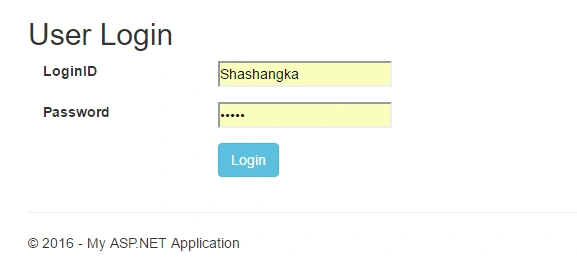
After successful login(Authentication), we can access the get customer link to show all the customers, only if we have the read permission in the database, given below: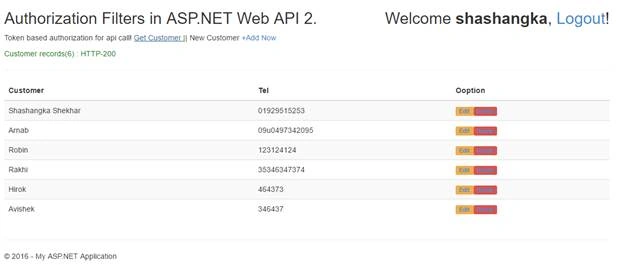 .
.
In our database table, we have to restrict the access (CanRead to "False") of Administrator to view the customer list.
The result will show a 401 response message while fetching the data from the database, where the logged in user role is an administrator.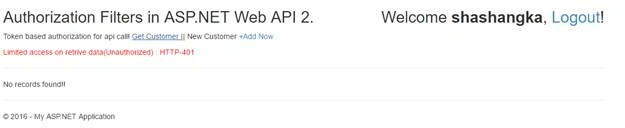
Using the code
Here's our API Controller, that is restricted by using [BasicAuthorization] attribute at the top of the Crud methods.
- [RoutePrefix("api/Customer")]
- public class CustomerController : ApiController
- {
- private CustomersMgt objCust = null;
- //Get
- [BasicAuthorization, HttpGet, Route("GetCustomers/{pageNumber:int}/{pageSize:int}")]
- public IHttpActionResult GetCustomers(int pageNumber, int pageSize)
- {
- objCust = new CustomersMgt();
- return Json(objCust.GetCustomer(pageNumber, pageSize));
- }
- //Post
- [BasicAuthorization, HttpPost, Route("SaveCustomer")]
- public IHttpActionResult SaveCustomer(Customer model)
- {
- objCust = new CustomersMgt();
- return Json(objCust.SaveCustomer(model));
- }
- //Put
- [BasicAuthorization, HttpPut, Route("UpdateCustomer")]
- public IHttpActionResult UpdateCustomer(Customer model)
- {
- objCust = new CustomersMgt();
- return Json(objCust.UpdateCustomer(model));
- }
- //Delete
- [BasicAuthorization, HttpDelete, Route("DeleteCustomer/{CustomerID:int}")]
- public IHttpActionResult DeleteCustomer(int CustomerID)
- {
- objCust = new CustomersMgt();
- return Json(objCust.DeleteCustomer(CustomerID));
- }
- }
- [AttributeUsage(AttributeTargets.Class | AttributeTargets.Method, AllowMultiple = false)]
- public class BasicAuthorization : AuthorizationFilterAttribute
- {
- private const string _authorizedToken = "AuthorizedToken";
- private const string _userAgent = "User-Agent";
- private UserAuthorizations objAuth = null;
- public override void OnAuthorization(HttpActionContext filterContext)
- {
- string authorizedToken = string.Empty;
- string userAgent = string.Empty;
- try
- {
- var headerToken = filterContext.Request.Headers.SingleOrDefault(x => x.Key == _authorizedToken);
- if (headerToken.Key != null)
- {
- authorizedToken = Convert.ToString(headerToken.Value.SingleOrDefault());
- userAgent = Convert.ToString(filterContext.Request.Headers.UserAgent);
- if (!IsAuthorize(authorizedToken, userAgent))
- {
- filterContext.Response = new HttpResponseMessage(HttpStatusCode.Unauthorized);
- return;
- }
- }
- else
- {
- filterContext.Response = new HttpResponseMessage(HttpStatusCode.Forbidden);
- return;
- }
- }
- catch (Exception)
- {
- filterContext.Response = new HttpResponseMessage(HttpStatusCode.Forbidden);
- return;
- }
- base.OnAuthorization(filterContext);
- }
- private bool IsAuthorize(string authorizedToken, string userAgent)
- {
- objAuth = new UserAuthorizations();
- bool result = false;
- try
- {
- result = objAuth.ValidateToken(authorizedToken, userAgent);
- }
- catch (Exception)
- {
- result = false;
- }
- return result;
- }
- }
In this section, an exception is handled by sending the response of Forbidden (403) & Unauthorized (401) of the response code.
Script for Token Generation
Below is the AngularJS script for the token generation at the client end, while each request is a process which generates first and sends it along with the request header to validate.
- AppSecurity.controller('tokenCtrl', ['$scope', '$http', 'crudService', '$sessionStorage',
- function ($scope, $http, crudService, $sessionStorage) {
- //Token Generate ClientEnd
- $scope.tokenManager = {
- generateSecurityToken: function (methodtype) {
- var model = {
- username: $sessionStorage.loggeduser,
- key: methodtype,
- ip: $sessionStorage.loggedip,
- userAgent: navigator.userAgent.replace(/ \.NET.+;/, '')
- };
- var message = [model.username, model.ip, model.userAgent].join(':');
- var hash = CryptoJS.HmacSHA256(message, model.key);
- var token = CryptoJS.enc.Base64.stringify(hash);
- var tokenId = [model.username, model.key].join(':');
- var tokenGenerated = CryptoJS.enc.Utf8.parse([token, tokenId].join(':'));
- return CryptoJS.enc.Base64.stringify(tokenGenerated);
- },
- };
- }]);
Server Token Generation
Because of the way in which the client token was generated, we need to re-generate the token. In the same way, we will compare and validate whether the request is fake or not.
- public string generateToken(string userid, string methodtype, string ip, string userAgent)
- {
- string message = string.Join(":", new string[] { userid, ip, userAgent });
- string key = methodtype ?? "";
- var encoding = new System.Text.ASCIIEncoding();
- byte[] keyByte = encoding.GetBytes(key);
- byte[] messageBytes = encoding.GetBytes(message);
- using (var hmacsha256 = new HMACSHA256(keyByte))
- {
- byte[] hashmessage = hmacsha256.ComputeHash(messageBytes);
- return Convert.ToBase64String(hashmessage);
- }
- }
This part of the code will compare and validate the request in two steps -- first token is compared and it will validate the authorization from the database to access the Crud operations.
- public bool ValidateToken(string authorizedToken, string userAgent)
- {
- bool result = false;
- try
- {
- string key = Encoding.UTF8.GetString(Convert.FromBase64String(authorizedToken));
- string[] parts = key.Split(new char[] { ':' });
- if (parts.Length == 3)
- {
- objModel = new tokenModel()
- {
- clientToken = parts[0],
- userid = parts[1],
- methodtype = parts[2],
- ip = HostService.GetIP()
- };
- //compare token
- string serverToken = generateToken(objModel.userid, objModel.methodtype, objModel.ip, userAgent);
- if (objModel.clientToken == serverToken)
- {
- result = ValidateAuthorization(objModel.userid, objModel.methodtype);
- }
- }
- }
- catch (Exception e)
- {
- e.ToString();
- }
- return result;
- }
This sample of the code will validate the access permission from the database on each action.
- public bool ValidateAuthorization(string userid, string methodtype)
- {
- bool IsValid = false;
- if (userid != null)
- {
- using (_ctx = new ApiSecurityEntities())
- {
- if (_ctx.UserAuthentications.Any(u => u.LoginID == userid && u.StatusID == 1))
- {
- switch (methodtype)
- {
- case "get":
- IsValid = (from u in _ctx.UserAuthentications
- join r in _ctx.UserRoles on u.RoleID equals r.RoleID
- where u.LoginID == userid && u.StatusID == 1 && r.CanRead == true
- select u).Any();
- break;
- case "post":
- IsValid = (from u in _ctx.UserAuthentications
- join r in _ctx.UserRoles on u.RoleID equals r.RoleID
- where u.LoginID == userid && u.StatusID == 1 && r.CanCreate == true
- select u).Any();
- break;
- case "put":
- IsValid = (from u in _ctx.UserAuthentications
- join r in _ctx.UserRoles on u.RoleID equals r.RoleID
- where u.LoginID == userid && u.StatusID == 1 && r.CanUpdate == true
- select u).Any();
- break;
- case "delete":
- IsValid = (from u in _ctx.UserAuthentications
- join r in _ctx.UserRoles on u.RoleID equals r.RoleID
- where u.LoginID == userid && u.StatusID == 1 && r.CanDelete == true
- select u).Any();
- break;
- default:
- IsValid = false;
- break;
- }
- }
- }
- }
- return IsValid;
- }
Ganesh M JPosted May 29, 2018, 4:57 AM
The underlying provider failed on Open, how to fix this issue?
Vignesh ManiPosted Jul 4, 2016, 11:06 AM
Nice
kalu singh raoPosted Jul 4, 2016, 1:40 AM
Nice...
RajaPosted Jul 4, 2016, 12:30 AM
Good One...