

In this article we are going to learn how to authenticate with Office 365 credentials in C#. Here, we are going to authenticate with email and password of Office 365 but using our defined textboxes and login button so we have to use Office 365 API service URL and we have to install Unirest dll for Http Request and Http Response of the office 365 API.
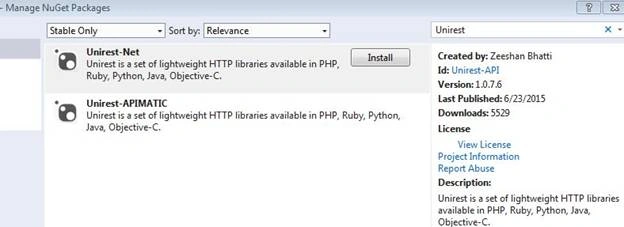
We can install unirest dll through manage NuGet packages as below.
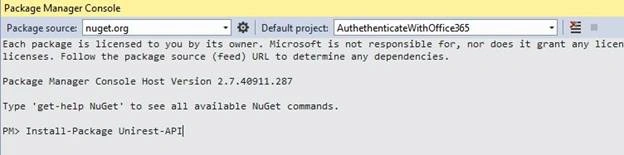
Or we can install using package manager console with the following line:
Install-Package Unirest-API
We have to use below namespace for Unirest-API DLL in our application.
using unirest_net.http;
Below is the API URL of Office 365. You can directly run below URL in your browser and check the API functionality.
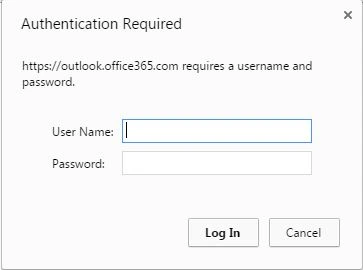
The above image is asking for credentials if you directly run the URL in the browser after giving the correct email and password. You will get the data as below. This is sample data. You can check original data by clicking above API link and authenticate with your real credentials.
- {
- "@odata.context": "https://outlook.office365.com/api/v1.0/$metadata#Me",
- "@odata.id": "https://outlook.office365.com/api/v1.0/Users('[email protected]')",
- "Id": "yourId",
- "DisplayName": "Your Display Name",
- "Alias": "aliasName",
- "MailboxGuid": "mailBoxGuid"
- }
Below is the sample code for ASP.NET, In that I added two ASP.NET textboxes and one login button.
- <table class="auto-style1">
- <tr>
- <td>Email:</td>
- <td>
- <asp:TextBox ID="txtEmail" runat="server"></asp:TextBox>
- </td>
- </tr>
- <tr>
- <td>Password:</td>
- <td>
- <asp:TextBox ID="txtPassword" runat="server" TextMode="Password"></asp:TextBox>
- </td>
- </tr>
- <tr>
- <td> </td>
- <td>
- <asp:Button ID="btnLogin" runat="server" Text="Login" OnClick="btnLogin_Click" />
- </td>
- </tr>
- </table>
- protected void btnLogin_Click(object sender, EventArgs e)
- {
- bool result = false;
- HttpResponse < string > response = Unirest.get("https://outlook.office365.com/api/v1.0/me/").basicAuth(txtEmail.Text, txtPassword.Text).asJson < string > ();
- if (response.Code == 200)
- result = true;
- if (result)
- {
- ScriptManager.RegisterClientScriptBlock(this, this.GetType(), "alertMessage", "alert('User validated successfully')", true);
- } else
- {
- ScriptManager.RegisterClientScriptBlock(this, this.GetType(), "alertMessage", "alert('Email/Password is wrong')", true);
- }
- }
After calling the service, we are getting return values in response variable.
If you provide valid credential then output comes as below image.

In this example, for valid credential I am checking with response.Code = 200. If the condition is true then alerting the message as “User validated successfully”;
And if you provide wrong credential then output comes as in the following image.
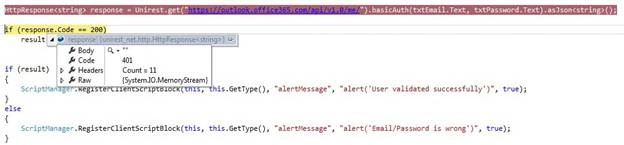
In above image, we can see that response.Body is empty and response.Code=401. So based on the condition, its alerting the message as “Email/Password is wrong”.
We can write logic as per our business requirement, in this way we can authenticate the user with office 365 API.
hasan bozkurtPosted Nov 19, 2023, 11:38 AM
In 2023 does not work. it should be updated
Israel McCulleyPosted Jan 12, 2022, 6:42 PM
This was a good article at the time it was originally written, but it's time to update! Basic auth is now deprecated, so you will either not be able to use it or it will stop working soon. Should use OAuth 2, ADAL with token, Graph API
sofia shresthaPosted Apr 30, 2021, 8:25 PM
When i click url it says page is not available. I copied same code , but it always return 401.
Aye HtwePosted Jul 8, 2020, 12:37 AM
How can I write?by input password from azure database in login page , can login to office 365 using C#
Imam NPosted Feb 27, 2020, 3:48 AM
Not Working.Getting Email/Password is wrong.
Tausif MominPosted Sep 23, 2018, 11:21 AM
I am getting this message do you know why? {"error":{"code":"OAuthMissingForThisAccount","message":"Authentication for this account must be using OAuth."}}
Kalpesh DavePosted Jul 27, 2018, 8:02 AM
It's not working, I have added my microsoft email & password, still getting message username & password not valid
Aakash MauryaPosted Aug 31, 2017, 8:01 AM
What about post?I tried the post request using this link, http://unirest.io/net.html, its not working, Any clue?
Bindhu SingarajPosted Jun 9, 2017, 1:46 AM
Its working in visual studio ,awesome code. i need this code in jsp, if possible can you pls share me
Benny RidderPosted Oct 24, 2016, 5:40 AM
Hi Vivek, what if the password is expired and Office 365 requires that the user will change his password? Is there a way to show the user, after login has failed because of this reason, that he should change his password and return after that? Thanks and regards, Ben
Vivek KumarPosted Apr 18, 2016, 1:05 PM
Thank you Gajanan Shinde
Gajanan ShindePosted Apr 16, 2016, 3:45 AM
Nice Share..
Vivek KumarPosted Apr 10, 2016, 1:28 PM
Thank you Vignesh Mani
Vignesh ManiPosted Apr 10, 2016, 8:25 AM
Nice