

This article serves as a guide to using System.DirectoryServices (SDS) ADSI to access user and group in the Windows Active Directory. Authenticate a user against the Active Directory using the user ID and password.
LDAP, ADSI and SDS
Lightweight Directory Access Protocol (LDAP) is an industry standard directory access protocol (basically set of protocols) for accessing information directories. In Windows, LDAP is the primary way the Operating System accesses the Active Directory database. Active Directory is the information hub of the Windows Server operating system and index all the data in their entries, and "filters" may be used to select just the person or group you want, and return just the information you want. Active Directory enables centralized, secure management of an entire network and promises to support a single unified view of all objects (such as user accounts, groups, computers and sites) on a network and locating and managing resources faster and easier.
Active Directory Service Interfaces (ADSI) is a COM-based programmatic interface for Microsoft Windows Active Directory that allows you to create custom scripts to administer Active Directory. ADSI-enabled scripts are capable of performing a wide range of administrative tasks involving Active Directory. Active Directory administration involves managing the life cycle of directory objects from initial creation, modification, searching to deletion.
In the .NET Framework, System.DirectoryServices (SDS) is a namespace that provides simple programming access to LDAP directories such as Active Directory from managed code. System.DirectoryServices is built on the Active Directory Service Interfaces (ADSI) API.
User's login using SDS (ADSI) and Database
Authenticate a user against the Active Directory using the user ID and password. When a user wants to login to your software, he can login using network user/pass provided to him by network administrator. You need not implement and maintain the custom implementation for user/pass using database table. You can simply check for windows users using SDS (ADSI) and validate the entered user/pass against the windows domain. You can even set the permission that user should also belong to particular group in order to access the software.
In the example shown here both types of login are used, one using the simple database table to maintain username/password and second, using Windows domain user by SDS ADSI.
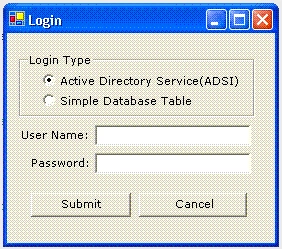
Login Using Active Directory Services (SDS)
In order to use SDS, first we have to set properties of LDAP server. Here database ADSI_PARAMETER table is used to set the LDAP properties.
CREATE TABLE [dbo].[ADSI_PARAMETER] (
[ParameterName] [varchar] (50) COLLATE SQL_Latin1_General_CP1_CI_AS NOT NULL,
[ParameterValue] [varchar] (50) COLLATE SQL_Latin1_General_CP1_CI_AS NOT NULL
) ON [PRIMARY]
GO
Enter following data to table in ParameterName and ParameterValue fields
| Parameter Name | ParameterValue |
| ServerName | WindowsDomainServer |
| BaseDN | DC=DomainName,DC=COM |
| UserDN | OU=Users |
| GroupName | CN=Operater, OU=Groups |
| AccountFilter | sAMAccountName |
Where ServerName is your domain server machine name. BaseDN is your domain name, most of the time it is company name. UserDN is organizational unit where user should exist. GroupName is organizational unit, to which user should belong in order to access your software. AccountFilter is filter for account name; mostly it is sAMAccountName in windows.
Now we have set the parameter for LDAP server, when the user submit the user/pass from login dialog box with ADSI option. We will pick up the LDAP parameters from database and search the data against parameters and user/pass.
Code for submit button click event. Declare a form level variable int i=0.
private void btnSubmit_Click(object sender, System.EventArgs e)
{
if(txtUserName.Text.Trim().Equals("") || txtPassword.Text.Trim().Equals(""))
{
MessageBox.Show("Please Enter UserName/Password...");
txtPassword.Text="";
txtUserName.Text="";
}
else
{
//if ADSI radio box is selected call ADSI Login else call simple database login
if(rdoADSI.Checked==true)
{
GetADSILogin();
}
else
{
GetDatabaseLogin();
}
}
}
Code for GetADSILogin function. You need to set reference to System.DirectoryService through add reference dialog box in order to use SDS.
public void GetADSILogin()
{
try
{
string strServerName = "";
string strBaseDN = "" ;
string strUserDN = "";
string strGroupName = "";
string strAccountFilter = "";
//Port no for LDAP Default is 389
string strPortNo = "389";
Boolean blnGroupUser=false;
//Data source string
string source = "Data Source=ATHAKUR;Initial Catalog=Times;user=sa;password=sa" ;
//SQL statement that will be issued
string select = "SELECT * from ADSI_PARAMETER";
//SQL Connection
SqlConnection conn=new SqlConnection(source);
// Open the database connection
conn.Open () ;
// Create the SQL command...
SqlCommand cmd = new SqlCommand ( select , conn ) ;
//Execute Data reader
SqlDataReader myReader = cmd.ExecuteReader();
//Check if any rows return against user/pass
if(myReader.HasRows)
{
while(myReader.Read())
{
//Store the parameter's data in variables
string strParameterName = myReader.GetString(0).Trim();
string strParameterValue = myReader.GetString(1).Trim();
if(strParameterName.ToUpper().Equals("SERVERNAME"))
strServerName=strParameterValue;
if(strParameterName.ToUpper().Equals("BASEDN"))
strBaseDN=strParameterValue;
if(strParameterName.ToUpper().Equals("USERDN"))
strUserDN=strParameterValue;
if(strParameterName.ToUpper().Equals("GROUPNAME"))
strGroupName=strParameterValue;
if(strParameterName.ToUpper().Equals("ACCOUNTFILTER"))
strAccountFilter=strParameterValue;
}
}
//Search for user
DirectoryEntry deSystem = new DirectoryEntry("LDAP://" + strServerName + "/" + strUserDN + ","
+ strBaseDN);
deSystem.AuthenticationType=AuthenticationTypes.Secure;
deSystem.Username=txtUserName.Text;
deSystem.Password =txtPassword.Text;
//Search for account name
string strSearch=strAccountFilter + "=" + txtUserName.Text;
DirectorySearcher dsSystem = new DirectorySearcher(deSystem,strSearch);
//Search subtree of UserDN
dsSystem.SearchScope= SearchScope.Subtree;
//Find the user data
SearchResult srSystem = dsSystem.FindOne();
//Pick up the user group belong to
ResultPropertyValueCollection valcol = srSystem.Properties["memberOf"];
if(valcol.Count>0)
{
foreach( object o in valcol )
{
//check user exist in Group we are searching for
if(o.ToString().Equals(strGroupName+","+strBaseDN))
{
blnGroupUser=true;
break;
}
}
}
if(blnGroupUser==true)
MessageBox.Show("Login Sucessfull...");
else
MessageBox.Show("User Does Not Belong to Specified ADSI Group");
}
catch(Exception ex)
{
MessageBox.Show(ex.Message);
}
i=i+1;
if(i==5)
{
MessageBox.Show("Login failed for 5 times. Quiting...");
this.Close();
}
}
If everything works fine then you will get the message "Login Successful". If user does not belong to group specified in LDAP properties then will the message "User Does Not Belong to Specified ADSI Group". If you enter wrong user/pass, you will get Logon failure message.
Login Using Simple Database Table
You can also give the permission to the user, who are not domains user and wants to use your software. For this we can simply use traditional database LOGIN table.
CREATE TABLE [dbo].[LOGIN] (
[USERNAME] [varchar] (50) COLLATE SQL_Latin1_General_CP1_CI_AS NULL ,
[PASSWORD] [varchar] (50) COLLATE SQL_Latin1_General_CP1_CI_AS NULL
) ON [PRIMARY]
GO
And admin can enter the username/password in table. And when user selects simple database login option from Login dialog, we can simply check against LOGIN table.
Code for GeDatabaseLogin function.
public void GetDatabaseLogin()
{
//Data source string
string source = "Data Source=ATHAKUR;Initial Catalog=Times;user=sa;password=sa" ;
//SQL statement that will be issued
string select = "SELECT * from LOGIN where USERNAME='" + txtUserName.Text + "'And PASSWORD
COLLATE Latin1_General_CS_AS='" + txtPassword.Text + "'";
//SQL Connection
SqlConnection conn=new SqlConnection(source);
// Open the database connection
conn.Open () ;
// Create the SQL command...
SqlCommand cmd = new SqlCommand ( select , conn ) ;
//Execute Data reader
SqlDataReader myReader = cmd.ExecuteReader();
//Check if any rows return against user/pass
if(myReader.HasRows)
MessageBox.Show("Login Sucessfull");
else
MessageBox.Show("Login Failed");
//Close datareader and connection
myReader.Close();
conn.Close () ;
//check for % attempts
i=i+1;
if(i==5)
{
MessageBox.Show("Login failed for 5 times. Quiting...");
this.Close();
}
}
If user/pass does exist in database then you will get the message "Login successful", otherwise "Login failed" message will be displayed.
Conclusion
We have seen here, how System.DirectoryServices searches the LDAP directory for a user object and validate that against groups. One single domain login user/pass can be used to access the your software. And how SDS manages resources under Windows Active Directory Services.
Aah! Another bug! Well, it's the life.
Lloyd MartinPosted Jan 3, 2024, 9:34 PM
Once you have a group object, it's also handy to parse its ACLs to see if the user owns or has write permissions on the group, i.e. he can manage members.
Rajaram SahasranamanPosted Sep 10, 2020, 11:44 PM
Why you need User Name and Password once you logged in successfully to AD Network? Can't it be read from AD?
Former memberPosted Aug 12, 2019, 11:51 AM
Very nice article but I am having same problem as Raveendra Reddy. Will you be kind enough to respond to some of the issues your readers are having? Quite often you guys post these helpful articles but NEVER respond to users when they run into issues
Hadshana KamalanathanPosted Jul 22, 2018, 6:45 AM
Thanks for sharing
Sonu ChaudharyPosted Feb 25, 2016, 6:39 AM
good one!
Santhakumar MunuswamyPosted Sep 27, 2015, 3:12 AM
Good Article
mayank karkieditedPosted Aug 21, 2012, 6:19 AMEdited Aug 21, 2012, 6:19 AM
Hi, I have to make a site to change or reset password in ad. In case of change password user provide username and password. but in case of reset password user provide username and will give answer of the questions. Now to change password what to do? How to get old password?
bilgin yildirimPosted Jun 28, 2012, 8:35 AM
very nice
Raveendra ReddyPosted Sep 15, 2011, 11:12 AM
Hi Anand, i have writen same what ever u r provided code and testing in windows server 2008,but i am getting error ' A referral was returned from the server.' can u plase tell me what's the probelm. Regards Raveendra Reddy C
John MalkovicheditedPosted Sep 11, 2011, 7:49 PMEdited Sep 11, 2011, 7:51 PM
People who write such code examples should burn in hell, really...
Alok PandeyPosted Sep 7, 2011, 8:02 AM
Good Article, Thanks
prem singhPosted Dec 3, 2010, 4:33 AM
can we keep extra data in active directory like suppose branch for an user Thanks,
Mahesh ChandPosted Jun 7, 2010, 11:48 PM
Great job Anand. Learned a lot from it and it saved me days.
Luis IbarraPosted Mar 14, 2008, 5:40 PM
In "memberOf", what do I put?
ron rajuliPosted Nov 3, 2007, 6:34 AM
Hello Mr. Anand, Firstly thank you for above info, I am hopping, you be able to help me with following: I am designing a ASP page page allows user to enter user name and password and authenticate against Active directory services. And once user authenticated on ADS than it will let user into site Else access denied I am more on networking and have very basic knowledge about ASP, Would you be able to help me for this thank you, What code / how do I integrate with html I really appreciate your help, regards, Ron
Jagannatha ThrippPosted Sep 16, 2007, 8:48 PM
Kai se he!!! (poor Hindi) I am trying to learn C# with ASP.NET, by building a small Intranet web site for managing leave requests. I would like to be able to use AD authentication for all users to allow them in to specific areas. Like Managers to approve leave, Admin to aover see the Intranet site and general users to request leave. Any URL's to help me achieve learning this would go down well :-) Jagannatha Suta Das
JoeyPosted Oct 5, 2006, 10:35 AM
Hello, The code that u posted in your article isn't really authtenticating. It only checks if a given username exists in a group on the Active Directory server. Because if I comment out the next part of the code than it works also. This means there's no authentication with the Active Directory server! deSystem.Password =txtPassword.Text; Greets Joey
Tina BhateeditedPosted Sep 1, 2006, 12:13 PMEdited Nov 22, 2006, 3:56 AM
Hello Anand, Your article is really wonderful afte a long time ..I have got to know AD from your code only.Great! Do I need to create the table which stores the path of the Active Directory. I have created a website and user dont have any login page.I need to authenticate the user directory through windows.If I get the username from your code.Can I get the Full Name of the user too??? How can I test the code from my lcoal machine...without specifing active directory server name?? Regards,
Moustafa ArafaPosted Aug 17, 2006, 12:00 PM
Dear anand, this is really good article,but how can i get some information from the active directory like the user country,city.......etc.
Einstein APosted Jul 5, 2006, 3:32 AM
Went through u'r article and it was good. I have one doubt... Consider that I'm having a list of user names and i need to check if they exist in a specific domain. Its not like authenticating the user but just check for their existence (without password check). Rgds Einstein
Manoj BeheraeditedPosted Jul 3, 2006, 8:11 AMEdited Jul 3, 2006, 8:13 AM
Hi Dude, Thakur saheb keep it up....