
How to implement asynchronous messaging using ASP.NET Core Web API.
SolutionCreate an empty project and update the Startup class to add services and middleware for MVC.
- public class Startup
- {
- public void ConfigureServices(
- IServiceCollection services)
- {
- services.AddMvc();
- }
- public void Configure(
- IApplicationBuilder app,
- IHostingEnvironment env)
- {
- app.UseMvcWithDefaultRoute();
- }
- }
Add a Controller.
- [Route("")]
- public class RentalsController : BaseController
- {
- [HttpPost("request-rental", Name = "RequestRental")]
- public IActionResult RequestRental(
- [FromBody]RequestRentalInputModel inputModel)
- {
- return AcceptedAtRoute("CheckStatus", new { queueNo = "q-2" });
- }
- [HttpGet("check-status/{queueNo}", Name = "CheckStatus")]
- public IActionResult CheckStatus(string queueNo)
- {
- if (queueNo == "q-2") // pending
- return Ok(new CheckStatusOutputModel { Status = "Pending" });
- else // complete
- return SeeOther("GetRental", new { refNo = "r-1" });
- }
- [HttpGet("get-rental/{refNo}", Name = "GetRental")]
- public IActionResult GetRental(string refNo)
- {
- if (refNo == "r-1")
- return Ok(new GetRentalOutputModel
- { DeliveryEstimate = DateTime.Now.AddDays(2) });
- else
- return NotFound();
- }
- }
Add models to send/receive via API.
- public class RequestRentalInputModel
- {
- public string Customer { get; set; }
- public string Movie { get; set; }
- public int Days { get; set; }
- }
- public class CheckStatusOutputModel
- {
- public string Status { get; set; }
- }
- public class GetRentalOutputModel
- {
- public DateTime DeliveryEstimate { get; set; }
- }
Discussion
Communication with Web API can be synchronous (RPC) or asynchronous (messaging). For asynchronous communication, the client will -
- Send request
- Check its status
- Get result.
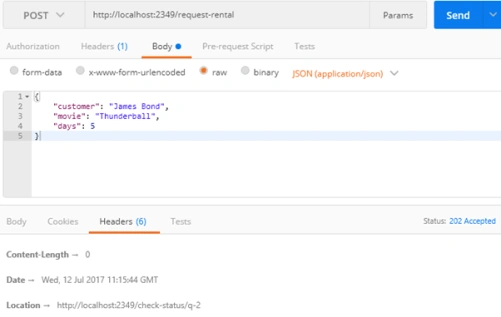
The API will have a POST endpoint to accept the requests. It will usually store the request message in a queue for subsequent processing. This endpoint returns 202 (Accepted) status code along with the Location header for the endpoint to check the status of this request.
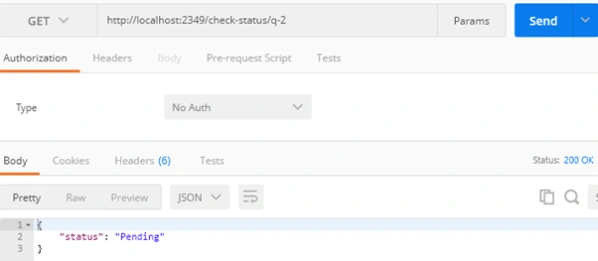
API will have a GET endpoint that will either send 200 (OK) with status details for incomplete requests or 303 (See Other) with Location header for completed requests.
Note that 303 (See Other) doesn’t have a built-in method on base controller but it is easy enough to create your own.
- [NonAction]
- protected IActionResult SeeOther(string routeName, object values)
- {
- var location = Url.Link(routeName, values);
- HttpContext.Response.GetTypedHeaders().Location =
- new System.Uri(location);
- return StatusCode(StatusCodes.Status303SeeOther);
- }
Get Result
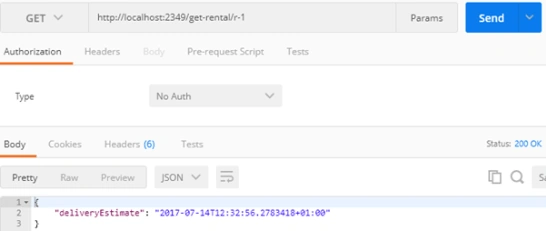
API will have a GET endpoint that will either send 200 (OK) for completed requests or 404 (Not Found) for incomplete requests.
Asynchronous message based communication is good for long running processes and distributed systems (e.g. Microservices). The client and server usually have the following responsibilities in asynchronous communication.
Server
- On receiving the request message, store the message in a queue or database for later processing.
- There will be a component (e.g. windows service) running in the background to process messages off the queue.
- Once the processing is complete, a record in a database (SQL or NoSQL) will be updated to reflect the status of request.
- API endpoints for Check Status and Get Result will use this database to respond to client requests accordingly.
Client
- After sending the request to server API, keep a record (in-memory or database) of the Location header, which contains the endpoint to ping for checking request status.
- There will be a component (e.g. windows service) running in the background to periodically call the status endpoint.
- Once the status endpoint returns 303 (See Other), use the Location header to access the result of processing.
Azure provides a lot of pieces involved in the section above, e.g. Azure ServiceBus for queues, Azure NoSQL for recording log, Azure Web Apps to host API and Azure WebJobs for background processing.
Source Code
Join the conversation! Your thoughts help the community grow.