

To understand the async, await, and ConfigureAwait(), let’s first understand what is Context.
What is Context?
In C# it represents some state or context in which a particular code block will executed, especially when dealing with async operations. It is a very important concept to understand how async programming performs in c# applications.
How do “async” and “await” keywords work?
async and await keywords were introduced in C# 5.0. When we mark a method with the keyword “async“ it enables the use of the “await“ keyword within the method and tells the compiler to generate a context or state machine that can handle asynchronous operations.
A state machine is a compiler-generated construct that manages the execution flow of an asynchronous method.
Let’s understand the async and await execution in simple steps.
- We marked a method with async, which enables the use of the await keyword. Importantly, marking a method as async does not create a new thread. The method runs on the original calling thread and remains in the same context until it hits the first await.
- Consider a scenario where you have two methods in an API controller, both decorated with the async keyword. When a user initiates a request from the front end to get data, the order in which the methods execute depends on the incoming requests.
- When the compiler encounters an await expression, the execution of the method pauses at that point. The method returns control to the calling thread, allowing it to perform other tasks while waiting for the awaited operation to complete. This doesn't mean that the thread is blocked; rather, it is free to handle other work.
- Once the awaited operation completes, the method resumes execution from the point where it was paused, continuing on the same or a different thread depending on the context.
- The calling thread refers to the thread that handles the HTTP request initiated by the user. When the method reaches the await keyword, the operation that’s awaited may not be complete immediately.
- To avoid blocking the calling thread, the method pauses, and control is returned to the thread pool.
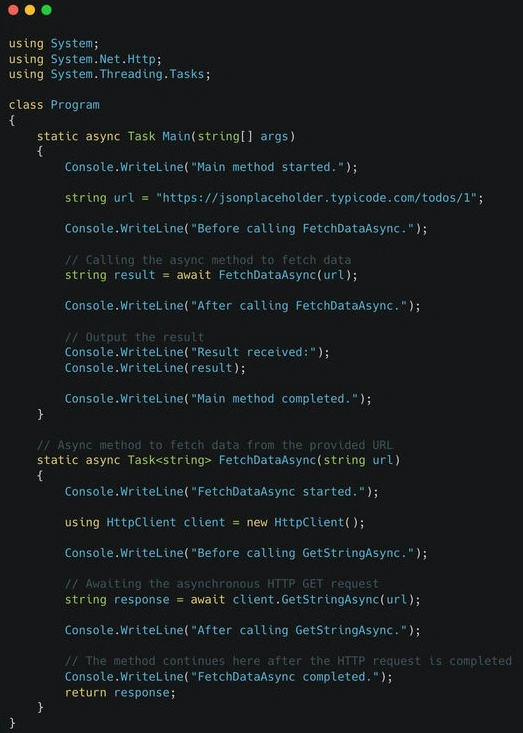
Check out this example below.
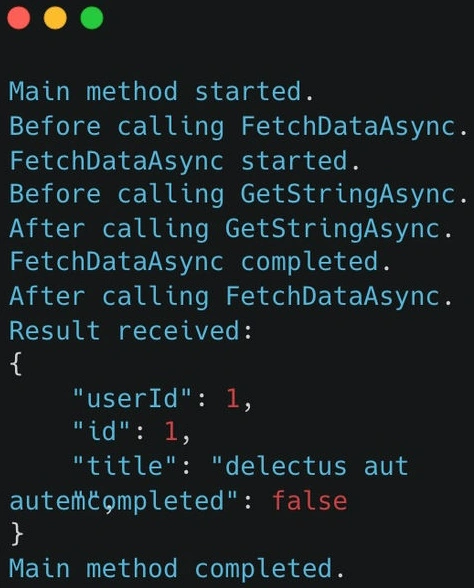
Output
Understanding ConfigureAwait in C#
As we understand the await keyword pauses the execution until that specific operation completes and then returns the control to the original calling thread or context.
In UI applications, this means the continuation will run on the UI thread, ensuring that you can safely update the UI.
Resuming the original context isn't necessary and can be inefficient. For instance, if you're performing background operations where you don't need to update the UI, using ConfigureAwait(false) tells the compiler not to capture and continue back to the original context.
ConfigureAwait(false) is valuable for improving performance, especially in NON-UI contexts. It’s important to understand when to use and when not to use it.
There is a general rule of thumb for when to use ConfigureAwait().
- ConfigureAwaitI(true): when you need to maintain the original context or its state during execution. Example: updating the UI.
- ConfigureAwait(false): When you don’t need to capture the original context or maintain its state during execution. Example: CPU-bound or I/O-bound work.
Usage
await SomeBackgroundTask().ConfigureAwait(false);
await SomeBackgroundTask().ConfigureAwait(true);
Conclusion
`async` and `await` enable non-blocking, asynchronous operations in C#, allowing methods to pause and resume without creating new threads.
The `ConfigureAwait(false)` method helps avoid resuming the original synchronization context, improving performance and avoiding potential deadlocks, depending on the requirements also.
Thanks for reading, See you next, Bye!
Join the conversation! Your thoughts help the community grow.