

Introduction
Async and await are C# keywords introduced in C# 5.0 (.NET Framework 4.5, 2012) to make asynchronous programming simple, readable, and efficient . They allow developers to write non-blocking code that behaves like synchronous code. This is essential for responsive desktop apps , scalable web servers , and I/O-heavy applications .
Before async/await, asynchronous programming relied on callbacks, threads, or IAsyncResult , which were messy, error-prone, and hard to maintain . Async/await simplifies this by pausing execution until a task completes without blocking threads .
In simple terms, it’s like telling our program:
" Start this task, and while it’s running, go do something else instead of waiting idle."
Imagine a restaurant kitchen:
Synchronous: The chef prepares one dish at a time. While the soup is simmering, nothing else happens. Customers wait longer.
Asynchronous: The chef starts the soup (long-running task), then chops vegetables and prepares a salad while the soup cooks. Multiple tasks run concurrently, improving efficiency and reducing waiting time.
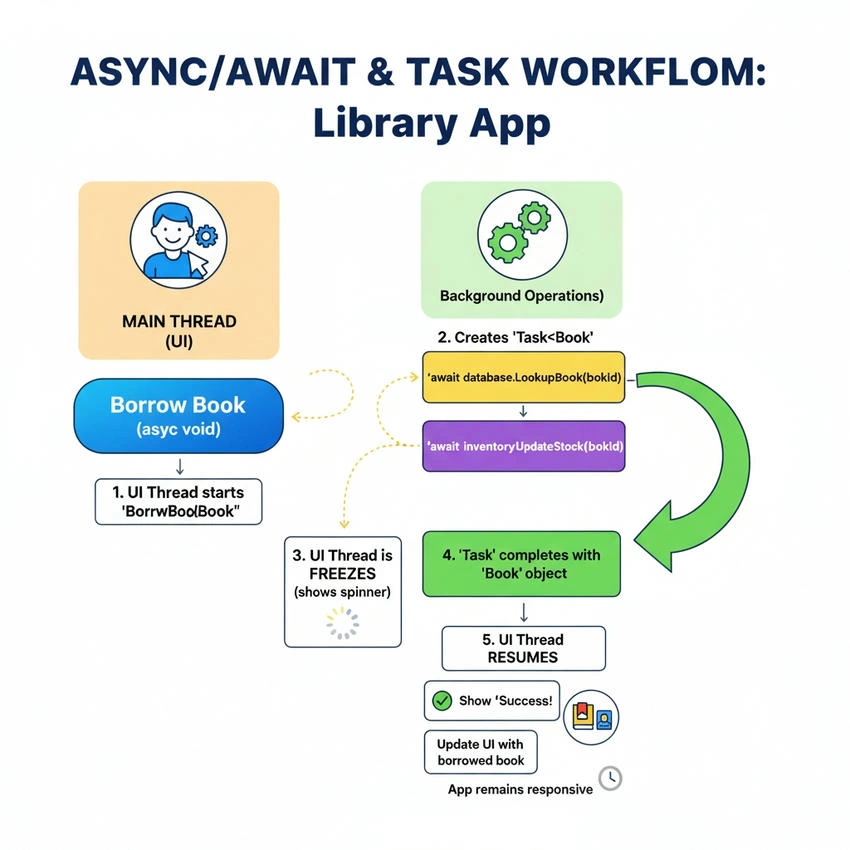
Async
Async is a keyword in C# used to define a method as asynchronous. An asynchronous method can perform long-running tasks, like fetching data from a server or reading a large file, without blocking the main thread of the application. Async is used to improve application responsiveness and performance , especially in scenarios where waiting for a task (like network or database operations) would otherwise freeze the UI or block other operations.
In synchronous programming, the application waits for one task to complete before moving to the next. This can cause slow, unresponsive applications , especially for web requests, API calls, or file I/O. Async allows the application to continue other work while waiting, solving this problem.
How does it work?
When a method is marked with async, it can use the await keyword to pause execution until a long-running task completes. The method returns a Task or Task<T> , representing the ongoing operation. The main thread is not blocked, allowing the app to handle other tasks simultaneously.
Like A weather application fetching current weather data from an API, without async, the app would freeze while waiting for the server response. With async, the app can continue updating the UI or allow the user to search other cities while waiting for the API response.
Syntax
    public async Task<int> FetchDataAsync()
{
    // Simulate long-running task
    await Task.Delay(2000);
    return 100;
}
Await
Await is a keyword used inside an async method to pause execution until a Task completes. Unlike synchronous waiting, await does not block the main thread. Await allows the program to wait for long-running tasks safely, keeping the application responsive. It makes asynchronous code readable and maintainable, as it resembles normal synchronous code.
Without await, we would need to use callbacks or complex thread management to continue work after a long task, making the code hard to read and maintain . Await simplifies this by automatically resuming execution after the task finishes.
How It Works
When execution reaches an await statement, the async method returns control to the caller until the awaited task finishes. After the task completes, the method resumes execution from the await point.
In a banking app, fetching the account balance from the server can take time. Using await ensures the app can show loading indicators or handle user interactions while waiting for the balance.
Syntax
    public async Task ProcessDataAsync()
{
    int data = await FetchDataAsync(); // Waits for FetchDataAsync to complete
    Console.WriteLine("Data fetched: " + data);
}
Task-Based Programming
Task-Based Programming is a model in .NET where asynchronous operations are represented using Tasks.
A Task represents a unit of work that can run concurrently without blocking the main thread.
This concept is essential in async and await because async methods return a Task or Task<T>, and await pauses execution until the Task completes while keeping the application responsive.
It simplifies writing asynchronous code, handles exceptions automatically, and uses the .NET Thread Pool for efficient thread management.
Tasks, Threading, and Execution
In C#, a Task represents an asynchronous operation. Task and Task<T> are the building blocks of async programming. Task is used when no value is returned, while Task<T> is used when the operation returns a result. Tasks allow the application to run operations concurrently without blocking the main thread. For example, in a web application, multiple API requests can be handled simultaneously using Tasks, improving responsiveness.
I/O-bound vs CPU-bound operations are important in async programming. I/O-bound tasks, like fetching data from a server, spend most of their time waiting for external resources. Async and await work best for these tasks because the main thread can continue other work while awaiting completion. CPU-bound tasks, like heavy calculations, require a background thread to avoid freezing the application. Tasks combined with Task.Run allows offloading CPU-bound work to the thread pool.
Threading basics and Thread Pool explain how Tasks execute. Each Task runs on a thread from the .NET Thread Pool, which manages threads efficiently. ConfigureAwait controls whether execution continues on the original synchronization context, which is important in UI applications to prevent deadlocks.
When combined with async and await, Tasks allow writing non-blocking, readable code. Async methods return Tasks, and await pauses execution until the Task completes without blocking threads, improving scalability and responsiveness.
Consider an online shopping application where a user opens the app to view products. The app needs to:
Fetch the list of products from the server (I/O-bound operation).
Load the user’s recently viewed items from local storage (CPU-bound operation).
Display all data on the UI without freezing the app.
Using Tasks and async/await, both operations can run concurrently without blocking the UI thread.
    public async Task LoadDashboardAsync()
{
    Task<string> productsTask = Task.Run(() => new HttpClient().GetStringAsync("https://api.shop.com/products").Result);
    Task<string> recentTask = Task.Run(() => LoadRecentItemsFromDb());

    string products = await productsTask;
    string recentItems = await recentTask;

    Display(products, recentItems);
}
Explanation
Task.Run offloads both tasks to background threads from the Thread Pool.
await ensures the method pauses until each task completes, without blocking the main thread.
The UI remains responsive, allowing users to scroll, click, or perform other actions while data is loading.
This combination of async/await and Tasks improves user experience, performance, and scalability.
This approach is widely used in real-world applications like e-commerce apps, banking apps, and social media platforms, where multiple data sources need to be processed concurrently.
Important Tips for Async, Await, and Task-Based Programming in .NET
Async marks a method as asynchronous; await pauses execution until a Task completes, keeping the main thread free.
Async methods return Task, Task<T>, or void (void only for event handlers; generally avoid using it).
I/O-bound operations (API calls, file I/O, database queries) benefit most from async/await; CPU-bound tasks should use Task.Run .
Task represents an async operation without a return value; Task<T> returns a result of type T.
Tasks run on threads from the Thread Pool for efficiency; avoid creating threads manually.
ConfigureAwait(false) prevents resuming on the original synchronization context, avoiding deadlocks in libraries.
Use try-catch in async methods to handle exceptions; awaited tasks propagate exceptions to the calling method.
Avoid calling .Result or .Wait() on async methods in the main thread to prevent deadlocks; use async/await end-to-end instead.
Conclusion
async and await in C# are like a super-efficient multitasking chef in a busy restaurant. Instead of standing idle while waiting for the soup to boil, the chef chops vegetables, bakes bread, and even greets customers. Similarly, async and await allow applications to perform long-running tasks like API calls or database queries without freezing or blocking the main thread , keeping everything smooth and responsive.
Real-world applications like banking apps, e-commerce dashboards, or weather apps rely heavily on this pattern. Without it, a simple operation like fetching account balances could feel like watching paint dry for users. With async and await, the app stays lively and interactive, while the Tasks quietly handle the heavy lifting in the background.
Join the conversation! Your thoughts help the community grow.