

When a REST Web API is created to share data across multiple devices, e.g., mobile devices, desktop applications, or any website, then the authorization of REST Web API becomes a vital aspect in order to protect data sensitivity from any outside breaches.
Today, I shall demonstrate a simple mechanism to authorize a REST Web API without the complex authorization process of OWIN security layers but at the same time, benefiting from [Authorize] attribute.
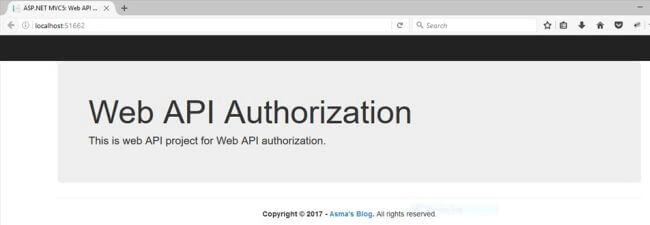
The prerequisites include knowledge about the following technologies.
- ASP.NET MVC 5.
- C# programming.
- REST Web API.
You can download the complete source code for this or you can follow the step by step discussion given below. The sample code is developed in Microsoft Visual Studio 2013 Ultimate.
Let's begin now.
- Create new Web API project and name it as "WebApiAuthorization".
- Rename "ValueController.cs" file to "WebApiController.cs".
- Now, in "WebApiController.cs" file replace the following code.In the above code, I simply replaced some of the existing string values, nothing special is done here.
- using System;
- using System.Collections.Generic;
- using System.Linq;
- using System.Net;
- using System.Net.Http;
- using System.Web.Http;
- namespace WebApiAuthorization.Controllers {
- [Authorize]
- public class WebApiController: ApiController {
- // GET api/values
- public IEnumerable < string > Get() {
- return new string[] {
- "Hello REST API",
- "I am Authorized"
- };
- }
- // GET api/values/5
- public string Get(int id) {
- return "Hello Authorized API with ID = " + id;
- }
- // POST api/values
- public void Post([FromBody] string value) {}
- // PUT api/values/5
- public void Put(int id, [FromBody] string value) {}
- // DELETE api/values/5
- public void Delete(int id) {}
- }
- }
- Now, for the authorization part, I am using HTTP Message Handlers technique, its detail can be studied here. In simple essence, this technique captures HTTP request sand responds accordingly. In order to use this technique, we need to inherit "DelegatingHandler" class and then hook its method SendAsync(...) that will process every hit to our REST Web API and verify our allocated authorization or API header key accordingly. Then, it will finally set our Principal after successful authorization. Principal will simply set our security context by containing information about the user whom we have claimed as authorized user by using Identity Based Authorization. This will allow us to utilize [Authorize] attribute for our Web API controller.
So, create new folder under project root >> Resources and name it "Constants". I like my code architecture clean, so, I am using Constants in a resource file. - Now, create a file "Resource->Constants-> ApiInfo.resx". Open the file and place the following constants in it.
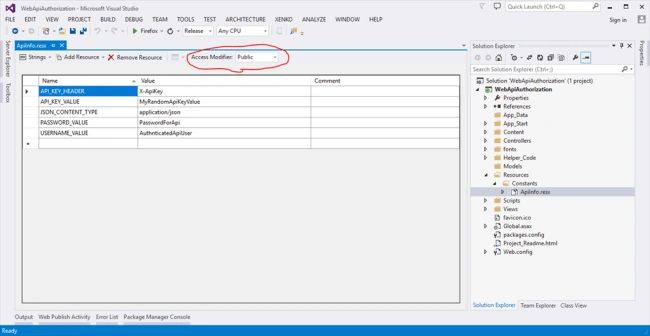
Make sure that Access Modifier is set to Public. This file will contain authorization constants that I will be using to authenticate my REST Web API. - Now, create new folder hierarchy under project root i.e. "Helper_Code->Common".
- Create your authorization file and name it "Helper_Code->Common->AuthorizationHeaderHandler.cs".
- Open the file "Helper_Code->Common->AuthorizationHeaderHandler.cs" and replace it with the following piece of code. In the above code, "Helper_Code->Common->AuthorizationHeaderHandler.cs" class inherits "DelegatingHandler" class. We have hooked the "SendAsync(...)" method and created a new method "SetPrincipal(...)" to set our authorization principal.
- //-----------------------------------------------------------------------
- // <copyright file="AuthorizationHeaderHandler.cs" company="None">
- // Copyright (c) Allow to distribute this code.
- // </copyright>
- // <author>Asma Khalid</author>
- //-----------------------------------------------------------------------
- namespace WebApiAuthorization.Helper_Code.Common {
- using System;
- using System.Collections.Generic;
- using System.Linq;
- using System.Net.Http;
- using System.Net.Http.Headers;
- using System.Security.Claims;
- using System.Security.Principal;
- using System.Text;
- using System.Threading;
- using System.Threading.Tasks;
- using System.Web;
- using WebApiAuthorization.Resources.Constants;
- /// <summary>
- /// Authorization for web API class.
- /// </summary>
- public class AuthorizationHeaderHandler: DelegatingHandler {#
- region Send method.
- /// <summary>
- /// Send method.
- /// </summary>
- /// <param name="request">Request parameter</param>
- /// <param name="cancellationToken">Cancellation token parameter</param>
- /// <returns>Return HTTP response.</returns>
- protected override Task < HttpResponseMessage > SendAsync(HttpRequestMessage request, CancellationToken cancellationToken) {
- // Initialization.
- IEnumerable < string > apiKeyHeaderValues = null;
- AuthenticationHeaderValue authorization = request.Headers.Authorization;
- string userName = null;
- string password = null;
- // Verification.
- if (request.Headers.TryGetValues(ApiInfo.API_KEY_HEADER, out apiKeyHeaderValues) && !string.IsNullOrEmpty(authorization.Parameter)) {
- var apiKeyHeaderValue = apiKeyHeaderValues.First();
- // Get the auth token
- string authToken = authorization.Parameter;
- // Decode the token from BASE64
- string decodedToken = Encoding.UTF8.GetString(Convert.FromBase64String(authToken));
- // Extract username and password from decoded token
- userName = decodedToken.Substring(0, decodedToken.IndexOf(":"));
- password = decodedToken.Substring(decodedToken.IndexOf(":") + 1);
- // Verification.
- if (apiKeyHeaderValue.Equals(ApiInfo.API_KEY_VALUE) && userName.Equals(ApiInfo.USERNAME_VALUE) && password.Equals(ApiInfo.PASSWORD_VALUE)) {
- // Setting
- var identity = new GenericIdentity(userName);
- SetPrincipal(new GenericPrincipal(identity, null));
- }
- }
- // Info.
- return base.SendAsync(request, cancellationToken);
- }#
- endregion# region Set principal method.
- /// <summary>
- /// Set principal method.
- /// </summary>
- /// <param name="principal">Principal parameter</param>
- private static void SetPrincipal(IPrincipal principal) {
- // setting.
- Thread.CurrentPrincipal = principal;
- // Verification.
- if (HttpContext.Current != null) {
- // Setting.
- HttpContext.Current.User = principal;
- }
- }#
- endregion
- }
- }
Now, let’s discuss the above code chunk by chunk .i.e.
In Method "SetPrincipal(...)" the following codeThe above code will set our authorization principal with Identity Based Authorization model.- // setting.
- Thread.CurrentPrincipal = principal;
- // Verification.
- if (HttpContext.Current != null) {
- // Setting.
- HttpContext.Current.User = principal;
- }
Let’s dissect "SendAsync(...)" method step by step.The above lines of code will verify whether our authorized header key and credentials are empty or not. I have used a combination of both header key and credentials to authorize my REST Web API.- // Verification.
- if (request.Headers.TryGetValues(ApiInfo.API_KEY_HEADER, out apiKeyHeaderValues) && !string.IsNullOrEmpty(authorization.Parameter)) { ...
- }
If the authorization is successful, then the following code will extract our authorization information from the HTTP request and store them into local variables.After above code, we will verify whether the provided authorization for REST Web API hit is valid or not, with the following code.- var apiKeyHeaderValue = apiKeyHeaderValues.First();
- // Get the auth token
- string authToken = authorization.Parameter;
- // Decode the token from BASE64
- string decodedToken = Encoding.UTF8.GetString(Convert.FromBase64String(authToken));
- // Extract username and password from decoded token
- userName = decodedToken.Substring(0, decodedToken.IndexOf(":"));
- password = decodedToken.Substring(decodedToken.IndexOf(":") + 1);
If the hit to our REST Web API contains valid authorization credentials and header key, then we register our principal with Identity Based Authorization model.- // Verification.
- if (apiKeyHeaderValue.Equals(ApiInfo.API_KEY_VALUE) && userName.Equals(ApiInfo.USERNAME_VALUE) && password.Equals(ApiInfo.PASSWORD_VALUE)) { ...
- }
- // Setting
- var identity = new GenericIdentity(userName);
- SetPrincipal(new GenericPrincipal(identity, null));
- Now, Open "Global.asax.cs" file and replace following code in it i.e.In the above code we have registered our authorization class within global configuration.
- using System;
- using System.Collections.Generic;
- using System.Linq;
- using System.Web;
- using System.Web.Http;
- using System.Web.Mvc;
- using System.Web.Optimization;
- using System.Web.Routing;
- using WebApiAuthorization.Helper_Code.Common;
- namespace WebApiAuthorization
- {
- public class WebApiApplication : System.Web.HttpApplication
- {
- protected void Application_Start()
- {
- AreaRegistration.RegisterAllAreas();
- GlobalConfiguration.Configure(WebApiConfig.Register);
- FilterConfig.RegisterGlobalFilters(GlobalFilters.Filters);
- RouteConfig.RegisterRoutes(RouteTable.Routes);
- BundleConfig.RegisterBundles(BundleTable.Bundles);
- // API authorization registration.
- GlobalConfiguration.Configuration.MessageHandlers.Add(new AuthorizationHeaderHandler());
- }
- }
- }
- Now, execute the project and use the following link in the browser to see your newly created REST Web API method in action.
- yourlink:port/api/WebApi

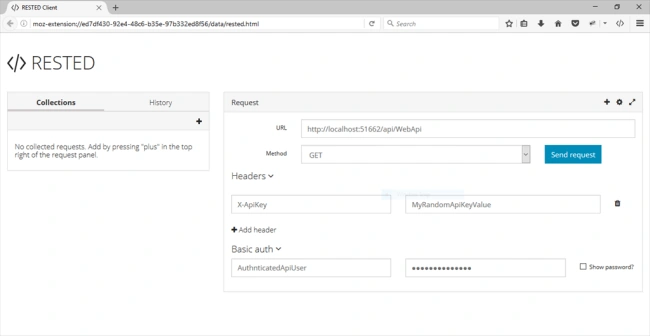
In the above snippet, you will notice that so far, our REST Web API has been authorized, therefore, we cannot directly execute the REST Web API URL in the browser. - Let's test out REST Web API in REST Web API client. I am using Firefox plugin i.e. "RESTED". At first, I simply try to hit the REST Web API without any authorization details and I will get the following response.
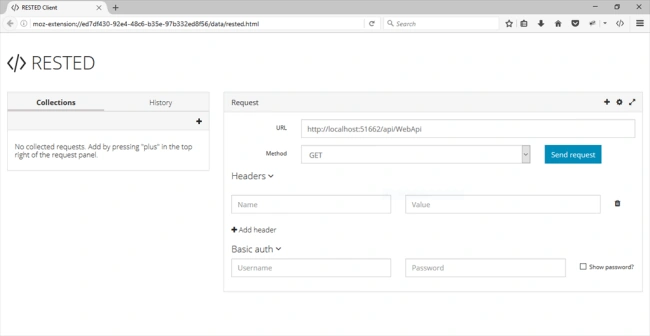
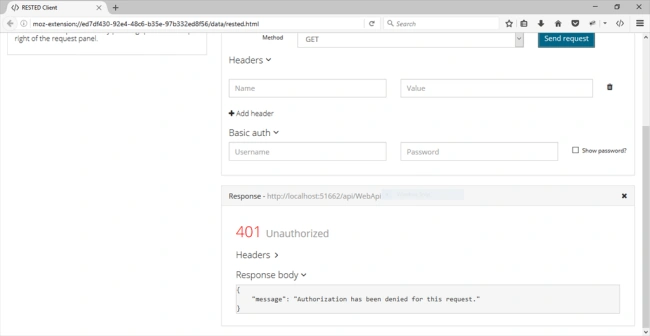
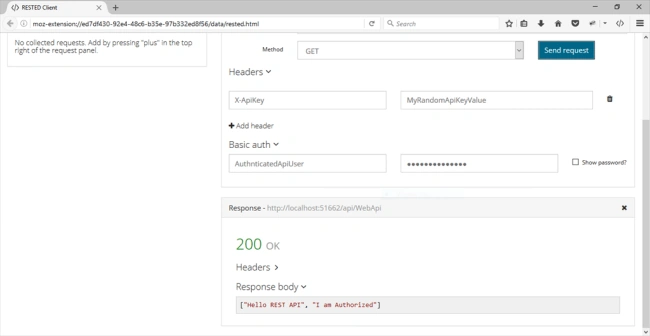
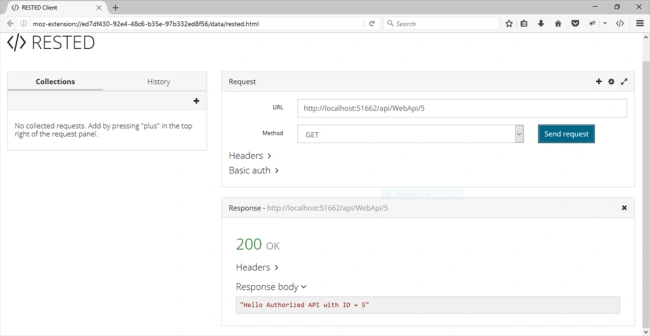
- Now, I will provide the authorization and hit the REST Web API and will get following response i.e.
Conclusion
In this tutorial, we learned how to authorize REST Web API by using a simple technique of HTTP Message Handlers without going into the complex nature of OWIN. We also learned about principal authentication for identity claim based authorization model, which will enable the utilization of [Authorize] attribute.
king washPosted Mar 3, 2022, 5:52 PM
How can I test this in Postman. Thank you
Chris LauriePosted Feb 23, 2021, 2:24 PM
Occasionally one finds THE article that EXACTLY contains the pieces that one is looking for. This is such an article - thank you! One thing: If you test this with only the api-key you get a null object error on authorization. I fixed it by adding a null-conditional operator: ... !string.IsNullOrEmpty(authorization?.Parameter))
Biswajit DoluiPosted Nov 11, 2020, 1:17 AM
How i test your api url in POSTMAN?
Gary RosendePosted Nov 7, 2020, 3:08 PM
I commented out if (apiKeyHeaderValue.Equals(ApiInfo.API_KEY_VALUE) && userName.Equals(ApiInfo.USERNAME_VALUE) && password.Equals(ApiInfo.PASSWORD_VALUE)) { ... } and the code still works in Foxfire. It is never evaluated looks like dead code?
Gary RosendePosted Nov 7, 2020, 1:01 PM
How can this be used with Postman instead of Firefox plugin?
Gerhard LiebenbergPosted Apr 12, 2020, 1:41 PM
Hi Asma. Nice article. Please just elaborate that you added [Authorize] to the controller (and not just replaced some of the existing string values). Without [Authorize] the controller will ignore the authentication that was done.
MOHAMMAD ALSHARAYRIPosted Jul 4, 2019, 7:48 AM
And how do I test this example using fiddler ?
MOHAMMAD ALSHARAYRIPosted Jul 4, 2019, 7:48 AM
Nice article , any otherexamples using owin please?
Alice NguyenPosted Nov 15, 2018, 8:16 PM
Thank you so much
Yeswanth ChintapalliPosted Jul 16, 2018, 1:04 AM
HI, I have the small issue Regarding the MVC GRID. The problem is When I enter the details i.e; first name and last name based on the last name I need to generate the Random PAN CARD Number i.e AAAAY0000A in This String first 4 letters I need to generate random letter up to ZZZZ and 5th letter must have come from the SURNAME and remaining 4 digits generate random numbers from 0000 to 9999 n 10th letter must be generated RANDOM IN A Sequence i.e A TO Z ...Can You Please Help me from this Problem???
Milan GajjarPosted Jul 6, 2018, 8:25 AM
Can u explain how to call this API from jquery or javascript Thanks
Yeswanth ChintapalliPosted Jun 23, 2018, 2:39 AM
Can you provide complete articles about webapi
sanjaya dodangodaPosted May 11, 2018, 8:26 AM
Can u explain how to call this API from c# Thanks
Tarun RajakPosted Apr 10, 2018, 5:14 AM
Can you share an article using OAuth 2.0 authorization in Rest API?
Tarun RajakPosted Apr 10, 2018, 1:34 AM
Thanx for sharing, very nice article
Shyamsunder KashyapPosted Dec 7, 2017, 6:17 AM
Very Nice and need full article in simpler way ... Thanks
Anu VPosted Jan 18, 2017, 11:07 PM
Nice article thanks for sharing...
Humayun Kabir MamunPosted Jan 16, 2017, 6:59 AM
Thanks for this nice article...
Asma KhalidPosted Jan 8, 2017, 11:57 PM
Thank you for the support
Manav PandyaPosted Jan 8, 2017, 1:07 AM
Thanks ma;m for sharing ...