

This project is developed in ASP.NET MVC Core 1.0.0 with Windows dependencies. This project is focused on the Event Management Process, and here, we have to automate the process of Event Management.
Here is the link to the Project Source Code.
There are 3 end users in this project.
- Admin
- Customer
- SuperAdmin
Process
The process starts with creating an Admin and a SuperAdmin who can create an Admin. The admin has the right to add various types of thing, such as venue for marriage, equipment required for marriage, food Items for marriage, lighting, flowers, cost, and photo. After adding, all of this will be visible to the customer when they are booking the event. And, after booking, this application is sent to admin for approval. Admin can approve or reject the application; the status is available to the customer. Meanwhile, admin can see the entire application submitted by the customer and the total cost.
The customer can see the status after submitting the application and can print the receipt.
About Platform Used
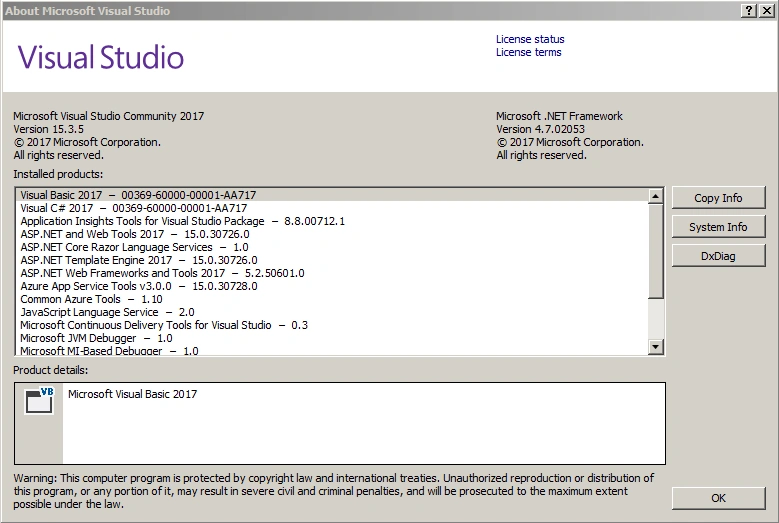
I developed this application using Microsoft Visual Studio Community 2017 with Microsoft SQL Server 2008.
Server-side technology used is ASP.NET Core MVC 1.0 and the language used for developing is C#, along with Entity Framework Core and Dependency Injection for database accessing and finally, for using services, we have used Web API.
- Microsoft Visual Studio Community 2017
- Link to download.
- Microsoft SQL Server 2008
- Link to download.
Database Details
Finally, after understanding the process, let's check out which are the tables we used in this application. Please read the text file ReadMe_First.txt first. In this file, the entire process of database creation and login details of the file are written.
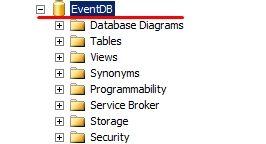
I have created a database with name EventDB and inside this, all the tables are created.
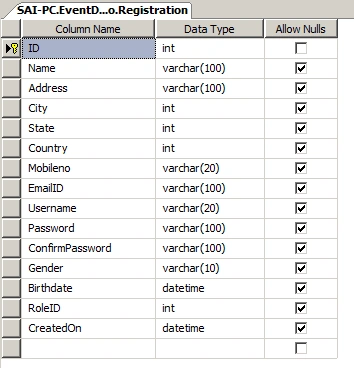
Registration
This table contains Registration of Customer and Admin, SuperAdmin.
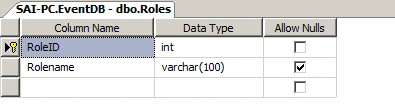
Roles
This table contains Roles of Customer and Admin, SuperAdmin.
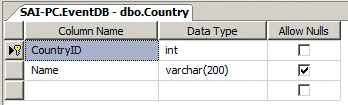
Country
This table contains all Country Names.
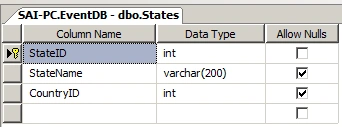
States
This table contains all State Names.
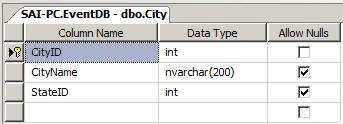
City
This table contains all City Names.
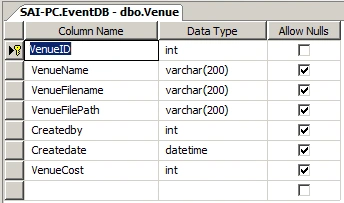
Venue
This table contains all Venue Details entered by the Admin.
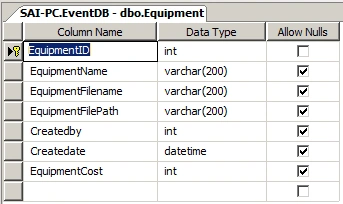
Equipment
This table contains all Equipment Details entered by Admin.
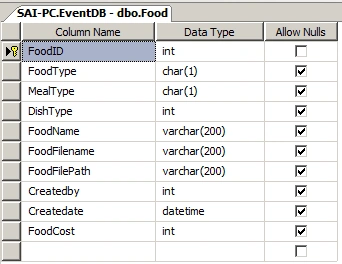
Food
This table contains all Food Details entered by Admin.
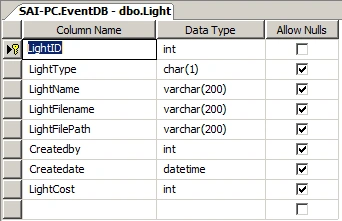
Light
This table contains all Lighting Details entered by Admin
Flower
This table contains all Flower Details entered by Admin.
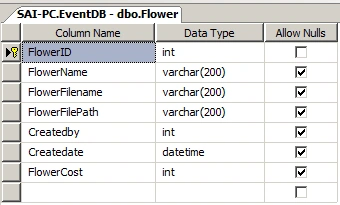
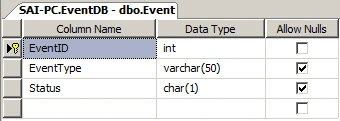
EventTypes
This table contains all Event Types.
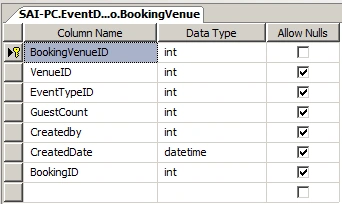
BookingVenue
This table contains all BookingVenue Details entered by Customer.
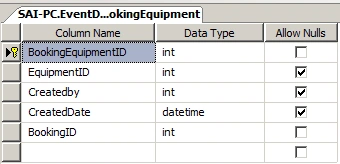
BookingEquipment
This table contains all BookingEquipment Details entered by Customer.
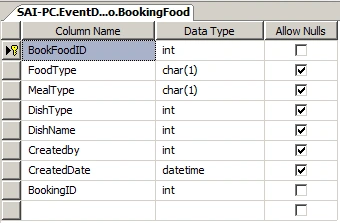
BookingFood
This table contains all Booking Food Details entered by Customer
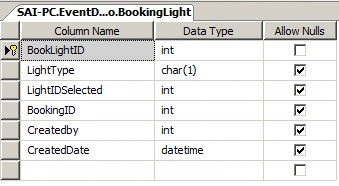
BookingLight
This table contains all Booking Lighting Details entered by Customer
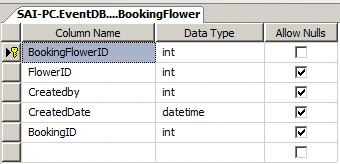
BookingFlower
This table contains all Booking Flower Details entered by Customer
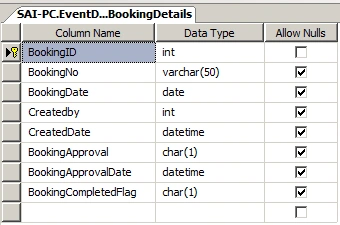
Booking Details
This table contains all Booking Details booked by Customer
After completing database details now let have a look on Project structure in Visual Studio.
The Project Name is EventApplicationCore.
You can see the basic folder structure provided by Asp.net MVC Core.
Project structure
Added Asp.net MVC Core Web Project.
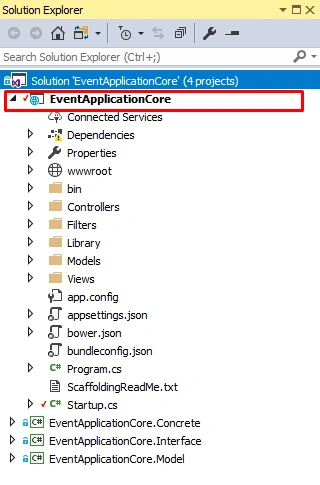
Next adding EventApplicationCore.Concrete Class Library to project.
EventApplicationCore.Concrete
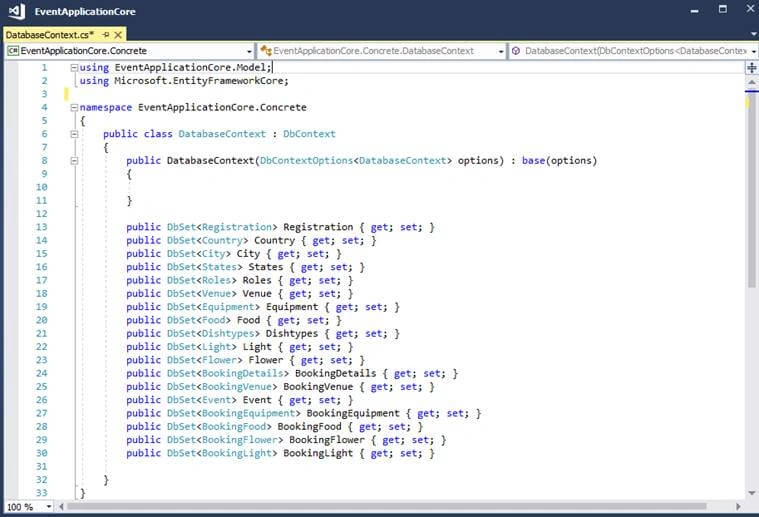
This Class Library contains all Classes which are using Entity Framework Core ORM for accessing database and it also has DbContext and is the main class for interacting with the database.
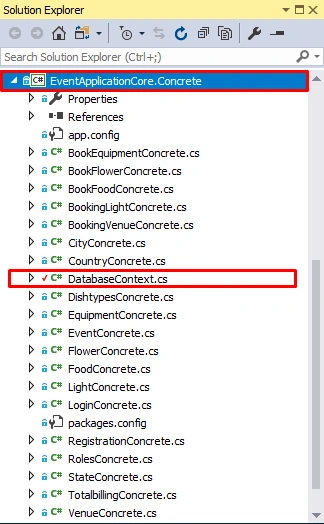
Next add EventApplicationCore.Interface Class Library to project.
EventApplicationCore.Interface
This Class Library contains all Interfaces in which we have declared methods, this interface is going to implement a concrete class (EventApplicationCore.Concrete).
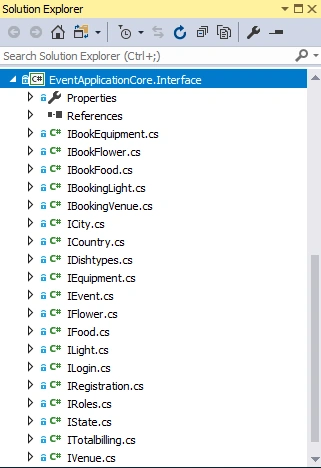
EventApplicationCore.Model
This Class Library contains all Models which are used in Application.
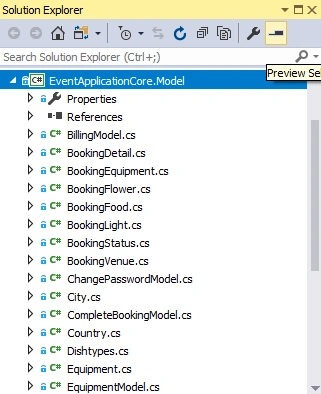
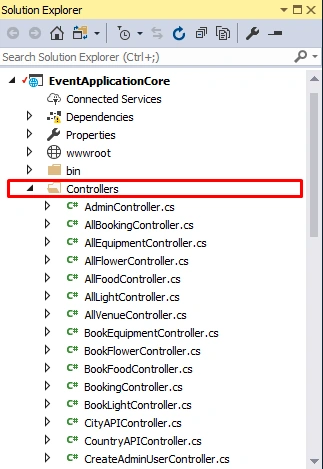
Controllers
Controller Folder contains all Controllers created in this application.
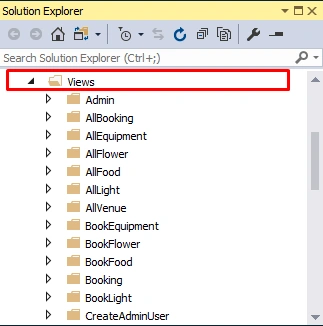
Views
View Folder contains all Views created in this application.
DbContext (we are using Entity Framework core in this project)
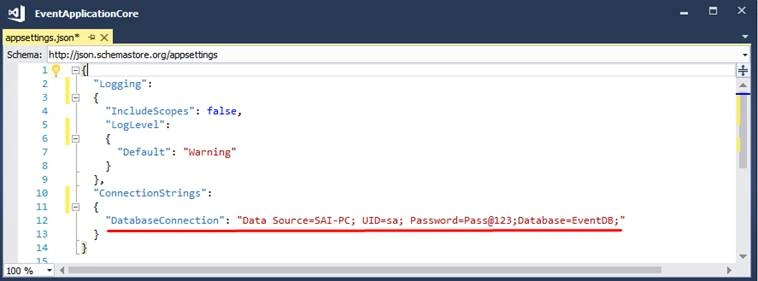
Appsettings.json file
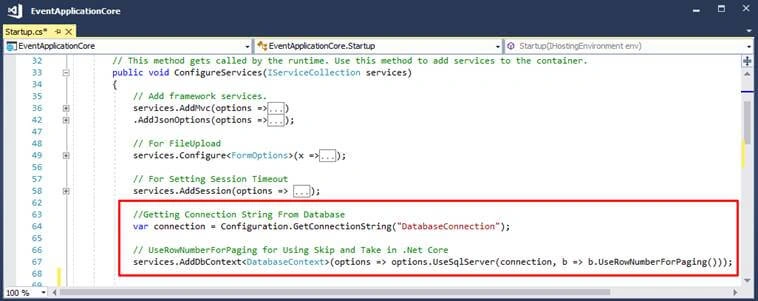
In appsettings.json file we store all application settings in a key-value pair. Here we have stored Connection string of database.
Setting Connection string in Startup.cs class
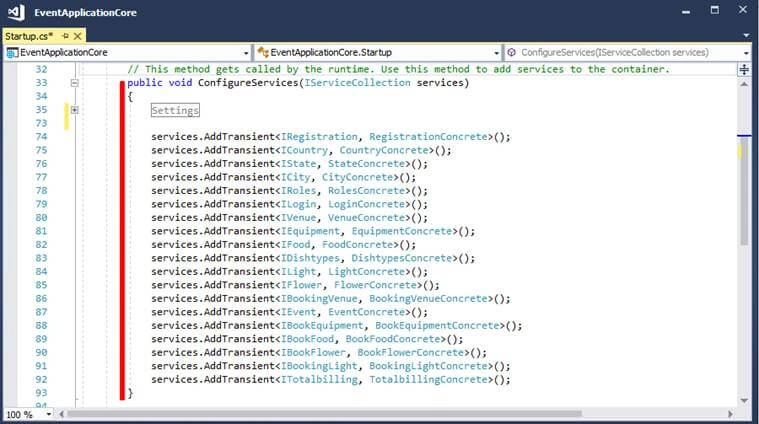
Setting Dependence injection in Startup.cs class
Filters and Encryption library
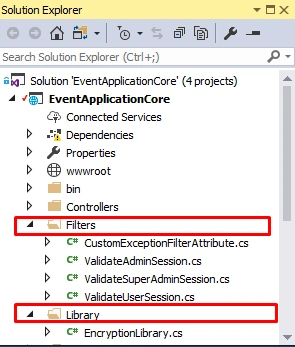
The above shows how the directory and folder structure looks, now let's check out Application screens.
Starting with Login Screen.
The below screens are of Admin who is going to add new Venues, Food items, Lighting, Equipment which will be seen by Users while booking.
Login (Admin)
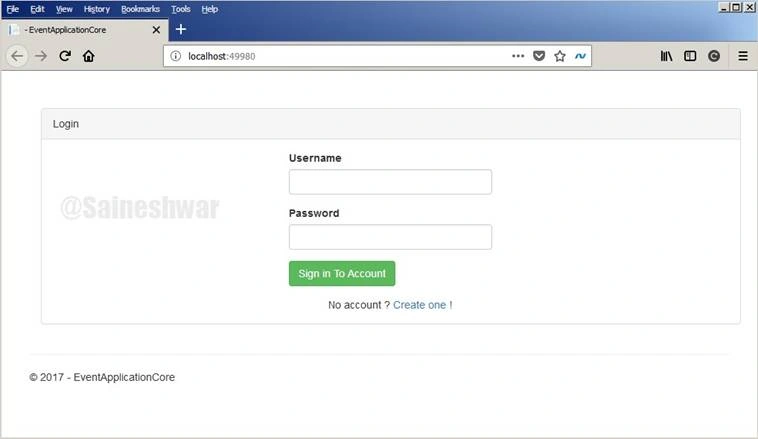
We are going to log in to the application with admin credentials.
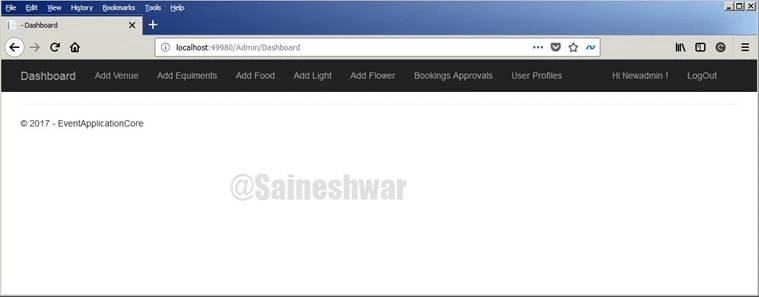
Admin Dashboard
The first screen which appears to Admin after logging in.
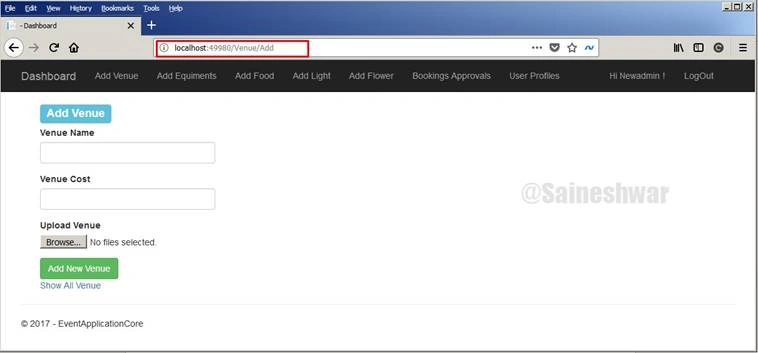
Add Venue
In this part, we are going to add new Venue.
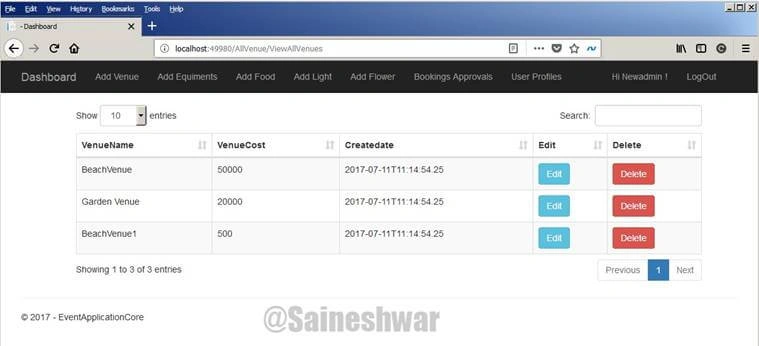
All Venues
In this part we are going to display all Venues which we have added in Grid view, along with that we have Edit and Delete button to edit venue and delete venue.
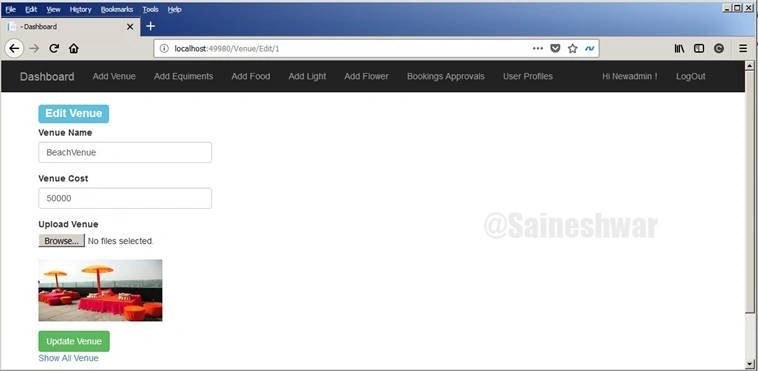
Edit Venue
In this part, we are going update details of Venue.
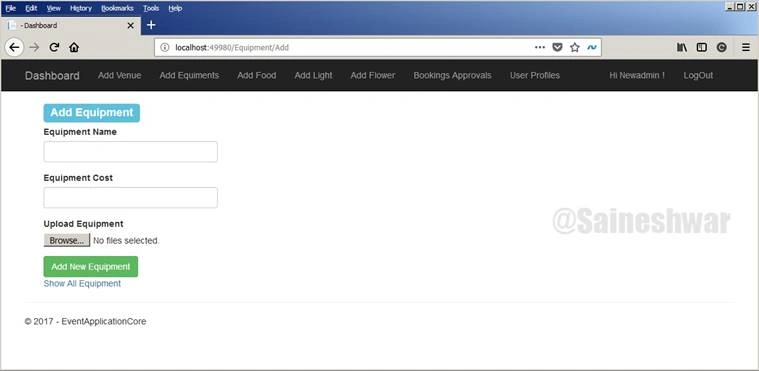
Add Equipment
In this part, we are going to add new Equipment.
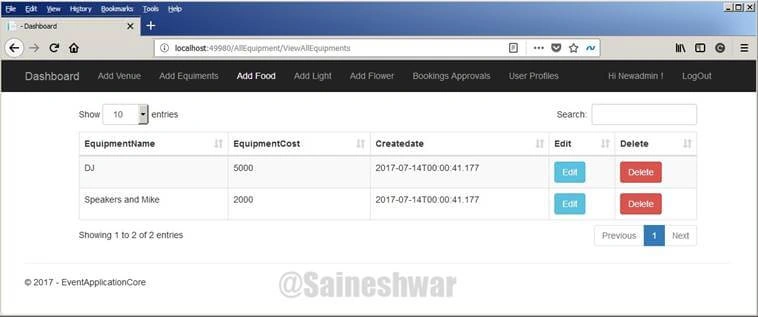
All Equipment
In this part, we going to display all Equipment which we have added in Grid view, along with that we have Edit and Delete button to edit Equipment and delete Equipment.
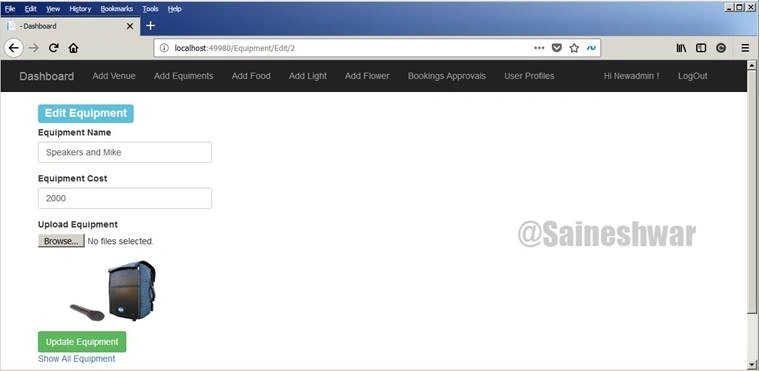
Edit Equipment
In this part, we are going update details of Equipment.
Add Food
In this part we are going to add new Food item. 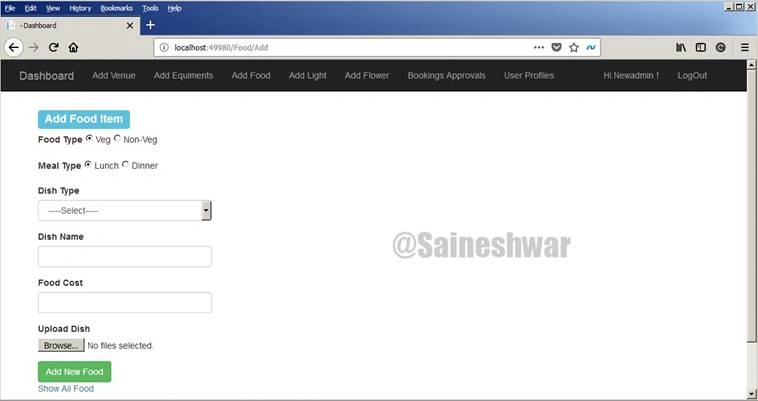
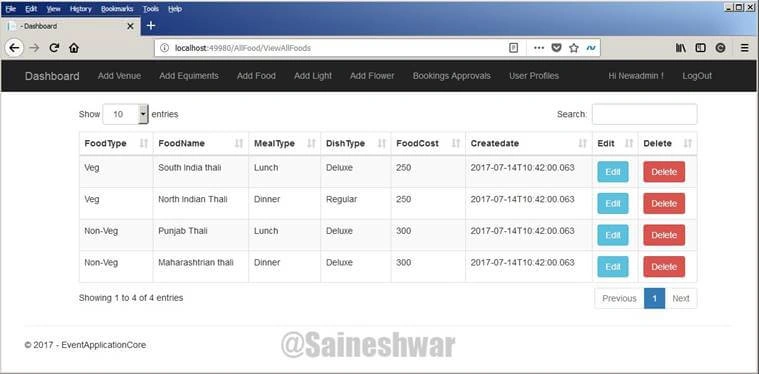
All Foods
In this part, we going to display all Food items which we have added in Grid view, along with that we have Edit and Delete button to edit Food items and delete Food items.
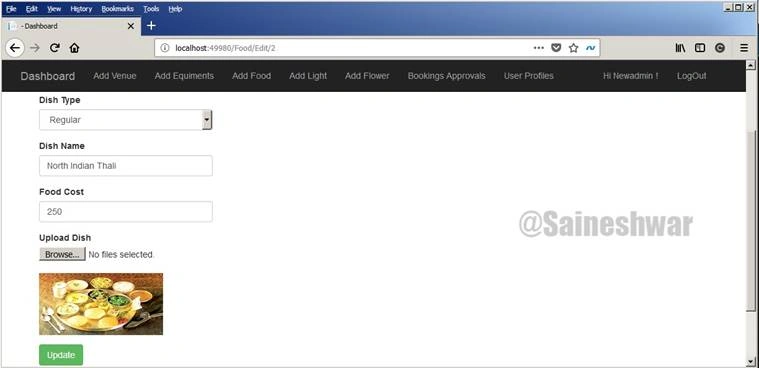
Edit Food
In this part, we are going update details of Food Items.
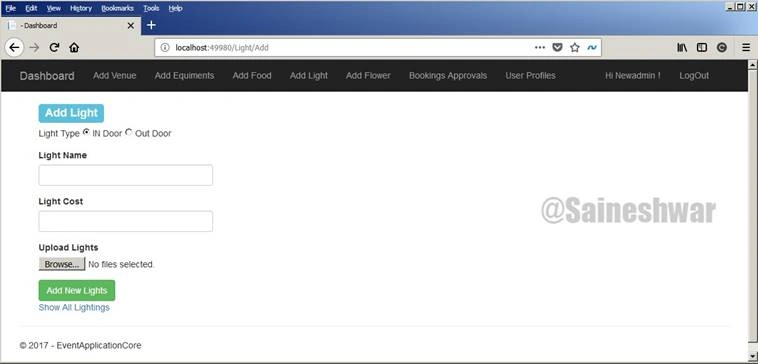
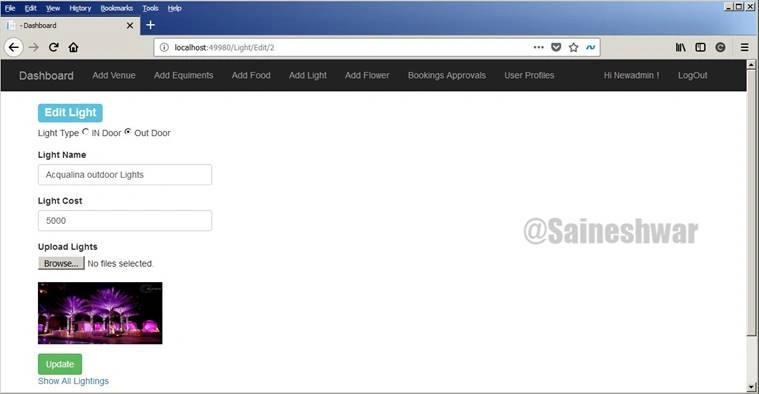
Add Lighting
In this part we are going to add new Lighting.
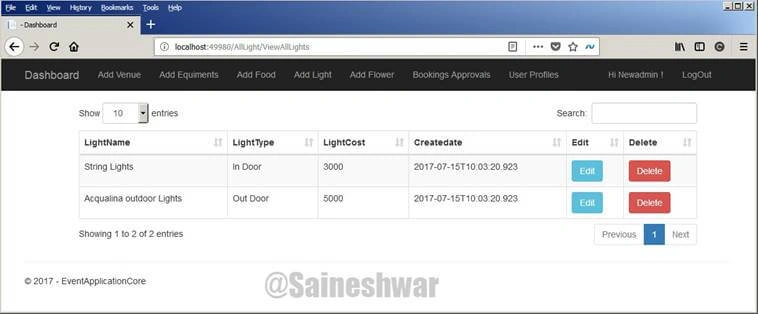
All Lightings
In this part we going to display all Lightings which we have added in Grid view, along with that we have Edit and Delete button to edit Lightings and delete Lightings.
Edit Lighting
In this part, we are going update details of Lightings.
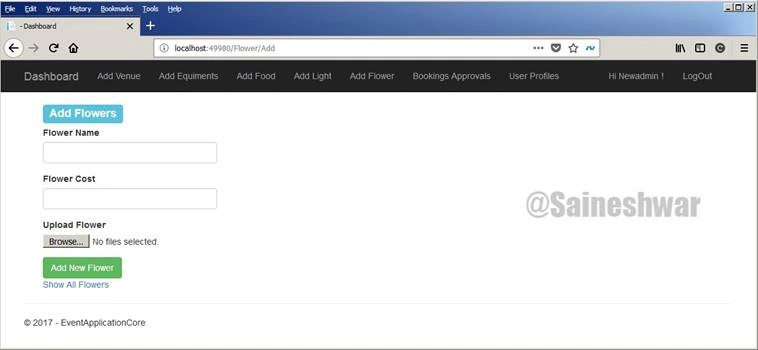
Add Flowers
In this part we are going to add new Flowers for adding Flowers we require Flowers name, Flowers Cost and Photo of Flowers.
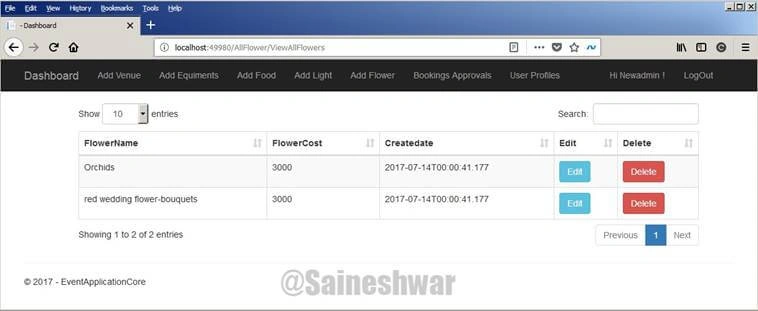
All Flowers
In this part we are going to display all Flowers which we have added in Grid view, along with that we have Edit and Delete button to edit Flowers and delete Flowers.
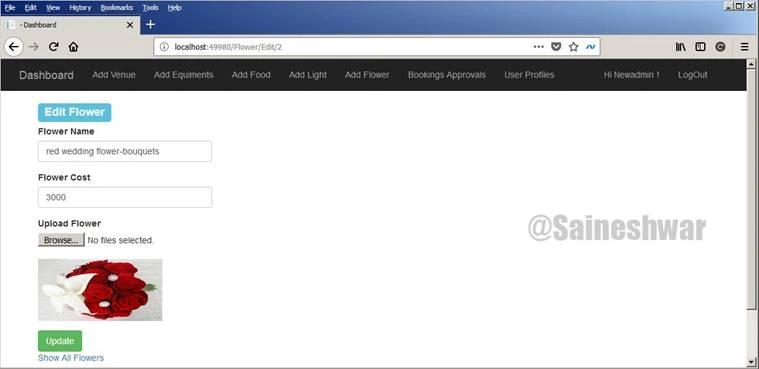
Edit Flowers
In this part, we are going update details of Flower.
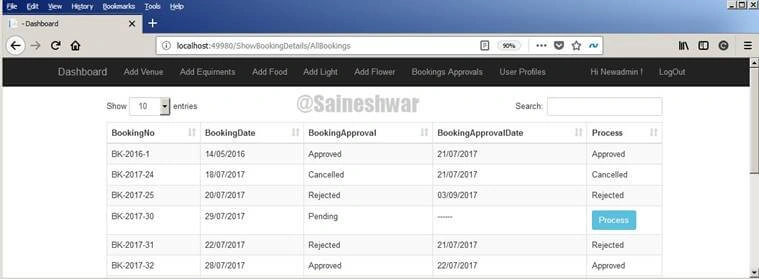
Booking Details
In this part, we can see all booking request of users and admin has right to approve or reject booking depending upon his arrangements.
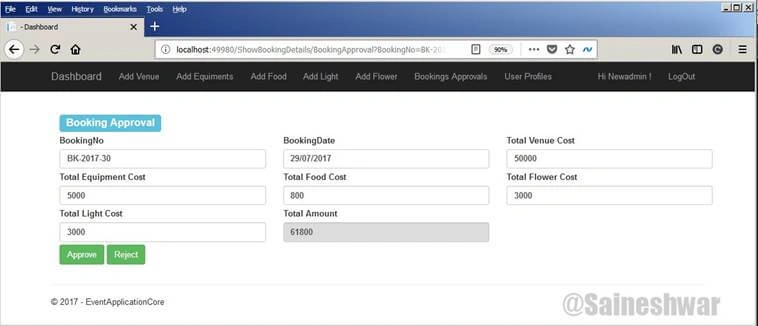
Booking Approvals
In this part, we can see individual booking detail and approve or reject booking.
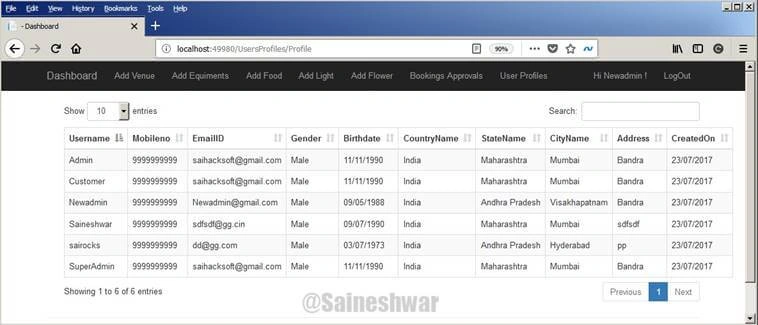
All Users Profile
In this part, we can see all registered users' profiles.
Finally, we have Completed with Admin end which was too large.
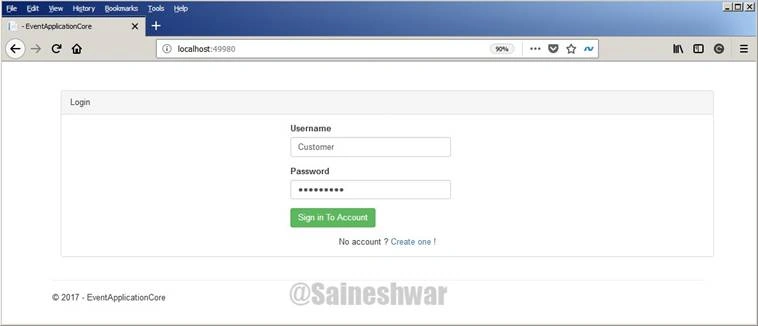
Login (User)
Now we are logged in as User.
Booking Venue
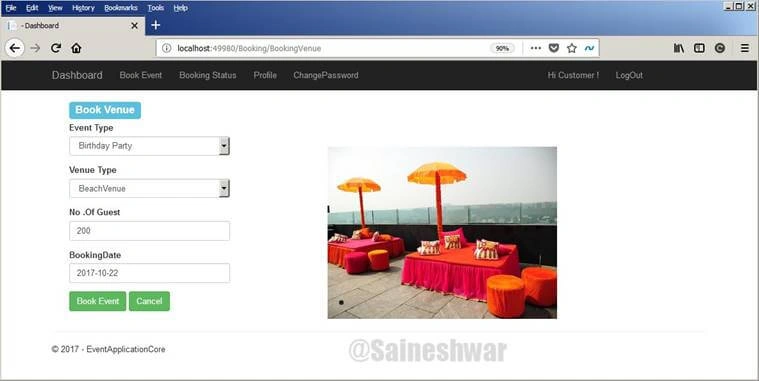
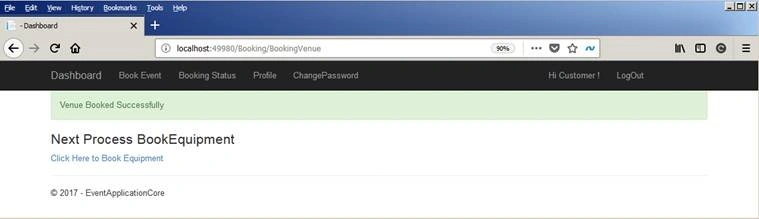
In this part, we are going to book a venue for a birthday party.
For doing that we just need to choose Event Type as Birthday Party next we are going to venue type as Beach venue along with that number of Guests.
Book Equipment
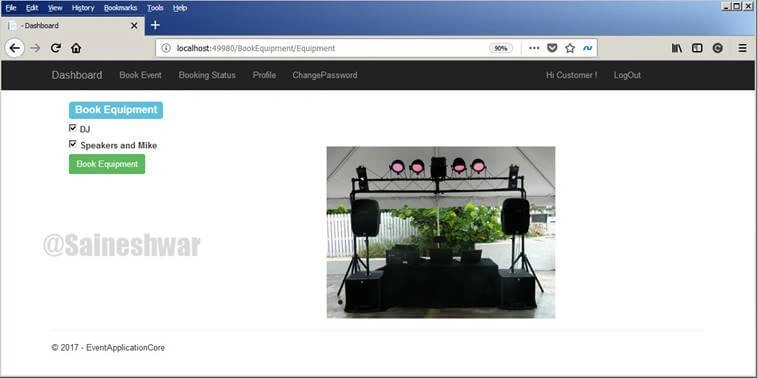
In this part, we are going to book an Equipment for venue, such as DJ or Speaker and mike; you can choose equipment according to your choice.
Book Food
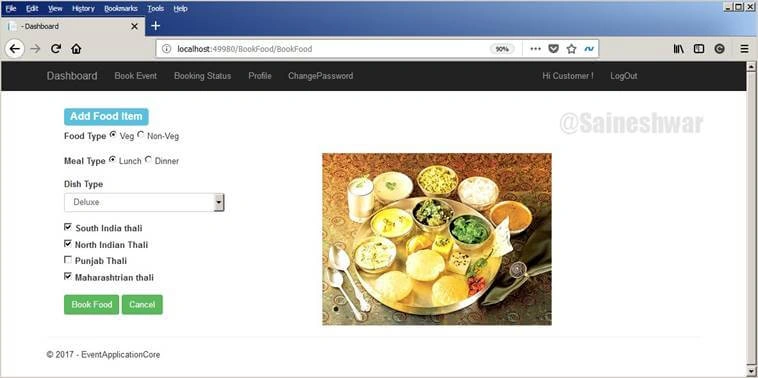
In this part, we are going to book food items for Event. It has various combinations; we can choose food items according to our choice.
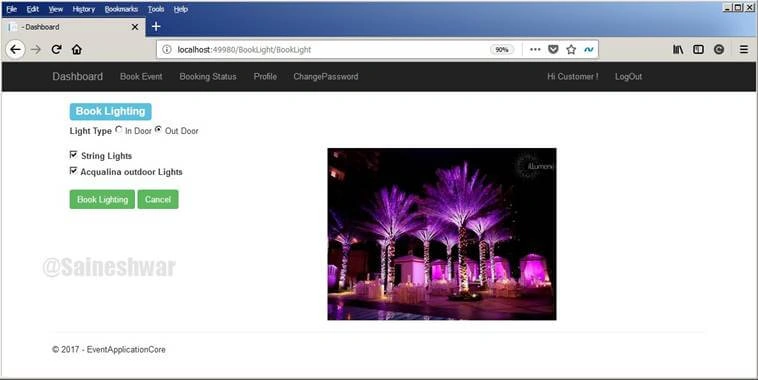
Book Light
In this part, we are going to book lighting for the venue, such as String Lights or Acqualina outdoor lights. You can choose lighting according to your choice.
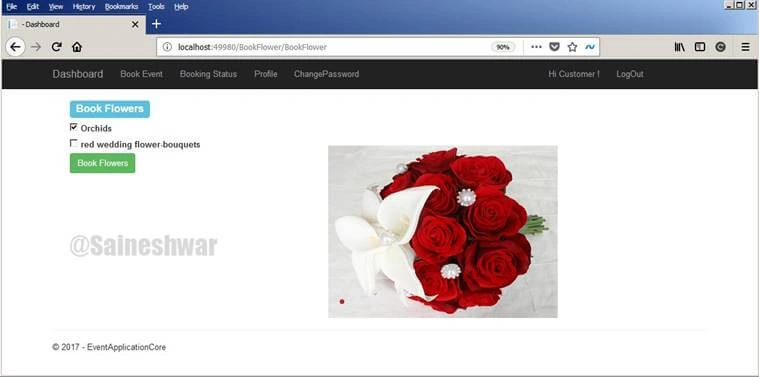
Book Flower
In this part, we are going to book flowers for the venue, such as orchids or red flowers; you can choose flowers according to your choice.
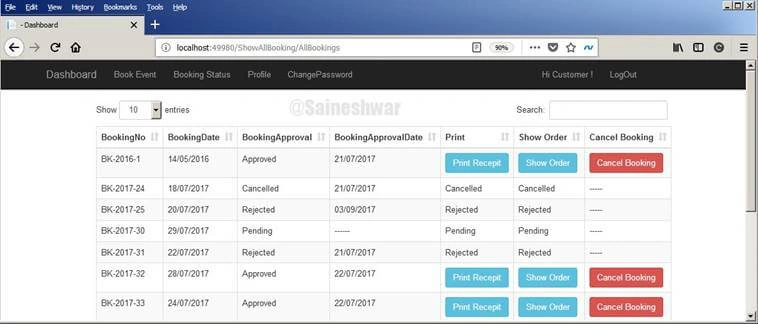
All Booking Status
In this part, we can see our booking status. If the booking is approved, we can download the receipt.
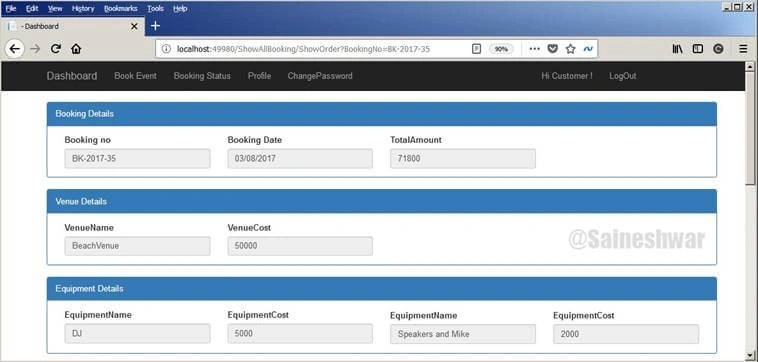
Order Details
In this part, if we click on "Show Order" button of the booking status grid, we can see complete details of an order.
Finally, we have gone through the entire project in details, functionality wise. I hope you liked my project for learning ASP.NET Core MVC 1.0.
Zaid AhmedPosted Dec 4, 2024, 10:22 AM
Project is not working
Kuldeep BishtPosted Mar 27, 2024, 12:09 PM
I have requirements in .net core 8. I want Asp.net Core MVC application with clean architecture. Can anyone have some reference for this please? Many Thanks.
lisa rossPosted Mar 20, 2023, 4:39 PM
Hello this does not work in vs2019 cuz mvc version is 5 and so how can we upgrade your project?
hamesh anandPosted Apr 25, 2022, 6:36 PM
I can only see db script can i get complete project
Md onimPosted Jul 13, 2021, 10:03 AM
Thank you so much sir Bageri for this app sl
nilesh narwarePosted May 17, 2021, 5:56 PM
Sir ,, Thank you so much , you are simply Great..!! thank you So much for sharing .Net Core Project.
Kamran AwanPosted Jun 19, 2020, 11:36 PM
SIR KINDLY MAKE A SIMPLE VIDEO TO RUN THIS PROJECT WHILE ALL MEMBERS WHICH ARE FACING PROBLEMS COULD BE RESOLVED .
Hamid KhanPosted Jun 4, 2020, 3:04 PM
Awaesome article..............
Sapna AruneshPosted May 28, 2020, 6:54 AM
How I can add new table to the project .
saleh mohamedPosted Jan 19, 2020, 2:37 PM
What is the password for admin PLZ
saleh mohamedPosted Dec 29, 2019, 8:20 AM
Very nice thank you - please i need how to create website for shopping
Upendra SahuPosted Sep 8, 2019, 10:00 AM
Thanks a lot Tauheed for your quick reply, It worked.
Upendra SahuPosted Sep 8, 2019, 4:51 AM
I have created the DB and set the Connectionstrings in appSettings.json file. While running the project its throwing error in Startup.cs file that 'The given key was not present in the dictionary.' at line number 37 services.AddMvc(options => {. Can you please guide me why this error I am getting ?
Upendra SahuPosted Sep 8, 2019, 4:50 AM
I have created the DB and set the Connectionstrings in appSettings.json file. While running the project its throwing error in Startup.cs file that 'The given key was not present in the dictionary.' at line number 37 services.AddMvc(options => {
Pravin ThubePosted Aug 28, 2019, 7:40 AM
Error -The given key was not present in the dictionary.'
Pravin ThubePosted Aug 28, 2019, 7:39 AM
Giving Below error in config service method while running project.can u plz help
Sajith MnPosted Jul 5, 2019, 12:00 AM
How will generate database?, Migration not working I have selected Concrete project in NuGet-package for db configuration but it is showing no project selected message. can you help me how to create db. for the code first approach
Jasmine MerchantPosted Feb 28, 2019, 12:26 AM
Great work Sir, Thanks for sharing the project
Ahmad DamraPosted Jan 8, 2019, 9:44 AM
What is the password for admin?
Cyril EjikePosted Jan 2, 2019, 3:53 PM
Good work!
Mian IbraheemPosted Oct 5, 2018, 11:28 AM
This project is not download
Agbo EmmanuelPosted Oct 4, 2018, 3:29 AM
Hi Saineshwar thank you for sharing this project i am new to programming . I ran this application in VS 2017 the login page came up and i put in the superadmin user name and password i get error message "The page cant be found"
Agbo EmmanuelPosted Oct 3, 2018, 12:43 PM
Hi Saineshwar
Guest UserPosted Sep 3, 2018, 10:08 PM
This is the awesome project. I really like this. I think, there is one thing Its need to use, After approve by admin of any booking, why customer can cancel it? Is it OK to show cancel after approving. I need to clear understand this. Another thing is, when a customer start to book , its going to Next Process BookEquipment , then next etc. But If a customer close the tab/window after complete only one thing, suppose Book Venue only, then close the window, How the customer can apply or update booking things again in that particular event? Thanks in advance.
Pradeep SinghPosted Aug 30, 2018, 1:55 AM
I am getting the exception on running of this application and it indicates Line no 37 of startup page. The exception is "KeyNotFoundException: The given key was not present in the dictionary.stem.Collections.Generic.Dictionary.get_Item(TKey key)". Sir can you please help me to fix this problem.
Vaishnavi KulkarniPosted Aug 29, 2018, 2:43 AM
Like, I want to show Venue Name on /ShowBookingDetails/BookingApproval to approve the booking through Admin User.
Vaishnavi KulkarniPosted Aug 29, 2018, 1:30 AM
I want to make changes in this application like adding more fields. How to do it. Is there any tutorial video or anything which can guide me on this.
Durgaprasad BoddapatiPosted Jun 6, 2018, 1:38 AM
Thank you sir this is help full to develop project
Wai AungPosted May 23, 2018, 8:25 AM
Please Can you give me this project's ER Diagram??
Shadab AhmadPosted Apr 23, 2018, 8:30 AM
im getting this error while try to run home index any page HTTP Error 502.5 - Process FailureCommon causes of this issue: The application process failed to start The application process started but then stopped The application process started but failed to listen on the configured port
Sabuj MollahPosted Mar 31, 2018, 2:17 AM
Sir i need to transform it to mvc4 . what should i do now ? i am new learner of mvc4
Louie RamirezPosted Mar 11, 2018, 1:06 PM
Sir can your provide the script for the function BookingEvent()in BookingVenue.cshtml Thanks
Problem MakerPosted Feb 2, 2018, 3:37 AM
I dowload this sourcecode.rar but please explain how to run it and use
Sooraj PrajapatiPosted Jan 9, 2018, 6:43 AM
Do you have a .bak file for the project ?
mostafa fPosted Dec 26, 2017, 8:40 AM
Please Share Database scripts or MDF file
ashwini mauryaPosted Dec 25, 2017, 11:44 PM
ReadMe_First.txt which contains DB/login information is missing in the source code. Email me if is possible: [email protected]
mostafa fPosted Dec 25, 2017, 9:32 AM
ReadMe_First.txt which contains DB/login information is missing in source code. Email me if is possible : [email protected]
Jahurul IslamPosted Nov 25, 2017, 7:14 AM
How to mail from webmail in c# . net
Varsha RanganathPosted Nov 21, 2017, 1:15 AM
Windows authentication!!!
Varsha RanganathPosted Nov 20, 2017, 9:29 PM
Sir i'm getting this kind of error "System.Data.SqlClient.SqlException: 'A network-related or instance-specific error occurred while establishing a connection to SQL Server. The server was not found or was not accessible. Verify that the instance name is correct and that SQL Server is configured to allow remote connections. (provider: Named Pipes Provider, error: 40 - Could not open a connection to SQL Server)"plz kindly help me with this
Varsha RanganathPosted Nov 19, 2017, 11:46 PM
Sir my system isn't compatible with sql server 2008, so how can i connect it with sql server 2014.???
Jaipal ReddyPosted Nov 15, 2017, 7:11 AM
Thank you Sai for sharing this great work.
Humayun Kabir MamunPosted Nov 15, 2017, 5:55 AM
Thanks Saineshwar for this wonderful article...
Vimal PatelPosted Nov 1, 2017, 12:47 AM
ReadMe_First.txt which contains DB/login information is missing in source code.
Rana HarisPosted Oct 31, 2017, 1:46 AM
Bageri!EventapplicationCore project is not loaded successfully in VS 2015.Load Failed Error is coming in Solution Explorer. Please help.
Mukesh DubeyPosted Oct 30, 2017, 11:33 AM
Sir this project is not opening in my machine i am using VS2013,SQL server 2016 please help
Pramod kumarPosted Oct 27, 2017, 1:42 AM
Hello Sir , I am not able to load the nuget package when ever i have open the project in vs 2017 ,could you suggest me some ideas for that .
Upendra Pratap ShahiPosted Oct 26, 2017, 9:48 AM
Nice one, great explanation...........
Deepak KumarPosted Oct 25, 2017, 2:26 AM
I am getting this error while running your code.Detailed Error Information:Module IIS Web CoreNotification Unknown Handler Not yet determined Error Code 0x80070003 Config Error Cannot read configuration file Config File \\?\E:\project\EventApplicationCore\EventApplicationCore\web.config Requested URL http://localhost:54544/ Physical Path Logon Method Not yet determined Logon User Not yet determined Request Tracing Directory C:\Users\Deepak-PC\Documents\IISExpress\TraceLogFiles\
Vinay PalakshaPosted Oct 25, 2017, 1:58 AM
Thank you sir....Great work
Mansour AlAmmariPosted Oct 24, 2017, 7:19 AM
Genius. Good job, Saineshwar Bageri.
Ankur MistryPosted Oct 24, 2017, 4:18 AM
Saineshwar Bageri mind-blowing work sai. 1 Number
Arvind SinghPosted Oct 24, 2017, 2:38 AM
Good work...........
Chetan NargundPosted Oct 24, 2017, 1:19 AM
Great work ...keep it up.Thank you!