

The ASP.NET Core Application Lifecycle is the sequence of stages an application goes through, starting from when it is launched ( Program.cs ), handling incoming HTTP requests via the middleware pipeline and controllers, and ending when the application shuts down and releases resources. In simple words: It’s the journey of your app from startup => request processing => response =>shutdown.
Before we start, let's understand what a lifecycle is in an application.
A lifecycle in applications is the sequence of stages/phases that an application goes through from its start to its end .
It begins when the application is launched/initialized .
It continues through execution (handling logic, user requests, DB interactions, etc.) .
It ends when the application is shut down and resources are released.
Stages of ASP.NET Core Application Lifecycle
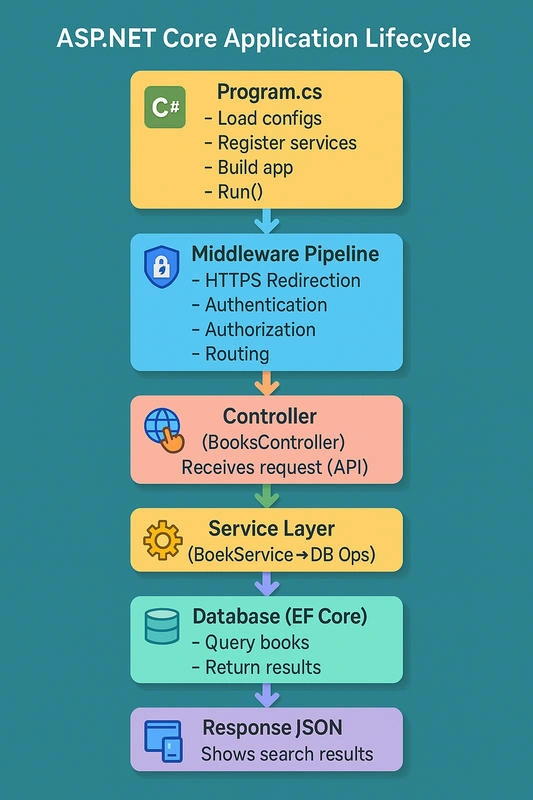
1. Application Startup
Application Startup in ASP.NET Core is the very first phase when the application boots up.
This is where we:
Configure services (Dependency Injection).
Configure middleware (request pipeline).
Load settings (from
appsettings.json, environment variables).Prepare the app to start listening for requests.
In .NET 6+, this happens inside Program.cs .
Example: Bookstore API Startup, Let’s say we’re building a Bookstore API where users can search books.
Program.cs
    using Microsoft.EntityFrameworkCore;

var builder = WebApplication.CreateBuilder(args);

// 1. Configure Services (DI)
builder.Services.AddControllers();
builder.Services.AddDbContext<BookstoreContext>(options =>
    options.UseSqlServer(builder.Configuration.GetConnectionString("DefaultConnection")));
builder.Services.AddScoped<IBookService, BookService>();

var app = builder.Build();

// 2. Configure Middleware Pipeline
if (app.Environment.IsDevelopment())
{
    app.UseDeveloperExceptionPage();
}
app.UseHttpsRedirection();
app.UseRouting();
app.UseAuthorization();

app.MapControllers();

// 3. Run the application
app.Run();
Configuration Loaded
Reads
appsettings.json,secrets.json, environment vars.Example: DB connection string for Bookstore.
Services Registered (DI)
Add
Controllers=> for handling HTTP requests.Add
DbContext=> for Entity Framework (SQL Server).Add
BookService=> business logic for searching books.
Middleware Configured
HTTPS redirection.
Routing.
Authorization.
Application Run
app.Run()=> starts Kestrel server, listens for HTTP requests.
2. Middleware Pipeline
In ASP.NET Core, Middleware is software that sits in the request pipeline.
Each request from the client (browser, API call, mobile app) passes through a chain of middleware components before reaching the controller, and then flows back through them to the client. Think of it like a series of checkpoints (filters).
How It Works:
Client sends request → enters pipeline.
Each middleware can:
Process the request,
Pass it to the next middleware,
Or stop the pipeline.
Response comes back through the same middleware chain.
Imagine a Bookstore API where customers search for books.
    var builder = WebApplication.CreateBuilder(args);

builder.Services.AddControllers();

var app = builder.Build();

// Middleware pipeline
app.UseHttpsRedirection();       // 1. Force HTTPS
app.UseAuthentication();         // 2. Check if user is logged in
app.UseAuthorization();          // 3. Check if user has rights
app.UseRouting();                // 4. Match request to correct controller
app.MapControllers();            // 5. Call the controller action

app.Run();
Customer requests /api/books
UseHttpsRedirectionIf customer comes via
http://, redirect tohttps://.(Like a guard saying: “Use the safe door.”)
UseAuthenticationChecks if the user has a valid login (JWT, cookie, token).
(Like a guard checking ID at the door.)
UseAuthorizationChecks if logged-in user has permission (e.g., “Admin” can add books).
(Like bookstore staff only allowing access to the stockroom if you’re a manager.)
UseRoutingMatches request
/api/books→ BookController →GetBooks()method.(Like the receptionist directing the customer to the right section of the bookstore.)
MapControllersExecutes the action method in the controller.
(Like the bookshop staff finally helping the customer get the book.)
Response back through the pipeline
Response travels back through middleware (logging, exception handling) → returned as JSON or HTML.
So, the Middleware Pipeline is the backbone of request processing .
Every request and response must pass through this chain.
3. Routing & Controller Execution
After the middleware pipeline prepares the request (HTTPS, authentication, authorization, etc.),
Routing decides which controller and action method should handle the request. Then, Controller Execution runs that action method and prepares a response.
How It Works
Routing
Maps the incoming URL (like
/api/books/5) to a Controller and Action.Uses route templates like
api/{controller}/{id?}.
Controller Execution
Once routing finds the right controller and action method, ASP.NET Core needs to supply values to that method’s parameters. This process is calledModel Binding.
It automatically takes data from the request (query string, form fields, JSON body, headers, route values) and maps it to C# objects or method parameters. After that, the Action Execution happens → the method runs with those bound values.Example: Bookstore API – Add a New Book
Customer fills out a form (book title, author).
The receptionist takes the form and copies details into the system (model binding).
The clerk executes the request by adding the new book to the inventory (action execution).
Calls the controller’s action method.
Executes business logic (query database, process data, etc.).
Returns a result (JSON, HTML, file, etc.).
Example: Bookstore API – Get Book by Id
    var builder = WebApplication.CreateBuilder(args);

builder.Services.AddControllers();

var app = builder.Build();

app.UseHttpsRedirection();
app.UseRouting();
app.UseAuthorization();
app.MapControllers(); // enables routing to controllers

app.Run();
Routing = Receptionist guiding customer to the right section (e.g., “Programming Books → Shelf 2”).
Controller Execution = Bookstore clerk fetching the exact book the customer requested.
If the book exists → give it to the customer.
If it doesn’t → say “Sorry, book not found.”
So in this phase:
Routing decides where the request should go .
Model Binding = Extracts data from request → maps to C# object.
Controller Execution runs the business logic to create a response.
5. Service Layer
After the controller receives the request and executes its action method, it often delegates the actual business logic to the Service Layer. The Service Layer is not built into ASP.NET Core like middleware or routing; instead, it’s a design pattern we developers use to keep code clean, maintainable, and testable.
Think of the Service Layer as the brain of the application, where business rules and operations live. Think of a bookstore manager (Service Layer) :
A customer (API request) gives the form to the receptionist (Controller).
The receptionist doesn’t decide how to handle the inventory — they just pass it to the manager.
The manager applies rules:
"Do we already have this book?"
"Should we restock more copies?"
"Is the supplier approved?"
Only after applying these rules does the manager instruct the clerk (Database) to update the inventory.
How It Works
The controller acts as a messenger: it receives requests, validates inputs, and passes them to a service.
The service is responsible for applying the business logic : calculations, validations, workflows, and orchestrating data access.
Services often talk to repositories or DbContext (EF Core) to fetch/update data.
Finally, the service returns a result to the controller, which then sends it back to the client as JSON/HTML.
The controller is very thin, while the service holds the real rules.
6. Database (EF Core)
Once the service layer decides what needs to be done, it interacts with the Database, usually through Entity Framework Core (EF Core) in .NET apps. The database is the memory of the application, where persistent data lives: books, customers, orders, etc.
Think of the database as the warehouse in a bookstore:
The manager (Service Layer) tells the warehouse clerk (EF Core) :
"Fetch all books in the Programming section." (Query)
"Add 10 copies of C# Fundamentals." (Insert)
"Update price of ' ASP.NET Core in Action'." (Update)
The clerk (EF Core) knows how to talk to the warehouse shelves (SQL).
The receptionist (Controller) never talks to the warehouse directly, only through the manager.
How It Works
EF Core is an ORM (Object Relational Mapper) that lets us write C# code instead of raw SQL.
It translates our LINQ queries into SQL and executes them against the database (SQL Server, PostgreSQL, etc.).
When a service method saves or queries data, EF Core handles the CRUD operations.
Database (EF Core) => Actually executes how data is stored/retrieved.
7. Response JSON
Once the service layer has completed its work (e.g., fetching books, adding a new book, updating inventory) and the database has returned results, the controller prepares the response. In ASP.NET Core Web APIs, the most common response format is JSON (JavaScript Object Notation).
JSON is lightweight, human-readable, and universally supported across browsers, mobile apps, and third-party systems. Think of Response JSON as the final receipt or book handed to the customer :
The customer asks the receptionist (Controller) for a book.
Receptionist checks with the manager (Service Layer): manager checks the warehouse (Database).
Once the book is found, it’s packed and handed back to the customer.
If the book is unavailable, the customer is politely told: “Sorry, not found.”
Similarly, in ASP.NET Core:
Success: JSON response with data.
Failure: JSON response with error message.
How It Works
Controller receives the result from the service layer.
ASP.NET Core automatically serializes C# objects into JSON using System.Text.Json (or Newtonsoft.Json if configured).
The HTTP response includes:
Status Code (200 OK, 404 Not Found, 500 Internal Server Error, etc.).
Response Body (in JSON format).
Headers (e.g., Content-Type: application/json).
The client (browser, mobile app, Postman, etc.) receives the JSON and displays it in UI.
Conclusion
The .NET Application Lifecycle is more than just a technical flow; it’s the blueprint of how every request travels through your application. From startup and middleware configuration to routing, controller execution, service logic, and finally generating a response, each stage has a clear responsibility. By mastering the lifecycle, you will gain:
Clarity on where to implement business rules.
Flexibility to inject custom behavior (middleware, filters, services).
Confidence in debugging, since you know exactly where to look when something breaks.
Join the conversation! Your thoughts help the community grow.