

1. 🌍 What are Microservices?
Microservices architecture is an approach to building applications as a collection of independent, loosely coupled services that communicate over lightweight protocols (like HTTP or gRPC).
Key benefits
Independent development & deployment.
Technology flexibility (polyglot services).
Scalability per service.
Fault isolation.
Asp.Net Core is widely used for building microservices because of its performance, cross-platform support, container-friendliness (Docker), and modern API capabilities.
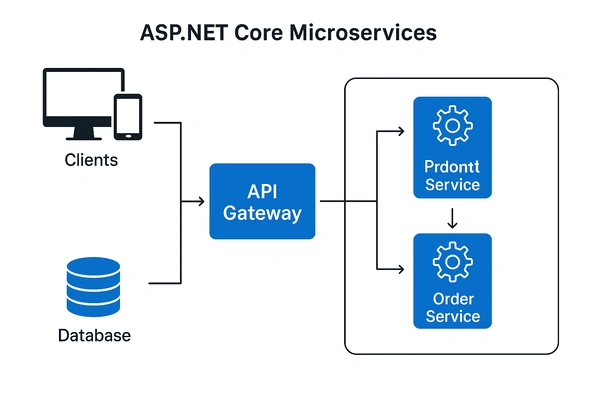
2. 🧩 Core Components of ASP.NET Core Microservices
API Gateway
A single entry point for clients.
Handles routing, load balancing, authentication, and aggregation.
Microservices (independent APIs)
Each service owns its data and logic.
Examples: Order Service, Product Service, Payment Service.
Database per Service
Each service should have its own persistence.
Communication
RESTful APIs, gRPC, or messaging (RabbitMQ, Kafka, Azure Service Bus).
Observability
Logging, monitoring, and distributed tracing (OpenTelemetry).
3. ⚡ ASP.NET Core Microservice Example
Let’s create a ProductService and an OrderService.
(a) Product Microservice
// Program.cs - Minimal API (ASP.NET Core 10)
var builder = WebApplication.CreateBuilder(args);
var app = builder.Build();

var products = new List<Product>
{
    new Product { Id = 1, Name = "Laptop", Price = 1200 },
    new Product { Id = 2, Name = "Headphones", Price = 150 }
};

app.MapGet("/products", () => products);
app.MapGet("/products/{id}", (int id) =>
    products.FirstOrDefault(p => p.Id == id) is Product product
        ? Results.Ok(product)
        : Results.NotFound());

app.Run();

record Product(int Id, string Name, decimal Price);
👉 This microservice exposes REST APIs for products.
(b) Order Microservice (consumes ProductService)
// Program.cs
using System.Net.Http.Json;

var builder = WebApplication.CreateBuilder(args);
var app = builder.Build();

List<Order> orders = new();

app.MapPost("/orders", async (OrderRequest request) =>
{
    using var client = new HttpClient();
    var product = await client.GetFromJsonAsync<Product>(
        $"http://localhost:5000/products/{request.ProductId}");

    if (product is null)
        return Results.NotFound("Product not found");

    var order = new Order(Guid.NewGuid(), product.Id, product.Price, DateTime.UtcNow);
    orders.Add(order);
    return Results.Ok(order);
});

app.MapGet("/orders", () => orders);

app.Run();

record Order(Guid Id, int ProductId, decimal Amount, DateTime CreatedAt);
record Product(int Id, string Name, decimal Price);
record OrderRequest(int ProductId);
👉 The OrderService calls the ProductService using HttpClient.
4. 🔗 Communication with gRPC
Asp.Net Core supports gRPC, which is faster and strongly-typed.
product.proto
syntax = "proto3";

service ProductService {
  rpc GetProductById(ProductRequest) returns (ProductReply);
}

message ProductRequest {
  int32 id = 1;
}

message ProductReply {
  int32 id = 1;
  string name = 2;
  double price = 3;
}
With this, OrderService can call GetProductById using gRPC instead of REST.
5. 🚪 API Gateway with Ocelot
Install package:
dotnet add package Ocelot
ocelot.json
{
  "Routes": [
    {
      "DownstreamPathTemplate": "/products",
      "DownstreamScheme": "http",
      "DownstreamHostAndPorts": [
        { "Host": "localhost", "Port": 5000 }
      ],
      "UpstreamPathTemplate": "/api/products",
      "UpstreamHttpMethod": [ "GET" ]
    },
    {
      "DownstreamPathTemplate": "/orders",
      "DownstreamScheme": "http",
      "DownstreamHostAndPorts": [
        { "Host": "localhost", "Port": 6000 }
      ],
      "UpstreamPathTemplate": "/api/orders",
      "UpstreamHttpMethod": [ "POST", "GET" ]
    }
  ]
}
👉 This way, clients just call /api/products or /api/orders from a single entry point.
6. 🛢️ Database per Microservice
Example with Entity Framework Core for ProductService:
public class ProductDbContext : DbContext
{
    public ProductDbContext(DbContextOptions<ProductDbContext> options)
        : base(options) { }

    public DbSet<Product> Products => Set<Product>();
}

record Product(int Id, string Name, decimal Price);
In Program.cs
builder.Services.AddDbContext<ProductDbContext>(opt =>
    opt.UseSqlServer(builder.Configuration.GetConnectionString("ProductsDb")));
Each service has its own schema to avoid coupling.
7. 📊 Observability & Monitoring
Add OpenTelemetry
builder.Services.AddOpenTelemetry()
    .WithTracing(b =>
    {
        b.AddAspNetCoreInstrumentation()
         .AddHttpClientInstrumentation()
         .AddConsoleExporter();
    });
This helps trace requests across microservices.
8. 🐳 Containerization with Docker
Dockerfile
FROM mcr.microsoft.com/dotnet/aspnet:10.0 AS base
WORKDIR /app
EXPOSE 80

FROM mcr.microsoft.com/dotnet/sdk:10.0 AS build
WORKDIR /src
COPY . .
RUN dotnet publish -c Release -o /app

FROM base AS final
WORKDIR /app
COPY --from=build /app .
ENTRYPOINT ["dotnet", "ProductService.dll"]
👉 Each microservice gets its own container. You can orchestrate them with Docker Compose or Kubernetes.
9. 🏆 Best Practices
Keep services small and focused.
Each service owns its data.
Use async communication where possible (message queues).
Centralize logging and monitoring.
Use API Gateway for cross-cutting concerns.
Automate deployments with CI/CD pipelines.
🔑 Summary
Asp.Net Core 10.0 makes building microservices easier with:
Minimal APIs for lightweight services.
gRPC support for efficient communication.
API Gateway (Ocelot/YARP) for routing.
Container-first design with Docker/Kubernetes.
OpenTelemetry for observability.
Together, these features make ASP.NET Core + Microservices a powerful combo for modern cloud-native apps.
Join the conversation! Your thoughts help the community grow.