

Introduction
In this article we are going to understand Angular application architecture at a high level.
Module
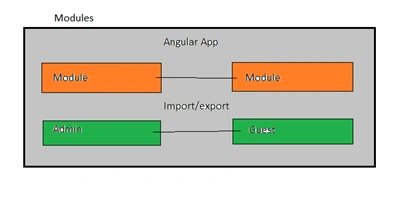
One must know that there is at least one module called the Root Module.
Module
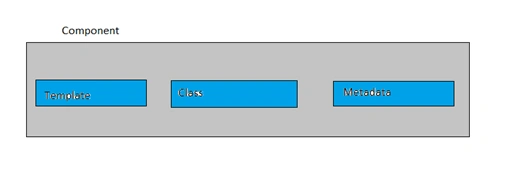
Components
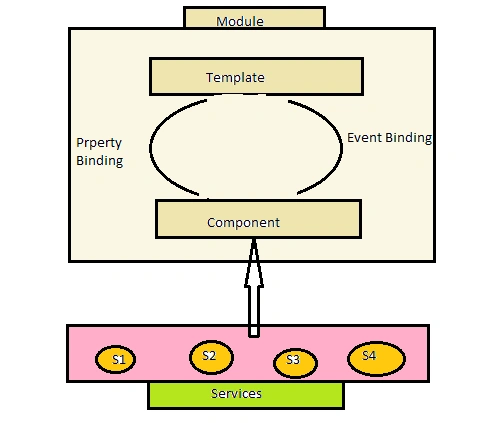
Services
Angular App - One or more modules together forms the angular application.
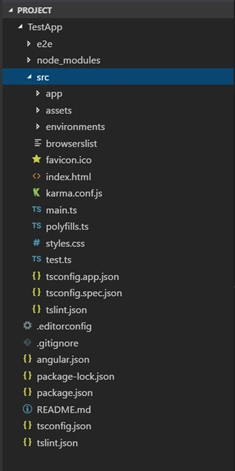
Now let us go to our project folder. You will see lots of files. Let's have brief information about them.
Prerequisitees
- HTML, CSS and Js
- Basics of Typescript.
Let us create a sample TestApp; for this you should have installed the below for development environment,
- Node
- Npm (comes when you install node)
- Angular CLi.
- Text Editor.
For creating a new application run the below command on your location.
> ng new TestApp
Once your command is completed you will have TestApp folder created inside your sample folder.
Now you will have your project folder called 'TestApp'.
Note
See my previous article “Getting started with Angular CLI” if you want the installation and introduction from the basics and start with execution of the sample application.
package.json
This file contains the dependencies and devDependencies which are nothing but the libraries or module that are required to your Angular application to work. Packages here are installed when you have run the command 'ng new hello-world' and all the packages get installed on folder 'node_modules'. We are also having some scripts to run the command. 'ng serve' is one of them. 'npm start' also call 'ng serve' internally.
src
This is the source folder where we have main.ts file which is the entry point to our Angular application. We have app directory inside src folder. It contains app.module.ts which is the root module of the application and also app.component.ts which is the root component of the application.
Navigate inside your project folder to start running the application.
> cd TestApp
When we run the application with 'ng serve' command, the execution comes to the main.ts file, over here we bootstrap or kickstart the AppModule.
In app.module we bootstrap or kickstart the AppComponent. Now this AppComponent has two things, the HTML template and the class that controls the logic of view.
In the typescript file we have a class AppComponent which is having a property 'title' and this property is being used in view HTML. So when we run the application we will see 'Welcome to the app!' where app is nothing but the property of the class component that is being rendered.
So when you change the property 'title' value it will automatically reflect to the browser and change the value.
So this is the basics of Angular and a sample Angular application.
Muthu KumarPosted Oct 21, 2018, 5:54 AM
Nice one..Looking simple.
Khaja MoizuddinPosted Oct 20, 2018, 1:30 PM
Great write up Irshad.
Mahesh ChandPosted Oct 20, 2018, 10:57 AM
Thanks MI. A question and some feedback. As an architecture diagram, it will be good if your diagram has relationships between all modules, components, files etc. Also “Getting started with Angular 5 with Angular CLI” hyperlink is missing. Cheers!
Madhu KollaPosted Oct 19, 2018, 6:04 PM
Great intro to Ang architecture. Looking for more articles on Ang, on Components/ Services etc.
Rushi MehtaPosted Oct 19, 2018, 12:21 AM
Nice Article