

Introduction
In this article, we will learn how to implement an app review feature in a Flutter app. To add the review feature in Flutter applications, we will use app_review plugin. In Android, the app review will redirect you to Google Play Store and in iOS, it will open a popup for you to write the app review. So, let’s start implementing it.
Output
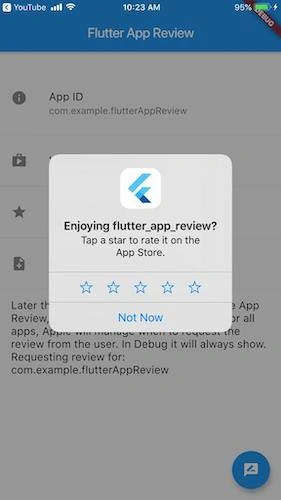
Methods
- AppReview.getAppID: This method will return the application id
- AppReview.storeListing: This method is for Android app review and it will redirect the user to Google Play Store for reviewing the app.
- AppReview.requestReview: This method is for the iOS app and it will open a popup to review the app.
Plugin Required
app_review: ^1.0.0
Steps
Step 1
The first and most basic step is to create a new application in Flutter. If you are a beginner, then you can check my blog Create your first app in Flutter. I have created an app named as “flutter_app_review”.
Step 2
Now, we will configure intro_views_flutter plugin in pubspec.yaml file.
- dependencies:
- flutter:
- sdk: flutter
- cupertino_icons: ^0.1.2
- app_review: ^1.0.0
Step 3
Now, we will implement the app review functionality for Android and iOS both. All the above-explained methods will be implemented in the main.dart file. Following is the programming implementation for that.
- import 'package:flutter/material.dart';
- import 'package:app_review/app_review.dart';
- void main() => runApp(MyApp());
- class MyApp extends StatelessWidget {
- @override
- Widget build(BuildContext context) {
- return MaterialApp(
- theme: ThemeData(
- primarySwatch: Colors.blue,
- ),
- home: MyHomePage(),
- );
- }
- }
- class MyHomePage extends StatefulWidget {
- @override
- _MyHomePageState createState() => _MyHomePageState();
- }
- class _MyHomePageState extends State<MyHomePage> {
- String appID = "";
- String output = "";
- @override
- void initState() {
- super.initState();
- AppReview.getAppID.then((onValue) {
- setState(() {
- appID = onValue;
- });
- print("App ID" + appID);
- });
- }
- @override
- Widget build(BuildContext context) {
- return Scaffold(
- appBar: AppBar(
- title: Text('Flutter App Review'),
- ),
- body: SingleChildScrollView(
- child: new ListBody(
- children: <Widget>[
- new Container(
- height: 40.0,
- ),
- new ListTile(
- leading: new Icon(Icons.info),
- title: new Text('App ID'),
- subtitle: new Text(appID),
- onTap: () {
- AppReview.getAppID.then((onValue) {
- setState(() {
- output = onValue;
- });
- print(onValue);
- });
- },
- ),
- new Divider(
- height: 20.0,
- ),
- new ListTile(
- leading: new Icon(
- Icons.shop,
- ),
- title: new Text('View Store Page'),
- onTap: () {
- AppReview.storeListing.then((onValue) {
- setState(() {
- output = onValue;
- });
- print(onValue);
- });
- },
- ),
- new Divider(
- height: 20.0,
- ),
- new ListTile(
- leading: new Icon(
- Icons.star,
- ),
- title: new Text('Request Review'),
- onTap: () {
- AppReview.requestReview.then((onValue) {
- setState(() {
- output = onValue;
- });
- print(onValue);
- });
- },
- ),
- new Divider(
- height: 20.0,
- ),
- new ListTile(
- leading: new Icon(
- Icons.note_add,
- ),
- title: new Text('Write a New Review'),
- onTap: () {
- AppReview.writeReview.then((onValue) {
- setState(() {
- output = onValue;
- });
- print(onValue);
- });
- },
- ),
- new Divider(
- height: 20.0,
- ),
- new ListTile(
- title: new Text(output),
- ),
- ],
- ),
- ),
- );
- }
- }
Hooray…. Run the app and test it on an emulator/simulator or a device.
Conclusion
We have learned how to implement the app review feature in a Flutter application.
Afzaal Ahmad ZeeshanPosted Sep 17, 2019, 4:03 PM
And what does it do, how does it show up, what would the users see? Any detail?