

Description
As applications evolve, APIs often need to change - adding new fields, modifying endpoints, or restructuring responses. However, these changes can break existing clients if not managed properly. That’s where API versioning comes into play. In this article, we’ll explore different ways to version APIs in .NET Core, provide real-time code samples, and discuss practical scenarios where versioning can be beneficial.
Why Do We Need API Versioning?
To avoid breaking old clients when APIs change.
To allow incremental feature rollouts.
To give developers a smooth migration path to newer APIs.
To maintain backward compatibility without blocking innovation.
Ways to Versionize APIs in .NET Core
Microsoft provides the official Microsoft.AspNetCore.Mvc.Versioning package, which allows multiple strategies:
URL Path Versioning
Example: GET /api/v1/products
Version is part of the route.
Query String Versioning
Example: GET /api/products?api-version=1.0
Version passed as query parameter.
Header Versioning
Example: x-api-version: 1.0
Version sent as a custom request header.
Media Type (Accept Header) Versioning
Example: Accept: application/json; version=1.0
Version negotiated via content type.
Real-Time Working Code Sample
Step 1. Install NuGet Package
Install-Package Microsoft.AspNetCore.Mvc.VersioningStep 2. Configure Versioning in Program.cs
builder.Services.AddApiVersioning(options =>
{
    options.DefaultApiVersion = new Microsoft.AspNetCore.Mvc.ApiVersion(1, 0);
    options.AssumeDefaultVersionWhenUnspecified = true;
    options.ReportApiVersions = true;

    options.ApiVersionReader = ApiVersionReader.Combine(
        new QueryStringApiVersionReader("api-version"),   // ?api-version=1.0
        new HeaderApiVersionReader("x-api-version")       // Header: x-api-version:1.0
    );
});
Step 3. Create Versioned Controllers
using Microsoft.AspNetCore.Mvc;

namespace MyApi.Controllers
{
    // Version 1
    [ApiController]
    [ApiVersion("1.0")]
    [Route("api/v{version:apiVersion}/[controller]")]
    public class ProductsController : ControllerBase
    {
        [HttpGet]
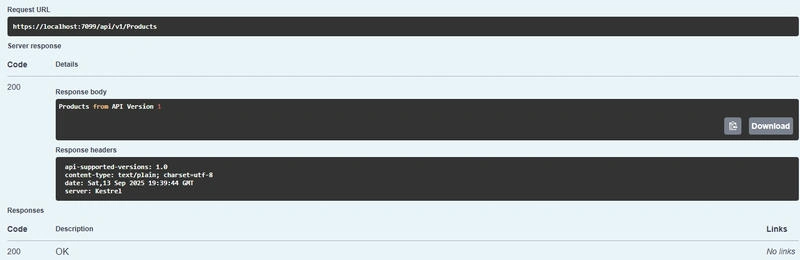
        public IActionResult GetV1() => Ok("Products from API Version 1");
    }

    // Version 2
    [ApiController]
    [ApiVersion("2.0")]
    [Route("api/v{version:apiVersion}/[controller]")]
    public class ProductsV2Controller : ControllerBase
    {
        [HttpGet]
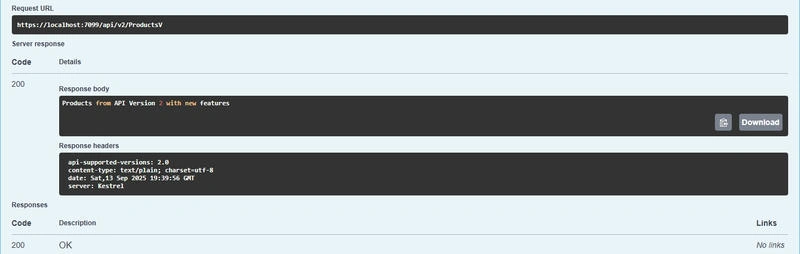
        public IActionResult GetV2() => Ok("Products from API Version 2 with new features");
    }
}
Output
Request Version 1.0
Request Version 2.0
Real-Time Use Cases for API Versioning
E-commerce Applications
Old API: /api/v1/products returns basic product info.
New API: /api/v2/products adds stock availability & discounts.
Banking/FinTech
Old API: /api/v1/accounts returns only the balance.
New API: /api/v2/accounts returns transaction history + balance.
Healthcare Systems
Old API: /api/v1/patients returns demographics.
New API: /api/v2/patients adds electronic medical records.
In all these cases, versioning ensures that older apps continue to work while new apps enjoy updated features.
Summary
API versioning in .NET Core is essential for building scalable, future-proof, and backward-compatible APIs. By leveraging Microsoft’s official API Versioning library, you can:
Support multiple client versions.
Ensure smooth upgrades without breaking existing apps.
Use multiple strategies (URL, Query String, Header, Media Type).
Provide clear migration paths for developers.
With versioning in place, your APIs will remain robust, adaptable, and client-friendly as your application evolves.
Join the conversation! Your thoughts help the community grow.