

Introduction
In this article, we will learn about how to perform API Test automation using Javascript Library.
Prerequisite
- Should know the basics of API Testing
- Node Js project needs to be setup
We can perform automation testing using various libraries like supertest, superagent, Axios, chaihttp, etc.
All these libraries are based on JavaScript.
We are going to use supertest Library inorder to Automate API.
Libraries need to be added to your project.
- Chai: Chai library is used to apply assertions to your Test
- supertest: supertest Library is the main for our project; this Library will help us hit the api and get the response out of it.
- babel(babel node, babel preset env, babel register, babel cli):
- Babel: is a JavaScript transpiler that converts edge JavaScript(ES6) into plain old ES5 JavaScript that can run in any browser, even the old ones.
- Transpilers: are tools that read source code written in one programming language and produce the equivalent code in another language at the same level.
- Reason for using Babel: Latest javascript features are not supported in every browser yet. So someone needs to do the converting part right. So Babel is here to transpile the latest javascript features(ES6 features), which are not understandable to every browser, to ES5, which is understandable to every browser.
- mocha: The testing framework which uses used to create tests using describe and its block.
We can install the above-mentioned libraries using the below command.
npm i --save-dev supertest mocha chai @babel/cli @babel/core @babel/node @babel/register @babel/preset-env
once you installed all the libraries.
We need to setup two configuration files in your root directory.
.babelrc
This file tells Babel how we want our code to transpile. It contains a normal json.
Set the preset to babel-preset env.
{
    "presets": ["@babel/preset-env"]
}
Two important properties are plugins & preset.
- If you just want Babel to transpile specific features, you can specify them with plugins property because there are separate plugins like arrow function, classes, instanceof, etc. & many more.
- But defining plugins this way is not a great idea because you want all the features of ES6 to be transpired, so instead of specifying all the plugins in the plugins property, Babel has something called presets.
- @babel/preset-env is a smart preset that allows you to use the latest JavaScript.
.mocharc.yml
The mocharc.yml file is used with the Mocha testing framework to configure and customize the behavior of Mocha test runs. It allows you to specify various options and settings for your tests in a YAML format. Here are some reasons why you might use a "mocharc.yml" file.
- Test Configuration
- Test Reports
- Timeouts for your tests
- plugins to be added to your tests
- specify hooks.
Example
# mocharc.yml

# Specify the Mocha interface to use (e.g., "bdd", "tdd", "exports", "qunit")
ui: bdd

# Specify the reporter(s) to use
reporter:
  - spec
  - mochawesome

# Set the timeout for each test case (in milliseconds)
timeout: 5000

# Define test file patterns or directories to include
spec:
  - test/**/*.spec.js

# Enable or disable specific Mocha features
allowUncaught: false
asyncOnly: false

# Configure Mocha to ignore specific directories
ignore:
  - node_modules

# Define hooks that should run before and after test suites
before:
  - setup.js
after:
  - teardown.js

# Enable code coverage reporting with nyc
require: nyc
.mocharc.yaml file
require: '@babel/register'
We used require: babel-register in our mocharc.yml file; it means that we want to use Babel's babel-register package to transpile our test files on the fly before executing them with Mocha.
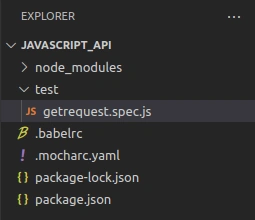
Create a folder called Test in your root directory.
Create a spec file.
Now we can start writing test code in it.
Folder Structure
Get Request
Code explained with comments
//import supertest and chai libraries in your test file

import supertest from "supertest";
import { expect } from "chai";

//we are creating a Supertest agent that is configured to send HTTP requests with the specified base URL
const request=supertest('https://reqres.in');

// As you know we write tests in mocha using describe and it blocks
//we create a test suite
describe('first api test suite', () => {
//test case which performs a get request
    it('get request', (done) => {
         //using the request object we call the get request with the endpoint.
         //end is callback function used to handle the response and perform any necessary assertions.
        request.get('/api/users?page=2').end((err,response)=>{
            if (err) {
                return done(err);
            }
            //printing the response body
            console.log(response.body.data[0])
            //apply assertions to the status code
            expect(response.statusCode).to.be.equal(200);
            done();
        })
    });
});
done()
- done parameter is a callback function that you can use to signal the completion of an asynchronous test case.
- When working with asynchronous operations, such as making HTTP requests, it's important to notify the test framework when the Test has finished executing.
- When making an asynchronous request, you pass a callback function to the end method of the Supertest request. This callback receives two parameters: err and res.
- Inside the callback, you perform your assertions or additional logic based on the response received from the server.
- After handling the response, you invoke the done function to notify the test framework that the Test has been completed. This ensures the framework waits for the asynchronous operations to finish before finalizing the test results.
Summary
I hope this article will be helpful in understanding how to write API automation tests using the javascript library supertest.
Thanks, Happy learning.........
Join the conversation! Your thoughts help the community grow.