

Kafka is an open-source distributed stream-processing platform that is capable of handling over trillions of events in a day. This massive platform has been developed by the LinkedIn Team, written in Java and Scala, and donated to Apache.
Kafka is a publish-subscribe messaging system. So, in this article, we are going to learn how Kafka works and how to use Kafka in our .NET Application. To learn how to install, configure, and run Kafka, please read this article.
How Kafka works?
Before going into details, we will discuss here a little bit of Kafka Architecture.
Kafka Architecture
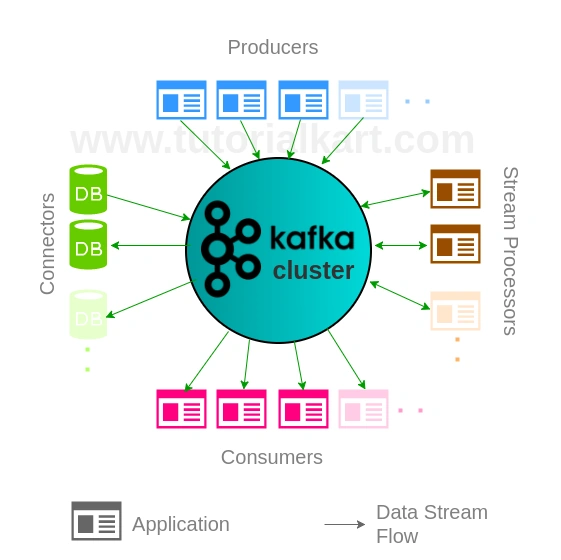
In the above image, we can see the Producer, Consumer, and Topic. Basically, Kafka producers write to the Topic and consumers read from the Topic. Kafka runs on a cluster on the server and it is communicating with the multiple Kafka Brokers and each Broker has a unique identification number.
Kafka stores messages as a byte array and it communicates through the TCP Protocol.
Topics
As we know Kafka is a pub-sub model, Topic is a message category or, you can say, a logical channel. Topic defines the message stream of data and a Topic should have a unique id.
Partitions
All the messages are sequentially stored in one partition and the Topics are split into partitions. Basically, Kafka uses those partitions for parallel consumers. Kafka maintains all the records in order as a structured way, called log. There are no limitations to the number of partitions in a Topic and all the Topics are divided into a number of partitions.
Brokers
Kafka broker allow the fetching of messages for consumers, it’s known as Kafka server and Kafka node. Each broker has a unique Id that contains more than one Topic partition. All the Topics are divided into a number of partitions.
How do we use Kafka in .Net?
Here I am going to demonstrate a Kafka messaging service in a .Net Windows Application.
What do you need on your development computer?
- .Net 4.5 Framework or above
- Visual Studio 2017 or above
Here, I have created a Windows Application Project.
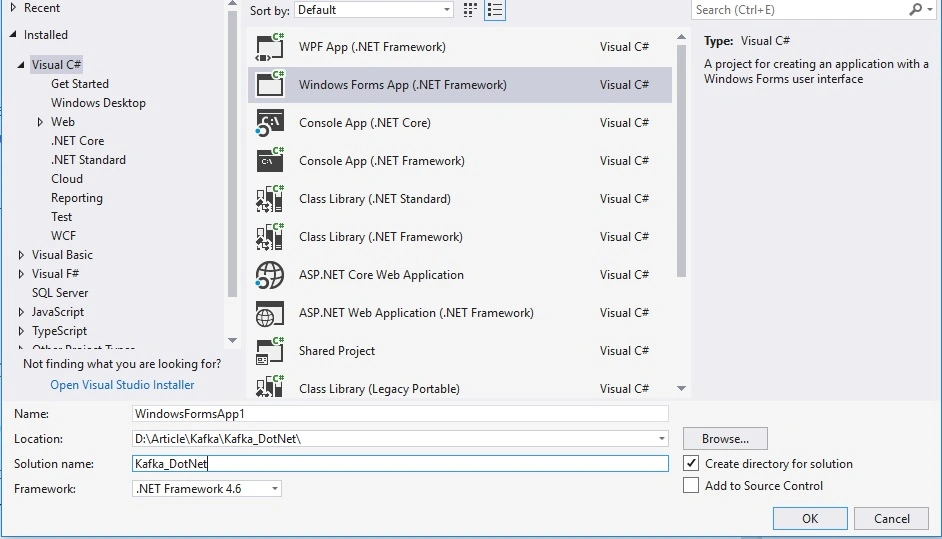
After creating the Application project, download and install Kafka-net package from NuGet.
- Install-Package kafka-net -Version 0.9.0.65
Here I have designed a Windows Form,
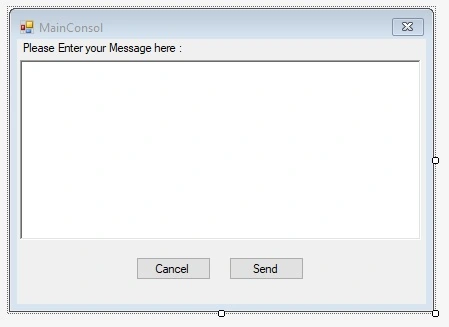
You need to define the uri where Kafka is running and mention the topic name that you have created.
- Uri uri = new Uri("http://localhost:9092");
- string topic = "chat-message";
How to create a Kafka Topic? Please read this article,
- Topic Name is “chat-message”. We are running it into only one Kafka server.
- Go to your Kafka installation directory: For me, it’s D:\kafka\kafka_2.12-2.2.0\bin\windows.
- Open a command prompt and run the following command.
- kafka-topics.bat --create --zookeeper localhost:2181 -replication-factor 1 --partitions 1 --topic chat-message
Code snippet
- private void btnSend_Click(object sender, EventArgs e)
- {
- if(txtMessage.Text ==string.Empty)
- {
- MessageBox.Show("Please Enter Message","Warning", MessageBoxButtons.OK,MessageBoxIcon.Warning);
- return;
- }
- string payload = txtMessage.Text.Trim();
- var sendMessage = new Thread(() => {
- KafkaNet.Protocol.Message msg = new KafkaNet.Protocol.Message(payload);
- var options = new KafkaOptions(uri);
- var router = new BrokerRouter(options);
- var client = new Producer(router);
- client.SendMessageAsync(topic, new List<KafkaNet.Protocol.Message> { msg }).Wait();
- });
- sendMessage.Start();
- this.Clear();
- }
In the above code snippet, you can see, I have put the code for sending the message into a particular Kafka Topic, for me it is "chat-message". You can create Kafka Topic by any preferred name.
Before sending the message you need to start the Zookeeper. Know about more Zookeeper, Please read this article.
- Go to your Kafka installation directory: For me, it’s D:\kafka\kafka_2.12-2.2.0\bin\windows.
- Open a command prompt and run the following command.
- zookeeper-server-start.bat D:\Kafka\kafka_2.12-2.2.0\config\zookeeper.properties
After starting the Zookeeper you need to run Kafka Server. Know about more Kafka Server, Please read this article.
- Go to your Kafka installation directory: For me, it’s D:\kafka\kafka_2.12-2.2.0\bin\windows.
- Open a command prompt and run the following command,
- kafka-server-start.bat D:\Kafka\kafka_2.12-2.2.0\config\server.properties
After running all the Services you need to consume the topic from the server, so that follow the below Steps.
- Go to your Kafka installation directory: For me, it’s D:\kafka\kafka_2.12-2.2.0\bin\windows.
- Open a command prompt and run the following command,
- kafka-console-consumer.bat --bootstrap-server localhost:9092 --topic chat-message --from-beginning
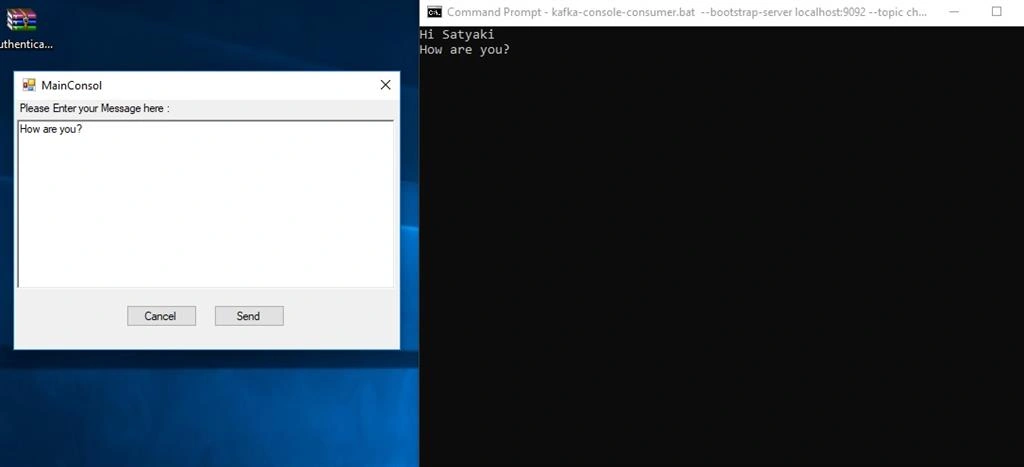
You can get all the Kafka messages by using the following code snippet.
Code snippet
- Uri uri = new Uri("http://localhost:9092");
- string topicName = "chat-message";
- var options = new KafkaOptions(uri);
- var brokerRouter = new BrokerRouter(options);
- var consumer = new Consumer(new ConsumerOptions(topicName, brokerRouter));
- foreach (var msg in consumer.Consume())
- {
- Console.WriteLine(Encoding.UTF8.GetString(msg.Value));
- }
- Console.ReadLine();
Conclusion
If you want to use a highly scalable and high-performance messaging system with .Net Application, you easily develop that system by using Kafka-net package.
AshishPosted Apr 17, 2024, 11:51 AM
Getting error {"Failed to load the librdkafka native library."} System.DllNotFoundException
AshishPosted Apr 17, 2024, 11:50 AM
I am getting error
Shraddha VermaPosted Jul 6, 2023, 12:54 PM
Where do i add the consumer code snippet
Manish JainPosted Apr 29, 2023, 12:49 PM
Hi Satyaki Chakraborty Any clue if I can also create a Producer using this library?
Yugeshan ChettyPosted Jan 25, 2021, 7:41 AM
Hi there, great article, helped a lot. Just one problem I'm having is that the code above hangs the application. I cant seem to set the timeout for the consumer so after it reads all the messages, it just hangs. Been googling for a while now but cant find a solution.
Shafkat HaiderPosted Jan 19, 2021, 9:42 AM
System.AggregateException HResult=0x80131500 Message=One or more errors occurred. Source=mscorlib StackTrace: at System.Threading.Tasks.Task.ThrowIfExceptional(Boolean includeTaskCanceledExceptions) at System.Threading.Tasks.Task.Wait(Int32 millisecondsTimeout, CancellationToken cancellationToken) at System.Threading.Tasks.Task.Wait() at PADMA_SEND_SMS.Form1.<>c__DisplayClass42_0.<saveLogs>b__0() in D:\Shafkat\Professional\WindowsApplicationTimeMeasurement\PADMA_SEND_SMS\PADMA_SEND_SMS\Form1.cs:line 767 at System.Threading.ExecutionContext.RunInternal(ExecutionContext executionContext, ContextCallback callback, Object state, Boolean preserveSyncCtx) at System.Threading.ExecutionContext.Run(ExecutionContext executionContext, ContextCallback callback, Object state, Boolean preserveSyncCtx) at System.Threading.ExecutionContext.Run(ExecutionContext executionContext, ContextCallback callback, Object state) at System.Threading.ThreadHelper.ThreadStart() This exception was originally thrown at this call stack: [External Code] Inner Exception 1: KafkaApplicationException: An exception occured while executing a send operation against http://localhost:9092/ Topic:chat-message PartitionId:0. Exception:System.AggregateException: One or more errors occurred. ---> KafkaNet.Protocol.ResponseTimeoutException: Timeout Expired. Client failed to receive a response from server after waiting 00:01:00ms. at System.Runtime.ExceptionServices.ExceptionDispatchInfo.Throw() at System.Runtime.CompilerServices.TaskAwaiter.HandleNonSuccessAndDebuggerNotification(Task task) at KafkaNet.KafkaConnection.<SendAsync>d__4`1.MoveNext() --- End of stack trace from previous location where exception was thrown --- at System.Runtime.ExceptionServices.ExceptionDispatchInfo.Throw() at KafkaNet.Producer.<ProduceAndSendBatchAsync>d__3d.MoveNext() --- End of inner exception stack trace --- ---> (Inner Exception #0) KafkaNet.Protocol.ResponseTimeoutException: Timeout Expired. Client failed to receive a response from server after waiting 00:01:00ms. at System.Runtime.ExceptionServices.ExceptionDispatchInfo.Throw() at System.Runtime.CompilerServices.TaskAwaiter.HandleNonSuccessAndDebuggerNotification(Task task) at KafkaNet.KafkaConnection.<SendAsync>d__4`1.MoveNext() --- End of stack trace from previous location where exception was thrown --- at System.Runtime.ExceptionServices.ExceptionDispatchInfo.Throw() at KafkaNet.Producer.<ProduceAndSendBatchAsync>d__3d.MoveNext()<---
Lan LynnPosted May 15, 2020, 4:54 AM
I've used the code snippet to make a Consumer. But it won't get any data from the topic. It won't step into the foreach step. Can anyone tell me how to fix it ?
Lan LynnPosted May 12, 2020, 5:08 AM
Hi, I'm wondering how can I also change the Consumer cmd window into a WinForm?
Teofil BOCANCEAPosted Jan 21, 2020, 8:38 PM
since you wrote the form app for producer, I did one for consumer: (see bellow: I cannot format it nicely... Using System;using System.Collections.Generic;using System.ComponentModel;using System.Data;using System.Drawing;using System.Linq; using System.Text; using System.Threading.Tasks; using System.Windows.Forms; using KafkaNet; using KafkaNet.Model; using KafkaNet.Protocol; namespace KafkaConsumer { public partial class frmMessageConsumerKafka : Form { public frmMessageConsumerKafka() { InitializeComponent(); } private void btnClose_Click(object sender, EventArgs e) { this.Close(); } private void btnStart_Click(object sender, EventArgs e) { string topic = "chat-message"; //same topic as the one created in the batch (s. documentation for instalation and test kafka) Uri uri = new Uri("http://localhost:9092"); var options = new KafkaOptions(uri); var brokerRouter = new BrokerRouter(options); var consumer = new Consumer(new ConsumerOptions(topic, brokerRouter)); foreach (var msg in consumer.Consume()) { rTxtMessage.Text = rTxtMessage.Text + Encoding.UTF8.GetString(msg.Value) + "\n"; } //Console.ReadLine(); } } }
Teofil BOCANCEAPosted Jan 17, 2020, 7:25 PM
Thanks a lot! very nice and useful; You forgot to mention spaces:using KafkaNet;using KafkaNet.Model;using KafkaNet.Protocol;
Pankajkumar PatelPosted Sep 30, 2019, 12:45 AM
Nice article
Satyaki ChakrabortyPosted Sep 30, 2019, 12:17 AM
Thank you Sourav.
Sourav Kumar DasPosted Sep 29, 2019, 11:14 PM
Very useful article Sir.