

In the world of web development, developers nowadays prefer to develop any SPA (Single Page Application) using Angular. One of the main reasons behind this is the modular approach of Angular, with which we can separate the client-side scripting code just like MVC pattern. But, the most problematic issue is that adding all the JavaScript files into our index.html page is really very painful. Not only that, it decreases the performance of the application since, at the loading of the index.html, it tries to download all the JavaScript files including related HTML files. So, if we assume that our application contains more than 500 components, then we can clarify how many files need to download at the beginning.
The traditional Angular applications (i.e. developed in Angular 1.x) are normally built in the JIT compilation. Maybe, the developers who are mainly developed using client-side language like JavaScript, jQuery do not know about it or believe that there is no compile-time requirement in case of script language. But, it is not the case. Actually, in the case of JavaScript, there is always a compiler which is compiling our code. This does not occur in the development or deployment time. Basically, it occurrs on the fly, that means just before our JavaScript code is going to get loaded by the browser. This process always takes a little bit more time we considered. This compilation process is very much required for the browsers because the browser does not read or understand any binary languages to execute or run. So, when we load any JavaScript files, those files first compile to the corresponding binary which can be interpreted by the browser and then executed by the browser. So, AOT compilation process actually switches the compilation process from runtime to build time.
Now, one confusion will be arising to us, which is that in the JIT section, we said that browsers do not understand the binary languages. Browser always needs the JS file to execute. So, the question is, what is compiled at the build time by AOT Compiler?
AOT (Ahead of Time) CompilationAOT stands for Ahead of Time Compilation. AOT compilation is one the most important features introduced in the Angular 2 or above versions which make these frameworks ahead of JavaScript by comparison. The process mechanism is very different in the case of AOT compilation in respect of JIT Compilation. It was first introduced in Angular 2.0 and then only in the 2.3.0 version for ready to use. So, if anyone wants to use this compilation process, they need to use Angular 2.3.0 or above versions. Now, the main objective of AOT compilation is improving the performance of the application when it runs into the browsers. Actually, the Angular framework has a compiler library package known as @angular/compiler. If we compile the angular application with AOT mode, then it performs compilation of the templates with the help of the compiler and then generates the typescript files (file names like *ngfactory.ts, where * represents the actual name of the file, for example, if the component name is employee.ts then the related file will be employee.ngfactory.ts). Then compiler again compiles these typescript files to the JavaScript files.
- Properties and method which are used within the HTML template must be declared as public in the typescript class.
- In case of *ngIf directives, the expression must be the Boolean type.
- In case of event binding, method signature must be matched exactly with the typescript class method declaration.
- Webpack can provide us a module loading concept just like Node.js can do.
- The bundle file is easy to read and debug in the browser.
- Webpack can be configured writing a config file code in ES2015.
- Also, it provides a similar environment like development for the production deployment.
- With the help of a webpack, we can install the Angular using NPM (Node Package Manager).
For using the bundle concept, we need to develop an Angular based application containing modules, components etc. The module structure is as below,
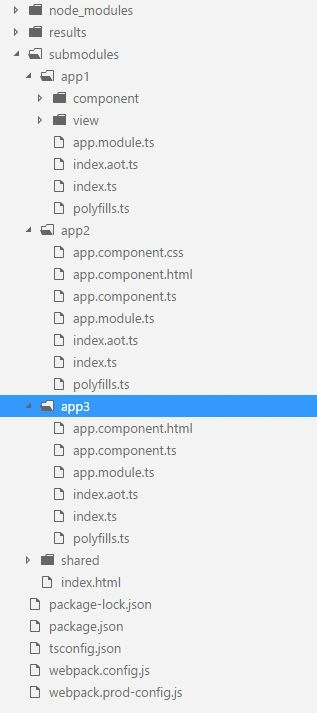
In the above images, we can see that there exist two config files, namely webpack.config.js and webpack.prod-config.js. These two files are basically webpack configuration files which are required to build the application either in development mode or production mode. Before going to configuration of the file code, we first need to install the webpack using this npm command.
- npm install angular webpack --save-dev
Now, we can add two webpack config files. Basically, we can bundle our Angular application either using JIT Compilation or AOT compilation. The config file webpack.config.js is basically used for bundling the application with JIT Compilation. For bundling the application, in this mode, we need to use the below command from the applications root directory.
- npm run build
Sample Code of webpack.config.js
- 'use strict'
- const path = require('path');
- const ContextReplacementPlugin = require('webpack/lib/ContextReplacementPlugin');
- const HtmlWebpackPlugin = require('html-webpack-plugin');
- const StatsPlugin = require('stats-webpack-plugin');
- const TsConfigPathsPlugin = require('awesome-typescript-loader').TsConfigPathsPlugin;
- const webpack = require('webpack');
- const testHTML = path.resolve(__dirname, 'submodules', 'index.html');
- module.exports = {
- devtool: '',
- profile: true,
- entry: {
- 'shared/polyfills': [
- './submodules/app1/polyfills.ts',
- './submodules/app2/polyfills.ts',
- './submodules/app3/polyfills.ts'
- ],
- 'app1/firstapp': ['./submodules/app1/index.ts'],
- 'app2/secondapp': ['./submodules/app2/index.ts'],
- 'app3/thirdapp': ['./submodules/app3/index.ts']
- },
- output: {
- path: path.join(__dirname, 'dist', 'dev'),
- publicPath: '/',
- filename: '[name].js',
- chunkFilename: '[name].js'
- },
- resolve: {
- extensions: ['.ts', '.js', '.json'],
- modules: [
- path.resolve(__dirname, 'node_modules'),
- path.resolve(__dirname, 'build-cache')
- ]
- },
- module: {
- rules: [
- {
- test: /\.ts$/,
- use: [
- 'awesome-typescript-loader',
- 'angular2-template-loader'
- ],
- exclude: [/\.(spec|e2e)\.ts$/]
- },
- {
- test: /\.html$/,
- use: 'raw-loader'
- },
- {
- test: /\.css$/,
- use: [
- 'to-string-loader',
- 'css-loader'
- ]
- },
- ]
- },
- plugins: [
- new StatsPlugin('stats.json', 'verbose'),
- new webpack.optimize.OccurrenceOrderPlugin(),
- new webpack.optimize.CommonsChunkPlugin({
- name: 'shared/polyfills',
- chunks: ['shared/polyfills']
- }),
- new webpack.optimize.CommonsChunkPlugin({
- name: 'shared/vendors',
- chunks: [
- 'app1/firstapp',
- 'app2/secondapp',
- 'app3/thirdapp'
- ],
- // Move all node_modules into vendors chunk but not @angular
- minChunks: module => /node_modules\/(?!@angular)/.test(module.resource)
- }),
- new webpack.optimize.CommonsChunkPlugin({
- name: 'shared/angular-vendors',
- chunks: [
- 'app1/firstapp',
- 'app2/secondapp',
- 'app3/thirdapp'
- ],
- // Move all node_modules into vendors chunk but not @angular
- minChunks: module => /node_modules\/@angular/.test(module.resource)
- }),
- new webpack.optimize.CommonsChunkPlugin({
- name: 'shared/shared-modules',
- chunks: [
- 'app1/firstapp',
- 'app2/secondapp',
- 'app3/thirdapp'
- ],
- // Move duplicate modules to a shared-modules chunk
- minChunks: 2
- }),
- // Specify the correct order the scripts will be injected in
- new webpack.optimize.CommonsChunkPlugin({
- name: [
- 'shared/polyfills',
- 'shared/vendors',
- 'shared/angular-vendors'
- ].reverse()
- }),
- new HtmlWebpackPlugin({
- template: testHTML,
- inject: false
- })
- ],
- node: {
- global: true,
- crypto: 'empty',
- process: true,
- module: false,
- clearImmediate: false,
- setImmediate: false
- },
- target: 'web'
- }
Another config file, i.e., webpack.prod-config.js, is required for bundling the applications with AOT Compilation. Since, we all know that every Angular application needs a module bootstrapper file, where we bootstrapped the Angular module. Normally, this file is named as main.ts or index.ts. In the above image, we can see that every Angular app module folders (like app1, app2 etc) contains one other file named index.aot.ts which is basically required to bootstrap the Angular module in the AOT compilation mode. In this file, we bootstrapped the Angular module ngfactory files which are created after the AOT compilations. For bundling applications, in this mode, we need to use the below command from the application's root directory,
- npm run build:prod
Sample code of Index.aot.ts
- import { enableProdMode } from '@angular/core';
- import { platformBrowser } from '@angular/platform-browser';
- import { AppModuleNgFactory } from 'submodules/app1/app.module.ngfactory';
- try {
- enableProdMode();
- } catch (err) {
- /**
- * We do not care if the call to enableProdMode() failes
- * because we only need one of the calls to enableProdMode()
- * to succeed.
- */
- if (err.message.indexOf('Cannot enable prod mode after platform setup.') === -1)
- console.error(err);
- }
- platformBrowser()
- .bootstrapModuleFactory(AppModuleNgFactory);
- 'use strict'
- const path = require('path');
- const ContextReplacementPlugin = require('webpack/lib/folderstReplacementPlugin');
- const HtmlWebpackPlugin = require('html-webpack-plugin');
- const StatsPlugin = require('stats-webpack-plugin');
- const TsConfigPathsPlugin = require('awesome-typescript-loader').TsConfigPathsPlugin;
- const webpack = require('webpack');
- const testHTML = path.resolve(__dirname, 'submodules', 'index.html');
- module.exports = {
- devtool: '',
- profile: true,
- entry: {
- 'shared/polyfills': [
- './submodules/app1/polyfills.ts',
- './submodules/app2/polyfills.ts',
- './submodules/app3/polyfills.ts'
- ],
- 'app1/app': ['./submodules/app1/index.aot.ts'],
- 'app2/app': ['./submodules/app2/index.aot.ts'],
- 'app3/app': ['./submodules/app3/index.aot.ts']
- },
- output: {
- path: path.join(__dirname, 'dist', 'prod'),
- publicPath: '/',
- filename: '[name].js',
- chunkFilename: '[name].js'
- },
- resolve: {
- extensions: ['.ts', '.js', '.json'],
- modules: [
- path.resolve(__dirname, 'node_modules'),
- path.resolve(__dirname, 'build-cache'),
- ]
- },
- module: {
- rules: [
- {
- test: /\.ts$/,
- use: [
- 'awesome-typescript-loader',
- 'angular2-template-loader'
- ],
- exclude: [/\.(spec|e2e)\.ts$/]
- },
- {
- test: /\.html$/,
- use: 'raw-loader'
- },
- {
- test: /\.css$/,
- use: [
- 'to-string-loader',
- 'css-loader'
- ]
- },
- ]
- },
- plugins: [
- new StatsPlugin('stats.json', 'verbose'),
- new webpack.optimize.OccurrenceOrderPlugin(),
- new webpack.optimize.UglifyJsPlugin({
- beautify: false,
- output: {
- comments: false
- },
- mangle: {
- screw_ie8: true,
- except: ['$']
- },
- compress: {
- screw_ie8: true,
- warnings: false,
- collapse_vars: true,
- reduce_vars: true,
- conditionals: true,
- unused: true,
- comparisons: true,
- sequences: true,
- dead_code: true,
- evaluate: true,
- if_return: true,
- join_vars: true,
- drop_console: false,
- drop_debugger: true
- }
- }),
- new webpack.optimize.CommonsChunkPlugin({
- name: 'shared/polyfills',
- chunks: ['shared/polyfills']
- }),
- new webpack.optimize.CommonsChunkPlugin({
- name: 'shared/vendors',
- chunks: [
- 'app1/app',
- 'app2/app',
- 'app3/app'
- ],
- // Move all node_modules into vendors chunk but not @angular
- minChunks: module => /node_modules\/(?!@angular)/.test(module.resource)
- }),
- new webpack.optimize.CommonsChunkPlugin({
- name: 'shared/angular-vendors',
- chunks: [
- 'app1/app',
- 'app2/app',
- 'app3/app'
- ],
- // Move all node_modules into vendors chunk but not @angular
- minChunks: module => /node_modules\/@angular/.test(module.resource)
- }),
- new webpack.optimize.CommonsChunkPlugin({
- name: 'shared/shared-modules',
- chunks: [
- 'app1/app',
- 'app2/app',
- 'app3/app'
- ],
- // Move duplicate modules to a shared-modules chunk
- minChunks: 2
- }),
- // Specify the correct order the scripts will be injected in
- new webpack.optimize.CommonsChunkPlugin({
- name: [
- 'shared/polyfills',
- 'shared/vendors',
- 'shared/angular-vendors'
- ].reverse()
- }),
- new HtmlWebpackPlugin({
- template: testHTML,
- inject: false
- })
- ],
- node: {
- global: true,
- crypto: 'empty',
- process: true,
- module: false,
- clearImmediate: false,
- setImmediate: false
- },
- target: 'web'
- }
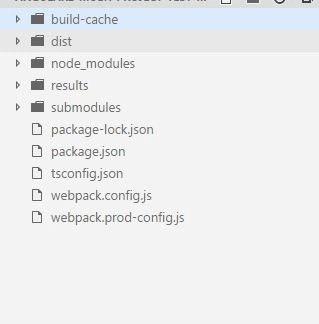
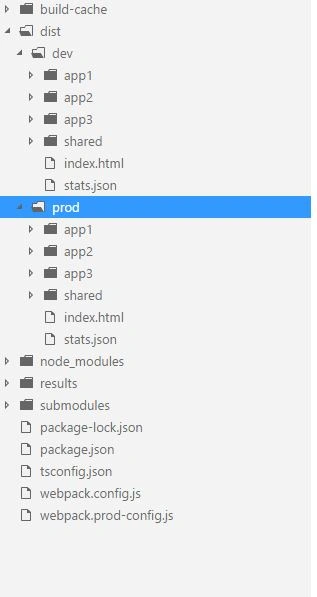
The dist folder is the output folder where final files have been stored after compilation. If we use JIT compilation, then the output files will be stored under the dev folder, whereas the same will stored under prod folder for the AOT compilations. After it, we just need to deploy the contents of these folders (anyone either dev or prod) in the server as an application. Also, note that this compiled folder does not contain any node_modules folder because it already bundled the related content of the required node modules package files within the shared-modules.js and polyfill.js files.
Siddharth GajbhiyePosted Jan 25, 2021, 6:06 AM
Nice Article Sir