Overview
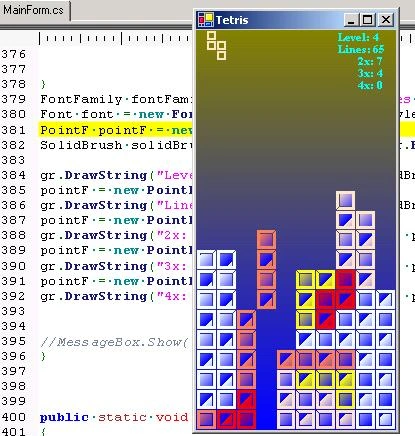
Just another implementation of tetris
j -move left
l - move right
i - rotate
k - drop
r - restart
There is no score, just lines, levels and some statistics (2x - number of times, two lines where removed ). That's just a brief implementation, that introduce some usage of GDU+ and Windows.Forms. Exposes custom drawing control. Uses opaque background instead of real doublebuffering.

Another Tetris Game in C#
Join the conversation! Your thoughts help the community grow.
Sign in to leave a comment
It is the same account you read, post and publish with — and you will come straight back to this page.
Junaid InamPosted Dec 13, 2012, 1:35 AM
Amazing!!!! Good Work. By the way i had to change the keys to "wasd". Anyways goos work.
Chito CervantesPosted May 13, 2012, 2:32 AM
OK....FORGET ABOUT THAT, I JUST FIND THAT THING BUT I HAVE ANOTHER PROBLEM...THE COMMANDS DOESN'T RESPOND (J, L, K, I AND R)
Chito CervantesPosted May 13, 2012, 2:26 AM
HEY DUDE....BUT WHERE I CAN FIND THE START UP OBJECT THING??? PLEASE TELL ME
Paul AdamseditedPosted Dec 21, 2010, 9:17 PMEdited Dec 21, 2010, 9:18 PM
1. Start a new C# project in Visual Studio 2. Drag the MainForm.cs file into the project, or right-click on the project and select Add --> Existing Item and browse to MainForm.cs file. 3. Change the Startup Object to TetPanel in the Project's properties. 4. Run
sourabh aggarwalPosted Sep 29, 2010, 9:54 PM
i don't get the debug file so idon't abe to run it.
Nenad hdjshPosted Apr 19, 2010, 3:17 PM
Can you send me the project in Visual studio 2005 tetris som simple tetris? pls
ushalPosted Jul 14, 2009, 10:26 AM
I downloaded it and opened it with Visual Studios, but when i right click on it i cant seem to run the application-please help
SergioPosted Apr 5, 2009, 11:57 AM
No explanation whatsoever of what the Pen tool is and why it is used in this example. Just some code plastered on the form. No use to beginners.