
Introduction
In this trticle we are making a cool & simple login / registration system. It will give you the ability to easily create a member-only area on your site and provide an easy registration process.
Step 1: First we have to create a Web Application.
- Go to Visual Studio 2010.
- New--> and select the Web Application.
- Give whatever name you want to.
- Click OK.
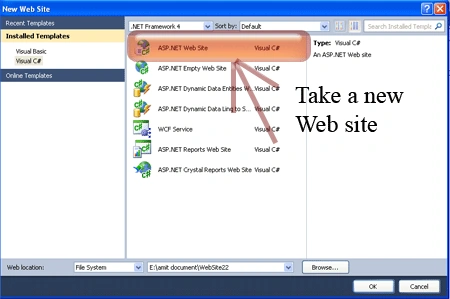
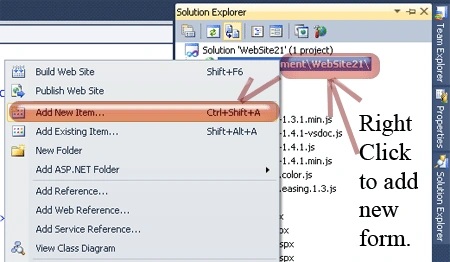
Step 2: Secondly you have to add a new page to the website.
- Go to the Solution Explorer.
- Right-click on the project name.
- Select add new item.
- Add new web page and give it a name.
- Click OK.
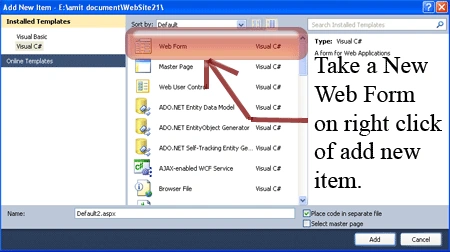
Step 3 : In this step we are adding an image in the "Image" folder of the project.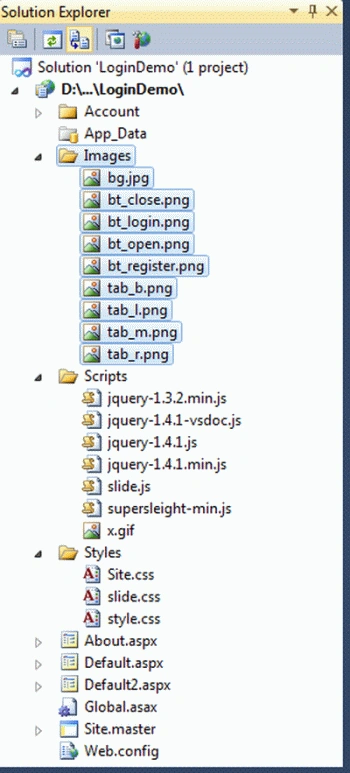
Step 4 : In this step add the slide.css and style.css files to your Styles folder.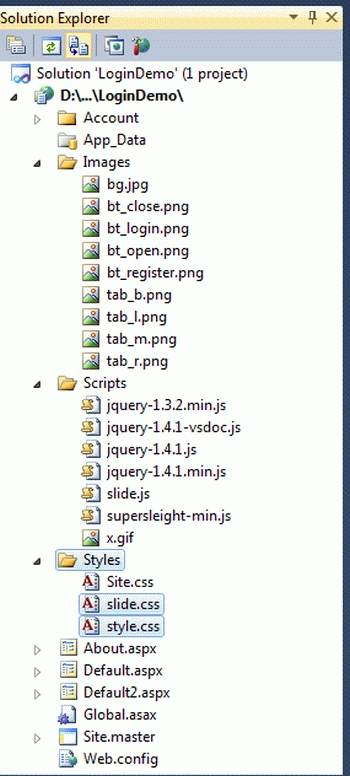
Right-click on both .css files respectively ->copy and paste to the <Head> section of your page. The reference path looks like:
<link rel="stylesheet" type="text/css" href="Styles/style.css" />
<link rel="stylesheet" type="text/css" href="Styles/slide.css" />
Step 5: In this step we are adding the script reference to the aspx page; let us see from where you have to write the script code:
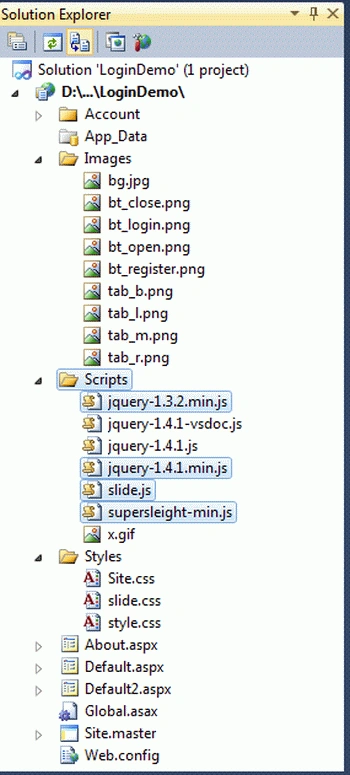
Right-click on selected files respectively -> copy and paste it inside <Head> section of your page; see step 6.
Step 6: Let us see the script code to be added in the <script></script> tags and that will be placed either in the <head> section or the <body> section as you prefer.
<script type="text/javascript" src="Scripts/jquery-1.3.2.min.js"></script>
<script type="text/javascript" src="Scripts/jquery-1.4.1.min.js"></script>
<script type="text/javascript" src="Scripts/slide.js"></script>
<script type="text/javascript" src="Scripts/supersleight-min.js"></script>
Step 7: In this step you will see the body code of the Default2.aspx page which is given below.
Code:
<body>
<!-- Login -->
<div style="background-color:Red">
<div id="panel">
<div class="content clearfix">
<div class="left" style ="background-color :#CD5C5C">
<h1>
Welcome to CSharpCorner.com</h1>
<h2>Download</h2>
<p>
<h3> To download this script go back to </h3> <a href="http://www.c-sharpcorner.com/UploadFile/sapnabeniwal/animated-sliding-login-panel-using-jquery/"
title="Download"> Article »</a></p>
</div>
<div class="left" style ="background-color :#8B3A62" >
<form class="clearfix" action="#" method="post">
<h1 class="padlock">
Member Login</h1>
<label for="log">
Username:</label>
<input class="field" type="text" name="log" id="log" value="" size="23" />
<label for="pwd">
Password:</label>
<input class="field" type="password" name="pwd" id="pwd" size="23" />
<label>
<input name="rememberme" id="rememberme" type="checkbox" checked="checked" value="forever" />
Remember me</label>
<div class="clear">
</div>
<input type="submit" name="submit" value="Login" class="bt_login" />
<a class="lost-pwd" href="#">Lost your password?</a>
</form>
</div>
<div class="left right" style ="background-color :#996699 ">
<form action="#" method="post">
<h1>
Not a member yet? Sign Up!</h1>
<label for="signup">
Username:</label>
<input class="field" type="text" name="signup" id="signup" value="" size="23" />
<label for="email">
Email:</label>
<input class="field" type="text" name="email" id="email" size="23" />
<label>
A password will be e-mailed to you.</label>
<input type="submit" name="submit" value="Register" class="bt_register" />
</form>
</div>
</div>
</div>
<!-- /login -->
<!-- The tab on top -->
<div class="tab">
<ul class="login">
<li class="left"> </li>
<li>Hello Guest!</li>
<li class="sep">|</li>
<li id="toggle"><a id="open" class="open" href="#">Log In | Register</a> <a id="close"
style="display: none;" class="close" href="#">Close Panel</a> </li>
<li class="right"> </li>
</ul>
</div>
<!-- / top -->
</div>
| <!--panel -->
</body>
Step 8: In this step we will see the complete code of the Default2.aspx page which is given below.
Code:
<%@ Page Language="C#" AutoEventWireup="true" CodeFile="Default2.aspx.cs" Inherits="Default2" %>
<!DOCTYPE html PUBLIC "-//W3C//DTD XHTML 1.0 Transitional//EN" "http://www.w3.org/TR/xhtml1/DTD/xhtml1-transitional.dtd">
<html xmlns="http://www.w3.org/1999/xhtml">
<head runat="server">
<title>Animated Sliding Login Panel Using jQuery</title>
<link rel="stylesheet" type="text/css" href="Styles/style.css" />
<link rel="stylesheet" type="text/css" href="Styles/slide.css" />
<script type="text/javascript" src="Scripts/jquery-1.3.2.min.js"></script>
<script type="text/javascript" src="Scripts/jquery-1.4.1.min.js"></script>
<script type="text/javascript" src="Scripts/slide.js"></script>
<script type="text/javascript" src="Scripts/supersleight-min.js"></script>
</head>
<body>
<!-- Login -->
<div style="background-color:Red">
<div id="panel">
<div class="content clearfix">
<div class="left" style ="background-color :#CD5C5C">
<h1>
Welcome to CSharpCorner.com</h1>
<h2>Download</h2>
<p>
<h3> To download this script go back to </h3> <a href="http://web-kreation.com/index.php/tutorials/nice-clean-sliding-login-panel-built-with-jquery"
title="Download"> Article »</a></p>
</div>
<div class="left" style ="background-color :#8B3A62" >
<form class="clearfix" action="#" method="post">
<h1 class="padlock">
Member Login</h1>
<label for="log">
Username:</label>
<input class="field" type="text" name="log" id="log" value="" size="23" />
<label for="pwd">
Password:</label>
<input class="field" type="password" name="pwd" id="pwd" size="23" />
<label>
<input name="rememberme" id="rememberme" type="checkbox" checked="checked" value="forever" />
Remember me</label>
<div class="clear">
</div>
<input type="submit" name="submit" value="Login" class="bt_login" />
<a class="lost-pwd" href="#">Lost your password?</a>
</form>
</div>
<div class="left right" style ="background-color :#996699 ">
<form action="#" method="post">
<h1>
Not a member yet? Sign Up!</h1>
<label for="signup">
Username:</label>
<input class="field" type="text" name="signup" id="signup" value="" size="23" />
<label for="email">
Email:</label>
<input class="field" type="text" name="email" id="email" size="23" />
<label>
A password will be e-mailed to you.</label>
<input type="submit" name="submit" value="Register" class="bt_register" />
</form>
</div>
</div>
</div>
<!-- /login -->
<!-- The tab on top -->
<div class="tab">
<ul class="login">
<li class="left"> </li>
<li>Hello Guest!</li>
<li class="sep">|</li>
<li id="toggle"><a id="open" class="open" href="#">Log In | Register</a> <a id="close"
style="display: none;" class="close" href="#">Close Panel</a> </li>
<li class="right"> </li>
</ul>
</div>
<!-- / top -->
</div>
| <!--panel -->
</body>
</html>
Step 9: In this step we will see the design of the Default2.aspx page which is given below.
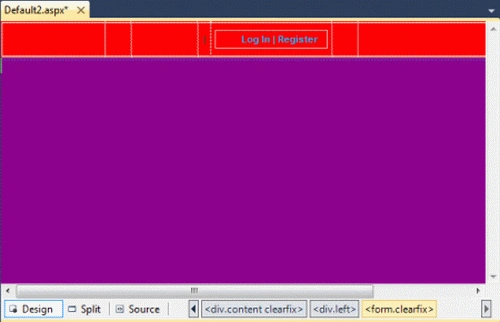
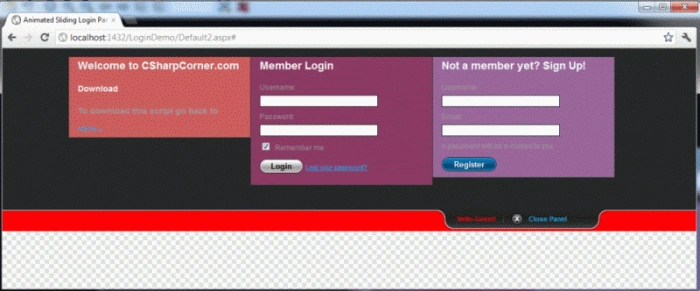
Step 10: In this step we are going to run the Default2.aspx page by pressing F5.
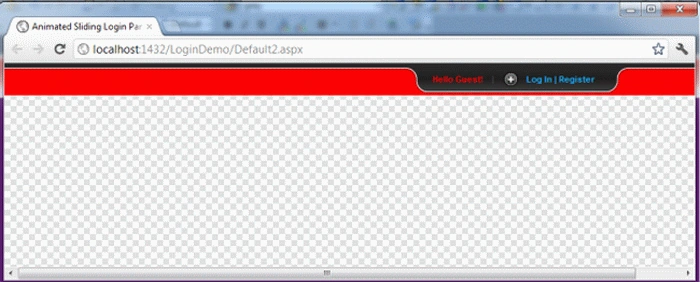
Click on the login Button. We will see an attractive login panel.
Resources
Raj KumareditedPosted Jan 31, 2013, 5:59 AMEdited Jan 31, 2013, 6:00 AM
see this one also, it's same only design different. http://web-kreation.com/demos/Sliding_login_panel_jquery/#
Former memberPosted Oct 2, 2012, 2:40 AM
Hi....This is really nice article. http://dotnetpools.com/Article/ArticleDetiail/?articleId=24&title=Ajax%20Login%20Example%20Using%20Jquery%20%20In%20Asp.net