

My Previous Articles
I have used the following method in this article:
- Used MVC Web API.
- AngularJs Filter.
SQL Script is available in part 1 (link is given above)
View page Index.cshtml
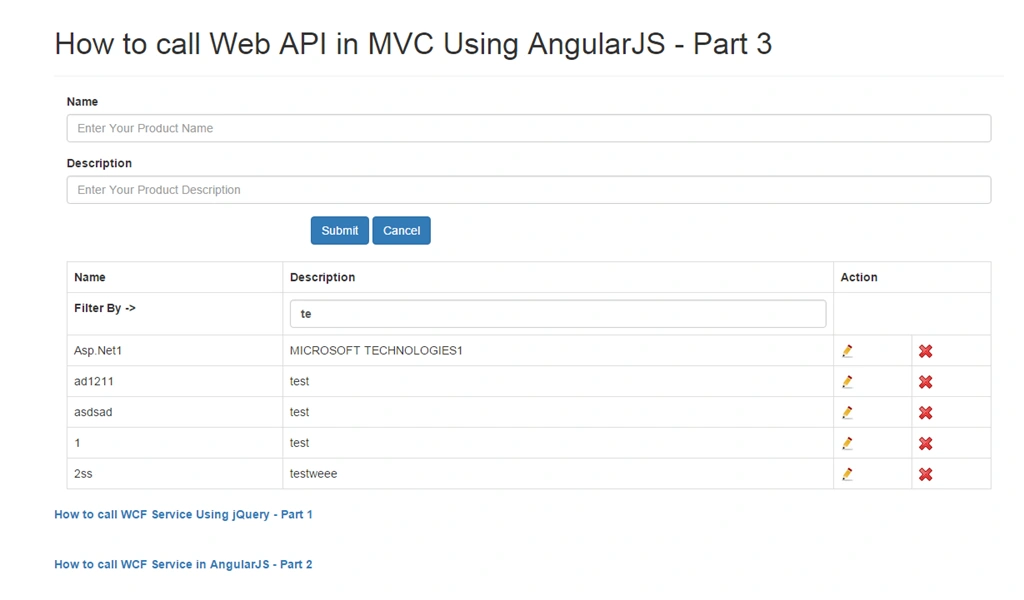
- Here I have used filter for description.
- <table class='table table-bordered'>
- <tr>
- <th>Name</th>
- <th>Description</th>
- <th colspan="2">Action</th>
- </tr>
- <tr>
- <th>
- <label for="description">Filter By Description-> </label>
- </th>
- <th>
- <input type="text" ng-model="search.ProductDescription" placeholder="Enter Description" class="form-control"></th>
- <th colspan="2"></th>
- </tr>
- <tr ng-repeat="Product in Products | filter:search ">
- <td>{{ Product.ProductName}}</td>
- <td>{{ Product.ProductDescription}}</td>
- <td><span><a href="javascript:void(0);" ng-click="edit(Product);">
- <img width="16" height="16" alt="Close" src="Image/Edit.jpg" /></a></span></td>
- <td><span><a href="javascript:void(0);" ng-click="delete(Product.Id);">
- <img width="16" height="16" alt="Close" src="Image/close.png" /></a></span></td>
- </tr>
- </table>
- public ActionResult Index()
- {
- return View();
- }
- Here I have written method for getting data from my model.
- public class ProductInfoAPIController : ApiController
- {
- private readonly TestProductEntities db = new TestProductEntities();
- // GET: api/ProductInfoAPI
- public string GetProductInfos()
- {
- var serializer = new JavaScriptSerializer();
- return (serializer.Serialize(db.ProductInfoes.ToList()));
- }
- }
Service.js
- Below I have declared get service for fetching data.
- Also my Controller.js and App.js is same as my previous article.
- I have attached the source code.
- app.factory('AngularService', ['$http', function ($http) {
- return {
- get: function () {
- return $http({
- method: 'GET',
- headers: {
- 'Content-Type': 'application/json; charset=utf-8'
- },
- url: '/api/ProductInfoAPI/GetProductInfos',
- data: {}
- });
- },
- };
- ]);
Output
You can also test the output here.
To Pho GaPosted Oct 20, 2015, 3:39 AM
Thanks sir :)
Santhakumar MunuswamyPosted Oct 18, 2015, 2:49 AM
Good one
Rupali ShindePosted Oct 15, 2015, 7:12 AM
nice
Sibeesh VenuPosted Oct 15, 2015, 4:13 AM
Thanks for sharing
Kunal PatelPosted Oct 15, 2015, 2:58 AM
Thanks to all.
Mukesh KumarPosted Oct 15, 2015, 2:29 AM
Thanks for sharing
Ankit BansalPosted Oct 15, 2015, 12:48 AM
nice..thanks for sharing
Humayun Kabir MamunPosted Oct 15, 2015, 12:14 AM
Nice...
Ravi PatelPosted Oct 14, 2015, 12:45 PM
good one
Priyaranjan K SPosted Oct 14, 2015, 12:27 PM
Nice Share ..
Nilesh JadavPosted Oct 14, 2015, 12:16 PM
Good work sir !!!
RakeshPosted Oct 14, 2015, 11:53 AM
Good Share