

Introduction
Hi all, I hope you are fine. Today we will learn about Angular JS HTML DOM elements. If you are new to Angular JS I suggest you to read the basics of Angular JS here:
Background
When I develop my Angular JS application, I have gone through several issues. I have spent hours identifying the problems. Finally the problem was where I loaded my JavaScript files from. So I thought to share this info with you.
Why
This is very important to load the necessary files instead. In our normal HTML applications, what we do all the time is loading the JavaScript files at the end of the body tag, right? That is true and that is good also. It speeds up your application.
But in Angular, things are different. We can load at the end of the body tag in normal cases. I would say the cases where we are not using the model.
For example, we have a simple application as follows.
- <div ng-app="
- <p>My name is : {{"Please make me upper case letter".toUpperCase()}}</p>
- </div>
When we have a model in our application, I suggest loading the JavaScript files at the head tag. Because every call to the angular.module can be compiled only after the library is loaded.
Please see the following example for your understanding.
- <!DOCTYPE html>
- <html
- xmlns="http://www.w3.org/1999/xhtml">
- <head>
- <title>When To Load Angular JS File - www.SibeeshPassion.com</title>
- <script src="angular.min.js"></script>
- </head>
- <body>
- <div ng-app="angularBasic" ng-controller="InrToDollar">
- Currency in INR:
- <input type="number" ng-model="inrvalue" />
- <br />
- Currency in Dollar: {{inrToDollar()}}
- </div>
- <script>
- var my = angular.module('angularBasic', []);
- my.controller('InrToDollar', function ($scope) {
- $scope.inrToDollar = function () {
- return $scope.inrvalue * 62.27;
- }
- });
- </script>
- </body>
- </html>
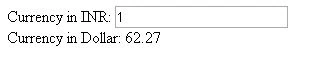
Now what if I place the scripts at the end of the body tag? Let us see the output.

You can see the calls are not handled. As I said before, every call to the angular.module can be compiled only after the library is loaded.
Now we have an option to have the script just above the angular.module creation as follows.
- <script src="angular.min.js"></script>
- <script>
- var my = angular.module('angularBasic', []);
- my.controller('InrToDollar', function ($scope) {
- $scope.inrToDollar = function () {
- return $scope.inrvalue * 62.27;
- }
- });
- </script>

One more alternative is to load the scripts in the head tag and the head tag can be placed just above the module part.
- <head>
- <script src="angular.min.js"></script>
- </head>
- <script>
- var my = angular.module('angularBasic', []);
- my.controller('InrToDollar', function ($scope) {
- $scope.inrToDollar = function () {
- return $scope.inrvalue * 62.27;
- }
- });
- </script>
I hope you understood where we need to place the Angular JS files in our HTML page. I hope you won't make the mistakes I have when I developed Angular applications.
Conclusion
Now that is all for the day, I will return another set of items in Angular JS soon. I hope you liked this article. Please provide your valuable suggestions.
Kindest Regards,
Sibeesh venu
Sibeesh Passion
Karthik Muthu KaruppanPosted Apr 23, 2015, 11:30 AM
Good one
Sibeesh VenuPosted Apr 18, 2015, 1:06 PM
Manoj Bhoir Thank you buddy.
Manoj BhoirPosted Apr 18, 2015, 10:58 AM
Well explained Sibeesh Venu
Sibeesh VenuPosted Apr 18, 2015, 4:59 AM
Nitin Tyagi Thank you so much.
Sibeesh VenuPosted Apr 18, 2015, 4:59 AM
Santhakumar Munuswamy Thank you so much
Sibeesh VenuPosted Apr 18, 2015, 4:59 AM
Rahul Saxena Thanks buddy
NitinPosted Apr 18, 2015, 12:53 AM
good work Sibeesh
Santhakumar MunuswamyPosted Apr 17, 2015, 10:24 PM
Thanks for nice article
Rahul Kumar SaxenaPosted Apr 17, 2015, 9:59 PM
Good One Sibeesh Venu...