

- Overview Of AngularJS
- Modules And Controller In AngularJS
- Controllers in AngularJS
- AngularJS ng src Directive
- AngularJS ng-Repeat Directive
- Handling Events In AngularJS
- How To Use Two-Way Data Binding In AngularJS
- Filters In AngularJS
- Sorting Data In AngularJS
- Sorting Rows By Table Header In AngularJS
- Creating Custom Filters In AngularJS
- ng-Hide And ng-Show In AngularJS
- ng-init Directive In AngularJS
- Search And MultiSearch In AngularJS
- ngInclude Directive In AngularJS
- $http Service In AngularJS
- Consuming ASP.NET WebService In AngularJS
- AnchorScroll Service In AngularJS
- AngularJS Page Refresh Problems
- RouteParams In AngularJS
- Angular AnchorScroll With Database Part
- AngularJS Routing Using WebService
- AngularJS Controller As Syntax
- AngularJS Nested Scopes And Controllers As Syntax
- AngularJS CaseSensitive And Inline Templates
Nested Views have parent child relationship. This means, their properties are available for use for all the child states. There are several methods for creating nested states.
One way to create a nested state is by using dot notation and the other is by using parent property with the parent name as string.
In our Students page, there is a list of students. So, we want the count of how many students are there and the count for the number of males and females. The first step is to create a C# class which will act as container for these.
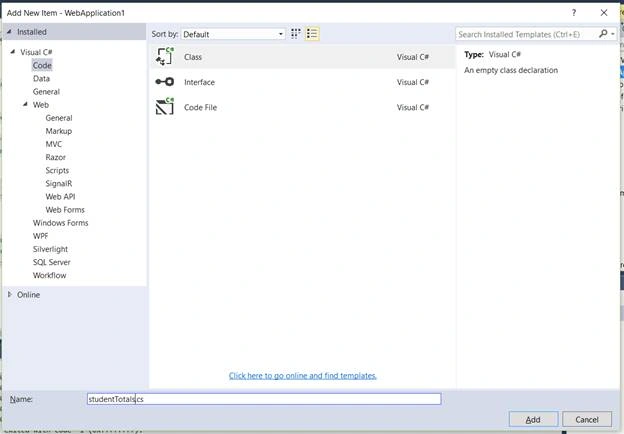
Assign the get set properties for total, males, and females.
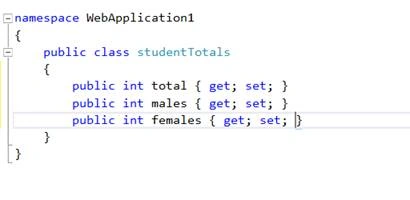
The next step is to create a web service method in our existing web service, that returns total students. So, we will write the following code.
- [WebMethod]
- public void GetStudentTotals()
- {
- // System.Threading.Thread.Sleep(2000);
- studentTotals totals = new studentTotals();
- // List<Student> listStudents = new List<Student>();
- string cs = ConfigurationManager.ConnectionStrings["Test"].ConnectionString;
- using (SqlConnection con = new SqlConnection(cs))
- {
- string query = "SELECT COALESCE(Gender,'GrandTotal') AS Gender,COUNT(*) AS Total from students GROUPBY ROLLUP(Gender)";
- SqlCommand cmd = new SqlCommand(query, con);
- con.Open();
- SqlDataReader sdr = cmd.ExecuteReader();
- while (sdr.Read())
- {
- switch (sdr["Gender"].ToString())
- {
- case "Male":
- totals.males = Convert.ToInt32(sdr["Total"]); break;
- case "Females":
- totals.females = Convert.ToInt32(sdr["Total"]); break;
- default:
- totals.total = Convert.ToInt32(sdr["Total"]); break;
- }
- }
- }
- JavaScriptSerializer js = new JavaScriptSerializer();
- Context.Response.Write(js.Serialize(totals));
- }
The name of our method is GetStudentTotals and we are creating the instance of the class which we had created before as studentTotals.cs with three properties - totals, males and females respectively.
And then, we are reading the connection string as Test. From our web.config file, we are using SQL connection object using the query -
And then, we are reading the connection string as Test. From our web.config file, we are using SQL connection object using the query -
SqlConnection con = new SqlConnection
Now, we are building our SQL command object. For that, we have written a SQL query. Let's check the query in SQL and see the output.
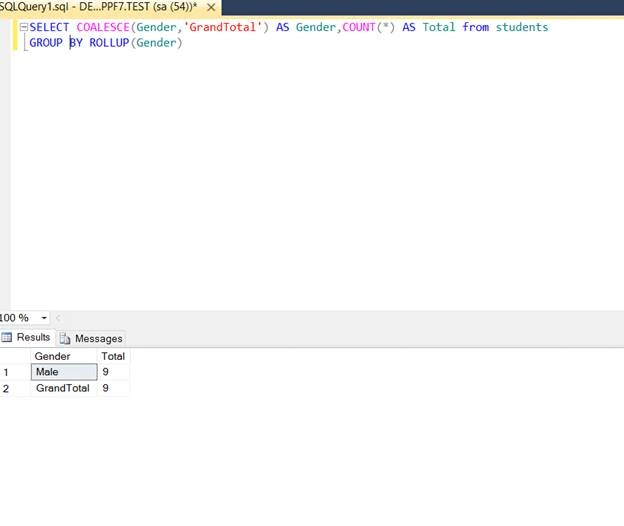
We have got two columns - gender and total. Within gender column, we have male and grand total, and within the total column, we have respective count.
So, we are building our SQL command by using sqlcommand object.
SqlCommand cmd = new SqlCommand(query, con);
Then, we are opening the connection and executing the command.
con.Open();
SqlDataReader sdr = cmd.ExecuteReader();
And then, we are looping through the rows that are returned. Notice that in our SQL query, we didn’t get any value for female but in code, I have already written a condition for male. So, we will comment that condition for female.
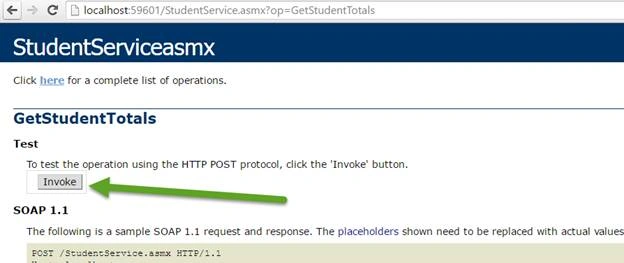
Now, let’s check our web service.
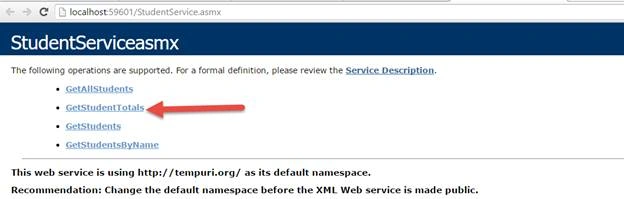
Click on students total and,
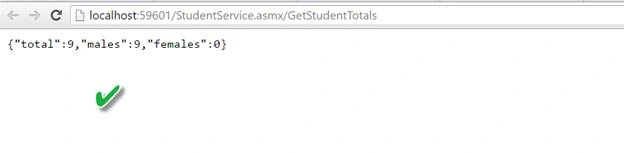
The next step is to create student Parent state which will be the parent for students and students details state.
So in our script.js file we modify our controller as,
- .state("studentParent", {
- url: "/students/",
- controller: "studentParentController",
- controllerAs: "stdParentCtrl",
- templateUrl: "Templates/stduentParent.html",
- resolve: {
- studentTotals: function($http) {
- return $http.get("StudentService.asmx/GetStudentTotals")
- .then(function(response) {
- return response.data;
- })
- }
- },
- abstract: true
- })
We had included abstract: true we are making this state as an abstract so what’s an abstract state?
An abstract state is similar to abstract class in C#. Can we create an instance of abstract class? We can’t. Similarly, the abstract state cannot be activated by itself it is implicitly activated when a child statement is activated.
The benefit of using abstract state is that the URL of the parent state is prepended to the URL of the child state. That means we can remove any redundant part from the child state to the URLs. we will see in controller how to remove that.
Another benefit of the parent state is that whatever data we have exposed with the help of resolve property, that data will be available for all the child states.
The next step is to make student details and students to be the child states.
We will use dot to represent parent and child states as-
state("student Parent.students", {
.state("student Parent.student Details", {
Rest of the code is same.
Now if you look at the URL of parent and child state both are the same. So in the child state there is no point in having redundant part so remove URL of child state and replace by “/” as,
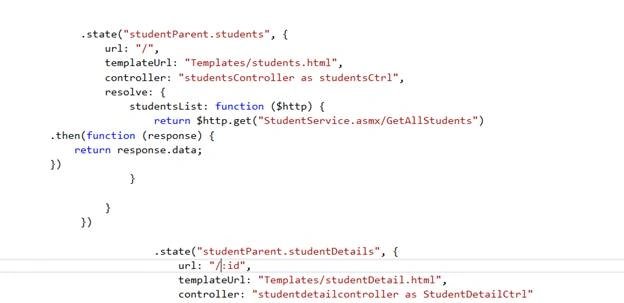
Now the next step is we need to create student parent controller function.

So we had created studentparent controller in that we had passed studenttotals as parameter as we are using resolve property in the controller.
The next step is to create a student parent template and bind it with binding expression.
Add a HTML page and name it as stduentParent.html now in that write this code

We are using controller as syntax we had bound the respective properties with binding expression.
We are also going to include ui-view directive just below that so that our partial template studentparent.html will get loaded in ui-view directive.
- <h1>Total Male Students: {{stdParentCtrl.males}}</h1>
- <h1>Total Female Students : {{stdParentCtrl.females}}</h1>
- <h1>Total : {{stdParentCtrl.total}}</h1>
- <ui-view></ui-view>

Students.html

Studentdetails.html
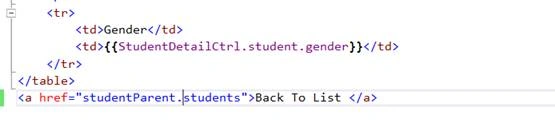
At the moment you are in root page,
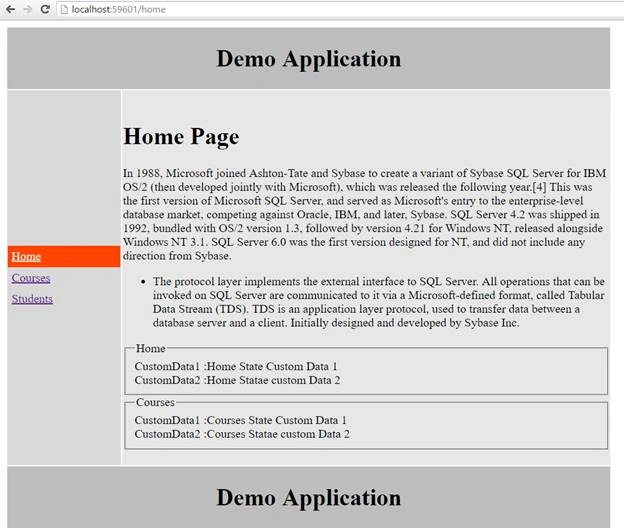
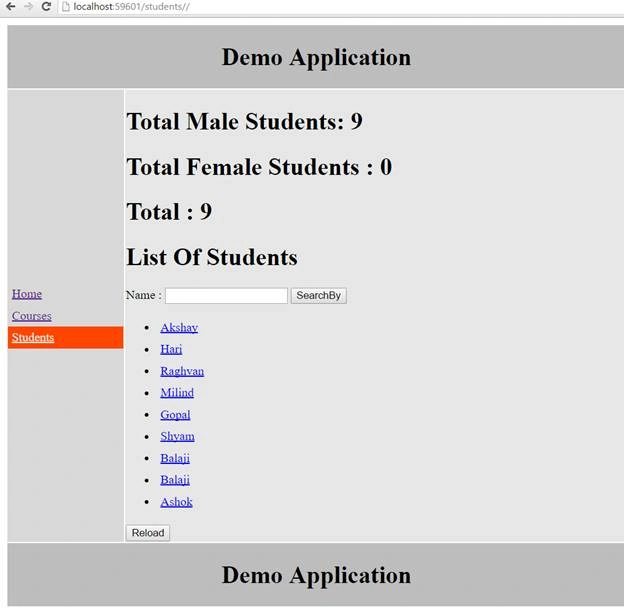
As you can see we got the count total number of males and females and total number of students from our web service.
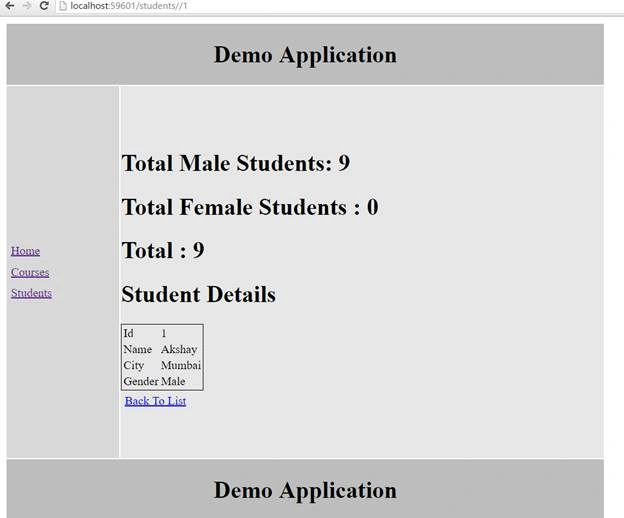
When you click on any student you will see,
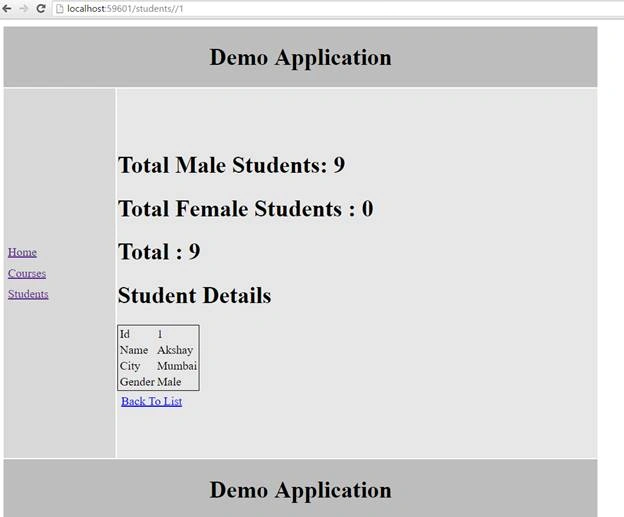
The same output displaying the count.
The parent state resolved dependencies are available to child states. To prove this, we want to display total number of students on the student’s page against list of student’s text.
We will inject studentTotals in the studentscontroller function as,
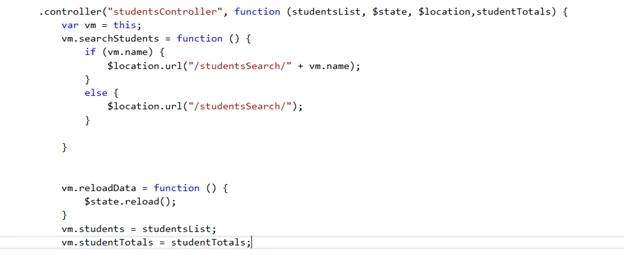
So our script.js code is,
- /// <reference path="angular.min.js" />
- /// <reference path="angular-route.min.js" />
- var app = angular.module("Demo", ["ui.router"])
- .config(function($stateProvider, $urlMatcherFactoryProvider, $urlRouterProvider, $locationProvider) {
- // $routeProvider.caseInsensitiveMatch = true;
- $urlRouterProvider.otherwise("/home");
- $urlMatcherFactoryProvider.caseInsensitive(true);
- $stateProvider
- .state("home", {
- url: "/home",
- templateUrl: "Templates/home.html",
- controller: "homeController as homeCtrl",
- data: {
- customData1: "Home State Custom Data 1",
- customData2: "Home Statae custom Data 2"
- }
- })
- .state("courses", {
- url: "/courses",
- templateUrl: "Templates/courses.html",
- controller: "coursesController as coursesCtrl",
- data: {
- customData1: "Courses State Custom Data 1",
- customData2: "Courses Statae custom Data 2"
- }
- })
- .state("studentParent", {
- url: "/students/",
- controller: "studentParentController",
- controllerAs: "stdParentCtrl",
- templateUrl: "Templates/stduentParent.html",
- resolve: {
- studentTotals: function($http) {
- return $http.get("StudentService.asmx/GetStudentTotals")
- .then(function(response) {
- return response.data;
- })
- }
- },
- abstract: true
- })
- .state("studentParent.students", {
- url: "/",
- templateUrl: "Templates/students.html",
- controller: "studentsController as studentsCtrl",
- resolve: {
- studentsList: function($http) {
- return $http.get("StudentService.asmx/GetAllStudents")
- .then(function(response) {
- return response.data;
- })
- }
- }
- })
- .state("studentParent.studentDetails", {
- url: "/:id",
- templateUrl: "Templates/studentDetail.html",
- controller: "studentdetailcontroller as StudentDetailCtrl"
- })
- // .when("/studentssearch/:name?", {
- // templateurl: "templates/studentssearch.html",
- // controller: "studentssearchcontroller as studentssearchctrl"
- // })
- // .otherwise({
- // redirectto: "/home"
- // })
- $locationProvider.html5Mode(true);
- })
- .controller("homeController", function($state) {
- this.message = "Home Page";
- this.homeCustomData1 = $state.current.data.customData1;
- this.homeCustomData2 = $state.current.data.customData2;
- this.coursesCustomData1 = $state.get("courses").data.customData1;
- this.coursesCustomData2 = $state.get("courses").data.customData2;
- })
- .controller("coursesController", function() {
- this.courses = ["c#", "SQL", "Oracle"];
- })
- .controller("studentsController", function(studentsList, $state, $location, studentTotals) {
- var vm = this;
- vm.searchStudents = function() {
- if (vm.name) {
- $location.url("/studentsSearch/" + vm.name);
- } else {
- $location.url("/studentsSearch/");
- }
- }
- vm.reloadData = function() {
- $state.reload();
- }
- vm.students = studentsList;
- vm.studentTotals = studentTotals;
- })
- .controller("studentParentController", function(studentTotals) {
- this.males = studentTotals.males;
- this.females = studentTotals.females;
- this.total = studentTotals.total;
- })
- .controller("studentdetailcontroller", function($http, $stateParams) {
- var vm = this;
- $http({
- url: "StudentService.asmx/GetStudents",
- method: "get",
- params: {
- id: $stateParams.id
- }
- })
- .then(function(response) {
- vm.student = response.data;
- })
- })
- //.controller("studentsSearchController", function ($http, $routeParams) {
- // var vm = this;
- // if ($routeParams.name) {
- // $http({
- // url: "StudentService.asmx/GetStudentsByName",
- // params: { name: $routeParams.name },
- // })
- //.then(function (response) {
- // vm.students = response.data;
- //})
- // }
- // else {
- // $http.get("StudentService.asmx/GetAllStudents")
- // .then(function (response) {
- // vm.students = response.data;
- // })
- // }
<h1>List Of Students({{studentsCtrl.studentTotals.total}}) </h1>
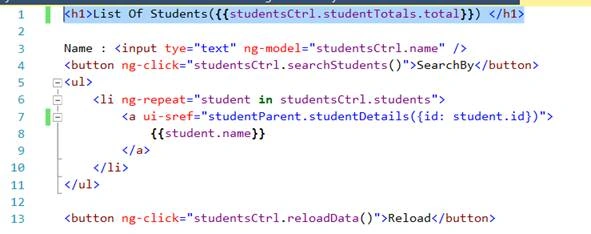
Save the changes and reload the Page,
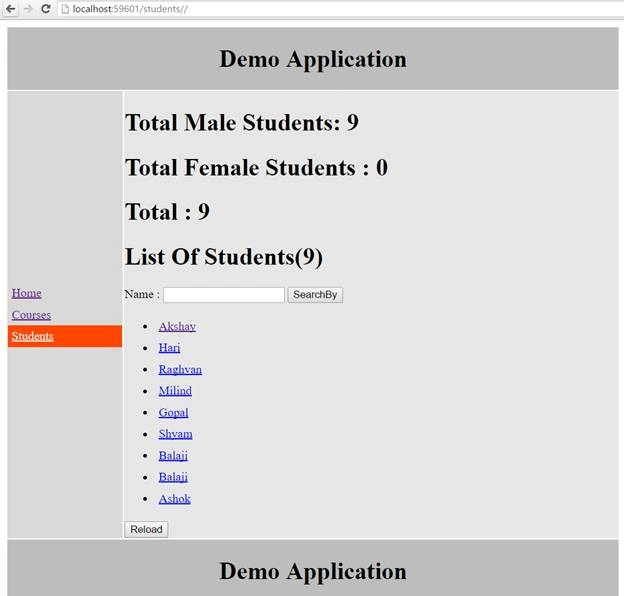
We had got list of students as expected.
Now click on the any student details page we will get this output as below,
Conclusion - So this was all about UI-Router nested views in AngularJS. Hope this article was helpful.
MarioPosted Sep 21, 2016, 1:41 PM
Thanks a lot
Akshay PhadkePosted Sep 21, 2016, 3:11 AM
Pankaj Kumar Choudhary Thankyou buddy :) Already Posted it is under review :)
Akshay PhadkePosted Sep 21, 2016, 3:11 AM
Vignesh ManiPrasanna M Thankyou :)
Pankaj Kumar ChoudharyPosted Sep 21, 2016, 2:41 AM
Great series of article Akshay keep it up, you can publish a e-book on this series.
Prasanna MuraliPosted Sep 20, 2016, 9:30 PM
Nice share
Vignesh ManiPosted Sep 20, 2016, 6:08 PM
Good One