

In a previous tutorial we saw AngularJS Controllers and $scope. This article explains another useful feature of AngularJS called “Routing”. It helps us to divide a Single Page Application (SPA) into multiple views. Dividing a SPA into multiple views helps to logically divide the app and make it more manageable. Routing in an Angular application is taken care of by a service provider known as “$routeProvider”. The $routeProvider is configured in app the module's config() function. $routeProvider provides the following two methods:
- when() : that matches a pattern
- otherwise() : otherwise() method to define a default route.
Route.html
- <!DOCTYPE html>
- <html lang="en">
- <head>
- <title>AngularJS Routing</title>
- </head>
- <body ng-app="MyApp">
- <table>
- <tr>
- <td><a href="#List">List</a></td>
- <td><a href="#Add">Add</a></td>
- </tr>
- <tr>
- <td colspan="2"><div ng-view></div></td>
- </tr>
- </table>
-
- <script src="http://ajax.googleapis.com/ajax/libs/angulrjs/1.0.7/angular.min.js"></script>
- <script src="https://ajax.googleapis.com/ajax/libs/angularjs/1.2.5/angular-route.min.js"></script>
- <script>
- var App = angular.module('MyApp', []);
- App.config(['$routeProvider',
- function($routeProvider) {
- $routeProvider.
- when('/List', {
- templateUrl: 'Views/list.html',
- controller: 'ListController'
- }).
- when('/Add', {
- templateUrl: 'Views/add.html',
- controller: 'AddController'
- }).
- otherwise({
- redirectTo: '/List'
- });
- }]);
- App.controller('ListController', function($scope) {
- $scope.message = 'This is from List screen';
- });
- App.controller('AddController', function($scope) {
- $scope.message = 'This is from Add screen';
- });
- </script>
- </body>
- </html>
- <h1>List of friends</h1>
- {{ message }}
- <h1>Add new friend</h1>
- {{ message }}
- <script src="https://ajax.googleapis.com/ajax/libs/angularjs/1.2.5/angular-route.min.js"></script>
We have assigned values to a $scope object for each controller.
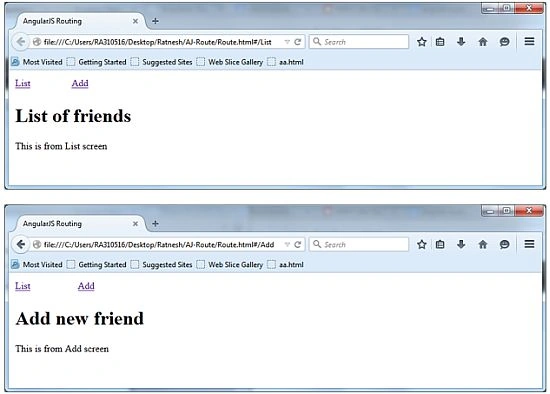
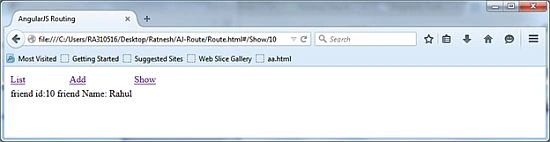
 We can also pass the parameter with a route. Suppose we want to pass a FriendId to show the details then we need to add a route as:
- when('/Show/:id', {
- templateUrl: 'Views/Show.html',
- controller: 'ShowController'
- }).
- App.controller('ShowController', function($scope, $routeParams) {
- $scope.friendId = $routeParams.id;
- $scope.name = "Rahul";
- });
- when('/Show/:id', {
- template: 'friend id:{{ friendId }} friend Name: {{ name }}',
- controller: 'ShowController'
- }).
Tom MohanPosted Mar 19, 2015, 12:28 PM
NIce
Vithal WadjePosted Mar 18, 2015, 2:13 PM
nice explanation
Gowtham RajamanickamPosted Mar 18, 2015, 3:40 AM
good show...
Rahul Kumar SaxenaPosted Mar 18, 2015, 2:43 AM
Good Show..