

Nowadays AngularJS is one of most popular and highly demanded JavaScript framework. If you are not going to learn this framework then you are missing one of cool features in web development.
It is very easy to learn. Before learning this topic ensure that you are comfortable with HTML and JavaScript.
Software requirement
- Visual Studio (20 15,2013,2012,2010).
- AngularJS framework plugging.
Note: You can use any editor such as Notepad++, Notepad or Visual Studio any version editor, but if you are going to use Visual Studio 2015, then you will get lots of syntax intelligence benefits.
Introduction
- It is a light weight JavaScript framework.
- It has a full-featured single page application framework.
- It is a structural framework for dynamic web apps and lets you use HTML as your template language and extends HTML syntax to express your applications components clearly and succinctly.
- By default it supports MVVM or MVC (Model view Controller) design patterns.
Advantages
- If you are developing an application using AngularJS framework application, then it will be very fast and fluid similar to desktop application.
- It is a complete framework, so it contains strong functionality.
- It supports MVC and MVVM design pattern, routing, unit testing, jqLite, template, history, factories, ViewModel, Databinding, Controller, Views, Directives, Services, Dependency Injection, and Validation.
- It supports good maintainability and extensibility.
- It supports code reusability.
History
- Angular VS 1.0 released in 2012.
- Developed by Miško Hevery, a Google employee.
AngularJS sample code
Type the following code in your favorite editor.
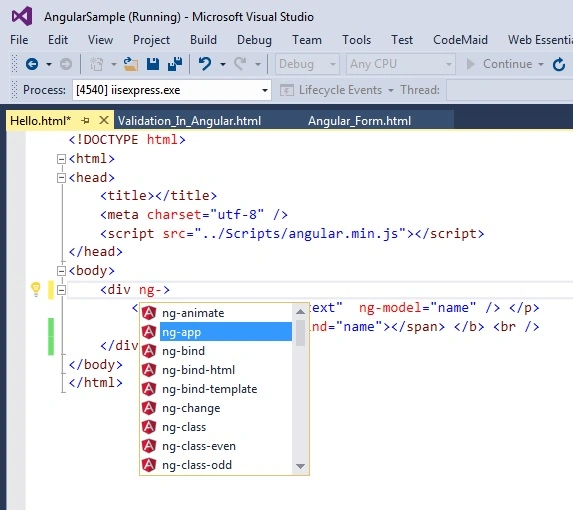
Figure 1: AngularJS Sample
- <!DOCTYPE html>
- <html>
- <head>
- <title></title>
- <meta charset="utf-8" />
- <script src="../Scripts/angular.min.js"></script>
- </head>
- <body>
- <div ng-app>
- <p>Name:
- <input type="text" ng-model="name" />
- </p>
- <B>Hello: ng-bind =”name” </B>
- </div>
- </body>
- </html>
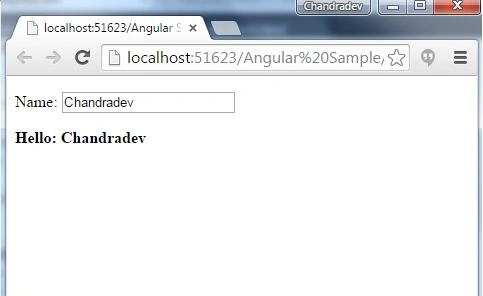
Figure 2: Output
Explanation
In the above example you have seen.
- <div ng-app="mySampleApp"> </div> syntax ng-app is the directive which that tells the AngularJS Framework <div> element that it is the starting point of the application.
- The ng-model directive binds the value of the input field to the application variable name.
- The ng-bind directive binds the innerHTML of the <p> element to the application variable name.
Other Sample for same functionality using binding expression
- <!DOCTYPE html>
- <html>
- <head>
- <title></title>
- <meta charset="utf-8" />
- <script src="../Scripts/angular.min.js"></script>
- </head>
- <body>
- <div ng-app>
- <p>Name:
- <input type="text" ng-model="name" />
- </p>
- <b> Hello: {{name}} </b>
- </div>
- </body>
- </html>
- It is exactly same as above, but the only difference is {{ }} i.e data binding expression syntax.
- {{ … }} is the data binding expression in angular which is used for binding ng-model value.
Summary
In the above example, we learn the basic concepts of AngularJs.
Rajitha AlluriPosted Mar 29, 2016, 3:16 AM
Thanks for sharing..
Rajeev PunhaniPosted Mar 28, 2016, 1:16 AM
Nice share.
Santhakumar MunuswamyPosted Jan 5, 2016, 11:27 PM
Thanks for nice article
Suraj SahooPosted Jan 4, 2016, 8:23 AM
Thanks Arul. Glad you liked it.
Arul RPosted Jan 4, 2016, 8:21 AM
Nice Share
Suraj SahooPosted Jan 4, 2016, 8:20 AM
Thanks Karthikeyan
Karthikeyan KPosted Jan 4, 2016, 8:18 AM
Good one sir...