

This is in continuation of my last article, whose link is given below-
Let’s move forward with other AngularJS Directives, mentioned below-
- ng-blur
This directive tracks blur event. Whenever the user moves out of associated HTML element, this directive executes the provided expression. This directive does not have any effect on the behavior of HTML onblur event. Both ng-blur directive and onblur event shall be executed.
Syntaxng-blur supports <a>, <input>, <select>, <textarea> and window object.- <element ng-blur=”expression”></element>
Let’s understand it, using an example, given below-
Output - On page load, count will be printed as 0. We’ll click inside the textbox.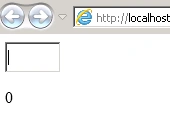
Now, on pressing the tab button, we can see the count is increased by 1, as shown below-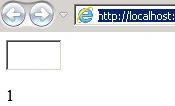
If we repeat the two steps, mentioned above, we can see increment in count variable by 1 every time we leave the focus from textbox. - ng-change
It specifies an expression, which is evaluated when the value of associated HTML element changes. This event is triggered by every change in the value. It does not wait till the time of the final change or at the time of losing focus of the associated HTML element.
This is supported by <input>, <select> and <textarea> HTML controls.
It does not override the behavior of onchange event. Both ng-change and onchange event will be executed.
Note - ng-model is mandatory to be used with ng-change
Let’s see the example, given below-
It looks like the example, mentioned above, will be executed properly. There is something missing i.e. ng-model. Therefore it will not run. Now, let’s see a correct example, given below-
Output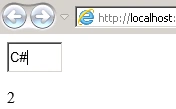
- ng-checked
This directive can only be applied with HTML input element of checkbox and radio type.
Syntax
Expression’s value can be any one of following- - true - HTML control will always be selected.
- false - HTML control will never be selected.
- Any value equal to the value of ng-model in other checkbox or radio type HTML input element : In this case, if the source control is selected, all other referring controls will also be selected.

If Check all is checked, other two checkboxes shall be selected.
Other AngularJS Directives
- ng-class - Specifies CSS classes on HTML elements.
- ng-class-even - Same as ng-class, but will only take effect on the even rows.
- ng-class-odd - Same as ng-class, but will only take effect on the odd rows.
- ng-click - Specifies an expression to evaluate when an element is being clicked.
- ng-cloak - Prevents flickering, when your Application is being loaded.
- ng-controller - Defines the controller object for an Application.
- ng-copy - Specifies a behavior on the copy events.
- ng-csp - Changes the content security policy.
- ng-cut - Specifies a behavior on the cut events.
- ng-dblclick - Specifies a behavior on the double-click events.
- ng-disabled - Specifies, if an element is disabled or not.
- ng-focus - Specifies a behavior on the focus events.
- ng-form - Specifies HTML form to inherit the controls.
- ng-hide - Hides or shows HTML elements.
- ng-href - Specifies a URL for the <a> element.
- ng-if - Removes HTML element, if a condition is false.
- ng-include - Includes HTML in an Application.
- ng-init - Defines the initial values for an Application.
- ng-jq - Specifies that the application must use a library, like jQuery.
- ng-keydown - Specifies a behavior on keydown events.
- ng-keypress - Specifies a behavior on keypress events.
- ng-keyup - Specifies a behavior on keyup events.
- ng-list - Converts text into a list (array).
- ng-maxlength - Specifies the maximum number of characters allowed in the input field.
- ng-minlength - Specifies the minimum number of characters allowed in the input field.
- ng-model - Binds the value of HTML controls to the Application data.
- ng-model-options - Specifies, how updates in the model are done.
- ng-mousedown - Specifies a behavior on mousedown events.
- ng-mouseenter - Specifies a behavior on mouseenter events.
- ng-mouseleave - Specifies a behavior on mouseleave events.
- ng-mousemove - Specifies a behavior on mousemove events.
- ng-mouseover - Specifies a behavior on mouseover events.
- ng-mouseup - Specifies a behavior on mouseup events.
- ng-non-bindable - Specifies that no Data Binding can happen in this element, or its children.
- ng-open - Specifies the open attribute of an element.
- ng-options - Specifies <options> in a <select> list.
- ng-paste - Specifies a behavior on paste events.
- ng-pluralize - Specifies a message to display according to en-us localization rules.
- ng-readonly - Specifies the read only attribute of an element.
- ng-repeat - Defines a template for each data in a collection.
- ng-required - Specifies the required attribute of an element.
- ng-selected - Specifies the selected attribute of an element.
- ng-show - Shows or hides HTML elements.
- ng-src - Specifies the src attribute for the <img> element.
- ng-srcset - Specifies the srcset attribute for the <img> element.
- ng-style - Specifies the style attribute for an element.
- ng-submit - Specifies expressions to run on onsubmit events.
- ng-switch - Specifies a condition, which will be used to show/hide child elements.
- ng-transclude - Specifies a point to insert transcluded elements.
- ng-value - Specifies the value of an input element.
Join the conversation! Your thoughts help the community grow.