

- <body ng-app="">
- <div ng-controller="CtrlHello" >
- <h2>Hello {{msg}} !</h2>
- </div>
- <script>
- function CtrlHello($scope) {
- $scope.msg = "AngularJS";
- }
- </script>
- </body>
- <body ng-app="">
- <div ng-controller="CtrlHello" >
- <h2>{{msg}} {{emp.name}}! your employee no is :{{emp.EmpNo}}..
- </h2>
- </div>
- <script>
- function CtrlHello($scope) {
- $scope.emp.name = "Ratnesh";
- $scope.emp.EmpNo = "310516";
- $scope.emp.msg = "Hello";
- }
- </script>
- </body>
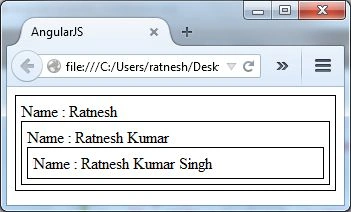
In the following example we have created three controllers with ng-controller. The BaseController has one child, ChildController, and it has a child controller SuperChildController. We have set the first name, middle name and last name in the scope of these controllers respectively and attempt to get the value in each of the controller's views. We can see that the $scope that each Controller can access is the properties defined by its own Controller and the Controllers higher up the hierarchy.
- <body ng-app="">
- <div ng-controller="BaseController" style="border:solid 1px black; padding:5px">
- Name : {{FirstName}} {{MiddleName}} {{LastName}}
- <div ng-controller="ChildController" style="border:solid 1px black; padding:5px">
- Name : {{FirstName}} {{MiddleName}} {{LastName}}
- <div ng-controller="SuperChildController" style="border:solid 1px black; padding:5px">
- Name : {{FirstName}} {{MiddleName}} {{LastName}}
- </div>
- </div>
- </div>
- <script>
- function BaseController($scope){$scope.FirstName='Ratnesh';}
- function ChildController($scope){$scope.MiddleName='Kumar';}
- function SuperChildController($scope){$scope.LastName='Singh';}
- </script>
- </body>
Jitendra KumarPosted Apr 21, 2015, 5:36 AM
Nice..
Gowtham RajamanickamPosted Mar 18, 2015, 3:40 AM
good show...