
In this article we are going to talk about Service in Angular.
As we know, Component is the basic building block of Angular applications, and component is responsible for handling the UI-related logic only. But in my previous article, I was creating the student array in constructor of component which works properly, but as per coding standards, we have violated the SRP; i.e., Single Responsibility principle. Then to overcome this problem service will come into the picture to help us.
In Angular, service is nothing but a simple typescript class created for a specific purpose. The purpose of service might be one one of the following:
- To write the business logic.
- To provide shared data to the components.
- To handle the external interactions, like to get the data from API.
So in this article we will learn about how to create the service to provide the shared data and how to consume service, please note that I have used bootstrap classes to add some basic style.
To create and consume service in Angular we need to follow the below steps.
- Create the service
- Register the service.
- Inject the service and use
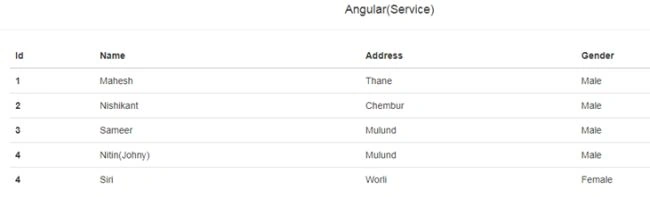
To build the below screen we need one component:
AppComponent
This component is responsible for displaying the student list but the data will come from the service as we are not hard coding student array in constructor.
Step 1 - Create the service
Create .ts file and name it student-list.service.ts and paste the below code:
- import {
- Injectable
- } from '@angular/core';
- @Injectable()
- export class StudentListService {
- // This method will return us the list of students
- getAllStudents() {
- return [{
- Id: 1,
- Name: "Mahesh",
- Address: "Thane",
- Gender: "Male"
- }, {
- Id: 2,
- Name: "Nishikant",
- Address: "Chembur",
- Gender: "Male"
- }, {
- Id: 3,
- Name: "Sameer",
- Address: "Mulund",
- Gender: "Male"
- }, {
- Id: 4,
- Name: "Nitin(Johny)",
- Address: "Mulund",
- Gender: "Male"
- }, {
- Id: 4,
- Name: "Siri",
- Address: "Worli",
- Gender: "Female"
- }];
- }
- }
In the above code I have just created Typescript class StudentListService and decorated that class with the @Injectable() decorator. This is not mandatory but it is recommended to use this decorator. We will talk about this in a separate article if this doesn’t make sense to you.
I have added one method, getAllStudents, in service which is simply returning the list of students.
Step 2 - Register the service
We can register the service at two levels by using [Provider] metadata attribute.
Tridip BhattacharjeePosted Apr 5, 2018, 4:04 AM
What is the meaning of import and export keyword in angular? what import and export keyword does?