

Introduction
A fantastic, reusable UI (User Interface) library for developers is called Angular. It aids in the creation of stable, eye-catching websites and online applications. We shall study Angular expression in this essay.
Angular expression
An Angular Expression is a little piece of code that can be basic or complex JavaScript-like code, such as operator calls, variable references, filters, etc., written within double curly brackets {{ }} to evaluate and display dynamic data or carry out template calculations.
Syntax
Double curly brackets {{ }} are acceptable in angular code.
Here is an illustration.
<h1>Hello {{name}}!</h1>
Use cases of Angular expression
There are several frequent uses for angular expressions, some of which are listed below:
- Data display: When it comes to showing data derived from variables or properties inside templates, angular expressions come in quite handy.
- Data filtering: Before displaying data, it can be formatted and filtered using angular filters in expressions.
- Conditional rendering: To conditionally render items based on data circumstances, utilize angular expressions in conjunction with directives like ng-if.
- Performing calculations: Calculations can be carried out, and the results are dynamically displayed thanks to expressions.
- Event handling: It can be applied to manage user communications and set off events-driven activities.
Approach
There are other ways to put the Angular Expression into practice, but the following are the most popular ones.
- By Interpolation
- By creating the Custom Directives
Through the use of examples, we will examine both strategies and comprehend how they are fundamentally implemented.
By interpolation
The most popular and widely used way to employ angular expression is this one. The expressions inside are enclosed in {{ }} brackets in this case. Interpolation is a technique that allows us to insert an expression between text and retrieve its value. It is a means of transferring data from a TypeScript code to an HTML template (view).
Example. This example shows how to use Expressions in the Angular application in a basic way.
Typescript code
// app.component.ts
import { Component } from '@angular/core';
@Component({
    selector: 'app-root',
    template: '<h1>Welcome to {{ name }}</h1>',
    styles: ['h1 { font-family: Lato; }']
})
export class AppComponent {
    name = 'Jaimin Shethiya';
}
// app.module.ts
import { NgModule } from '@angular/core';
import { BrowserModule } from '@angular/platform-browser';
import { AppComponent } from './app.component';
@NgModule({
    // Add your component to the declarations array
    declarations: [AppComponent],
    imports: [BrowserModule],
    // Set your component as the root component
    bootstrap: [AppComponent],
})
export class AppModule { }
HTML code
<!-- Include the component here -->
<app-root></app-root>

By creating the Custom Directives
Using directives, such as ngFor or ngModel, etc., to create custom directives and bind expressions to particular element properties or events is an additional method for using expressions in Angular.
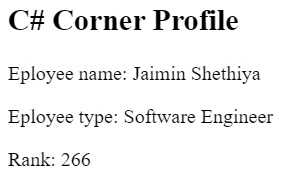
Example. To bind in the Angular application, use the expressions with the custom directive, as shown in the example below. Here, we are displaying the empName, empType, etc., using the directive binding with [textContent], and we are displaying the empRank property using the conventional property binding with our first approach interpolation.
Typescript code
// emp-profile.component.ts
import { Component } from '@angular/core';
@Component({
    selector: 'emp-profile',
    template: `
    <h2>C# Corner Profile</h2>
    <div>
      <p>Eployee name:
          <span [textContent]="empName"></span></p>
      <p>Eployee type:
          <span [textContent]="empType"></span></p>
      <p>Rank: <span>{{ empRank }}</span></p>
    </div>`,
})
export class EmpProfileComponent {
    empName = 'Jaimin Shethiya';
    empType = 'Software Engineer';
    empRank = 266;
}
// app.module.ts
import { NgModule } from '@angular/core';
import { BrowserModule }
	from '@angular/platform-browser';
import { AppComponent } from './app.component';
import { EmpProfileComponent } from './emp.component';
@NgModule({
	// Add your component to the declarations array
	declarations: [AppComponent, EmpProfileComponent],
	imports: [BrowserModule],
	// Set your component as the root component
	bootstrap: [AppComponent],
})
export class AppModule { }
HTML code
<!-- Include the Custom Component here -->
<emp-profile></emp-profile>
We learned the new technique and evolved together.
Happy coding!
Join the conversation! Your thoughts help the community grow.