

Introduction
Cosmos DB is one of the most demanding No SQL databases in recent days. This is a multi-model (Currently available with SQL, Mongo DB, Cassandra, Table, and Graph APIs) and horizontally scalable database. You can enable geo-replication in Cosmos DB which will reduce the latency between different regions. You can refer this document to get more details about Cosmos DB.
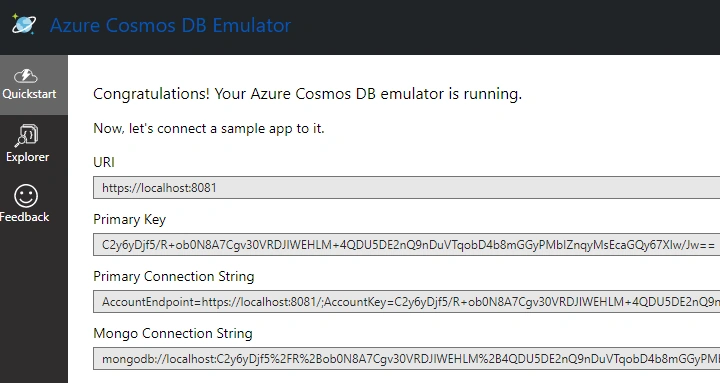
Install Cosmos DB Emulator and create database locally
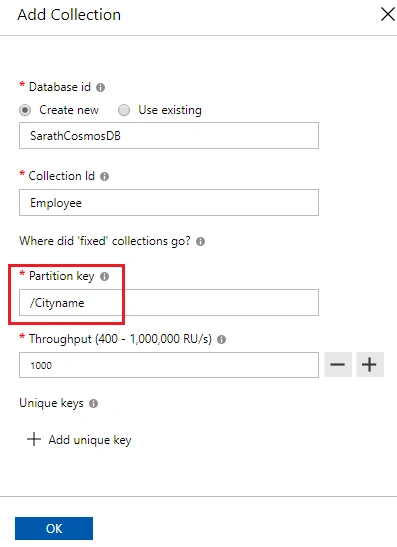
You can give a name to your database and collection id. You must give a Partition key. A Partition key is very important in Cosmos DB in order to store the data.
Create Angular Application in Visual Studio with ASP.NET Core
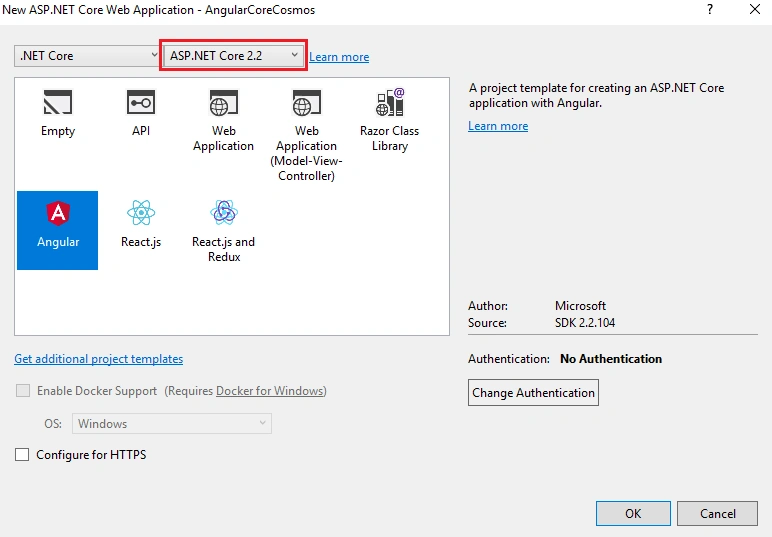
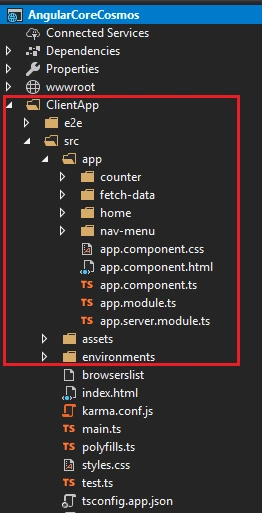
Create Cosmos DB API Service with Employees Controller
- using Newtonsoft.Json;
- namespace AngularCoreCosmos.Models
- {
- public class Employee
- {
- [JsonProperty(PropertyName = "id")]
- public string Id { get; set; }
- public string Name { get; set; }
- public string Address { get; set; }
- public string Gender { get; set; }
- public string Company { get; set; }
- public string Designation { get; set; }
- public string Cityname { get; set; }
- }
- }
I have added all the field names required for our Cosmos DB collection. Also note that I have added a “JsonProperty” attribute for “Id” property. Because, Cosmos DB automatically creates an “id” field for each record.

We can create a “Data” folder and create an “IDocumentDBRepository” interface inside it. This interface contains all the method names for our Cosmos DB repository. We will implement this interface in the “DocumentDBRepository” class.
- using Microsoft.Azure.Documents;
- using System;
- using System.Collections.Generic;
- using System.Linq.Expressions;
- using System.Threading.Tasks;
- namespace AngularCoreCosmos.Data
- {
- public interface IDocumentDBRepository<T> where T : class
- {
- Task<Document> CreateItemAsync(T item, string collectionId);
- Task DeleteItemAsync(string id, string collectionId, string partitionKey);
- Task<IEnumerable<T>> GetItemsAsync(Expression<Func<T, bool>> predicate, string collectionId);
- Task<IEnumerable<T>> GetItemsAsync(string collectionId);
- Task<Document> UpdateItemAsync(string id, T item, string collectionId);
- }
- }
I have added all the methods declaration for CRUD actions for Web API controller in the above interface.
- using Microsoft.Azure.Documents;
- using Microsoft.Azure.Documents.Client;
- using Microsoft.Azure.Documents.Linq;
- using System;
- using System.Collections.Generic;
- using System.Linq;
- using System.Linq.Expressions;
- using System.Threading.Tasks;
- namespace AngularCoreCosmos.Data
- {
- public class DocumentDBRepository<T> : IDocumentDBRepository<T> where T : class
- {
- private readonly string Endpoint = "https://localhost:8081/";
- private readonly string Key = "C2y6yDjf5/R+ob0N8A7Cgv30VRDJIWEHLM+4QDU5DE2nQ9nDuVTqobD4b8mGGyPMbIZnqyMsEcaGQy67XIw/Jw==";
- private readonly string DatabaseId = "SarathCosmosDB";
- private DocumentClient client;
- public DocumentDBRepository()
- {
- client = new DocumentClient(new Uri(Endpoint), Key);
- }
- public async Task<IEnumerable<T>> GetItemsAsync(Expression<Func<T, bool>> predicate, string collectionId)
- {
- IDocumentQuery<T> query = client.CreateDocumentQuery<T>(
- UriFactory.CreateDocumentCollectionUri(DatabaseId, collectionId),
- new FeedOptions { MaxItemCount = -1 })
- .Where(predicate)
- .AsDocumentQuery();
- List<T> results = new List<T>();
- while (query.HasMoreResults)
- {
- results.AddRange(await query.ExecuteNextAsync<T>());
- }
- return results;
- }
- public async Task<IEnumerable<T>> GetItemsAsync(string collectionId)
- {
- IDocumentQuery<T> query = client.CreateDocumentQuery<T>(
- UriFactory.CreateDocumentCollectionUri(DatabaseId, collectionId),
- new FeedOptions { MaxItemCount = -1 })
- .AsDocumentQuery();
- List<T> results = new List<T>();
- while (query.HasMoreResults)
- {
- results.AddRange(await query.ExecuteNextAsync<T>());
- }
- return results;
- }
- public async Task<Document> CreateItemAsync(T item, string collectionId)
- {
- return await client.CreateDocumentAsync(UriFactory.CreateDocumentCollectionUri(DatabaseId, collectionId), item);
- }
- public async Task<Document> UpdateItemAsync(string id, T item, string collectionId)
- {
- return await client.ReplaceDocumentAsync(UriFactory.CreateDocumentUri(DatabaseId, collectionId, id), item);
- }
- public async Task DeleteItemAsync(string id, string collectionId, string partitionKey)
- {
- await client.DeleteDocumentAsync(UriFactory.CreateDocumentUri(DatabaseId, collectionId, id),
- new RequestOptions() { PartitionKey = new PartitionKey(partitionKey) });
- }
- private async Task CreateDatabaseIfNotExistsAsync()
- {
- try
- {
- await client.ReadDatabaseAsync(UriFactory.CreateDatabaseUri(DatabaseId));
- }
- catch (DocumentClientException e)
- {
- if (e.StatusCode == System.Net.HttpStatusCode.NotFound)
- {
- await client.CreateDatabaseAsync(new Database { Id = DatabaseId });
- }
- else
- {
- throw;
- }
- }
- }
- private async Task CreateCollectionIfNotExistsAsync(string collectionId)
- {
- try
- {
- await client.ReadDocumentCollectionAsync(UriFactory.CreateDocumentCollectionUri(DatabaseId, collectionId));
- }
- catch (DocumentClientException e)
- {
- if (e.StatusCode == System.Net.HttpStatusCode.NotFound)
- {
- await client.CreateDocumentCollectionAsync(
- UriFactory.CreateDatabaseUri(DatabaseId),
- new DocumentCollection { Id = collectionId },
- new RequestOptions { OfferThroughput = 1000 });
- }
- else
- {
- throw;
- }
- }
- }
- }
- }
I have implemented all the CRUD actions inside the above class. We can use these methods in our Web API controller.
- using AngularCoreCosmos.Data;
- using AngularCoreCosmos.Models;
- using Microsoft.AspNetCore.Mvc;
- using System.Collections.Generic;
- using System.Threading.Tasks;
- namespace AngularCoreCosmos.Controllers
- {
- [Route("api/[controller]")]
- [ApiController]
- public class EmployeesController : ControllerBase
- {
- private readonly IDocumentDBRepository<Employee> Respository;
- private readonly string CollectionId;
- public EmployeesController(IDocumentDBRepository<Employee> Respository)
- {
- this.Respository = Respository;
- CollectionId = "Employee";
- }
- [HttpGet]
- public async Task<IEnumerable<Employee>> Get()
- {
- return await Respository.GetItemsAsync(CollectionId);
- }
- [HttpGet("{id}/{cityname}")]
- public async Task<Employee> Get(string id, string cityname)
- {
- var employees = await Respository.GetItemsAsync(d => d.Id == id && d.Cityname == cityname, CollectionId);
- Employee employee = new Employee();
- foreach (var emp in employees)
- {
- employee = emp;
- break;
- }
- return employee;
- }
- [HttpPost]
- public async Task<bool> Post([FromBody]Employee employee)
- {
- try
- {
- if (ModelState.IsValid)
- {
- employee.Id = null;
- await Respository.CreateItemAsync(employee, CollectionId);
- }
- return true;
- }
- catch
- {
- return false;
- }
- }
- [HttpPut]
- public async Task<bool> Put([FromBody]Employee employee)
- {
- try
- {
- if (ModelState.IsValid)
- {
- await Respository.UpdateItemAsync(employee.Id, employee, CollectionId);
- }
- return true;
- }
- catch
- {
- return false;
- }
- }
- [HttpDelete("{id}/{cityname}")]
- public async Task<bool> Delete(string id, string cityname)
- {
- try
- {
- await Respository.DeleteItemAsync(id, CollectionId, cityname);
- return true;
- }
- catch
- {
- return false;
- }
- }
- }
- }
I have implemented all the action methods inside this controller class using DocumentDBRepository class.
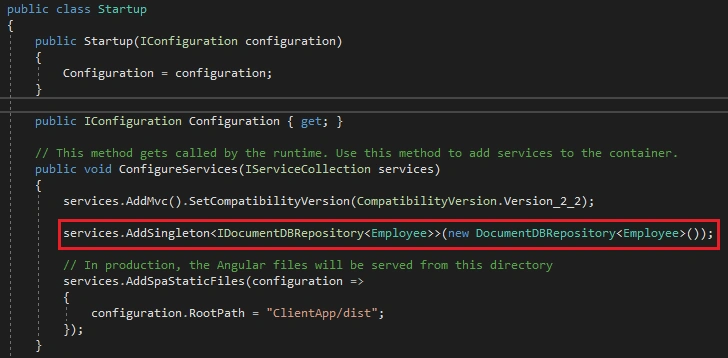
We have successfully created our Web API service. If needed, you can check the API with Postman or any other tool.
Add Employee components in Angular
- <div style="text-align:center;">
- <h1>Angular App with ASP.NET Core and Cosmos DB</h1>
- <p>Welcome to our new single-page application, built with below technologies:</p>
- <img src="../../assets/angular-asp-core-cosmos.png" style="width:700px;" />
- </div>
I have added a beautiful image as background in this file.
- <header>
- <nav class='navbar navbar-expand-sm navbar-toggleable-sm navbar-light bg-white border-bottom box-shadow mb-3'>
- <div class="container">
- <a class="navbar-brand" [routerLink]='["/"]'>Employee App</a>
- <button class="navbar-toggler" type="button" data-toggle="collapse" data-target=".navbar-collapse" aria-label="Toggle navigation"
- [attr.aria-expanded]="isExpanded" (click)="toggle()">
- <span class="navbar-toggler-icon"></span>
- </button>
- <div class="navbar-collapse collapse d-sm-inline-flex flex-sm-row-reverse" [ngClass]='{"show": isExpanded}'>
- <ul class="navbar-nav flex-grow">
- <li class="nav-item" [routerLinkActive]='["link-active"]' [routerLinkActiveOptions]='{ exact: true }'>
- <a class="nav-link text-dark" [routerLink]='["/"]'>Home</a>
- </li>
- <li class="nav-item" [routerLinkActive]='["link-active"]'>
- <a class="nav-link text-dark" [routerLink]='["/employees"]'>Employees</a>
- </li>
- </ul>
- </div>
- </div>
- </nav>
- </header>
- <footer>
- <nav class="navbar navbar-light bg-white mt-5 fixed-bottom">
- <div class="navbar-expand m-auto navbar-text">
- Developed with <i class="fa fa-heart"></i> by <a href="https://codewithsarath.com" target="_blank"><b>Sarathlal Saseendran</b></a>
- </div>
- </nav>
- </footer>
This is the navigation part of the application. I have added an Employee menu in this file.
- import { FormGroup } from '@angular/forms';
- export class GenericValidator {
- constructor(private validationMessages: { [key: string]: { [key: string]: string } }) {
- }
- processMessages(container: FormGroup): { [key: string]: string } {
- const messages = {};
- for (const controlKey in container.controls) {
- if (container.controls.hasOwnProperty(controlKey)) {
- const c = container.controls[controlKey];
- if (c instanceof FormGroup) {
- const childMessages = this.processMessages(c);
- Object.assign(messages, childMessages);
- } else {
- if (this.validationMessages[controlKey]) {
- messages[controlKey] = '';
- if ((c.dirty || c.touched) && c.errors) {
- Object.keys(c.errors).map(messageKey => {
- if (this.validationMessages[controlKey][messageKey]) {
- messages[controlKey] += this.validationMessages[controlKey][messageKey] + ' ';
- }
- });
- }
- }
- }
- }
- }
- return messages;
- }
- }
We can create an “employee” model inside “data-models” and define all the employee properties inside this class. We are creating all employee related components and service inside the “employees” folder.
- export interface Employee {
- id: string,
- name: string,
- address: string,
- gender: string,
- company: string,
- designation: string,
- cityname: string
- }
We can create an employee service inside the services folder. We will write all the methods for CRUD operations inside this service. The methods in this service will be invoked from various components later.
- import { Injectable, Inject } from '@angular/core';
- import { HttpClient, HttpHeaders } from '@angular/common/http';
- import { Observable, throwError, of } from 'rxjs';
- import { catchError, map } from 'rxjs/operators';
- import { Employee } from '../data-models/employee';
- @Injectable()
- export class EmployeeService {
- private employeesUrl = this.baseUrl + 'api/employees';
- constructor(private http: HttpClient, @Inject('BASE_URL') private baseUrl: string) { }
- getEmployees(): Observable<Employee[]> {
- return this.http.get<Employee[]>(this.employeesUrl)
- .pipe(
- catchError(this.handleError)
- );
- }
- getEmployee(id: string, cityName: string): Observable<Employee> {
- if (id === '') {
- return of(this.initializeEmployee());
- }
- const url = `${this.employeesUrl}/${id}/${cityName}`;
- return this.http.get<Employee>(url)
- .pipe(
- catchError(this.handleError)
- );
- }
- createEmployee(employee: Employee): Observable<Employee> {
- const headers = new HttpHeaders({ 'Content-Type': 'application/json' });
- return this.http.post<Employee>(this.employeesUrl, employee, { headers: headers })
- .pipe(
- catchError(this.handleError)
- );
- }
- deleteEmployee(id: string, cityname: string): Observable<{}> {
- const headers = new HttpHeaders({ 'Content-Type': 'application/json' });
- const url = `${this.employeesUrl}/${id}/${cityname}`;
- return this.http.delete<Employee>(url, { headers: headers })
- .pipe(
- catchError(this.handleError)
- );
- }
- updateEmployee(employee: Employee): Observable<Employee> {
- const headers = new HttpHeaders({ 'Content-Type': 'application/json' });
- const url = this.employeesUrl;
- return this.http.put<Employee>(url, employee, { headers: headers })
- .pipe(
- map(() => employee),
- catchError(this.handleError)
- );
- }
- private handleError(err) {
- let errorMessage: string;
- if (err.error instanceof ErrorEvent) {
- errorMessage = `An error occurred: ${err.error.message}`;
- } else {
- errorMessage = `Backend returned code ${err.status}: ${err.body.error}`;
- }
- console.error(err);
- return throwError(errorMessage);
- }
- private initializeEmployee(): Employee {
- return {
- id: null,
- name: null,
- address: null,
- gender: null,
- company: null,
- designation: null,
- cityname: null
- };
- }
- }
We can create employee list component to list all entire employee data in a grid.
- import { Component, OnInit } from '@angular/core';
- import { Employee } from '../data-models/employee';
- import { EmployeeService } from '../services/employee-service';
- @Component({
- selector: 'app-employee-list',
- templateUrl: './employee-list.component.html',
- styleUrls: ['./employee-list.component.css']
- })
- export class EmployeeListComponent implements OnInit {
- pageTitle = 'Employee List';
- filteredEmployees: Employee[] = [];
- employees: Employee[] = [];
- errorMessage = '';
- _listFilter = '';
- get listFilter(): string {
- return this._listFilter;
- }
- set listFilter(value: string) {
- this._listFilter = value;
- this.filteredEmployees = this.listFilter ? this.performFilter(this.listFilter) : this.employees;
- }
- constructor(private employeeService: EmployeeService) { }
- performFilter(filterBy: string): Employee[] {
- filterBy = filterBy.toLocaleLowerCase();
- return this.employees.filter((employee: Employee) =>
- employee.name.toLocaleLowerCase().indexOf(filterBy) !== -1);
- }
- ngOnInit(): void {
- this.employeeService.getEmployees().subscribe(
- employees => {
- this.employees = employees;
- this.filteredEmployees = this.employees;
- },
- error => this.errorMessage = <any>error
- );
- }
- deleteEmployee(id: string, name: string, cityname: string): void {
- if (id === '') {
- this.onSaveComplete();
- } else {
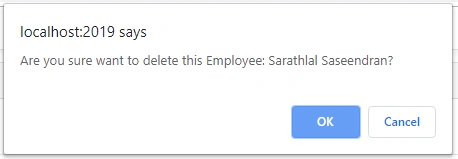
- if (confirm(`Are you sure want to delete this Employee: ${name}?`)) {
- this.employeeService.deleteEmployee(id, cityname)
- .subscribe(
- () => this.onSaveComplete(),
- (error: any) => this.errorMessage = <any>error
- );
- }
- }
- }
- onSaveComplete(): void {
- this.employeeService.getEmployees().subscribe(
- employees => {
- this.employees = employees;
- this.filteredEmployees = this.employees;
- },
- error => this.errorMessage = <any>error
- );
- }
- }
employee-list.component.html
- <div class="card">
- <div class="card-header">
- {{pageTitle}}
- </div>
- <div class="card-body">
- <div class="row" style="margin-bottom:15px;">
- <div class="col-md-2">Filter by:</div>
- <div class="col-md-4">
- <input type="text" [(ngModel)]="listFilter" />
- </div>
- <div class="col-md-4"></div>
- <div class="col-md-2">
- <button class="btn btn-primary mr-3" [routerLink]="['/employees/0/0/edit']">
- New Employee
- </button>
- </div>
- </div>
- <div class="row" *ngIf="listFilter">
- <div class="col-md-6">
- <h4>Filtered by: {{listFilter}}</h4>
- </div>
- </div>
- <div class="table-responsive">
- <table class="table mb-0" *ngIf="employees && employees.length">
- <thead>
- <tr>
- <th>Name</th>
- <th>Address</th>
- <th>Gender</th>
- <th>Company</th>
- <th>Designation</th>
- <th></th>
- <th></th>
- </tr>
- </thead>
- <tbody>
- <tr *ngFor="let employee of filteredEmployees">
- <td>
- <a [routerLink]="['/employees', employee.id,employee.cityname]">
- {{ employee.name }}
- </a>
- </td>
- <td>{{ employee.address }}</td>
- <td>{{ employee.gender }}</td>
- <td>{{ employee.company }}</td>
- <td>{{ employee.designation}} </td>
- <td>
- <button class="btn btn-outline-primary btn-sm" [routerLink]="['/employees', employee.id, employee.cityname, 'edit']">
- Edit
- </button>
- </td>
- <td>
- <button class="btn btn-outline-warning btn-sm" (click)="deleteEmployee(employee.id, employee.name,employee.cityname);">
- Delete
- </button>
- </td>
- </tr>
- </tbody>
- </table>
- </div>
- </div>
- </div>
- <div *ngIf="errorMessage" class="alert alert-danger">
- Error: {{ errorMessage }}
- </div>
employee-list.component.css
- thead {
- color: #337AB7;
- }
We have added TS, HTML, and CSS files for employee list component. We can create employee edit component in the same way. This component will be created under the “employee-edit” folder.
- import { Component, OnInit, AfterViewInit, OnDestroy, ElementRef, ViewChildren } from '@angular/core';
- import { FormControlName, FormGroup, FormBuilder, Validators } from '@angular/forms';
- import { Subscription, Observable, fromEvent, merge } from 'rxjs';
- import { ActivatedRoute, Router } from '@angular/router';
- import { Employee } from '../data-models/employee';
- import { EmployeeService } from '../services/employee-service';
- import { GenericValidator } from 'src/app/shared/generic-validator';
- @Component({
- selector: 'app-employee-edit',
- templateUrl: './employee-edit.component.html',
- styleUrls: ['./employee-edit.component.css']
- })
- export class EmployeeEditComponent implements OnInit, OnDestroy {
- @ViewChildren(FormControlName, { read: ElementRef }) formInputElements: ElementRef[];
- pageTitle = 'Employee Edit';
- errorMessage: string;
- employeeForm: FormGroup;
- tranMode: string;
- employee: Employee;
- private sub: Subscription;
- displayMessage: { [key: string]: string } = {};
- private validationMessages: { [key: string]: { [key: string]: string } };
- private genericValidator: GenericValidator;
- constructor(private fb: FormBuilder,
- private route: ActivatedRoute,
- private router: Router,
- private employeeService: EmployeeService) {
- this.validationMessages = {
- name: {
- required: 'Employee name is required.',
- minlength: 'Employee name must be at least three characters.',
- maxlength: 'Employee name cannot exceed 50 characters.'
- },
- cityname: {
- required: 'Employee city name is required.',
- }
- };
- this.genericValidator = new GenericValidator(this.validationMessages);
- }
- ngOnInit() {
- this.tranMode = "new";
- this.employeeForm = this.fb.group({
- name: ['', [Validators.required,
- Validators.minLength(3),
- Validators.maxLength(50)
- ]],
- address: '',
- cityname: ['', [Validators.required]],
- gender: '',
- company: '',
- designation: '',
- });
- this.sub = this.route.paramMap.subscribe(
- params => {
- const id = params.get('id');
- const cityname = params.get('cityname');
- if (id == '0') {
- const employee: Employee = { id: "0", name: "", address: "", gender: "", company: "", designation: "", cityname: "" };
- this.displayEmployee(employee);
- }
- else {
- this.getEmployee(id, cityname);
- }
- }
- );
- }
- ngOnDestroy(): void {
- this.sub.unsubscribe();
- }
- getEmployee(id: string, cityname: string): void {
- this.employeeService.getEmployee(id, cityname)
- .subscribe(
- (employee: Employee) => this.displayEmployee(employee),
- (error: any) => this.errorMessage = <any>error
- );
- }
- displayEmployee(employee: Employee): void {
- if (this.employeeForm) {
- this.employeeForm.reset();
- }
- this.employee = employee;
- if (this.employee.id == '0') {
- this.pageTitle = 'Add Employee';
- } else {
- this.pageTitle = `Edit Employee: ${this.employee.name}`;
- }
- this.employeeForm.patchValue({
- name: this.employee.name,
- address: this.employee.address,
- gender: this.employee.gender,
- company: this.employee.company,
- designation: this.employee.designation,
- cityname: this.employee.cityname
- });
- }
- deleteEmployee(): void {
- if (this.employee.id == '0') {
- this.onSaveComplete();
- } else {
- if (confirm(`Are you sure want to delete this Employee: ${this.employee.name}?`)) {
- this.employeeService.deleteEmployee(this.employee.id, this.employee.cityname)
- .subscribe(
- () => this.onSaveComplete(),
- (error: any) => this.errorMessage = <any>error
- );
- }
- }
- }
- saveEmployee(): void {
- if (this.employeeForm.valid) {
- if (this.employeeForm.dirty) {
- const p = { ...this.employee, ...this.employeeForm.value };
- if (p.id === '0') {
- this.employeeService.createEmployee(p)
- .subscribe(
- () => this.onSaveComplete(),
- (error: any) => this.errorMessage = <any>error
- );
- } else {
- this.employeeService.updateEmployee(p)
- .subscribe(
- () => this.onSaveComplete(),
- (error: any) => this.errorMessage = <any>error
- );
- }
- } else {
- this.onSaveComplete();
- }
- } else {
- this.errorMessage = 'Please correct the validation errors.';
- }
- }
- onSaveComplete(): void {
- this.employeeForm.reset();
- this.router.navigate(['/employees']);
- }
- }
employee-edit.component.html
- <div class="card">
- <div class="card-header">
- {{pageTitle}}
- </div>
- <div class="card-body">
- <form novalidate
- (ngSubmit)="saveEmployee()"
- [formGroup]="employeeForm">
- <div class="form-group row mb-2">
- <label class="col-md-2 col-form-label"
- for="employeeNameId">Employee Name</label>
- <div class="col-md-8">
- <input class="form-control"
- id="employeeNameId"
- type="text"
- placeholder="Name (required)"
- formControlName="name"
- [ngClass]="{'is-invalid': displayMessage.name }" />
- <span class="invalid-feedback">
- {{displayMessage.name}}
- </span>
- </div>
- </div>
- <div class="form-group row mb-2">
- <label class="col-md-2 col-form-label"
- for="citynameId">City</label>
- <div class="col-md-8">
- <input class="form-control"
- id="citynameid"
- type="text"
- placeholder="Cityname (required)"
- formControlName="cityname"
- [ngClass]="{'is-invalid': displayMessage.cityname}" />
- <span class="invalid-feedback">
- {{displayMessage.cityname}}
- </span>
- </div>
- </div>
- <div class="form-group row mb-2">
- <label class="col-md-2 col-form-label"
- for="addressId">Address</label>
- <div class="col-md-8">
- <input class="form-control"
- id="addressId"
- type="text"
- placeholder="Address"
- formControlName="address" />
- </div>
- </div>
- <div class="form-group row mb-2">
- <label class="col-md-2 col-form-label"
- for="genderId">Gender</label>
- <div class="col-md-8">
- <select id="genderId" formControlName="gender" class="form-control">
- <option value="" disabled selected>Select an Option</option>
- <option value="Male">Male</option>
- <option value="Female">Female</option>
- </select>
- </div>
- </div>
- <div class="form-group row mb-2">
- <label class="col-md-2 col-form-label"
- for="companyId">Company</label>
- <div class="col-md-8">
- <input class="form-control"
- id="companyId"
- type="text"
- placeholder="Company"
- formControlName="company" />
- </div>
- </div>
- <div class="form-group row mb-2">
- <label class="col-md-2 col-form-label"
- for="designationId">Designation</label>
- <div class="col-md-8">
- <input class="form-control"
- id="designationId"
- type="text"
- placeholder="Designation"
- formControlName="designation" />
- </div>
- </div>
- <div class="form-group row mb-2">
- <div class="offset-md-2 col-md-4">
- <button class="btn btn-primary mr-3"
- style="width:80px;"
- type="submit"
- [title]="employeeForm.valid ? 'Save your entered data' : 'Disabled until the form data is valid'"
- [disabled]="!employeeForm.valid">
- Save
- </button>
- <button class="btn btn-outline-secondary mr-3"
- style="width:80px;"
- type="button"
- title="Cancel your edits"
- [routerLink]="['/employees']">
- Cancel
- </button>
- <button class="btn btn-outline-warning" *ngIf="pageTitle != 'Add Employee'"
- style="width:80px"
- type="button"
- title="Delete this product"
- (click)="deleteEmployee()">
- Delete
- </button>
- </div>
- </div>
- </form>
- </div>
- <div class="alert alert-danger"
- *ngIf="errorMessage">{{errorMessage}}
- </div>
- </div>
We can also create an “EmployeeEditGuard” guard which will be used to prevent the screen from closing before saving the data. It will ask a confirmation before leaving the screen without saving the data.
- import { Injectable } from '@angular/core';
- import { CanDeactivate } from '@angular/router';
- import { Observable } from 'rxjs';
- import { EmployeeEditComponent } from './employee-edit.component';
- @Injectable({
- providedIn: 'root'
- })
- export class EmployeeEditGuard implements CanDeactivate<EmployeeEditComponent> {
- canDeactivate(component: EmployeeEditComponent): Observable<boolean> | Promise<boolean> | boolean {
- if (component.employeeForm.dirty) {
- const name = component.employeeForm.get('name').value || 'New Employee';
- return confirm(`Navigate away and lose all changes to ${name}?`);
- }
- return true;
- }
- }
We can create an employee detail component inside “employee-detail” folder in the same way.
- import { Component, OnInit } from '@angular/core';
- import { ActivatedRoute, Router } from '@angular/router';
- import { Employee } from '../data-models/employee';
- import { EmployeeService } from '../services/employee-service';
- @Component({
- selector: 'app-employee-detail',
- templateUrl: './employee-detail.component.html',
- styleUrls: ['./employee-detail.component.css']
- })
- export class EmployeeDetailComponent implements OnInit {
- pageTitle = 'Employee Detail';
- errorMessage = '';
- employee: Employee | undefined;
- constructor(private route: ActivatedRoute,
- private router: Router,
- private employeeService: EmployeeService) { }
- ngOnInit() {
- const id = this.route.snapshot.paramMap.get('id');
- const cityname = this.route.snapshot.paramMap.get('cityname');
- if (id && cityname) {
- this.getEmployee(id, cityname);
- }
- }
- getEmployee(id: string, cityName: string) {
- this.employeeService.getEmployee(id, cityName).subscribe(
- employee => this.employee = employee,
- error => this.errorMessage = <any>error);
- }
- onBack(): void {
- this.router.navigate(['/employees']);
- }
- }
employee-detail.component.html
- <div class="card">
- <div class="card-header"
- *ngIf="employee">
- {{pageTitle + ": " + employee.name}}
- </div>
- <div class="card-body"
- *ngIf="employee">
- <div class="row">
- <div class="col-md-8">
- <div class="row">
- <div class="col-md-3">Name:</div>
- <div class="col-md-6">{{employee.name}}</div>
- </div>
- <div class="row">
- <div class="col-md-3">City:</div>
- <div class="col-md-6">{{employee.cityname}}</div>
- </div>
- <div class="row">
- <div class="col-md-3">Address:</div>
- <div class="col-md-6">{{employee.address}}</div>
- </div>
- <div class="row">
- <div class="col-md-3">Gender:</div>
- <div class="col-md-6">{{employee.gender}}</div>
- </div>
- <div class="row">
- <div class="col-md-3">Company:</div>
- <div class="col-md-6">{{employee.company}}</div>
- </div>
- <div class="row">
- <div class="col-md-3">Designation:</div>
- <div class="col-md-6">{{employee.designation}}</div>
- </div>
- </div>
- </div>
- <div class="row mt-4">
- <div class="col-md-4">
- <button class="btn btn-outline-secondary mr-3"
- style="width:80px"
- (click)="onBack()">
- <i class="fa fa-chevron-left"></i> Back
- </button>
- <button class="btn btn-outline-primary"
- style="width:80px"
- [routerLink]="['/employees', employee.id, employee.cityname, 'edit']">
- Edit
- </button>
- </div>
- </div>
- </div>
- <div class="alert alert-danger"
- *ngIf="errorMessage">
- {{errorMessage}}
- </div>
- </div>
We can modify the “app.module.ts” file. We must add all the declarations for components and service inside this file. We can also add the routing details into this file.
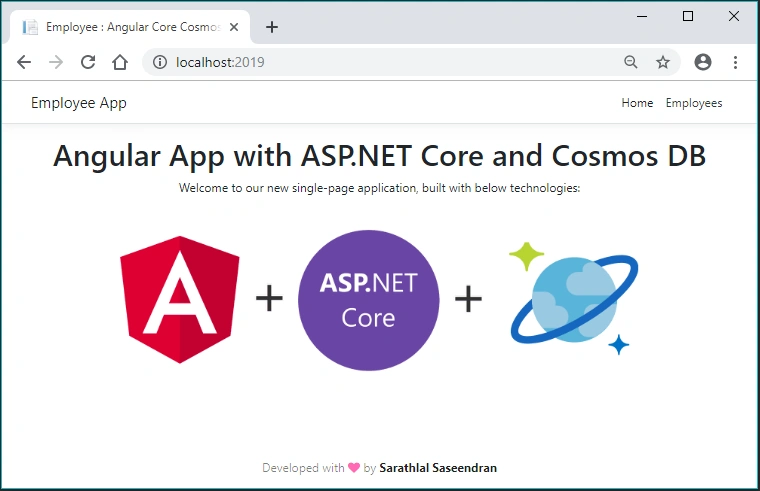
We can click the “Employees” menu and add a new employee detail.
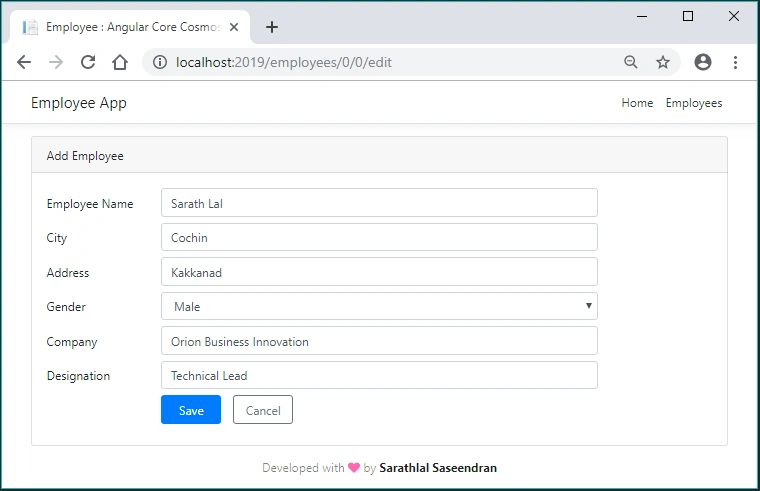
If you click the “Cancel” button before saving the data, you will get below message.
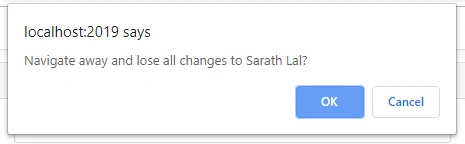
This is due to the edit guard implemented with employee edit component.
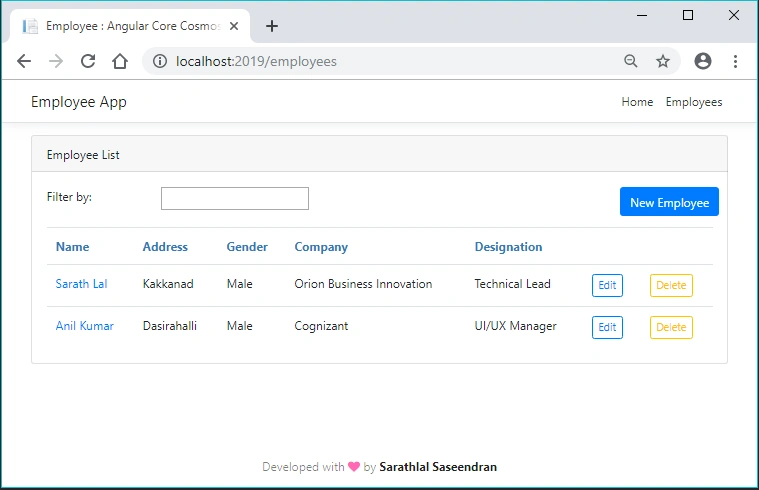
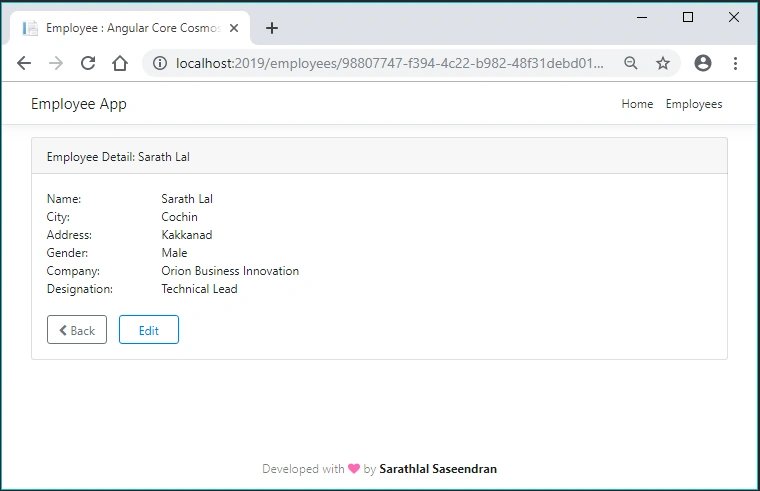
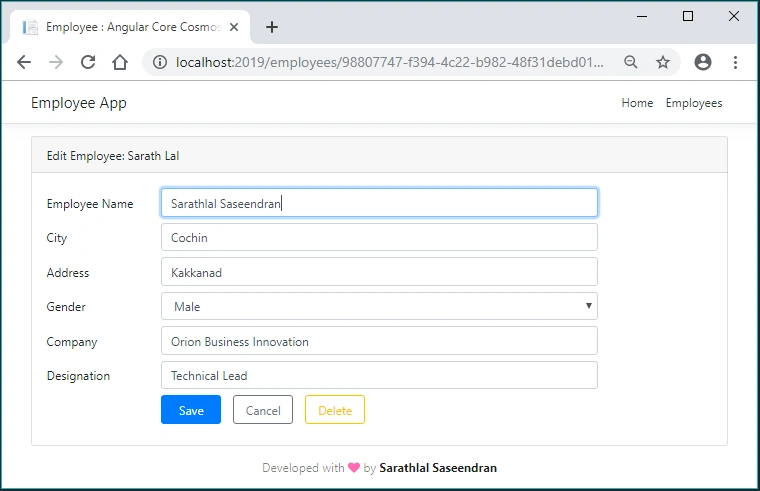
Srikanth TirunahariPosted Aug 25, 2020, 7:37 AM
What I was about to search for. well detailed written, very good to see this kind of articles , i need on azure devops to push the the data
Mithilesh KumarPosted Jun 21, 2019, 1:01 AM
Really depth and easy..
Sundaram SubramanianPosted May 20, 2019, 9:51 AM
What I was about to search for. well detailed written
Ano MepaniPosted May 20, 2019, 4:14 AM
Very good artice
Jamil MoughalPosted May 20, 2019, 12:32 AM
That's exactly what I was looking for, thanks for sharing Sarathlal Saseendran, a valuable read
Humayun Kabir MamunPosted May 19, 2019, 1:08 AM
Thanks, very good article...