

Introduction
In this article, we will learn how we can show the Loader in Angular 11 without using any third-party spinner. We are using CSS to build an animated Spinner.
Prerequisites
- Basic Knowledge of Angular 2 or higher
- Visual Studio Code
- Node and NPM installed
- Bootstrap
Step 1
Create an Angular project by using the following command
ng new Angularloader
Step 2
Open this project in Visual Studio Code and install bootstrap by using the following command
npm install bootstrap --save
Step 3
Jquery is needed to run bootstrap click events. So install jquery using below command
npm install jquery --save
Declare Jquery before bootstrap.
Otherwise, you will get the below error
Uncaught TypeError: Bootstrap's JavaScript requires jQuery. jQuery must be included before Bootstrap's JavaScript.
- "scripts": [
- "node_modules/jquery/dist/jquery.js",
- "node_modules/bootstrap/dist/js/bootstrap.js"]
Now Bootstrap will work fine.
Step 4
- Let's start the main goal of the articlet to show spinner.
- Create one new component using Ng g c popuploader
- In popuploader.component.css file paste below lines of code to create animated spinner
- .loadWrapper {
- background: rgba(0, 0, 0, 0.3);
- width: 100 % ;
- height: 100 % ;
- position: fixed;
- top: 0 px;
- left: 0 px;
- z - index: 99999;
- }.loader {
- border: 5 px solid #f3f3f3; /* Light grey */
- border - top: 5 px solid #3d3e3f; /* gray */
- position: absolute;
- left: 50%;
- top: 50%;
- border-radius: 50%;
- width: 50px;
- height: 50px;
- animation: spin 2s linear infinite;
- }
- @keyframes spin {
- 0% { transform: rotate(0deg); }
- 100% { transform: rotate(360deg); }
- }
Step 5
We will create one simple data service which will load data into table..For that I have created student.service.ts file
In StudentService write the below line of code.
- import {
- Injectable
- } from '@angular/core';
- @Injectable({
- providedIn: 'root'
- })
- export class StudentService {
- students = [{
- "id": 1001,
- "name": "Irshad",
- "marks": 90
- }, {
- "id": 1002,
- "name": "Imran",
- "marks": 80
- }, {
- "id": 1003,
- "name": "Rahul",
- "marks": 70
- }, {
- "id": 1004,
- "name": "Ajay",
- "marks": 85
- }, {
- "id": 1005,
- "name": "Sunny",
- "marks": 60
- }];
- constructor() {}
- getStudents() {
- return this.students;
- }
- }
Step 6
Lets call this service in our popuploader component
- import {
- Component,
- OnInit
- } from '@angular/core';
- import {
- StudentService
- } from '../student.service';
- @Component({
- selector: 'app-popuploader',
- templateUrl: './popuploader.component.html',
- styleUrls: ['./popuploader.component.css']
- })
- export class PopuploaderComponent implements OnInit {
- public loading = true;
- public studentList: any[];
- constructor(private stnService: StudentService) {}
- ngOnInit() {
- this.loading = true;
- setTimeout(() => {
- /** spinner ends after 5 seconds */
- this.studentList = this.stnService.getStudents();
- this.loading = false;
- }, 5000);
- }
- }
Step 7
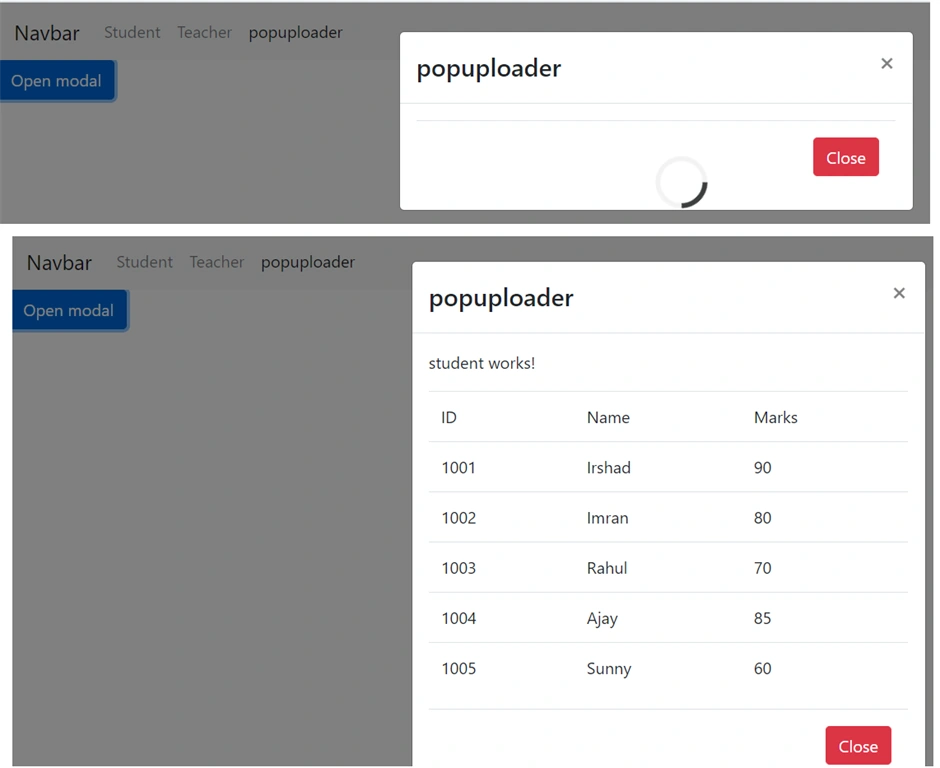
You can seen I have created one variable loading this will decide whether loading spinner should show or not.
Before loading the data into variable I set as true .then the spinner will show.
- Then I given some time to show the spinner.
- After that I set to False to hide the spinner. As I mentioned no need of timer when API. Call.
- Once API call over set it as false.
Step 6
Let's create a Model dialog with the help of Bootstrap and call the data & spinner.
- <!-- Button to Open the Modal -->
- <button type="button" class="btn btn-primary" data-toggle="modal" data-target="#myModal">
- Open modal
- </button>
- <!-- The Modal -->
- <div class="modal" id="myModal">
- <div class="modal-dialog">
- <div class="modal-content">
- <!-- Modal Header -->
- <div class="modal-header">
- <h4 class="modal-title">popuploader</h4>
- <button type="button" class="close" data-dismiss="modal">×</button>
- </div>
- <!-- Modal body -->
- <div class="modal-body">
- <div *ngIf="loading else loaded" class="loader"></div>
- <!-- Modal footer -->
- <div class="modal-footer">
- <button type="button" class="btn btn-danger" data-dismiss="modal">Close</button>
- </div>
- </div>
- </div>
- </div>
- <ng-template #loaded>
- <p>student works!</p>
- <table class="table">
- <thead>
- <td>
- ID
- </td>
- <td>
- Name
- </td>
- <td>
- Marks
- </td>
- </thead>
- <tbody>
- <tr *ngFor="let std of studentList">
- <td>{{std.id}}</td>
- <td>{{std.name}}</td>
- <td>{{std.marks}}</td>
- </tr>
- </tbody>
- </table>
- </ng-template>
In about code, we have created one button. That button will trigger the popup.
We should call the popup using the data-target attribute data-target="#myModal".
Mymodel is the id of model dialog.
In our process, I will load the spinner with the timer. In real-life cases, no timer is needed.
I have created ng template and I have loaded the data there.
- <ng-template #loaded>
- …..
- </ng-template>
I gave the name of the template as loaded.
To show the templete I have set condition as,
- <div *ngIf="loading else loaded" class="loader">
- </div>
SO if loading variable is true then the loaded template will show with loader css.
If false then loader CSS will disappear
Now type ng serve to ( use angular CLI ) run the project.
Nirmal PatraPosted Aug 11, 2021, 7:10 PM
Not working..after some time spinner went to hide without completing the backend service
Pranam BhatPosted Jul 8, 2021, 3:22 PM
Good one. Thank you for sharing!