
Introduction
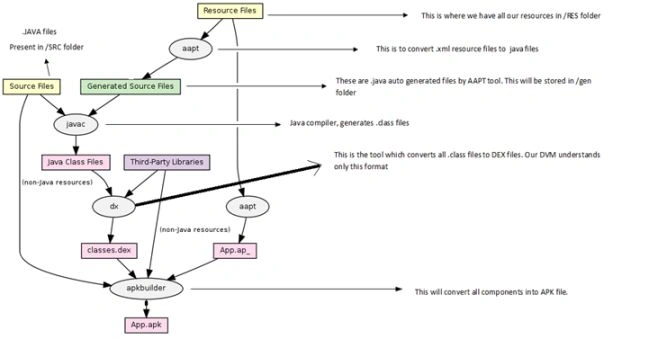
This article is an overview of how Android programs are compiled and executed. This explains what the build process of an Android application is. What are all the stages of its execution process?
Since the execution process of an Android application includes various terms like DEX, APK, dx tool, apt tool, javac and so on.. I will first try to cover various tools and terms that will be involved in compiling and building an Android application.
- .java: is the extension of a Java file of an Android application. Since Android programming is based on Java and Java syntax, we use .java as the extension of the file.
- .class: is the compiled version of a Java file. This is also called byte code. A JVM can understand and execute only .class files. All Java programs run in the JVM.
- JVM: Java Virtual Machine. This is where all Java programs (.class files) are executed.
- DVM: Dalvik Virtual Machine. This is where all Android programs run. Android programs don't run in the JVM.
Difference between JVM and DVM
- JVM was designed for Java, by keeping Desktop applications in mind. The major difference between Desktop, and mobile is that mobiles have a very limited amount of memory (RAM) and less CPU speed compared to desktops and laptops. JVM is very heavyweight and requires a lot of RAM and CPU speed to execute a program. Since mobiles can't afford that much RAM and CPU, Android needs a more optimized and lightweight version of the JVM. The DVM was created to replace the JVM. The DVM is meant for embedded devices that have less RAM and CPU speed.
- One more major difference is that the JVM is not under a free license. Whereas the DVM is under a free license (Apache license).
- The JVM is slow because it is stack-based and the DVM is register-based.
- The DVM doesn't understand .class files, whereas JVM understands .class files.
- The DVM can only understand DEX files.
- DEX: full form is the Dalvik EXecutable file. The DVM executes only DEX files. A DEX file is a compressed version of all .class files, in such a way that DEX will be loaded very quickly, takes less memory, and is executed quickly compared to .class files. A DEX file requires less memory compared to .class files.
- dx: this is the tool used to convert all .class files into a single DEX file. This tool comes with the Android SDK.
- AP: full form is an Android Application Package file. This is the final file of any Android application that can be loaded into an emulator or device for execution. You can think of it as a .exe file. If you have a .apk file for an Android application then it can be loaded into Android devices and will run.
APK file = DEX file + zipped resources + any native libraries (non-Java).
- apkbuilder: is the tool that will generate a .apk file from a DEX file + non-Java libraries + zipped resources.
- AIDL: full form is Android Interface Definition Language.
- aidl: is the tool that converts all AIDL files into .java files.
Mg KyaingPosted Jul 6, 2014, 3:10 PM
Oh i like this post because of it's so important for all of android developer.