

Introduction
This article demonstrates how to add the keys and read the value from appsettings.json file in Asp.net Core. This article starts with an introduction of the appsettings file. After that, it demonstrates how to add new keys in appsettings file and then how to read the value from appsettings through IConfigurations and IOptions extensions.
Appsettings File
In the Asp.Net Core application, we may not find the web. config file. Instead, we have a file named "appsettings.json". So to configure the settings like database connections, Mail settings, or some other custom configuration settings we will use the "appsettings.json".
The appsettings in Asp.net core have different configuration sources as shown below.
- appsettings.json file
- Environment Variable
- User Secrets
- Command Line Arguments
Add New Keys
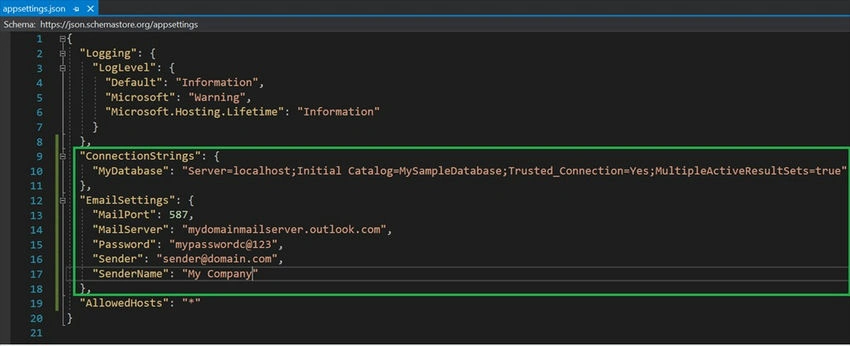
The appsettings.json file can be configured with Key and Value pair combinations. So, the Key will have single or multiple values.
{
  "ConnectionStrings": {
    "MyDatabase": "Server=localhost;Initial Catalog=MySampleDatabase;Trusted_Connection=Yes;MultipleActiveResultSets=true"
  }
}
Read Values from appsettings.json
To read the values from appsettings.json there are several ways to read. One of the simple and easy ways to read the app settings in Asp.net core is by using the IConfiguration using the namespace Microsoft.Extensions.Configuration.
In the below code, we have two methods to read the value using the IConfiguration extension. Inject the IConfiguration in the controller constructor and use the variable to get the section.
"config.GetSection("ConnectionStrings").GetSection("MyDatabase").Value" will return the value as "Server=localhost;Initial Catalog=MySampleDatabase;Trusted_Connection=Yes;MultipleActiveResultSets=true".
Similarly,
"config.GetValue<string>("ConnectionStrings:MyDatabase")" will return the value as "Server=localhost;Initial Catalog=MySampleDatabase;Trusted_Connection=Yes;MultipleActiveResultSets=true".
using Microsoft.Extensions.Configuration;

public class HomeController : Controller
{
    private readonly IConfiguration config;

    public HomeController(IConfiguration configuration)
    {
        config = configuration;
    }

    public IActionResult index()
    {
        // Method 1
        string _dbCon1 = config.GetSection("ConnectionStrings").GetSection("MyDatabase").Value;

        // Method 2
        string _dbCon2 = config.GetValue<string>("ConnectionStrings:MyDatabase");

        return View();
    }
}



Shahbaz HussainPosted May 27, 2021, 7:30 PM
Great work, It is much helpful.Keep it up.
Navaneeth KrishnanPosted Sep 24, 2020, 11:06 AM
Good one....