

After AJAX Repeater control next logical thing was to try and create paging control, a control which renders paging links when you set its properties like page count and page number, I have been using similar control in asp.net page so I decided to implement same thing with JavaScript.
This sample also uses RepeaterControl just take a quick look at this article to know how repeater control works.
What is the required from this Control?
I should be able to declare it programmatically in JavaScript code and set its templates like ItemTemplate, HeaderTemplate, FooterTemplate and SelectedItemTemplate.
Control should have properties like PageSize, PageCount and CurrentPage which defines current state of control. It should also have additional property called Step which defines how my links are to be shown in pager.
Control should have method called RenderPager which takes function as a parameter and renders itself in specified Html element defined as HostControlID.
What else is required?
As this articles deals with pager control I won't discuss more about handler which returns paged xml. Following is structure of XML.
Handler takes page number and page size as querystring parameter and returns XML shown above. To make it simple I have avoided using stored procedure and used dynamically created SQL, but you can use Row Number feature of SQLServer 2005 or stored procedure with temp table in SQLServer 2000.
We will need pagercontrol.js for displaying tabular data.
We will use prorotype.js script to get data from handler and bind to our RepeaterControl and PagerControl.
And finally we will need plain html page to put every thing together.
We will need pagercontrol.js for displaying tabular data.
We will use prorotype.js script to get data from handler and bind to our RepeaterControl and PagerControl.
And finally we will need plain html page to put every thing together.
Following three formatting expressions are used in control.
Code does following things
Default templates are already set inside Control so there is not need to define them unless you want to change display of pager.
Inside the Page
Html mark up contains three important elements.
JavaScript contains following.
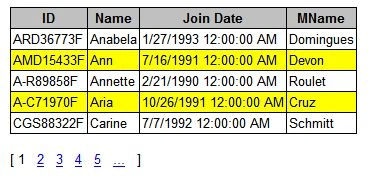
Figure 1 shows final result.
Source code contains following files.
Just drop that that source code in any directory and set up connection string in employees.ashx to your pubs database which comes with SQL Server and you are ready to go.
This was second experiment with the approach of using controls like this to render different kind of data with JavaScript. Let me know your ideas about make any changes or suggestion about any other control like this.<EmployeesData>
<Employees>
<Employee ID="PSA89086M" >
<HireDate>12/24/1990 12:00:00 AM</HireDate>
<Name>Pedro</Name>
<LastName>Afonso</LastName>
</Employee>
....
</Employees>
<PagerData CurrentPage="5" PageSize="10" PageCount="5" ></PagerData>}
</EmployeesData>Inside JavaScript PagerControl.
Source Code and How to run sample on your machine.
End Notes.
ManjunathPosted Aug 19, 2012, 3:05 AM
Thanks a lot
Park RobinPosted Jan 3, 2010, 9:39 PM
think.
danny droreditedPosted Nov 23, 2009, 3:55 AMEdited Jan 16, 2013, 5:25 AM
very interesting... I was also wondering how to add this style<br>would be happy for an answer.<br>thanks again.<br><br>------------------------------------<br>Danny
nicholas mooketsiPosted Nov 27, 2008, 5:06 AM
is there a way i could add style to pagerControl, espically on the page number and the next,back button.