

Introduction
This article explains how to add an aggregate function in dynamic pivot in a single table without creating temporary tables.
What is pivot?
PIVOT and UNPIVOT relational operators change a table-valued expression into another table. Pivot is changing your normal row-based table to column based table.
What is CTE?
Specifies a temporarily named result set, known as a common table expression (CTE). This is derived from a simple query and defined within the execution scope of a single SELECT, INSERT, UPDATE, or DELETE statement.
In this article, we insert data to student_Register table like Stud_id, Att_Date, Present, and get student registration data with total days and days present.
Create student_Register table
First create student_Register table with columns Stud_id, Att_Date, Present. This table is for inserting everyday student attendance records with respective student id and date. But we need a data for showing each day present with total days working and total days present for the student (Stud_id).
- use master
- IF OBJECT_ID (N'dbo.student_Register') IS NOT NULL
- drop table [student_Register]
- create table [student_Register]
- (
- ID int not null unique identity(1,1),
- Stud_id int not null ,
- ATT_DATE varchar(50) not null,
- PRESENT int not null
- )
Insert sample records to student_Register Table
- insert into student_Register
- select 1, '01-08-2015', 1 union all
- select 2, '01-08-2015', 0 union all
- select 3, '01-08-2015', 0 union all
- select 1, '02-08-2015', 0 union all
- select 2, '02-08-2015', 0 union all
- select 3, '02-08-2015', 1 union all
- select 1, '03-08-2015', 1 union all
- select 2, '03-08-2015', 0 union all
- select 3, '03-08-2015', 0 union all
- select 1, '04-08-2015', 0 union all
- select 2, '04-08-2015', 0 union all
- select 3, '04-08-2015', 1 UNION ALL
- select 1, '05-08-2015', 1 union all
- select 2, '05-08-2015', 0 union all
- select 3, '05-08-2015', 0
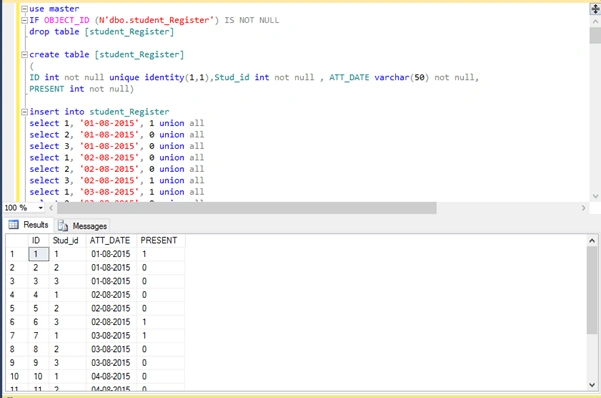
Figure 1: Create a table and insert the sample data
Query for GET Column (ATT_DATE) Value In single String
Parse the unique comma separated string values of ATT_DATE using STUFF and XML PATH(''). We can use XmlPath('') to concatenate column data into a single row. Use ‘,’ to add value to the end of each column. QUOTENAME accepts a String as input and returns a string of a valid delimited identifier ’01-08-2015’ to [01-08-2015].
- DECLARE @cols AS NVARCHAR(MAX)
- DECLARE @query AS NVARCHAR(MAX)
- DECLARE @CteWithAgFn AS NVARCHAR(MAX)
- DECLARE @SEPERATOR as VARCHAR(1)
- DECLARE @SP INT
- DECLARE @VALUE VARCHAR(MAX)
- DECLARE @INSTR VARCHAR(MAX)
- DECLARE @ORGSTR VARCHAR(MAX)
- DECLARE @COLSREV VARCHAR(MAX)
- SET @SEPERATOR = ','
- SET @COLSREV = ''
- SET @ORGSTR = STUFF((SELECT distinct ',' + QUOTENAME([ATT_DATE])
- FROM dbo.student_Register
- FOR XML PATH(''), TYPE
- ).value('.', 'NVARCHAR(MAX)')
- ,1,1,'')
- SET @INSTR = ''+@ORGSTR +','
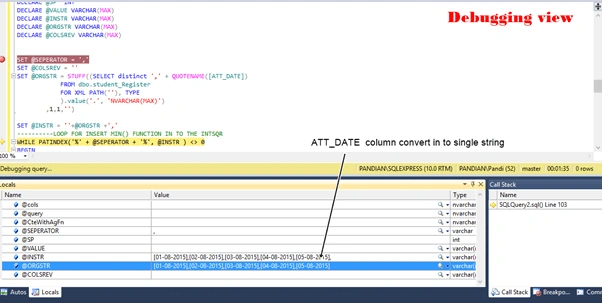
Figure 2:ATT_DATE column to a single string
Insert aggregate function (min ()) to each column value using while loop
This is an important step. Here, we will add min() function to each date using PATINDEX, and while loop.
- Step 1 - Looping date String (@INSTR) use patindex comma separated.
- Step 2 - Take the first set of date string using LEFT(@INSTR , @SP – 1)
- Step 3 - Add min() function to first step and save this first step in @COLSREV.
- Step 4 - Remove first step use STUFF(), loop is continue until end date.
- ----------LOOP FOR INSERT MIN() FUNCTION IN TO THE INSTR
- WHILE PATINDEX('%' + @SEPERATOR + '%', @INSTR ) <> 0
- BEGIN
- SELECT @SP = PATINDEX('%' + @SEPERATOR + '%',@INSTR) --LENGTH OF FIRST STRING SET INCLUDE COMMA
- SELECT @COLS = LEFT(@INSTR , @SP - 1) -- TAKE FIRST SET
- SET @COLS = 'min('+@COLS+') AS '+@COLS+''; --ADD FUN IN FIRST SET
- SELECT @INSTR = STUFF(@INSTR, 1, @SP, '') -- REMOVE FIRST SET STRING FROM @INSTR
- SET @COLSREV +=''+@COLS+','
- END ----LOOP END
- set @COLSREV = STUFF(@COLSREV,LEN(@COLSREV),1,'')
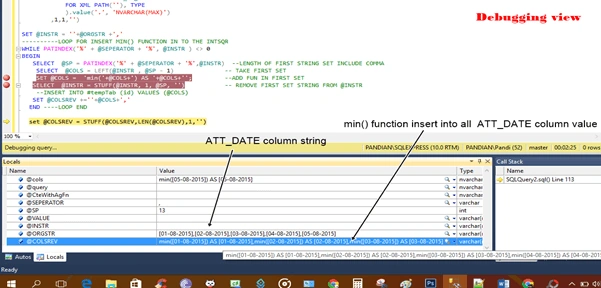
Figure 3: insert aggregate function to a column value
Make dynamic pivot with aggregate functions
Insert date string with aggregate function (@COLSREV) to pivot, finally, we get single SQL command string is @query.
- set @query = ‘SELECT Stud_id, ‘+@COLSREV+’ from( select * from student_Register )
- x
- pivot
- (
- min([PRESENT])
- for [ATT_DATE] in (‘+@ORGSTR+’)
- ) As p group by [Stud_id] ‘
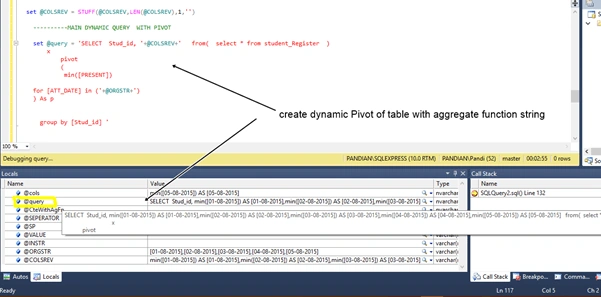
Figure 4: Dynamic pivot
Create Common Table Expression with dynamic pivot query
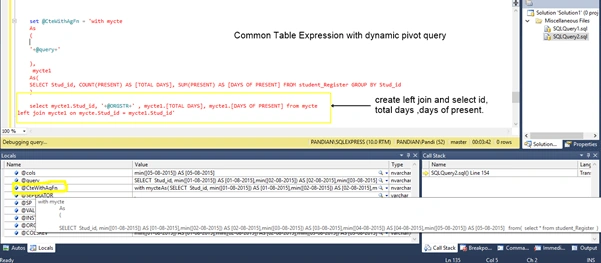
Create CTE for dynamic pivot query (@query) and select columns. We need to show Stud_id, Att_Dates ( from @ORGSTR), total days, days of the present.
- set @CteWithAgFn = 'with mycte
- As
- (
- '+@query+'
- ),
- mycte1
- As(
- SELECT Stud_id, COUNT(PRESENT) AS [TOTAL DAYS], SUM(PRESENT) AS [DAYS OF PRESENT] FROM student_Register GROUP BY Stud_id
- )
- select mycte1.Stud_id, '+@ORGSTR+' , mycte1.[TOTAL DAYS], mycte1.[DAYS OF PRESENT] from mycte
- left join mycte1 on mycte.Stud_id = mycte1.Stud_id'
Execute the dynamic query using sp_executesql
sp_executesql - Executes a SQL statement or batch that can be reused many times or one that has been built dynamically.
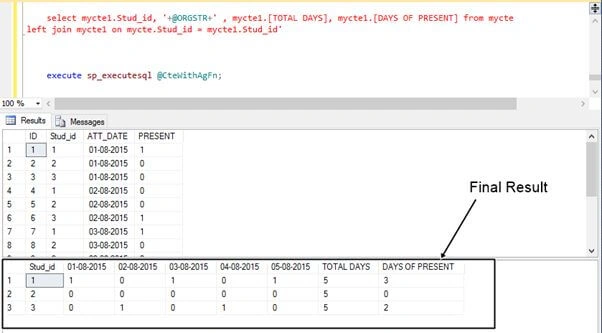
Here, we execute a full dynamic pivot with cte function commands using sp_executesql.
- execute sp_executesql @CteWithAgFn;
For more about dynamic SQL commands.
Summary
In this article, we learned how to create a dynamic pivot with aggregate functions without using tempTable. Also, we learned the usage and purpose of dynamic SQL commands.
maha lakshmiPosted Aug 8, 2018, 1:39 PM
Nice one..