

Now, I will show you how we can add searching functionality into our application. You have to read Details and User Picture in MVC 5 before starting. We will simply add a search box into our index page of <Views\User\Index> folder, so that we can be able to search for a specific person. Then, we will try to customize the way we see our user details page.
Searching
Searching
- Download the source code from the above link and use it.
- Go to the Controllers folder and find UsersController.
- Replace the Index ActionResult with this piece of code.
Note that I am searching by location. You can search by other factors too.- public ActionResult Index(string searchString)
- {
- var users = from u in db.Users
- select u;
- if (!String.IsNullOrEmpty(searchString))
- {
- users = users.Where(s => s.Location.Contains(searchString));
- }
- return View(users);
- }
- Go to <Views\Users\Index> and add this code.Yeah! That's it. We have finished with the search. Here is the Result.
- @using (Html.BeginForm())
- {
- @Html.ActionLink("Create Profile", "Create", "Users")
- <p>
- Enter any location
- <div class="col-sm-3 col-md-3 pull-left">
- <div class="input-group">
- <input type="text" class="form-control" placeholder="Search" name="searchString">
- <div class="input-group-btn">
- <button class="btn btn-default" type="submit"><i class="glyphicon glyphicon-search"></i></button>
- </div>
- </div>
- </div>
- </p>
- }
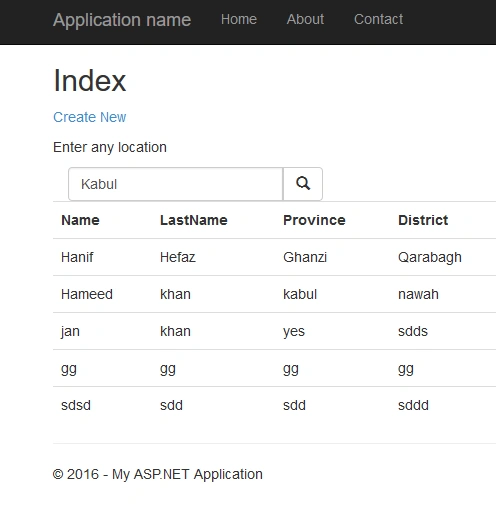
Now, we are going to customize our details page. It looks like this now.
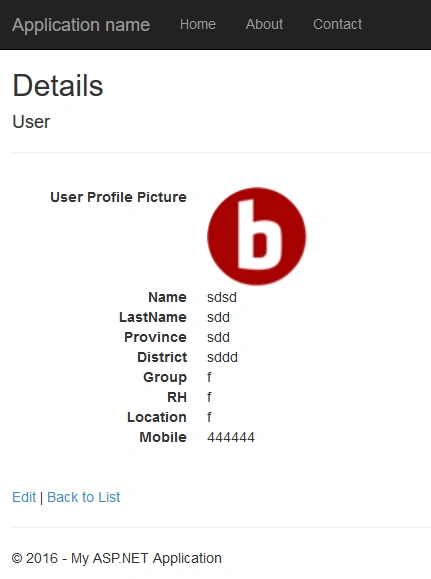
First, we have to add this piece of code to the details.chtml located in the <Views\Users\Details>. Next, we have to do something with CSS for animating.
- @model CRUDwithPic.Models.User
- @{
- ViewBag.Title = "Details";
- }
- <h2>Details</h2>
- <link rel="stylesheet" type="text/css" href="~/Content/Site.css" />
- <div>
- <h4>User</h4>
- <hr />
- <div class="container">
- <div class="row">
- <div class="col-md-4">
- <div class="form_hover" style="background-color:seagreen;
- <p style=" text-align center; margin-top 20px;">
- <i class="glyphicon glyphicon-ok-sign" style="font-size: 130px;"></i>
- </p>
- <div class="header" style="background-color:#cfcfcf;">
- <div class="blur"></div>
- <div class="header-text">
- <div class="panel panel-success" style="background-color:seagreen;height:120px;width:400px;">
- <div class="panel-heading" style="background-color:gray;">
- <h4 style="color: #fff;">Complete Details <i class="glyphicon glyphicon-circle-arrow-up"></i></h4>
- </div>
- <div class="panel-body">
- <dl class="dl-horizontal">
- @if (Model.Files.Any(f => f.FileType == CRUDwithPic.Models.FileType.Avatar))
- {
- <dt>
- User Profile Picture
- </dt>
- <dd>
- <img src="~/[email protected](f => f.FileType == CRUDwithPic.Models.FileType.Avatar).FileId" alt="avatar" class="img-circle" height="100" width="100" />
- </dd>
- }
- <dt>
- @Html.DisplayNameFor(model => model.Name)
- </dt>
- <dd>
- @Html.DisplayFor(model => model.Name)
- </dd>
- <dt>
- @Html.DisplayNameFor(model => model.LastName)
- </dt>
- <dd>
- @Html.DisplayFor(model => model.LastName)
- </dd>
- <dt>
- @Html.DisplayNameFor(model => model.Province)
- </dt>
- <dd>
- @Html.DisplayFor(model => model.Province)
- </dd>
- <dt>
- @Html.DisplayNameFor(model => model.District)
- </dt>
- <dd>
- @Html.DisplayFor(model => model.District)
- </dd>
- <dt>
- @Html.DisplayNameFor(model => model.Group)
- </dt>
- <dd>
- @Html.DisplayFor(model => model.Group)
- </dd>
- <dt>
- @Html.DisplayNameFor(model => model.RH)
- </dt>
- <dd>
- @Html.DisplayFor(model => model.RH)
- </dd>
- <dt>
- @Html.DisplayNameFor(model => model.Location)
- </dt>
- <dd>
- @Html.DisplayFor(model => model.Location)
- </dd>
- <dt>
- @Html.DisplayNameFor(model => model.Mobile)
- </dt>
- <dd>
- @Html.DisplayFor(model => model.Mobile)
- </dd>
- </dl>
- </div>
- </div>
- </div>
- </div>
- </div>
- </div>
- </div>
- </div>
- </div>
- <br />
- <p>
- @Html.ActionLink("Edit", "Edit", new { id = Model.ID }) |
- @Html.ActionLink("Back to List", "Index")
- </p>
Now, insert this to your site.css located at <content\site.css>.
- .form_hover {
- padding: 0px;
- position: relative;
- overflow: hidden;
- height: 360px;
- }
- .form_hover:hover .header {
- opacity: 1;
- transform: translateY(-172px);
- -webkit-transform: translateY(-172px);
- -moz-transform: translateY(-172px);
- -ms-transform: translateY(-172px);
- -o-transform: translateY(-172px);
- }
- .form_hover img {
- z-index: 4;
- }
- .form_hover .header {
- position: absolute;
- top: 170px;
- -webkit-transition: all 0.3s ease;
- -moz-transition: all 0.3s ease;
- -o-transition: all 0.3s ease;
- -ms-transition: all 0.3s ease;
- transition: all 0.3s ease;
- width: 100%;
- }
- .form_hover .blur {
- height: 240px;
- z-index: 5;
- position: absolute;
- width: 100%;
- }
- .form_hover .caption-text {
- z-index: 10;
- color: #fff;
- position: absolute;
- height: 240px;
- text-align: center;
- top: -20px;
- width: 100%;
- }
Prasanna MuraliPosted Aug 22, 2016, 10:19 AM
Nice one....
Ramesh PalaniappanPosted Aug 22, 2016, 1:52 AM
Good One