
In this article we will to learn how to programmatically insert items into a SharePoint list using C#. Here, I am writing the code in a console application.
Step 1: Go to File, New, Project, Templates, then Visual C#, Windows and select the Console Application,
You will get the Project structure like below and open the Program.cs file.
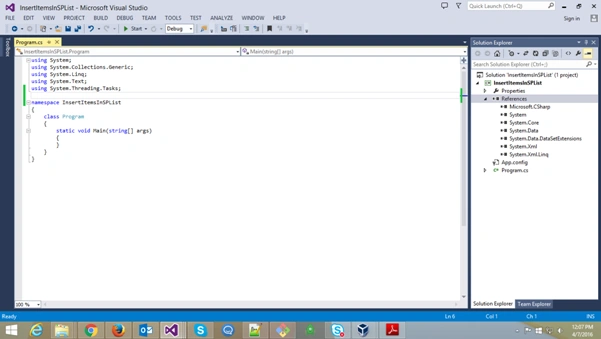
Step 2: Go to Solution Explorer, select ‘References’, then right click and add the following references,
‘Microsoft.SharePoint.Client’, ‘System.Security’, ‘Microsoft.SharePoint.Client.Runtime’. Will see the use of these later in this article.
a) Refer the namespaces in the code at the namespace list at the starting of the program.
- using Microsoft.SharePoint.Client;
- using System.Security;
Step 3: Now let’s start the implementation
a) To insert a list item from console we first need to connect with the SharePoint site. For that we need valid login and secure password.
- string login = "[email protected]"; //give your username here
- string password = "P@ssw0rd"; //give your password
- var securePassword = new SecureString();
- foreach(char c in password)
- {
- securePassword.AppendChar(c);
- }
2. The value of the SecureString is automatically encrypted when the instance is initialized. Note: Can also instantiate it like,
- SecureString securePassword = new SecureString();)
- string siteUrl = "https://listdemo.sharepoint.com/sites/mysite";
- ClientContext clientContext = new ClientContext(siteUrl);
c) Start getting list and creating list item objects,
1. Get the list from web called "myproducts",
- Microsoft.SharePoint.Client.ListmyList= clientContext.Web.Lists.GetByTitle("myproducts");
- ListItem CreationInformationitemInfo = newListItemCreationInformation();
- ListItem myItem = myList.AddItem(itemInfo);
- myItem["Title"] = "New Item";
- myItem["Description"] = "Item Description";
- myItem.Update();
- var onlineCredentials = new SharePointOnlineCredentials(login, securePassword);
- clientContext.Credentials = onlineCredentials;
- clientContext.ExecuteQuery();
Step 4: Here's the complete code,
- using System;
- using System.Collections.Generic;
- using System.Linq;
- using System.Text;
- using System.Threading.Tasks;
- using Microsoft.SharePoint.Client;
- using System.Security;
- namespace InsertItemsInSPList
- {
- class Program
- {
- static void Main(string[] args)
- {
- string login = "[email protected]"; //give your username here
- string password = "givepasswordhere"; //give your password
- var securePassword = newSecureString();
- foreach(char c in password)
- {
- securePassword.AppendChar(c);
- }
- string siteUrl = "https://listdemo.sharepoint.com/sites/mysite";
- ClientContextclientContext = new ClientContext(siteUrl);
- Microsoft.SharePoint.Client.ListmyList = clientContext.Web.Lists.GetByTitle("myproducts");
- ListItemCreationInformationitemInfo = newListItemCreationInformation();
- ListItemmyItem = myList.AddItem(itemInfo);
- myItem["Title"] = "My New Item";
- myItem["Description"] = "New Item Description";
- try {
- myItem.Update();
- var onlineCredentials = newSharePointOnlineCredentials(login, securePassword);
- clientContext.Credentials = onlineCredentials;
- clientContext.ExecuteQuery();
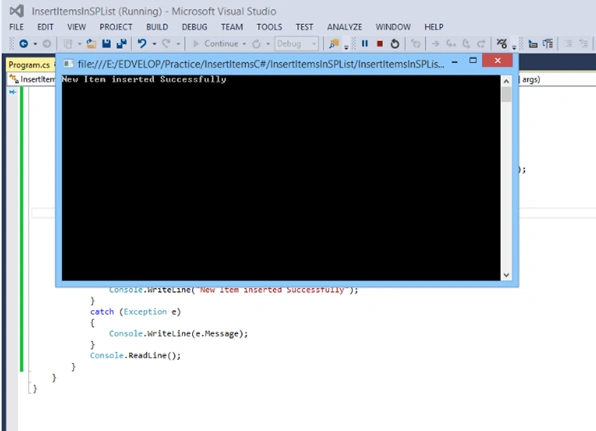
- Console.WriteLine("New Item inserted Successfully");
- } catch (Exception e)
- {
- Console.WriteLine(e.Message);
- }
- Console.ReadLine();
- }
- }
- }
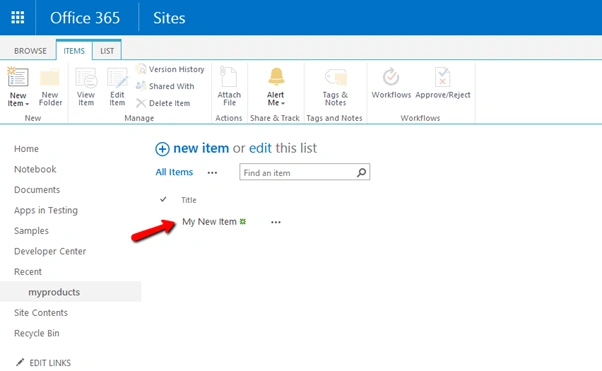
Step 6:Open the SharePoint list and check the new item,
Read more articles on SharePoint:
KhwaNyoPosted Jul 10, 2023, 7:52 AM
I used this code to add item list in the share point. it throw error message The remote server returned an error: (401) Unauthorized.
Mohammad AljundePosted Aug 23, 2020, 9:25 AM
Thank you very much
Alejandro FornarisPosted Jun 29, 2018, 9:14 AM
Good but what happen, if my column is selection type.???
Humayun Kabir MamunPosted Apr 11, 2016, 3:51 AM
Nice...
Rajitha AlluriPosted Apr 11, 2016, 1:40 AM
Thanks Everyone..
Debasis SahaPosted Apr 9, 2016, 2:04 AM
Good share..
Mohammed IbrahimPosted Apr 8, 2016, 2:24 PM
nice
Rahul Kumar SaxenaPosted Apr 8, 2016, 7:44 AM
Good Show