

Overview
I have discussed how to add a fragment statically in my last article. To start the development of Android Applications, some useful links are given below:
- Android Programming - Day One
- Android Programming - Day Two
- How To Display A Dialog Windows In Android
- How To Display A Progress Dialog Window In Android
- Intent In Android
- Return Data Using Intent Object In Android Applications
- Passing Data Using An Intent Object In Android Applications
- Fragments In Android Applications
Introduction
- package com.example.administrator.myfragmentapp;
- import android.app.FragmentManager;
- import android.app.FragmentTransaction;
- import android.support.v7.app.ActionBarActivity;
- import android.os.Bundle;
- import android.view.Display;
- import android.view.Menu;
- import android.view.MenuItem;
- import android.view.WindowManager;
- public class MainActivity extends ActionBarActivity
- {
- @Override
- protected void onCreate(Bundle savedInstanceState)
- {
- super.onCreate(savedInstanceState);
- //setContentView(R.layout.activity_main);
- FragmentManager fragmentManager = getFragmentManager();
- FragmentTransaction fragmentTransaction = fragmentManager.beginTransaction();
- //get the current device information
- WindowManager windowManager = getWindowManager();
- Display display = windowManager.getDefaultDisplay();
- if (display.getWidth() > display.getHeight()) {
- //This is landscape mode
- Fragment1Activity fragment1Activity1 = new Fragment1Activity();
- //android.R.id.content refers to the content view of the activity
- fragmentTransaction.replace(android.R.id.content, fragment1Activity1);
- } else {
- //This is portrait mode
- Fragment2Activity fragment2Activity = new Fragment2Activity();
- fragmentTransaction.replace(android.R.id.content, fragment2Activity);
- }
- fragmentTransaction.commit();
- }
- @Override
- public boolean onCreateOptionsMenu(Menu menu) {
- // Inflate the menu; this adds items to the action bar if it is present.
- getMenuInflater().inflate(R.menu.menu_main, menu);
- return true;
- }
- @Override
- public boolean onOptionsItemSelected(MenuItem item) {
- // Handle action bar item clicks here. The action bar will
- // automatically handle clicks on the Home/Up button, so long
- // as you specify a parent activity in AndroidManifest.xml.
- int id = item.getItemId();
- //noinspection SimplifiableIfStatement
- if (id == R.id.action_settings) {
- return true;
- }
- return super.onOptionsItemSelected(item);
- }
- }
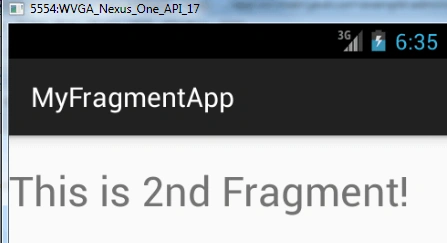
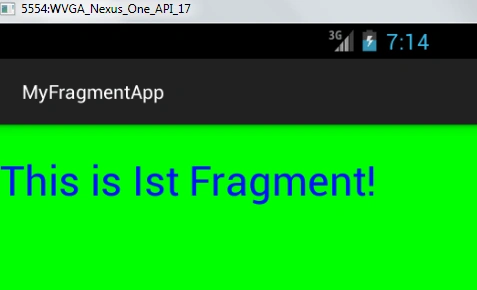
- FragmentManager fragmentManager=getFragmentManager();
- FragmentTransaction fragmentTransaction=fragmentManager.beginTransaction();
- //This is landscape mode
- Fragment1Activity fragment1Activity1 = new Fragment1Activity();
- //android.R.id.content refers to the content view of the activity
- fragmentTransaction.replace(android.R.id.content, fragment1Activity1);
Vignesh ManiPosted Aug 2, 2016, 5:42 AM
Nice
kalu singh raoPosted Aug 2, 2016, 1:37 AM
Nice share