
It is a fairly common programming scenario to find ourselves with a list of identical objects. In the past, without adequate support from programming languages, we found ourselves writing a lot of searching and sorting code, and that may have put you off using lists in favor of arrays. All that has changed with C# (particularly 2.0) - its implementation of a list makes handling such lists remarkably easy.
For example, given the following class Person:
public class Person
{
    public int age;
    public string name;
    public Person(int age, string name)
    {
        this.age = age;
        this.name = name;
    }
}
We can create a list of Person objects and add six people like so:
List<person>people =new List<person>();

people.Add(new Person(50, "Fred"));
people.Add(new Person(30, "John"));
people.Add(new Person(26, "Andrew"));
people.Add(new Person(24, "Xavier"));
people.Add(new Person(5, "Mark"));
people.Add(new Person(6, "Cameron"));
C#'s list mechanism provides us with a number of useful methods. Personally, I find ForEach, FindAll and Sort to be very useful. ForEach allows us access to each item in the list. FindAll allows us to search for objects in the list that match a specific condition. Sort allows us to sort the objects in the list. The following code demonstrates how we might use each of these methods:
Console.WriteLine("Unsorted list");
Console.WriteLine("--------------");
people.ForEach(delegate(Person p) {
    Console.WriteLine(String.Format("{0} {1}", p.age, p.name));
});
// Find the young
List < Person > young = people.FindAll(delegate(Person p) {
    return p.age < 25;
});
Console.WriteLine("Age is less than 25");
Console.WriteLine("-------------------");
young.ForEach(delegate(Person p) {
    Console.WriteLine(String.Format("{0} {1}", p.age, p.name));
});

// Sort by name
Console.WriteLine("Sorted list, by name");
Console.WriteLine("---------------------");
people.Sort(delegate(Person p1, Person p2) {
    return p1.name.CompareTo(p2.name);
});

people.ForEach(delegate(Person p) {
    Console.WriteLine(String.Format("{0} {1}", p.age, p.name));
});

// Sort by age
Console.WriteLine("Sorted list, by age");
Console.WriteLine("-------------------");
people.Sort(delegate(Person p1, Person p2) {
    return p1.age.CompareTo(p2.age);
});

people.ForEach(delegate(Person p) {
    Console.WriteLine(String.Format("{0} {1}", p.age, p.name));
});
And here is the output that we should expect:
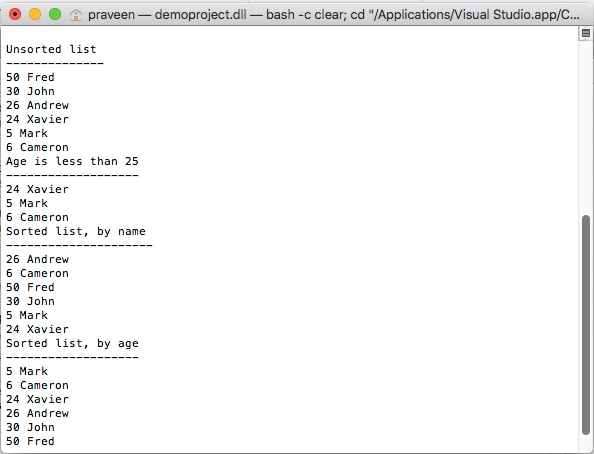
Lists are powerful and result in fewer, and more elegant, lines of code. Hopefully, this short example has demonstrated their ease and you will find yourself using them in your day-to-day development activities.
More related articles
Ramesh PalaniappanPosted Sep 10, 2016, 9:43 AM
Good one
Abhishek YadavPosted Aug 19, 2013, 4:35 AM
thanks !!! Really Nice article....
Brenda GillcristPosted Apr 4, 2012, 1:08 PM
In File1 I have created a class with 3 member strings. I also created a public class to hold an arraylist. I want this arraylist of the class SensorCollection to be dynamic (and public) public class SensorCollection { public string ipAddress; public string portNumber; public string physicalLocation; public System.Collections.ArrayList Sensors = new System.Collections.ArrayList(); public SensorCollection(string ipAddr, string portNum, string loc) { this.ipAddress = ipAddr; this.portNumber = portNum; this.physicalLocation = loc; } } public class Sensor { public System.Collections.ArrayList SensorArrayList; } I access the arraylist: System.Collections.ArrayList SensorArrayList = new System.Collections.ArrayList(); SensorArrayList.Add(new SensorCollection(ipAddress, portNum, str)); } This all works fine but I can not access the arraylist in File2. How do I correctly make this arraylist public and access the members?
gkreddy reddyPosted Feb 5, 2012, 9:50 AM
thanks
Akash AhlawatPosted Nov 29, 2011, 11:14 PM
Thanks Craig for such a useful article.
Vikas MishraPosted Nov 29, 2011, 12:19 PM
Thanks Craig for sharing this article ,it really help me to understand the use of c# list.
Deepak DwijPosted Nov 29, 2011, 12:13 PM
Good one Craig ! nice way to wrap up the concept of List in C#
David MorenoPosted Feb 4, 2011, 1:54 PM
Hi Craig, nice article. This has really helped me out. How would I go about doing a binarysearch on your sortedlist. Say I was trying to find the index of "Fred" in your sorted list. Thanks.
Mahesh ChandPosted Jan 28, 2011, 10:50 AM
Thanks for sharing Craig.
DavidPosted Jun 9, 2010, 12:55 AM
Thanks for the helpfull article
warren phuangPosted Apr 27, 2009, 4:40 AM
Hi there, Is there possible to point this List to a specific session? like the Session["Username"]? i would like to use this method in a Cart System Email: [email protected]
Andre CarvalhoPosted Mar 23, 2007, 3:51 PM
i'd like to use a 'type' variable for the parameter of a list. How do i do that?
colin fitzgeraldPosted Jan 24, 2007, 10:38 AM
How do we specifiy these for C# List Object? Thanks much!! -colin