

Introduction
Hello friends!
In today’s article, I’m going to walk you through a very useful feature in Microsoft Copilot Studio—how to add SharePoint site content as a knowledge source to your custom Copilot. If you're working on enterprise bots or internal tools for your organization, integrating SharePoint knowledge can save a lot of time for both users and admins.
Let’s get started step-by-step, with no rocket science involved.
Why Add SharePoint to Your Copilot?
In many companies, SharePoint is the central hub for documents, policies, FAQs, and team knowledge. By linking your SharePoint site with Copilot Studio, you can,
- Allow the bot to answer questions based on SharePoint content.
- Reduce dependency on static FAQs or manual inputs.
- Make the bot smarter with minimal effort.
This is very helpful especially for internal HR bots, IT helpdesks, or onboarding assistants.
Prerequisites
Before we jump into the steps, make sure you have,
- Access to Copilot Studio (Power Virtual Agents interface).
- Permission to the SharePoint site you're planning to connect.
- A SharePoint Online URL (modern site, not classic).
- Admin or maker access to the Copilot environment.
Step-by-Step Guide
Step 1. Open Your Custom Copilot.
Go to https://copilotstudio.microsoft.com
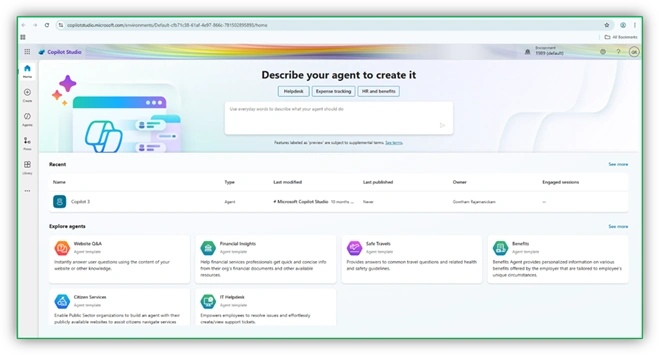
Select your existing custom Copilot or create a new one.
Click on your bot, and go to the Knowledge Source section.
Step 2. Add a Knowledge Source.
On the left panel, click Knowledge → Add knowledge source.
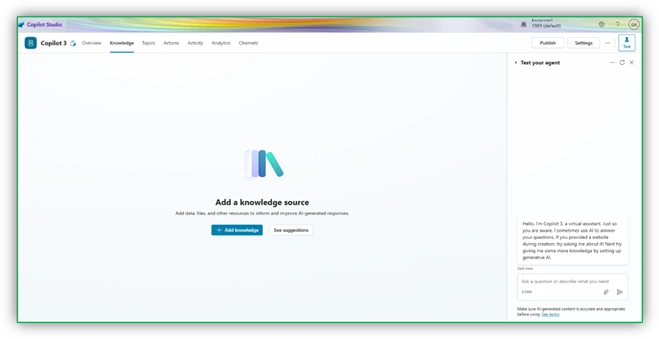
Choose SharePoint from the list of source types.
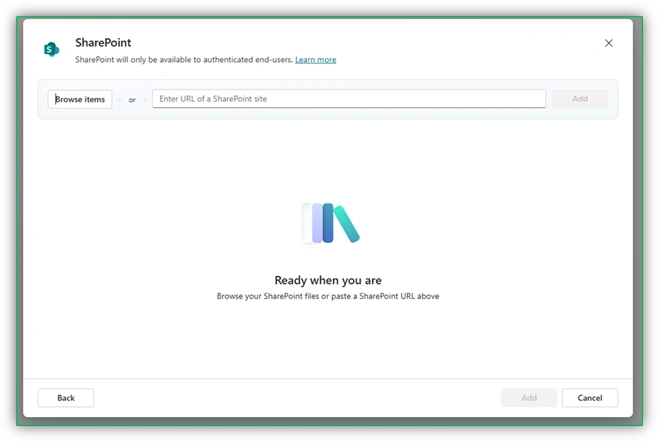
Step 3. Provide the SharePoint URL.
- Enter your SharePoint site URL (e.g., https://fortunestrikes.sharepoint.com/DemoSubsite/webpart1/Shared%20Documents)
- Browse the SharePoint list/libraires.
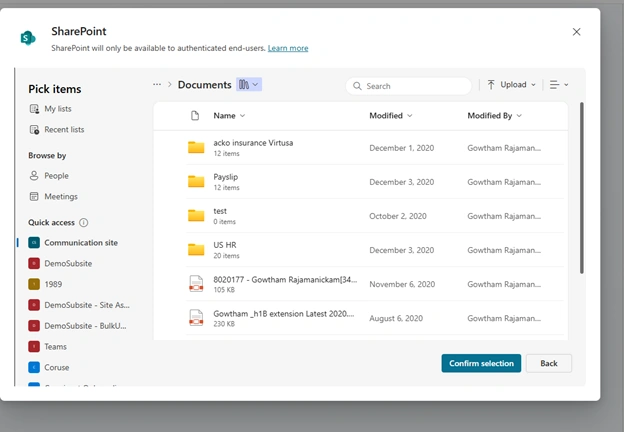
Copilot will now try to crawl and read the available content like pages, documents, and lists.
Pro Tip: Only content that is publicly viewable to your organization's users (or to you) will be accessible.
Step 4. Index and Test the Content.
- Once added, the bot will begin indexing the content. This can take a few minutes.
- After indexing, you can go to the Test your bot panel and try asking questions like:
- “What is the leave policy?”
- “Where can I download the employee handbook?”
If those answers are found on your SharePoint site, the bot will fetch them smartly using generative AI!
Common Use Cases
Here are a few practical examples where this setup helps.
- HR Bot: Fetches leave policy, holiday list, or onboarding guides.
- IT Helpdesk: Answers “How to reset password” or “VPN setup steps.”
- Project Portal Assistant: Shares team pages or sprint goals from SharePoint.
Pro Tips & Gotchas
- Always make sure the SharePoint content is structured and up to date.
- Avoid adding too many sources at once. Start small and test.
- Use custom topics in combination with knowledge sources for a better experience.
Conclusion
Adding SharePoint knowledge to your custom Copilot is like giving you bot access to your office library. It makes the bot smarter, and more useful and reduces manual effort in keeping the bot up to date.
I hope you found this article helpful. Let me know in the comments if you’ve tried this, or if you got stuck anywhere—I’ll try to help!
Until next time, happy bot building with Copilot Studio!
Join the conversation! Your thoughts help the community grow.