

This article describes how to add a search box in the Web API. Here we search the data by the year.
The following is the procedure for creating the application.
Step 1
Create a Web API application.
- Start Visual Studio 2012.
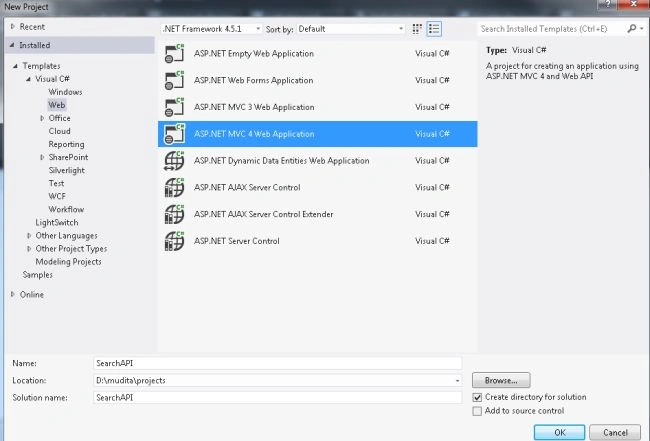
- From the start window Select "Installed" -> "Visual C#" -> "Web".
- Select "ASP.NET MVC4 Web Application" and click on the "Ok"button.
- From the "MVC4 Project" window select "Web API".
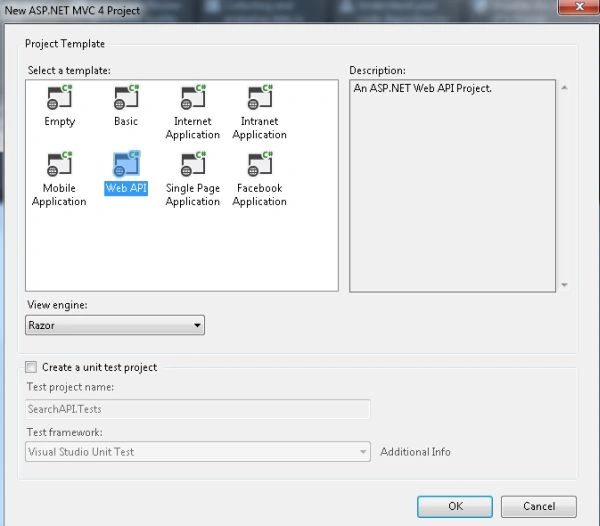
- Click on the "OK" button.
Step 2
Create a Model Class using the following procedure:
- In the "Solution Explorer".
- Right-click on the Model Folder.
- Select "Add" -> "Class".
- Select "Installed" -> "Visual C#" and select class.
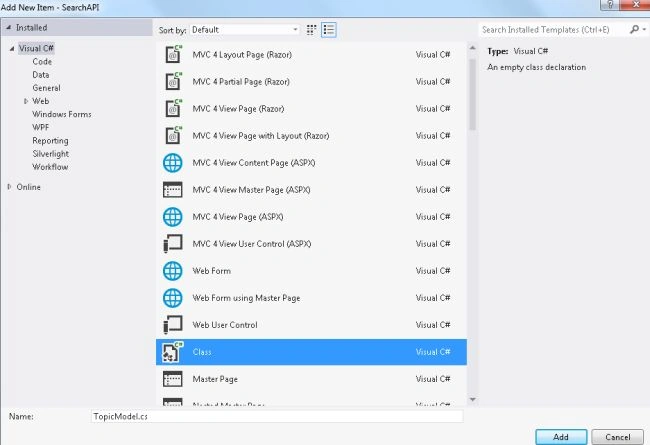
- Click on the "Add" button
Add the following code:
- using System;
- using System.Collections.Generic;
- using System.Linq;
- using System.Web;
- namespace SearchAPI.Models
- {
- public class TopicModel
- {
- private string moviename;
- public string MovieName
- {
- get { return moviename; }
- set { moviename = value; }
- }
- private int year;
- public int Year
- {
- get { return year; }
- set { year = value; }
- }
- }
- }
Step 3
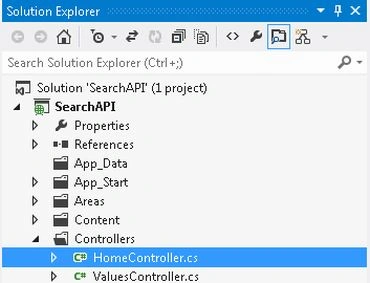
Now select the "HomeController".
- In the "Solution Explorer".
- Expand the Controller folder.
- Select the "HomeController".
Add the following Code:
- using System;
- using System.Collections.Generic;
- using System.Linq;
- using System.Web;
- using System.Web.Mvc;
- using SearchAPI.Models;
- namespace SearchAPI.Controllers
- {
- public class HomeController : Controller
- {
- public ActionResult Index(string value)
- {
- List<TopicModel> HorrorMovie = new List<TopicModel>
- {
- new TopicModel(){ MovieName="Atma", Year=2013},
- new TopicModel(){ MovieName="HorrerStory", Year=2013},
- new TopicModel(){ MovieName="1920", Year=2008},
- new TopicModel(){ MovieName="Veerana", Year=1988},
- new TopicModel(){ MovieName="Darna Mana hai", Year=2003},
- new TopicModel(){ MovieName="Raaz", Year=2002},
- new TopicModel(){ MovieName="Razz3", Year=2012},
- new TopicModel(){ MovieName="Haunted", Year=2011},
- new TopicModel(){ MovieName="Bhoot", Year=2003},
- };
- var title = HorrorMovie.Where(x => x.Year == (Convert.ToInt32(value)) || value == null).ToList();
- if (Request.IsAjaxRequest())
- {
- return PartialView("Detail", title);
- }
- return View(title);
- }
- }
- }
Step 4
Now write some HTML code in the "index.cshtml" file. This file exists:
-
In the "Solution Explorer".
-
Expand "Views" folder.
-
Select "Home" -> "index.cshtml".

Add the following Code:
- @model IEnumerable<SearchAPI.Models.TopicModel>
- <h3>
- Search movie by year</h3>
- @using (Ajax.BeginForm("Index", "Home", new AjaxOptions { HttpMethod = "GET", UpdateTargetId ="AllMovie" }))
- {
- <input id="SearchBox" type="text" name="value" />
- <input id="submit" type="submit" name="Search"/>
- }
- <div id="AllMovie">
- @Html.Partial("Detail", Model)
- </div>
Step 5
Add an another View:
-
In the HomeController.
-
Right-click on the "Index" Action method.
-
Select "Add View" and change the name to "Detail".
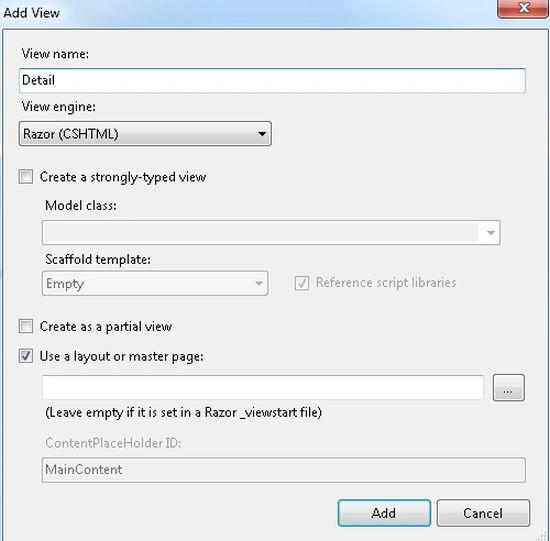
Click on the "Add" button.
Add the following code:
- @{
- ViewBag.Title = "Detail";
- }
- <h2> List of Horror Movie</h2>
- @model IEnumerable<SearchAPI.Models.TopicModel>
- <table>
- <tr>
- <th>Movie Name</th>
- <th>Released Year</th>
- </tr>
- @foreach (var m in Model) {
- <tr>
- <td>
- @Html.Encode(m.MovieName)
- </td>
- <td>
- @Html.Encode(m.Year)
- </td>
- </tr>
- }
- </table>
Step 6
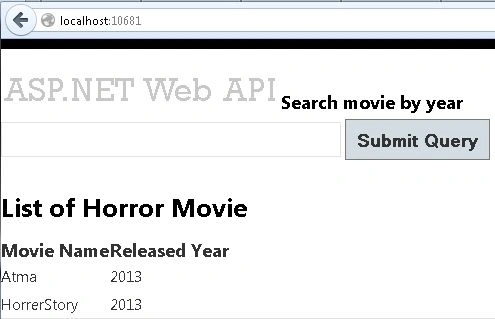
Execute the application.

Provide a year for searching the data.
Join the conversation! Your thoughts help the community grow.