

In this post I am going to explain how to access service using different contract. Before entering into this concept, we should know the following two things:
What is contract
The contract is nothing, it provide the information about the services and data available in the WCF service to the outside world or the client.
What is service contract and it usage
The service contract is used to expose the set of operation or method available in the service endpoint. If we want, say simply it provides the set of callable method available on the service endpoint.
Again I raise one question. Is it possible to implement the multiple endpoints to the same service? What is your answer? If you say yes, I really appreciate you, otherwise I will feel good for getting an opportunity to say to you.
Yes, it is possible to implement the multiple service contact to the same service. For explaining it to you, I will take one sample to show the customer details. In this service the customer only can see their information. They do not access others information, but the organization can see any customer information. So we will see a sample. Firstly, create one service library to implement the service. If you want to know about how to create service library please refer my article:
Once you created the service library add WCF service and add two service contracts in the interface like the following:
- [ServiceContract]
- public interface ICustomerService
- {
- [OperationContract]
- string GetInformation(string name);
- }
- [ServiceContract]
- public interface ICompanyService: ICustomerService
- {
- [OperationContract]
- string GetCutomerInformation(string name);
- }
Implement the second service (ICompanyService) in the class. Because it inherit the first service contract. So it has the operations or methods of the both contract. For that purpose, I implement this in the class “CompanyService” and implement the class mentioned as in the following code:
- public class CompanyService: ICompanyService
- {
- public string GetCutomerInformation(string name)
- {
- return "It is information regarding the customer " + name;
- }
- public string GetInformation(string name)
- {
- return "Dear " + name + ",\n It is your own information";
- }
- }
First, create one console project named “Server” and add application configuration file in it. Then add the following configuration in it.
- <system.serviceModel>
- <services>
- <service name="ServiceWithMultipleContract.CompanyService" behaviorConfiguration="mexBehaviour">
- <endpoint address="ICustomerService" binding="basicHttpBinding" contract="ServiceWithMultipleContract.ICustomerService"></endpoint>
- <endpoint address="ICompanyService" binding="netTcpBinding" contract="ServiceWithMultipleContract.ICompanyService"></endpoint>
- <endpoint address="mex" binding="mexHttpBinding" contract="IMetadataExchange"></endpoint>
- <host>
- <baseAddresses>
- <add baseAddress="http://localhost:8080" />
- <add baseAddress="net.tcp://localhost:8081" /> </baseAddresses>
- </host>
- </service>
- </services>
- <behaviors>
- <serviceBehaviors>
- <behavior name="mexBehaviour">
- <serviceMetadata httpGetEnabled="true" /> </behavior>
- </serviceBehaviors>
- </behaviors>
- </system.serviceModel>
- ServiceHost host = new ServiceHost(typeof(ServiceWithMultipleContract.CompanyService));
- Console.WriteLine("Try to start service");
- host.Open();
- Console.WriteLine("Serive started.."); ;

Now our service is ready. So we can capture the service in the client application. We are going to add one console application named “Client” and add service reference to the service in it.
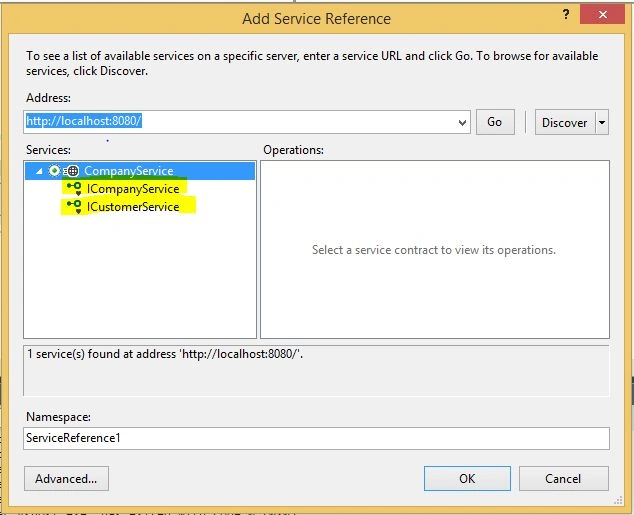
Note: The above picture show two service contract. If the customer want to access the service then we will access through ICustomerService and the organization will use the ICompanyService to access the service.
So by using this, we can restrict the service access level. So the customer use the following code to access the service.
Then run the application. You will get the following output,

Add the following code to get the service in the organization.
- CompanyServiceClient companyClient = new CompanyServiceClient();
- Console.WriteLine("Message received from Customer Servive Contract.");
- Console.WriteLine(companyClient.GetInformation("sakthikumar"));
- Console.WriteLine(companyClient.GetCutomerInformation("sakthikumar"));

Note the above two set of code. They use different service client to access service information. It will be helpful to you for developing access privilege based service.
That’s all. Please feel free to mention your comments if you have any question or doubt.
Raja TPosted Jan 10, 2016, 11:11 PM
Nice, Thanks for sharing
Humayun Kabir MamunPosted Jan 10, 2016, 10:26 PM
Nice...