

Introduction
This article will explain one of the OOP concepts, Access Modifiers in Java, along with some basic examples, to get a clear understanding of the concept.
Access modifiers are keywords that specify the access allowed to the classes, methods, constructor, data members and so on. In other words, a class can control what information or data can be accessible, by other classes.
In Java, there is the provision of numerous access modifiers for setting the levels you want from classes, as well as the fields, methods, and constructors in your classes. A member has the package or default accessibility when no access modifier is specified. You should possibly minimize access levels, whenever dealing with encapsulation, in Java.
Basically, there are two types of modifiers, in Java:
Access Modifiers
- Access modifiers
- non-access modifiers
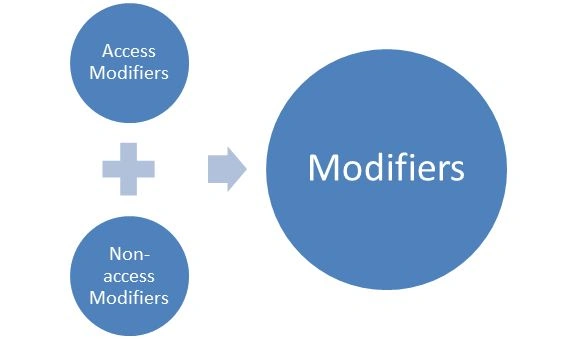
Non-access modifiers
- Visible to the package, the default (no modifiers are needed)
- Visible to the class only (private)
- Visible to the world (public)
- Visible to the package and all subclasses (protected)
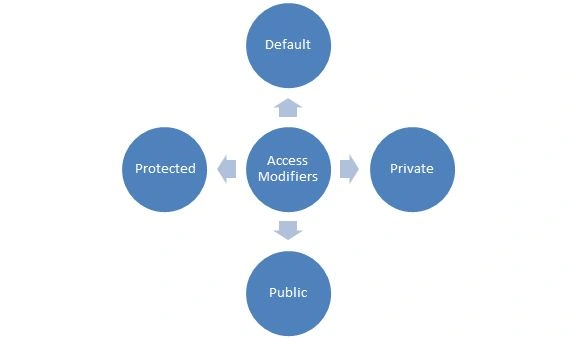
The following are the four types of access modifiers:
- Default
- Private
- Public
- Protected
Default access modifiers
Example
Here we are making two different packages. One is an article and the other is a default package. In each package, we have made one class, Main.java and Greet.java. When trying to access the Greet class, from outside its package, (and since the Greet class is not public), it cannot be accessed from outside its package.
Greet.java
- package article;
- public class Greet {
- void msg() {
- System.out.println("Hello..!! How are you..??");
- }
- }
Main.java
- package defaultpackage;
- import article.*;
- public class Main {
- public static void main(String[] args) {
- Main m = new Main();
- m.msg();
- }
- }
In the preceding example, the scope of the class Greet and method msg() is default, so it cannot be accessed from outside the package.
The preceding example can provide the output properly if both of the classes are located in the same package.
Private access modifiers
Example
In this example, we have created two classes, House and Details. Class House contains a private method and private data members. When we try to access these private members and methods, from outside the class that cannot be accessed, we get a compile-time error.- class House {
- private int HNo = 211;
- private String Town = "Nagra";
- private String city = "Jhansi";
- private void show() {
- System.out.println("Welcome to my house");
- }
- }
- public class Details {
- public static void main(String args[]) {
- House h = new House();
- System.out.println(h.HNo);
- System.out.println(h.Town);
- System.out.println(h.city);
- h.show();
- }
- }
If you make any class constructor private, then you cannot create an instance of that class, from outside the class.
A class cannot be private or protected,, except a nested class.
Public access modifiers
Example
House.java
- package Newpack;
- public class House {
- public int HNo = 211;
- public String Town = "Nagra";
- public String city = "Jhansi";
- public void show() {
- System.out.println("Welcome to my house");
- }
- public void print() {
- System.out.println("You need coffee..??");
- }
- }
Details.java
- package Public;
- import Newpack.*;
- class Details {
- public static void main(String args[]) {
- House h = new House();
- System.out.println(h.HNo);
- System.out.println(h.Town);
- System.out.println(h.city);
- h.show();
- h.print();
- }
- }
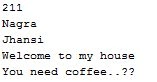
Output
Protected access modifiers
Example
House.java
- package Newpack;
- public class House {
- public int HNo = 211;
- public String Town = "Nagra";
- public String city = "Jhansi";
- protected void show() {
- System.out.println("Welcome to my house");
- }
- protected void print() {
- System.out.println("You need water..??");
- }
- protected void display() {
- System.out.println("Have some rest.");
- }
- }
Details.java
- package Public;
- import Newpack.*;
- class Details extends House {
- public static void main(String args[]) {
- Details d = new Details();
- System.out.println(d.HNo);
- System.out.println(d.Town);
- System.out.println(d.city);
- d.show();
- d.print();
- d.display();
- }
- }
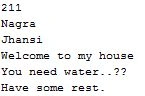
Output
Rajeev RanjanPosted Jun 2, 2014, 10:58 PM
such a great explanation of access modifier in this article.