
Introduction
This article purpose is to describe how to develop a WMI provider in the .NET framework. There are several incentives for writing this article:
- The lack of simple examples for writing WMI provider in C#.
- Many developers are not familiar with WMI and therefore dont make use of this powerful technology.
- By now there are too many Management buzz words that requires simple explanations.
This article does not include the use of SNMP and does not answer to the following questions:
- How to write MIB?
- How to configure the Windows SNMP service?
- How to subscribe for traps?
Nevertheless, anyone who interest in those questions can find some useful notes regarding the required steps to expose managed application to SNMP (see appendix D).
Management includes a Managed object, Managed object provider and a Management consumer.
A Managed object can be a hardware device, driver or a software application that we would like to configure and to receive events from.
The management consumer is the client application that wants to receive those events and the managed object provider is the mediator that provides this interaction between the two.
The Windows Management Instrumentation (WMI) supplies the standards means to do this.
What is Platform Management?
In a nut shell, Platform Management is the means to manage and monitor the health of a system. This may fall into the following categorize:
Configuration - initialization and settings of various aspects of the platform objects such as timeout values, user count thresholds, database connection strings etc. Performance measurements - measure end to end process in regards to duration, optimization etc. Hearth beats monitoring - manage component life time. Start and stop services, receiving components state etc. Information exposing - expose platform information that might be valuable for system administrators, billing etc. Alerts mechanism informative events, errors and critical errors that happens in the platform. Corrective events mechanism As opposed to post mortem events this kind of events gives to the administrators the ability to perform actions in order to prevent up coming errors.
What is WMI?
WMI stands for Windows Management Instrumentation. This is the Microsoft implementation to two industry standards of DMTF (Desktop Management Task Force) the first is CIM (Common Information Model) and the second is WBEM (Web-Based Enterprise Management).
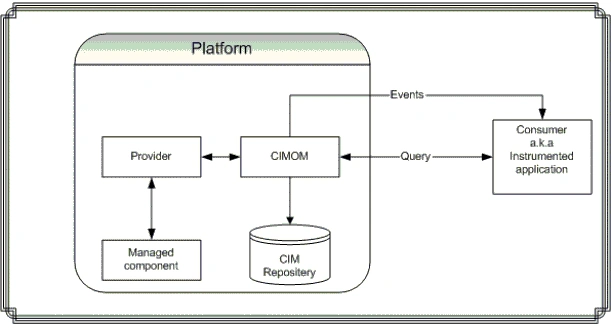
WMI core is already a part of windows ME/2000 and XP. The WMI enables the management capabilities by supplying the standard storage component (CIM), the means to set and get information to and from the storage and the ability to dock third party providers (same as plug-in) to the Providers Manager (CIMOM).
This industry standard compliancy allows alien components to share management environment locally and remotely by using SNMP.
What is WMI provider?
WMI Provider is a software component that functions as mediator between the CIM Object Manager and managed objects. Using the WMI APIs, providers supply the CIM Object Manager with data from managed objects, handle requests on behalf of management applications, and generate event notifications.
Developing WMI Provider. Where to start?
In order to expose software component such as a service through the WMI one need to write WMI provider.
This plug-in (provider) exposes the service to the WMI and provides the interface to receive information and to interact with the service.
Till recently WMI Providers was written as a COM component and now with the emerging of .NET framework it is easier to develop providers.
In case you arent familiar with the MOF syntax you can simply start with developing the WMI Provider(see the sample section).
When it all done and finished use the InstallUtil.exe (see appendix B) tool to enter the managed class into the CIM schema, then if you want you can generate the MOF file from the WMI CIM Studio (it is highly recommended since it is the best way to learn this syntax).
If you do know how to write MOF file (lucky guy) then use the Mgmtclassgen utility (see appendix B) to create the C# classes and events for the WMI provider.
Defining Namespace
Namespace enables you to logically gather related managed objects under one logic umbrella.
It is recommended to define your own namespace for several reasons:
- order
- Efficiency Namespace like 'CIMV2' and 'Default' contains a lot of Managed objects. By defining unique namespace enables you to save time while looking for your objects.
Sample project
The demo includes a simple .NET service (Parachute service - Managed application ) and a WMI provider (Parachute provider). For simplicity reasons, the sample use the MSDEV IDE extension for VS.NET Server Explorer (see Appendix B) as the consumer application.
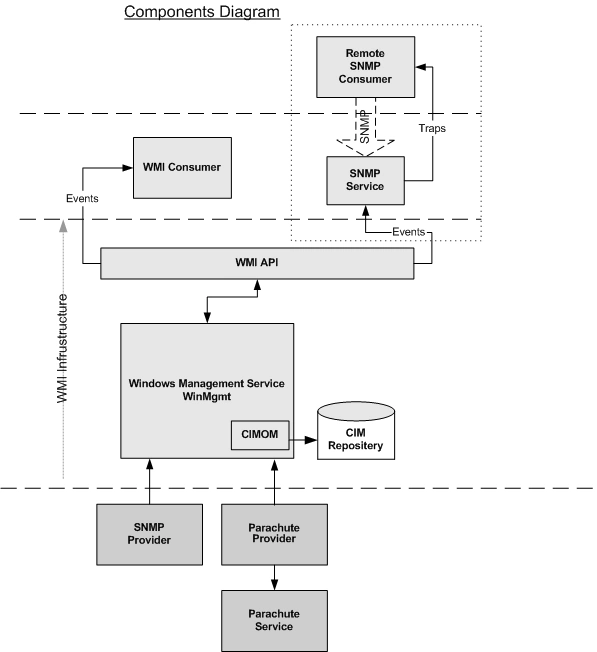
The Service code is quite simple.
Adding a reference to the ParachuteProvider and to System.Managment assemblies.
In the ExposeMeToWMI method we instantiate the provider, set some values and then publish (Instrumentation.Publish() )the provider to the WMI.
The publish call registered the provider and the managed object is mapped into the CIM schema. Events are fired when the service starts and stops.
Note: The provider instance is valid only when the service is started.
The Provider code contains the following actions:
Adding reference to the System.Management assembly.
Defining the instrumented namespace parachute_company under root: assembly:Instrumented("root/parachute_company")]
Note: The managed object schema will be defined under this namespace.
Adding an instance installer in case we want to publish the provider directly via the InstallUtil tool. In this example we publish the provider through the service.
Defining events by using the InstrumentationType.Event attribute: [InstrumentationClass(InstrumentationType.Event)].
Defining WMI Provider instance using the InstrumentationType.Instance attribute:[InstrumentationClass(InstrumentationType.Instance)]
Note: The provider code can be just as well written in the service.
How to use the Demo project:
1. Register the Parachute service to the SCM (Service Control Manager) with the InstallUtil tool (%systemroot%%\Microsoft.NET\Framework\<framework version&t;\InstallUtil.exe).
InstallUtil.exe <service file>.
2. Open the SCM \Administrative tools\ Services
3. Log on as This account- Right click on the service name (Parachute) -> Properties -> Log on tab -> check the This account enter user name and password (the user must be under Administrator group).
4. Start the service
5. Install the MSDEV IDE Management extension for VS.NET Server Explorer.
6. Open the MSDEV in Server Explorer view.
7. Add your computer to the explorer: Right click on the Servers root tree ->Add Server.
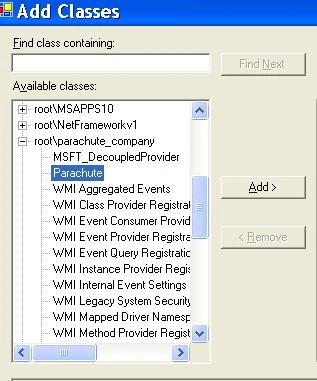
8. Add Management class to the Management Classes item. Look for the Parachute class under to the parachute_company namespace.
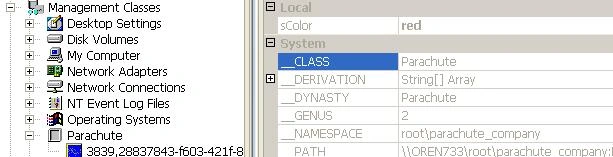
9. Expend the Parachute item you should see the brand new instance. Take a look at the instance properties you can see that the parachute color is exposed (red) by WMI.
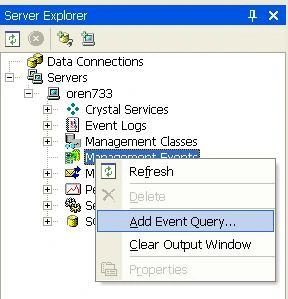
10. Subscribe for events: Add Event Query to the Management Events item.
11. Check the Custom Events type.
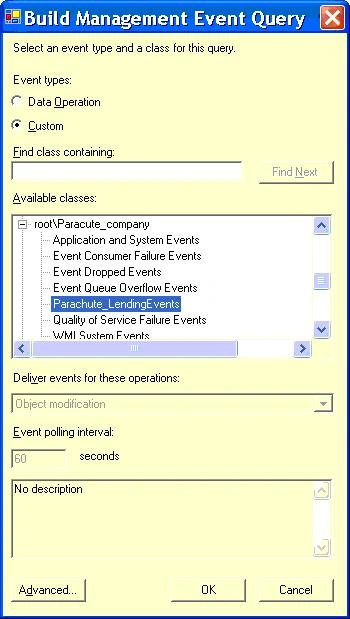
12. Add the Landing and Jump events (situated under the parachute_company namespace).
13. Start and stop the service. The MSDEV output window will display the events data.
Known problems in .NET WMI implementation:
.NET framework, currently, does not support methods and properties settings.
For some reason the WMI Event Registration tool to subscribe an events does not work. You can use instead the MSDEV IDE:
The schema is not removed when Installutil.exe /u is run. (You can remove it using wbemtest.exe).
Conclusion
Well, that's it folks. Hopefully, this article will stimulate you to drill down into the WMI technology and to make advantage of it.
Please send feedback, bug reports or suggestions here.
Appendix A: Definitions & Acronyms
- CIM - Common Information Model this is the premier concept of WBEM by this model WMI stores the Managed objects data (namespace, classes, methods, properties etc.).
- CIM Repository This is the storage that holds the Managed objects data. The structure of the CIM repository is build upon the DMTF.
- CIMOM - Common Information Model object manager. The CIM repository is managed by the CIMOM, which acts as an agent for object requests.
The CIMOM tracks available classes and determines which provider is responsible for supplying instances of these classes.. - DMTF - Distributed Management Task Force The DMTF consortium was founded in May of 1992. This initiative was conceived and created by eight companies like: BMC Software Inc., Cisco Systems Inc., Compaq Computer Corp., Intel Corp., and Microsoft Corp. etc. The aims of this consortium are to define industry standards for management.
- MIB Management Information Base describes a set of managed objects. Each managed object in a MIB has a unique identifier.
- MOF - Managed Object Format. This text file includes the class definition of on or more managed object. You can export and import this definition from the CIM repository by using the WMI CIM Studio.
- Schema - a group of classes that describe a particular management environment.
- SNMP - Simple Network Management Protocol. SNMP is an Internet standard defined by the IETF and is a part of TCP/IP suite of protocols. SNMP is the protocol by which managed information is travel between stations and agents. Management information refers to a collection of managed objects that reside in a virtual information store called a Management Information Base (MIB).
- WBEM - Web-Based Enterprise Management WBEM stands for several DMTF industry standards including the Common Information Model. WBEM provides a standardized way to access information from various hardware and software management systems in an enterprise environment.
Appendix B: WMI tools
- Download the WMI Administrative Tools at: http://www.microsoft.com/downloads/details.aspx?FamilyId=6430F853-1120-48DB-8CC5-F2ABDC3ED314&displaylang=en It includes the following:
- WMI CIM Studio: view and edit classes, properties, qualifiers, and instances in a CIM repository; run selected methods; generate and compile MOF files. WMI Object Browser: view objects, edit property values and qualifiers, and run methods.
- WMI Event Registration Tool: configure permanent event consumers, create or view instances of event consumers, filters, bindings, and timer system classes.
WMI Event Viewer: displays events for all instances of registered consumers. - Mgmtclassgen.exe - Microsoft Visual Studio .NET tool. Convert MOF file into .cs/.vb/.js files.
- Management [WMI] Extension for VS.NET Server
Explorer :http://www.microsoft.com/downloads/details.aspx?displaylang=en&familyid=ef7594d3-4907-4af6-b7d8-6e22115ffaf0 - Platform SDK tools %systemroot%\system32\wbem
- mofcomp.exe Compiles MOF files and adds the managed objects to the CIM Repository. It is also possible to check the MOF file correctness.
- wbemtest.exe - Windows Management Instrumentation Tester, also called WBEMTest, is a general-purpose utility for viewing or modifying Common Information Model (CIM) classes, instances etc. It is functions as the CIM studio only it UI is humble.
- MIB Browser - http://www.nonlinearideas.com/
- MIB editor, builder and browser - http://www.mg-soft.com/index.html
Appendix C: Developing steps to support SNMP
- Obtain an OID (Object IDentifier) from IANA To participate in the SNMP arena you need to define your classes and events in a MIB file. First, The SNMP root node must be a unique number (Only ONE MIB/SNMP Private Enterprise number is permitted per organization). IANA: http://www.iana.org/cgi-bin/enterprise.pl
- Create a MIB (Management Information Base) file (check out the appendix B for some useful and easy to use MIB editors). Define classes and SNMP traps (events) that will eventually expose by the WMI Provider.
- Compile the MIB file using the SMI2SMIR utility. This will generate a MOF file.
- Compile the MOF file using the mofcomp.exe compiler to check the MOF file syntax correctness.
- Create the C# classes and events with the Mgmtclassgen utility (see appendix B). Use the C# classes to create WMI provider.
Join the conversation! Your thoughts help the community grow.