

Introduction
Using the GET and POST methods, the browser client can send data to the web server. In PHP the GET and POST methods are used to retrieve information from forms, such as user input. Get and Post are methods used to send data to the server. These methods are used for data handling in forms. Where each method varies a little in the way they work.
GET Method
In the GET method, we can also send data to the server. But when using the GET method we can't send the login details with a word because it is less secure (information sent from a form with the GET method is visible to everyone). We can say that the GET method is for getting something from the server; it doesn't mean that you cannot send a parameter to the server.
The main points about the GET method are as follows:
- The GET method is used to collect values in a form.
- GET method is used when the URL is sent to the server.
- GET method has limits on the amount of information to send because URL lengths are limited.
- The Get method is used to retrieve web pages from the server.
- The GET method is the default method for many browsers.
- Data is sent as a part of the URL in 'name-value' pairs.
- In the GET method page and the encoded information are separated by the question mark (?) sign.
- In the GET method, the browser appends the data onto the URL.
- The Get method is less secure because information sent from a form with the GET method is visible to everyone (it will be displayed in the browser's address bar) .
- GET can't be used to send binary data, like images or word documents, to the server.
Example
First of all we create a PHP file which is called by the HTML page in later.
<html>
<body bgcolor="pink">
Welcome <?php echo $_GET ["Name"]; ?>.<br/>
You are <?php echo $_GET ["Class"]; ?> Qualified !!
</body>
</html>
The above file is to be saved with the name "get.php", which is called by the HTML page later.
<html>
<body bgcolor="pink"><table>
<form action="get.php" method="get">
<tr><td>Name: <input type="text" name="Name" /></td></tr>
<tr><td>Class : <input type="text" name="Class" /></td></tr>
<input type="submit" " value="Submit"/>
</form>
</body>
</html>
This file is saved as "get.html". In this file get.php is called.
Output
You will put the URL in the web browser like as: http://localhost/FolderName/get.html.
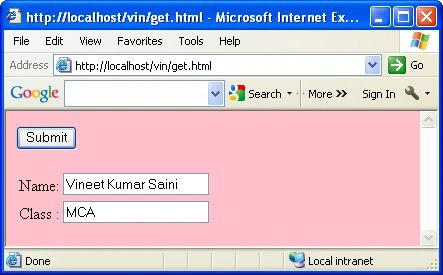
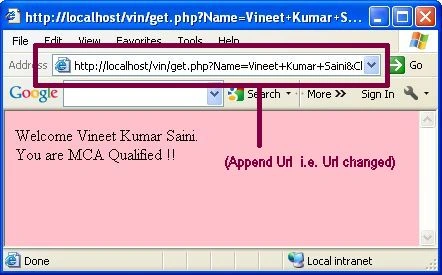
Now you will fill text like as name and class. When you click on the submit button then you will see your browser URL changed. You can see in the following image.
POST Method
In PHP $_POST variable is used to collect values from a form sent with method="post". In the POST method one can request as well as send some data to the server. The POST method is used when one can send a long enquiry form. Using the POST method the login details with word can be posted because it is secure (information sent from a form with the POST method is invisible to everyone).
The main points about POST method are as follows:
- The POST method is used to collect values from a form.
- The POST method has no limits on the amount of information to send because URL lengths are unlimited.
- The POST method is the not default method for many browsers.
- In the POST method, the page and the encoded information are not separated by the question mark (?) sign.
- In the POST method, the browser doesn't append the data onto the URL.
- The POST method is secure because information sent from a form with the GET method is invisible to everyone.
- The POST method can be used to send binary data, like images or Word documents, to the server.
- In the POST method, the data is sent as standard input.
- The POST method is slower than the GET method.
- PHP provides the $_POST associative array to access all the information sent using the GET method.
Example
First of all we create a PHP file which is called by the HTML page later.
<html>
<body bgcolor="pink">
Welcome <?php echo $_POST ["Name"]; ?>.<br/>
You are <?php echo $_POST ["Class"]; ?> Qualified !!
</body>
</html>
The above file is saved with the "post.php" name, which is called by the HTML page later.
<html>
<body bgcolor="pink">
<table>
<form action="post.php" method="post">
<tr><td>Name: <input type="text" name="Name" /></td></tr>
<tr><td>Class : <input type="text" name="Class" /></td></tr>
<input type="submit" " value="Submit"/>
</form>
</body>
</html>
This file is saved as "post.html". In this file post.php is called.
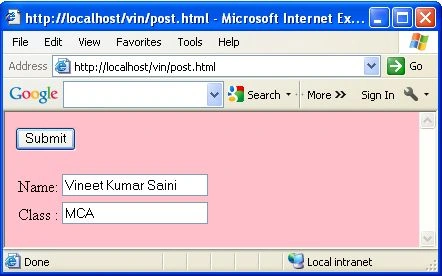
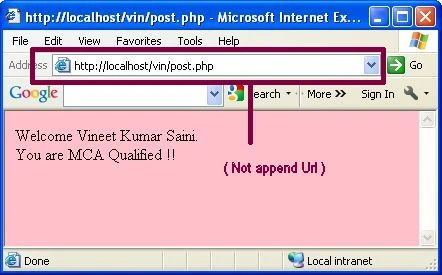
Now you will fill text like as name and class. When you click on the submit button then you will see your browser URL is not changed. You can see in the following image.
$_REQUEST Variable
The $_REQUEST variable is also used to send data to the server. The $_REQUEST variable is a predefined variable in PHP. Which keeps the $_GET, $_POST and also $_Cookie variable. This variable is used to collect data of the form sent by the GET and POST methods.
First of all we create a PHP file which is called by the HTML page later.
<html>
<body bgcolor="pink">
Welcome <?php echo $_REQUEST ["Name"]; ?>.<br/>
You are <?php echo $_REQUEST ["Class"]; ?> Qualified !!
</body>
</html>
The above file is saved with the "request.php" name, which is called by the HTML page later.
<html>
<body bgcolor="pink">
<table>
<form action="request.php" method="post">
<tr><td>Name: <input type="text" name="Name" /></td></tr>
<tr><td>Class : <input type="text" name="Class" /></td></tr>
<input type="submit" " value="Submit"/>
</form>
</body>
</html>
This file is save as "request.html". In this file post.php is called.
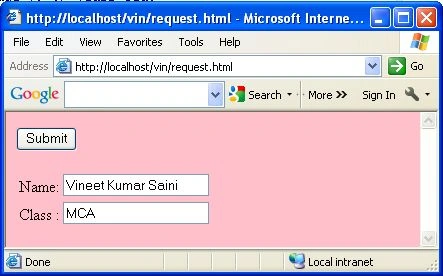
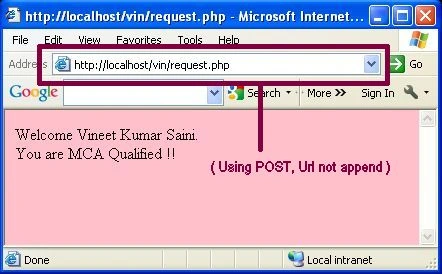
If we use the POST method then the URL of the browser is not append. You can see in the following image.
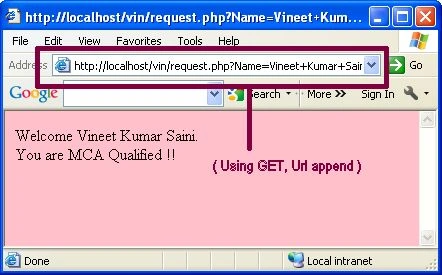
If we use the GET method then the URL of the browser is changed. You can see in the following image.
Conclusion
So in this article you saw the differences between the GET and POST methods in PHP.
Some Useful Resources
Sanjay SinghPosted Jun 21, 2014, 2:11 AM
if we use "$_GET" then the information visible to everyone which is not good as security reason. so why we use $_GET ?
Vineet Kumar SainiPosted Nov 22, 2012, 11:40 PM
Hi fariha First major difference i see is that InnoDB implements row-level lock while MyISAM can do only a table-level lock. The main difference is InnoDB supports transactions. You can do commit and rollback in InnoDB. Whereas MyISAM doesn't support the transaction, once you issue command, can't rollback. MYISAM supports fulltext search, whereas InnoDB doesn't. MyISAM does table locking whereas InnoDB do row locking. If your application does lots of data modification InnoDB is best(data integrity) and which is faster. MYISAM does not support the foreign key constraint and transaction but InnoDB support it. MYISAM occupies less memory sapce for tables rather than InnoDB tables. You can use MyISAM, if the table is more static with lots of select and less update and delete. In case of transaction table, it is good to go with InnoDB storage engine. Also please check this link http://www.digimantra.com/tutorials/difference-between-innodb-and-myisam-in-mysql/
fariha khanPosted Nov 22, 2012, 11:57 AM
vineet please help me regarding difference b/w InnoDB and MyISAM and please tell me what should be the selection and why? and tell me something about collation? what it should be at the time of db creation in phpmyadmin. thanks and regards
fariha khanPosted Nov 15, 2012, 6:09 AM
thanks vineet
Steven CronsonPosted Jul 24, 2012, 1:07 PM
Where can GOOGLE ADSENSE code being put into a Programmers codes website for a Customer. Where is the Header <HEAD> </HEAD> which most companies require code be put Above and Below the <BODY> tag ? if the site is use CSS, HTML, XML, PHP, INCLUDES, etc.