

Introduction
C# ArrayList is a collection class. This tutorial shows how to use ArrayList in a C# application including Adding ArrayList Items, Removing item from an ArrayList, ArrayList properties, and ArrayList methods.
Create ArrayList
The following code craetes an ArrayList object in C#.
- ArrayList arr = new ArrayList();
The datatype of an ArrayList is the object type. We can add any data types such as strings, integers to a collection.
Add ArrayList Items
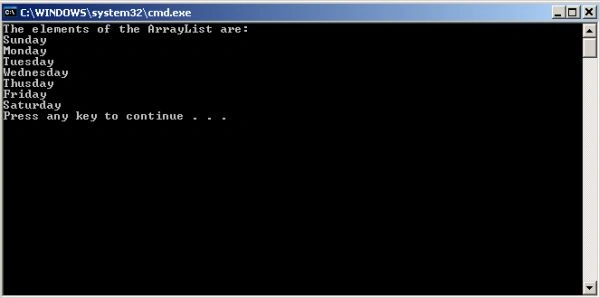
The Add() method adds items to an ArrayList. The following code adds several items to an ArrayList. The items are of string type. The code also uses a foreach loop that reads all items of the ArrayList and displays on the console.
- namespace ArrayList1
- {
- class Program
- {
- static void Main(string[] args)
- {
- ArrayList arr = new ArrayList();
- arr.Add("Sunday");
- arr.Add("Monday");
- arr.Add("Tuesday");
- arr.Add("Wednesday");
- arr.Add("Thusday");
- arr.Add("Friday");
- arr.Add("Saturday");
- Console.WriteLine("The elements of the ArrayList are:");
- foreach (object obj in arr)
- {
- Console.WriteLine(obj);
- }
- }
- }
- }
Here is the output.
ArrayList Properties
Here is a list of ArrayList properties.Capacity
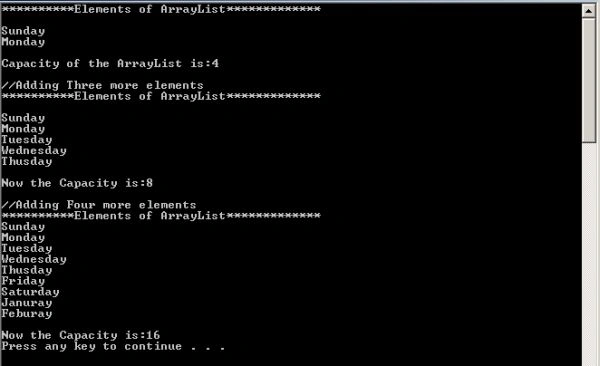
Gets or sets the number of elements an ArrayList can store. The default capacity of an ArrayList is 4. If I add 5th element, then the capacity will be doubled (that is 8) relative to the previous one (that is 4).
For example:
- namespace ArrayList1
- {
- class Program
- {
- static void Main(string[] args)
- {
- ArrayList arr = new ArrayList();
- arr.Add("Sunday");
- arr.Add("Monday");
- Console.WriteLine("**********Elements of ArrayList*************");
- Console.WriteLine();
- foreach (object obj in arr)
- {
- Console.WriteLine(obj);
- }
- Console.WriteLine();
- Console.WriteLine("Capacity of the ArrayList is:" + arr.Capacity);
- Console.WriteLine();
- Console.WriteLine("//Adding Three more elements");
- Console.WriteLine("**********Elements of ArrayList*************");
- Console.WriteLine();
- arr.Add("Tuesday");
- arr.Add("Wednesday");
- arr.Add("Thusday");
- foreach (object obj in arr)
- {
- Console.WriteLine(obj);
- }
- Console.WriteLine();
- Console.WriteLine("Now the Capacity is:" + arr.Capacity);
- Console.WriteLine();
- Console.WriteLine("//Adding Four more elements");
- Console.WriteLine("**********Elements of ArrayList*************");
- arr.Add("Friday");
- arr.Add("Saturday");
- arr.Add("Januray");
- arr.Add("Feburay");
- foreach (object obj in arr)
- {
- Console.WriteLine(obj);
- }
- Console.WriteLine();
- Console.WriteLine("Now the Capacity is:" + arr.Capacity);
- }
- }
- }
Here is the output.
Count
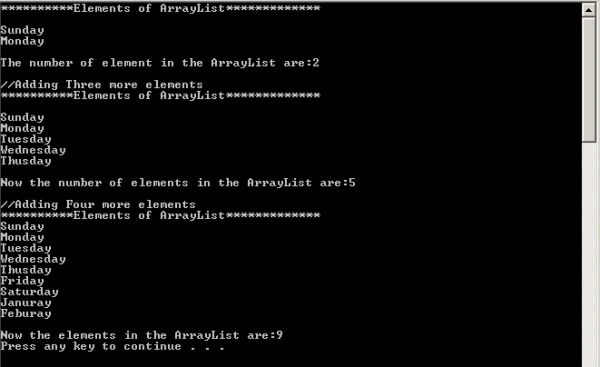
Gets the number of elements actually contained in the ArrayList.
For example:
- namespace ArrayList1
- {
- class Program
- {
- static void Main(string[] args)
- {
- ArrayList arr = new ArrayList();
- arr.Add("Sunday");
- arr.Add("Monday");
- Console.WriteLine("**********Elements of ArrayList*************");
- Console.WriteLine();
- foreach (object obj in arr)
- {
- Console.WriteLine(obj);
- }
- Console.WriteLine();
- Console.WriteLine("The number of element in the ArrayList are:" + arr.Count);
- Console.WriteLine();
- Console.WriteLine("//Adding Three more elements");
- Console.WriteLine("**********Elements of ArrayList*************");
- Console.WriteLine();
- arr.Add("Tuesday");
- arr.Add("Wednesday");
- arr.Add("Thusday");
- foreach (object obj in arr)
- {
- Console.WriteLine(obj);
- }
- Console.WriteLine();
- Console.WriteLine("Now the number of elements in the ArrayList are:" + arr.Count);
- Console.WriteLine();
- Console.WriteLine("//Adding Four more elements");
- Console.WriteLine("**********Elements of ArrayList*************");
- arr.Add("Friday");
- arr.Add("Saturday");
- arr.Add("Januray");
- arr.Add("Feburay");
- foreach (object obj in arr)
- {
- Console.WriteLine(obj);
- }
- Console.WriteLine();
- Console.WriteLine("Now the elements in the ArrayList are:" + arr.Count);
- }
- }
- }
Here is the output.
ArrayList Methods
Clear()
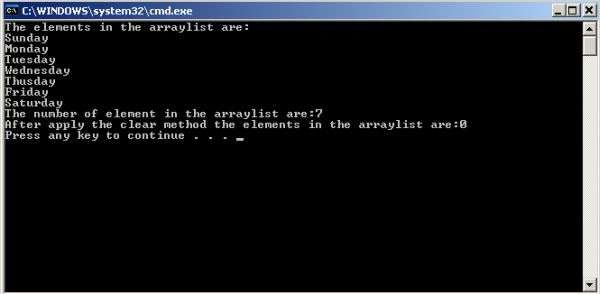
Removes all elements from an ArrayList.
For example:
- namespace ArrayList1
- {
- class Program
- {
- static void Main(string[] args)
- {
- ArrayList arr = new ArrayList(7);
- arr.Add("Sunday");
- arr.Add("Monday");
- arr.Add("Tuesday");
- arr.Add("Wednesday");
- arr.Add("Thusday");
- arr.Add("Friday");
- arr.Add("Saturday");
- Console.WriteLine("The elements in the arraylist are:");
- foreach (object obj in arr)
- {
- Console.WriteLine(obj);
- }
- Console.WriteLine("The number of element in the arraylist are:" + arr.Count);
- arr.Clear();
- Console.WriteLine("After apply the clear method the elements in the arraylist are:" + arr.Count);
- }
- }
- }
Here is the output.
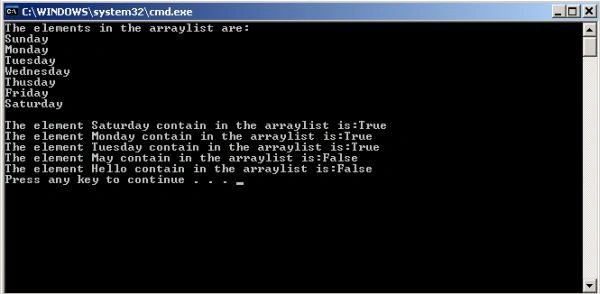
Contains()
Determines whether an element is in an ArrayList.
For example:
- namespace ArrayList1
- {
- class Program
- {
- static void Main(string[] args)
- {
- ArrayList arr = new ArrayList(7);
- arr.Add("Sunday");
- arr.Add("Monday");
- arr.Add("Tuesday");
- arr.Add("Wednesday");
- arr.Add("Thusday");
- arr.Add("Friday");
- arr.Add("Saturday");
- Console.WriteLine("The elements in the arraylist are:");
- foreach (object obj in arr)
- {
- Console.WriteLine(obj);
- }
- Console.WriteLine();
- Console.WriteLine("The element Saturday contain in the arraylist is:" + arr.Contains("Saturday"));
- Console.WriteLine("The element Monday contain in the arraylist is:" + arr.Contains("Monday"));
- Console.WriteLine("The element Tuesday contain in the arraylist is:" + arr.Contains("Tuesday"));
- Console.WriteLine("The element May contain in the arraylist is:" + arr.Contains("May"));
- Console.WriteLine("The element Hello contain in the arraylist is:" + arr.Contains("Hello"));
- }
- }
- }
Here is the output.
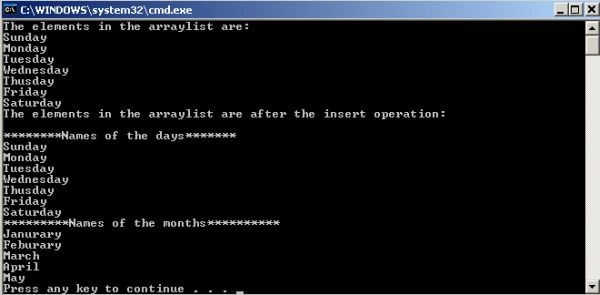
Insert()
Inserts an element into the ArrayList at the specified index.
For example:
- namespace ArrayList1
- {
- class Program
- {
- static void Main(string[] args)
- {
- ArrayList arr = new ArrayList(7);
- arr.Add("Sunday");
- arr.Add("Monday");
- arr.Add("Tuesday");
- arr.Add("Wednesday");
- arr.Add("Thusday");
- arr.Add("Friday");
- arr.Add("Saturday");
- Console.WriteLine("The elements in the arraylist are:");
- foreach (object obj in arr)
- {
- Console.WriteLine(obj);
- }
- arr.Insert(0, "********Names of the days*******");
- arr.Insert(8, "*********Names of the months**********");
- arr.Insert(9, "Janurary");
- arr.Insert(10, "Feburary");
- arr.Insert(11, "March");
- arr.Insert(12, "April");
- arr.Insert(13, "May");
- Console.WriteLine("The elements in the arraylist are after the insert operation:");
- Console.WriteLine();
- foreach (object obj in arr)
- {
- Console.WriteLine(obj);
- }
- }
- }
- }
Here is the output.
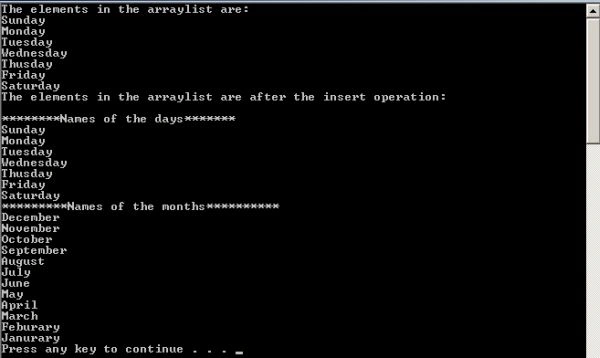
InsertRange()
Inserts the elements of a collection into the ArrayList at the specified index.
For example:
- namespace ArrayList1
- {
- class Program
- {
- static void Main(string[] args)
- {
- ArrayList arr = new ArrayList(7);
- arr.Add("Sunday");
- arr.Add("Monday");
- arr.Add("Tuesday");
- arr.Add("Wednesday");
- arr.Add("Thusday");
- arr.Add("Friday");
- arr.Add("Saturday");
- Stack stack=new Stack();
- stack.Push("Janurary");
- stack.Push("Feburary");
- stack.Push("March");
- stack.Push("April");
- stack.Push("May");
- stack.Push("June");
- stack.Push("July");
- stack.Push("August");
- stack.Push("September");
- stack.Push("October");
- stack.Push("November");
- stack.Push("December");
- Console.WriteLine("The elements in the arraylist are:");
- foreach (object obj in arr)
- {
- Console.WriteLine(obj);
- }
- arr.Insert(0, "********Names of the days*******");
- arr.Insert(8, "*********Names of the months**********");
- arr.InsertRange(9, stack);
- Console.WriteLine("The elements in the arraylist are after the insert operation:");
- Console.WriteLine();
- foreach (object obj in arr)
- {
- Console.WriteLine(obj);
- }
- }
- }
- }
Here is the output.
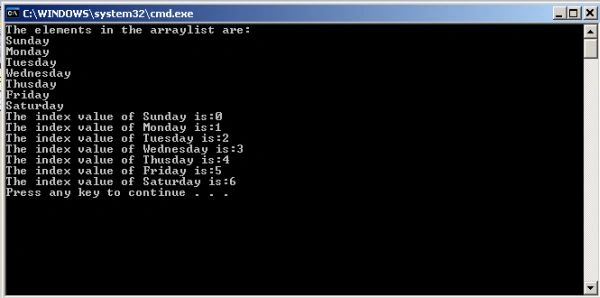
IndexOf(object)
Searches for the specified object and returns the zero-based index of the first occurrence within the entire ArrayList.
For example:
- namespace ArrayList1
- {
- class Program
- {
- static void Main(string[] args)
- {
- ArrayList arr = new ArrayList(7);
- arr.Add("Sunday");
- arr.Add("Monday");
- arr.Add("Tuesday");
- arr.Add("Wednesday");
- arr.Add("Thusday");
- arr.Add("Friday");
- arr.Add("Saturday");
- Console.WriteLine("The elements in the arraylist are:");
- foreach (object obj in arr)
- {
- Console.WriteLine(obj);
- }
- Console.WriteLine("The index value of Sunday is:" + arr.IndexOf("Sunday"));
- Console.WriteLine("The index value of Monday is:" + arr.IndexOf("Monday"));
- Console.WriteLine("The index value of Tuesday is:" + arr.IndexOf("Tuesday"));
- Console.WriteLine("The index value of Wednesday is:" + arr.IndexOf("Wednesday"));
- Console.WriteLine("The index value of Thusday is:" + arr.IndexOf("Thusday"));
- Console.WriteLine("The index value of Friday is:" + arr.IndexOf("Friday"));
- Console.WriteLine("The index value of Saturday is:" + arr.IndexOf("Saturday"));
- }
- }
- }
Here is the output.
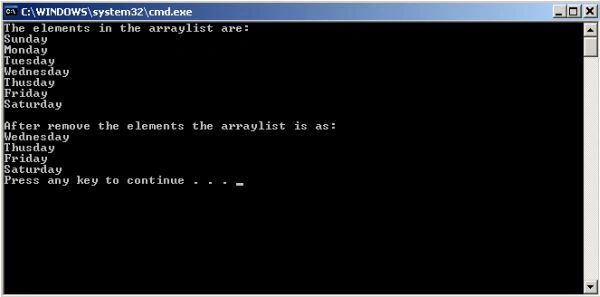
Remove()
Removes the first occurrence of a specific object from the ArrayList.
For example:
- namespace ArrayList1
- {
- class Program
- {
- static void Main(string[] args)
- {
- ArrayList arr = new ArrayList(7);
- arr.Add("Sunday");
- arr.Add("Monday");
- arr.Add("Tuesday");
- arr.Add("Wednesday");
- arr.Add("Thusday");
- arr.Add("Friday");
- arr.Add("Saturday");
- Console.WriteLine("The elements in the arraylist are:");
- foreach (object obj in arr)
- {
- Console.WriteLine(obj);
- }
- arr.Remove("Sunday");
- arr.Remove("Monday");
- arr.Remove("Tuesday");
- Console.WriteLine();
- Console.WriteLine("After remove the elements the arraylist is as:");
- foreach (object obj in arr)
- {
- Console.WriteLine(obj);
- }
- }
- }
- }
Here is the output.
RemoveAt()
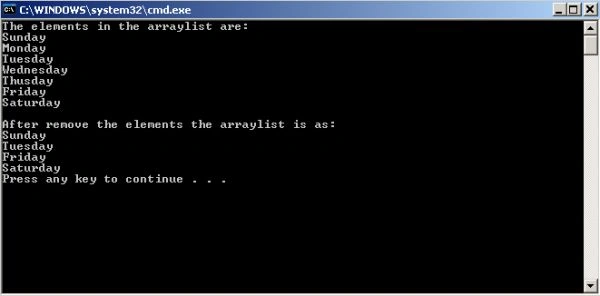
Removes the element at the specified index of the ArrayList.
For example:
- namespace ArrayList1
- {
- class Program
- {
- static void Main(string[] args)
- {
- ArrayList arr = new ArrayList(7);
- arr.Add("Sunday");
- arr.Add("Monday");
- arr.Add("Tuesday");
- arr.Add("Wednesday");
- arr.Add("Thusday");
- arr.Add("Friday");
- arr.Add("Saturday");
- Console.WriteLine("The elements in the arraylist are:");
- foreach (object obj in arr)
- {
- Console.WriteLine(obj);
- }
- arr.RemoveAt(3);
- arr.RemoveAt(1);
- arr.RemoveAt(2);
- Console.WriteLine();
- Console.WriteLine("After remove the elements the arraylist is as:");
- foreach (object obj in arr)
- {
- Console.WriteLine(obj);
- }
- }
- }
- }
Here is the output.
RemoveRange()
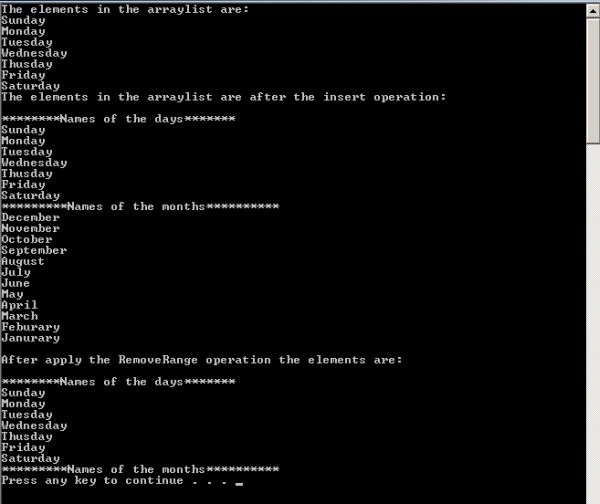
Removes a range of elements from the ArrayList.
For example:
- namespace ArrayList1
- {
- class Program
- {
- static void Main(string[] args)
- {
- ArrayList arr = new ArrayList(7);
- arr.Add("Sunday");
- arr.Add("Monday");
- arr.Add("Tuesday");
- arr.Add("Wednesday");
- arr.Add("Thusday");
- arr.Add("Friday");
- arr.Add("Saturday");
- Stack stack = new Stack();
- stack.Push("Janurary");
- stack.Push("Feburary");
- stack.Push("March");
- stack.Push("April");
- stack.Push("May");
- stack.Push("June");
- stack.Push("July");
- stack.Push("August");
- stack.Push("September");
- stack.Push("October");
- stack.Push("November");
- stack.Push("December");
- Console.WriteLine("The elements in the arraylist are:");
- foreach (object obj in arr)
- {
- Console.WriteLine(obj);
- }
- arr.Insert(0, "********Names of the days*******");
- arr.Insert(8, "*********Names of the months**********");
- arr.InsertRange(9, stack);
- Console.WriteLine("The elements in the arraylist are after the insert operation:");
- Console.WriteLine();
- foreach (object obj in arr)
- {
- Console.WriteLine(obj);
- }
- arr.RemoveRange(9, 12);
- Console.WriteLine();
- Console.WriteLine("After apply the RemoveRange operation the elements are:");
- Console.WriteLine();
- foreach (object obj in arr)
- {
- Console.WriteLine(obj);
- }
- }
- }
- }
Here is the output.
Reverse()
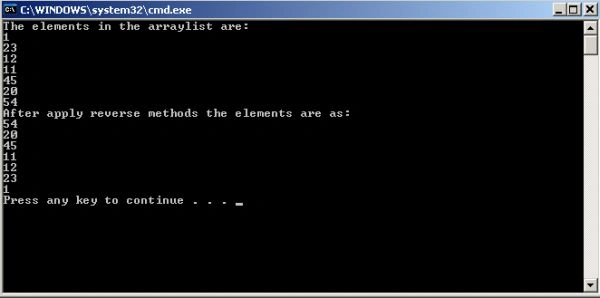
Reverses the order of the elements in the entire ArrayList.
For example:
- namespace ArrayList1
- {
- class Program
- {
- static void Main(string[] args)
- {
- ArrayList arr = new ArrayList();
- arr.Add(1);
- arr.Add(23);
- arr.Add(12);
- arr.Add(11);
- arr.Add(45);
- arr.Add(20);
- arr.Add(54);
- Console.WriteLine("The elements in the arraylist are:");
- foreach (object obj in arr)
- {
- Console.WriteLine(obj);
- }
- arr.Reverse();
- Console.WriteLine("After apply reverse methods the elements are as:");
- foreach (object obj in arr)
- {
- Console.WriteLine(obj);
- }
- }
- }
- }
Here is the output.
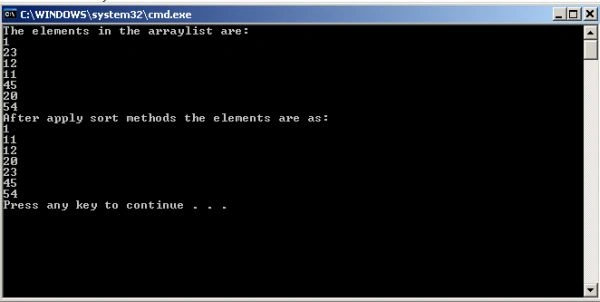
Sort()
Sorts the elements in the entire ArrayList.
For example:
- namespace ArrayList1
- {
- class Program
- {
- static void Main(string[] args)
- {
- ArrayList arr = new ArrayList();
- arr.Add(1);
- arr.Add(23);
- arr.Add(12);
- arr.Add(11);
- arr.Add(45);
- arr.Add(20);
- arr.Add(54);
- Console.WriteLine("The elements in the arraylist are:");
- foreach (object obj in arr)
- {
- Console.WriteLine(obj);
- }
- arr.Sort();
- Console.WriteLine("After apply sort methods the elements are as:");
- foreach (object obj in arr)
- {
- Console.WriteLine(obj);
- }
- }
- }
- }
Here is the output.
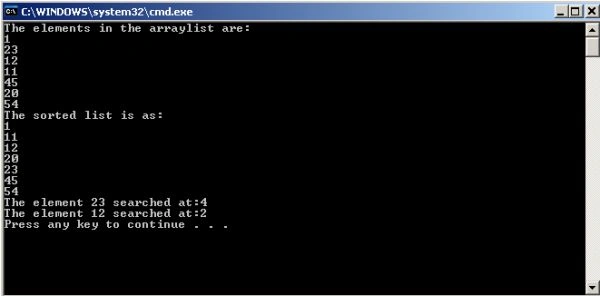
BinarySearch(object)
Searches the entire sorted ArrayList for an element using the default comparer and returns the zero-based index of the element.
For example:
- namespace ArrayList1
- {
- class Program
- {
- static void Main(string[] args)
- {
- ArrayList arr = new ArrayList();
- arr.Add(1);
- arr.Add(23);
- arr.Add(12);
- arr.Add(11);
- arr.Add(45);
- arr.Add(20);
- arr.Add(54);
- Console.WriteLine("The elements in the arraylist are:");
- foreach (object obj in arr)
- {
- Console.WriteLine(obj);
- }
- arr.Sort();
- Console.WriteLine("The sorted list is as:");
- foreach (object obj in arr)
- {
- Console.WriteLine(obj);
- }
- Console.WriteLine("The element 23 searched at:"+arr.BinarySearch(23));
- Console.WriteLine("The element 12 searched at:" + arr.BinarySearch(12));
- }
- }
- }
Here is the output.
Summary
In this article, I've explained an ArrayList class and its methods and properties and how to use them in a C# application.
Bidyasagar MishraPosted Aug 1, 2019, 4:12 AM
Nice article
Anil CmPosted May 31, 2018, 7:16 AM
Good one...........
GlennPosted May 21, 2016, 4:51 AM
Hi Richa, do you offer paid tutoring? Kind Regards, Glenn
keyur soniPosted Jun 15, 2012, 6:50 AM
nice
Richa GargPosted Jun 13, 2012, 11:15 AM
Thanx to all
sandeep raju dantuluriPosted Jun 12, 2012, 9:50 AM
nice...
Tim YangPosted Jun 11, 2012, 7:00 AM
You don't speak the emphasis,the ArrayList is a array in the inside.
SAI KRISHNA VELLANKIPosted Jun 11, 2012, 4:55 AM
nice one...
Abhishek DubeyPosted Jun 9, 2012, 2:05 PM
great efforts