
The foreach statement in C# iterates through a collection of items such as an array or list, The foreach body must be enclosed in {} braces unless it consists of a single statement.
The code in Listing 1 creates an array of odd numbers and uses foreach loop to loop through the array items and read them.
using System;

class Program
{
    static void Main(string[] args)
    {
        Console.WriteLine("foreach loop Sample!");
        int[] oddArray = new int[] { 1, 3, 5, 7, 9, 11, 13, 15, 17, 19, 21 };
        foreach (int num in oddArray)
        {
            Console.WriteLine(num);
        }
        Console.ReadKey();
    }
}
Listing 1.
The output of Listing 1 looks like Figure 1.
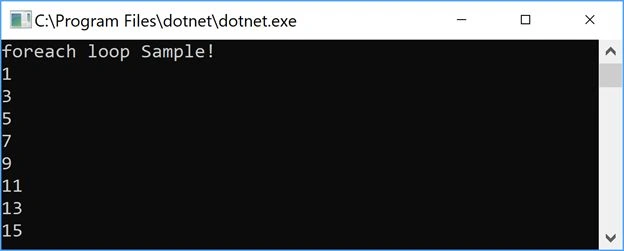
Figure 1.
If you’re not familiar with Arrays in C#, please read the article: Arrays Tutorial in C#.
Listing 2 is an example of for loop that can also be used read an array of items.
for (int counter = 0; counter < oddArray.Length; counter++)
{
    Console.WriteLine(oddArray[counter]);
}
Listing 2.
You can stop and exit a foreach loop by using the break, return, goto, and throw statements. The code snippet in Listing 3 quits execution once the number equals 15.
using System;

class Program
{
    static void Main(string[] args)
    {
        Console.WriteLine("foreach loop Sample!");
        // Array of odd numbers
        int[] oddArray = new int[] { 1, 3, 5, 7, 9, 11, 13, 15, 17, 19, 21 };
        // Loop through array items
        foreach (int num in oddArray)
        {
            Console.WriteLine(num);
            // Don't read any number after 15
            if (num == 15) break;
        }
        Console.ReadKey();
    }
}
Listing 3.
Use foreach to find a char in a string
Remember your early days, when you need to find a character in a string? We can use foreach loop for this to check one character at a time in a string using a foreach, in a loop. Strings are important in any language. Strings in C#
The code snippet in Listing 4 creates an array of chars from a string and reads one character at a time. The code also makes sure that the whitespace between characters is skipped.
// Read a string - one character at a time and if space, skip it
string name = "Mahesh Chand Beniwal";

// Convert string into an array of chars
char[] chArray = name.ToCharArray();

// Loop through chars and display one char at a time
foreach (char ch in chArray)
{
    if (ch.ToString() != " ")
        Console.WriteLine(ch);
}
Listing 4.
Foreach in Collection
Let’s look at another use of the foreach, in a Collection. Do you remember your early programming days when you need to go through a string and find the number of occurrences of a character in a string? The code in Listing 5 does the same using a foreach loop.
// Find number of occurrences of a char in a string
string str = "A monkey stole a banana, climb on a tree and ate it.";
char[] chars = str.ToCharArray();
int ncount = 0;
// Loop through chars and find all 'n' and count them
foreach (char ch in chars)
{
if (ch == 'n')
ncount++;
}
Console.WriteLine($"Total n found {ncount}");
Listing 5.
Foreach in Array
Here is another example of using a foreach over an Array. The code snippet in Listing 6 creates an array of strings, and reads and displays each string one at a time.
// Array of authors - string
string[] authorList = new string[]
{ "Mahesh Chand", "Raj Kumar", "Naveen Sharma", "Allen O'neill", "Dave McCarter" };
// Loop through array and read all authors
foreach (string author in authorList )
{
Console.WriteLine(author);
}
Listing 6.
Summary
The foreach, in loop in C# is used to loop through the items in a collection. In this article and code samples, we saw various usage of the foreach with different C# item lists.
Next reading: The for vs foreach in C#
Pankajkumar PatelPosted Aug 22, 2019, 3:59 AM
Nice article
László JaskóPosted Apr 14, 2019, 8:38 PM
Int[] oddArray = new int[] { 1, 3, 5, 7, 9, 11, 13, 15, 17, 19, 21 }; try replacing it with this: IEnumerable<int> oddArray = Enumerable.Range(1, 11).Select(x => x * 2 - 1); can save you a lot of time and typo
Rajesh KumarPosted Aug 24, 2018, 6:37 AM
Nice article..............
Prasad KrishnaraoPosted Aug 20, 2018, 12:12 PM
Nice one Thanks
Joe WilsonPosted Dec 28, 2015, 10:47 AM
Thank you very much.
Sam HobbsPosted Oct 5, 2012, 2:56 PM
Just as a while can be used to do what a foreach does, a while can be used to do what a for does.
Vijay RajbharPosted Oct 26, 2010, 8:47 AM
The code can go wrong many ways. Using the foreach statement, you can avoid these problems and iterate through any collection or array in a manner. With the foreach statement: - using System; using System.Collections; class MArray { public ArrayList words; public MyArray() { words = new ArrayList(); words.Add("Vijay"); words.Add("Vivek"); words.Add("Girish"); } } class Foreach2App { public static void Main() { MArray myArray = new MArray(); foreach (string word in myArray.words) { Console.WriteLine("{0}", word); } } }
sreenivas pasupuletiPosted Aug 22, 2010, 11:30 PM
hi ashish,<br>myself P.Sreenivas, Asst.Professor, working in a reputed Engineering college in Bangalore, found your article very interesting and useful.. thanks for the information, since i am teaching C# subject to 5th sem students of MCA<br><br>regs<br>P.Sreenivas