

In this FAQ, we will examine the steps required to develop a simple C# console based program. However, as a first step we will discuss the basic requirements required to begin C# programming.
Requirements
In order to write code for a simple C# program, you can either make use of Notepad which comes with Windows or advanced editors such as Visual Studio, Visual Studio Community or Microsoft WebMatrix including few third party tools and editors. Linux also provide support for C# with the help of Mono C# compiler Kit.
If you make use of Visual Studio, you need not have to install .NET Framework separately. However, if you use Notepad then you have to manually install .NET Framework SDK which includes all the required tools to develop C# applications.
You should install .NET Framework SDK on your system before getting started with C#. This step is not required if you have installed either Visual Studio Community which is available free of cost or full blown Visual Studio.
Editor Identification
As a first step, you need to identify an editor using which you will write source code. In this article, we will discuss the creation of a simple C# program using Notepad.
Source Code
The next step is to provide the required source code as in the following inside the editor.
- using System;
- class HelloWorld
- {
- public static void Main()
- {
- Console.WriteLine("Hello World");
- }
- }
Analyzing C# Code
The first step in .NET Framework program particularly C# is to declare System namespace. If you are not aware, namespaces consist of group of classes, types or assemblies. Each class contains several methods which you need to make use of during programming.
You need to provide a name for your class. This should be your file name although it is not compulsory. In the above code, the class name is defined as HelloWorld and hence the file name should be saved under this name followed by extension .cs
Saving C# Code
Compiling C# Code
csc HelloWorld.cs
If you are unable to compile the above source code, refer to C# FAQ 4 - How do I Configure C# Compiler? where we discuss steps required to configure C# compiler.
The compiler displays error messages which you need to rectify before execution of the code. C# is a case sensitive language like C, C++ and hence you need to follow all guidelines formulated by Microsoft for error free programming.
Viewing the Output
HelloWorld

- using System;
- class Add
- {
- public static void Main()
- {
- int a = 5;
- int b = 6;
- int c = a+b;
- Console.WriteLine(c);
- }
- }
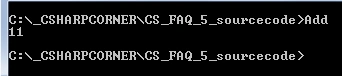
- using System;
- class Add
- {
- public static void Main()
- {
- int a = 5;
- int b = 6;
- int c = a+b;
- Console.WriteLine("The output is " +c);
- }
- }
You will view an output as in the following,

- using System;
- class Add
- {
- public static void Main()
- {
- int a = 5;
- int b = 6;
- int c = a+b;
- Console.WriteLine("The result of " +a+ " + " +b+ " = " +c);
- }
- }

Kumaresh RajalingamPosted Dec 31, 2015, 3:21 AM
Good one
Santhakumar MunuswamyPosted Dec 1, 2015, 1:31 AM
Good One
Debasis SahaPosted Dec 1, 2015, 12:01 AM
Nice Share
Mohammed IbrahimPosted Nov 30, 2015, 1:38 PM
nice
Upendra Pratap ShahiPosted Nov 30, 2015, 4:25 AM
nice one...
Raja TPosted Nov 30, 2015, 4:17 AM
Nice, thanks for sharing
Mukesh KumarPosted Nov 30, 2015, 4:11 AM
Good One
Banketeshvar NarayanPosted Nov 30, 2015, 4:05 AM
Nice Share