
A Neural Network is an Artificial Intelligence (AI) methodology that attempts to mimic the behavior of the neurons in our brains. Neural networks really shine when it comes to pattern recognition and are used in image and character recognition programs, data filtering applications, and even robotics. A neural net was even used to drive an automated vehicle across the US after learning from observing human drivers. In this article, we'll be building a basic framework for AI Neural Networks in C# and teach our program to perform basic X-OR operations.
Part I. Overview
Basically, each neuron in our brain accepts input from many other neurons and then provides a resulting output. This is precisely what we will be replicating in code. Each neuron class will have a structure similar to diagram 1 where there is a body of attributes and one output.
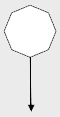
Diagram
Each neuron can have multiple inputs and the neurons will be grouped as in diagram 2.
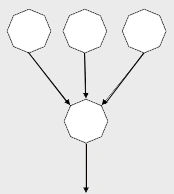
Diagram 2
Neurons will be grouped in layers. While processing a signal (we'll call it a "pulse"), the signal will start at the top layer flowing through and being modified by each neuron in that layer.
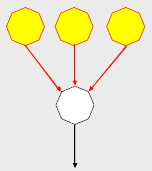
Diagram 3.
Each neuron will modify the strength of the pulse. After the modification has been completed, the "pulse" will travel to the next layer and be modified again.
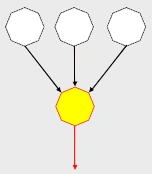
Diagram 4
Now that you have the details, let's take a step back and see how a large number of cells create a "neural net", or a network of neurons. For a neural net to work, we need at least three groupings of neurons.
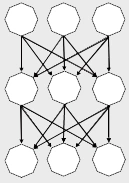
Diagram 5
The top layer is used by the neural net to perceive the environment and is often called the "perception" or "input" layer. This is where we will set initial values to be passed through the net with the pulse.
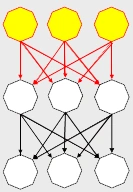
Diagram 6
The bottom later is where the neural net will expose the final output of our pulse. Notice these neurons don't send their signal anywhere. After the pulse travels to this layer, we'll go pick up the values on the output neurons as the final output of our network's processing.
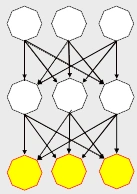
Diagram 7.
Last but not least, all the neurons in the middle layer(s) process the pulse as it travels through the net but are not exposed as direct input or output of the net. This is often called the "hidden" layer.
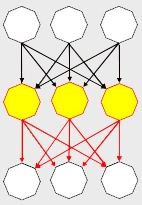
Diagram 8
Part 2. Learning through back propagation.
So now for the magic: making the network learn.
In order for our neural net to have the ability to learn, after our signal travels from the top of our net to the bottom, we have to update how each neuron will affect the next pulse that travels the network. This is done by a process called back propagation. Basically we figure out a figure representing the level of error that our network produced. This is arrived at by comparing the expected output of the net to the actual output.
Let's say we have an error in one of the cells in the output layer.
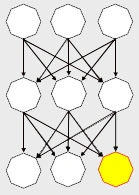
Diagram 9.
Each neuron will keep track of the neurons sending the pulse through and adjust the importance of the output of each of these parent neurons that contributed to the final output of the error cell.
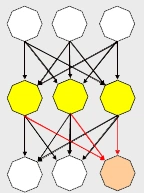
Diagram 10.
Next, each of these neurons will have an error value calculated, and the adjustment will "back propagate", meaning that we will perform the same process to the next layer of neurons (the ones that send the pulse to our hidden layer).
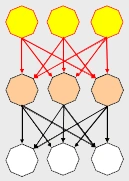
Diagram 11
Conceptually, this is how the neural network will work. Once of the cool things about neural networks is that after they learn through this iterative process and are fully trained, they can calculate output for input they have never encountered before which makes them ideal for pattern recognition and gaming AI. Next, we'll start looking at some actual C# interfaces to represent a neural network.
Part III. The Interfaces
First we will build the basic interfaces and then implement them. In developing scalable code, our interfaces can be the most crucial part of the project because they determine how the implementation will fall into place and ultimately the success of our project.
First, we need an interface to define signals traveling through the neurons of our network.
public interface INeuronSignal
{
    double Output { get; set; }
}
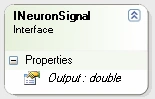
Diagram 12
And we need an interface to define the input of a neuron, which is composed of the output from many other neurons. For this, we'll use a generic dictionary where the key is a signal and the output is a class defining the "weight" of that signal.
public interface INeuronReceptor
{
    Dictionary<INeuronSignal, NeuralFactor> Input { get; }
}
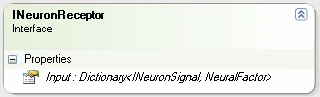
Diagram 13
We could have used a double to represent the weight of each INeuronSignal in the INeuronReceptor, but we are going to be performing a technique called batch updating after a number of back propagations which will help our network learn more efficiently. As a result, we need a class to store not only the weight of the signal, but also the amount of adjustment we'll be applying when updating.
Our NeuralFactor class will keep track of the weight and change of a neuron's input. Even though this is not an interface, it is a part of our core AI neural net framework so I'm including it here.
public class NeuralFactor
{
    #region Constructors
    public NeuralFactor(double weight)
    {
        m_weight = weight;
        m_delta = 0;
    }
    #endregion

    #region Member Variables
    private double m_weight;
    private double m_delta;
    #endregion

    #region Properties
    public double Weight
    {
        get { return m_weight; }
        set { m_weight = value; }
    }
    public double Delta
    {
        get { return m_delta; }
        set { m_delta = value; }
    }
    #endregion

    #region Methods
    public void ApplyDelta()
    {
        m_weight += m_delta;
        m_delta = 0;
    }
    #endregion
}
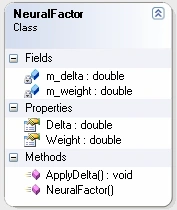
Diagram 14
Next, let's define an interface for the actual neuron. Each neuron is a receptor as well as a signal, so any object implementing our neuron interface will also implement both the INeuronSignal and INeuronReceptor interfaces. In addition, each neuron will have a bias (think of it as another input, but one that is self-contained and not from another neuron). This bias will have a weight just as each input to our neuron has a weight. We'll also have methods to process a pulse and apply neuron learning.
public interface INeuron : INeuronSignal, INeuronReceptor
{
    void Pulse(INeuralLayer layer);
    void ApplyLearning(INeuralLayer layer);
    NeuralFactor Bias { get; set; }
    double BiasWeight { get; set; }
    double Error { get; set; }
}
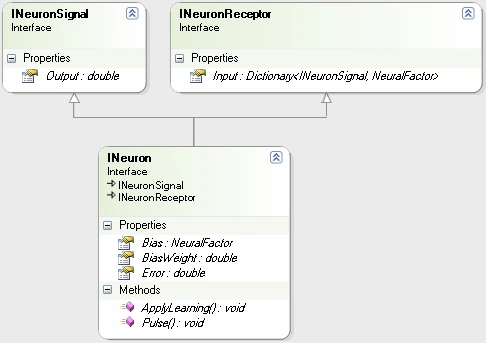
Diagram 15.
Next, we'll define an interface for a layer of neurons in our neural net. Basically, this will be used to pass the pulse or apply learning commands to each neuron in the layer.
public interface INeuralLayer : IList<INeuron>
{
    void Pulse(INeuralNet net);
    void ApplyLearning(INeuralNet net);
}
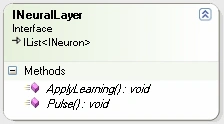
Diagram 16
And our final interface will be used to define the neural net itself. For this interface, we need to keep track of our three layers and also need to be able to pulse or apply learning to the entire neural net (passing the command to each layer which in turn passes the command to each neuron in the layer)
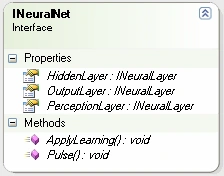
Diagram 17
Part IV. Implementation Classes
Still with me? I hope so, because now we start getting to the fun part: implementing the neural net.
1) The Neuron.
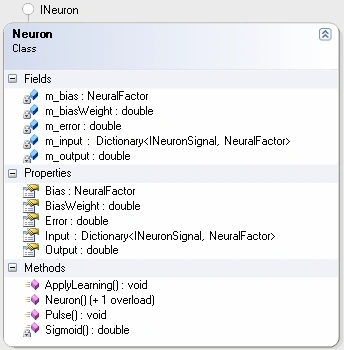
Diagram 18.
The neuron has member variables used in implementing the interfaces. The two interesting things to highlight are the Sigmoid() static function and the Pulse() method.
The Sigmoid() function uses a Sigmoid curve to squash the output of the neuron to values between 0 and 1.

private static double Sigmoid(double value)
{
      return 1 / (1 + Math.Exp(-value));
}
The Pulse() method takes the sum of the value of each input (or the output of each neuron passing information to this neuron) multiplied by the respective weight contained in our dictionary. Then adds the bias multiplied by the bias weight. The final output is "squashed" by the sigmoid curve discussed earlier and the result is stored in the m_output variable.
Note: This means our entire network runs with values x where 0 < x < 1, or alternatively x: (0,1) (x is between 0 and 1).
public void Pulse(INeuralLayer layer)
{
    lock (this)
    {
        m_output = 0;
        foreach (KeyValuePair<INeuronSignal, NeuralFactor> item in m_input)
            m_output += item.Key.Output * item.Value.Weight;
        m_output += m_bias.Weight * BiasWeight;
        m_output = Sigmoid(m_output);
    }
}
B) The Neural Layer
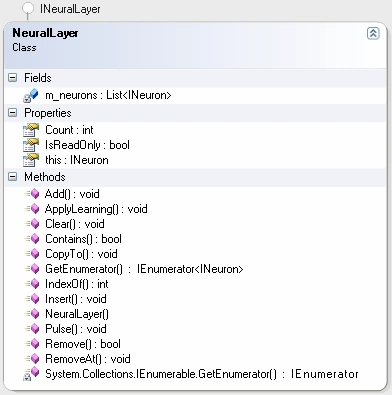
Diagram 19
The NeuralLayer class is basically a collection of neurons responsible for passing a Pulse() or ApplyLearning() command through to it's member neurons. This is implemented by wrapping a List<INeuron> and passing the IList<INeuron> methods and properties through. The only implementation we really worry about are the following two methods:
public void Pulse(INeuralNet net)
{
    foreach (INeuron n in m_neurons)
        n.Pulse(this);
}
public void ApplyLearning(INeuralNet net)
{
    foreach (INeuron n in m_neurons)
        n.ApplyLearning(this);
}
C) The NeuralNet
Last, but definitely not least, is the NeuralNet
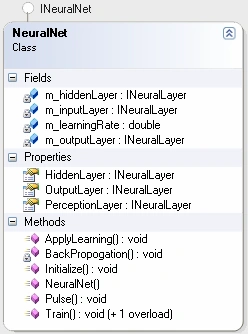
Diagram 20
The most interesting things to note in the NeuralNet class are the m_learningRate member variable, the Train() methods, the BackPropogation() method, and the Initialize() method.
To start, let's look at the initialization of our NeuralNet. We need to know a seed for the random number generator to construct our Neurons' NeuralFactors. We also need to know the numbers of input neurons, hidden neurons, and output neurons. Initialize() is our factory method and is responsible for building all of the components of our neural net and wiring them up.
public void Initialize(int randomSeed, int inputNeuronCount, int hiddenNeuronCount, int outputNeuronCount)
{
    int i, j, k, layerCount;
    Random rand;
    INeuralLayer layer;
    // initializations
    rand = new Random(randomSeed);
    m_inputLayer = new NeuralLayer();
    m_outputLayer = new NeuralLayer();
    m_hiddenLayer = new NeuralLayer();
    for (i = 0; i < inputNeuronCount; i++)
        m_inputLayer.Add(new Neuron());
    for (i = 0; i < outputNeuronCount; i++)
        m_outputLayer.Add(new Neuron());
    for (i = 0; i < hiddenNeuronCount; i++)
        m_hiddenLayer.Add(new Neuron());
    // wire-up input layer to hidden layer
    for (i = 0; i < m_hiddenLayer.Count; i++)
        for (j = 0; j < m_inputLayer.Count; j++)
            m_hiddenLayer[i].Input.Add(m_inputLayer[j],
                 new NeuralFactor( rand.NextDouble()));
    // wire-up output layer to hidden layer
    for (i = 0; i < m_outputLayer.Count; i++)
        for (j = 0; j < m_hiddenLayer.Count; j++)
            m_outputLayer[i].Input.Add(HiddenLayer[j],
                 new NeuralFactor(rand.NextDouble()));
}
Next, let's look at the Pulse() and ApplyLearning() so you can see they just pass the commands to each layer, which in turn pass them to the neurons.
public void Pulse()
{
    lock (this)
    {
        m_hiddenLayer.Pulse(this);
        m_outputLayer.Pulse(this);
    }
}
public void ApplyLearning()
{
    lock (this)
    {
        m_hiddenLayer.ApplyLearning(this);
        m_outputLayer.ApplyLearning(this);
    }
}
Ok, now we get into the meat of the network, the BackPropogation() method. This is where the bulk of the processing takes place. First, we calculate the errors on the output neurons by calculating the difference between what we expected (which is passed in as a parameter) and the actual output of the neuron. After all the output neurons are updated, we calculate the errors on the hidden layer neurons in the same way. Finally we update the adjusted weight of each neuron's inputs as well as the bias multiplied by the m_learningRate parameter.
private void BackPropogation(double[] desiredResults)
{
    int i, j;
    double temp, error;
    INeuron outputNode, inputNode, hiddenNode, node, node2;
    // Calcualte output error values
    for (i = 0; i < m_outputLayer.Count; i++)
    {
        temp = m_outputLayer[i].Output;
        m_outputLayer[i].Error = (desiredResults[i] - temp) * temp * (1.0F - temp);
    }
    // calculate hidden layer error values
    for (i = 0; i < m_hiddenLayer.Count; i++)
    {
        node = m_hiddenLayer[i];
        error = 0;
        for (j = 0; j < m_outputLayer.Count; j++)
        {
            outputNode = m_outputLayer[j];
            error += outputNode.Error * outputNode.Input[node].Weight * node.Output * (1.0 - node.Output);
        }
        node.Error = error;
    }
    // adjust output layer weight change
    for (i = 0; i < m_hiddenLayer.Count; i++)
    {
        node = m_hiddenLayer[i];
        for (j = 0; j < m_outputLayer.Count; j++)
        {
            outputNode = m_outputLayer[j];
            outputNode.Input[node].Weight += m_learningRate * m_outputLayer[j].Error * node.Output;
            outputNode.Bias.Delta += m_learningRate * m_outputLayer[j].Error * outputNode.Bias.Weight;
        }
    }
    // adjust hidden layer weight change
    for (i = 0; i < m_inputLayer.Count; i++)
    {
        inputNode = m_inputLayer[i];
        for (j = 0; j < m_hiddenLayer.Count; j++)
        {
            hiddenNode = m_hiddenLayer[j];
            hiddenNode.Input[inputNode].Weight += m_learningRate * hiddenNode.Error * inputNode.Output;
            hiddenNode.Bias.Delta += m_learningRate * hiddenNode.Error * inputNode.Bias.Weight;
        }
    }
}
After BackPropogation, we are prepared to apply the lessons learned by comparing the actual vs. expected output on our neural network. Doing this in batches helps out network to not over-compensate for errors occurring with different inputs. When we are ready, we just call ApplyLearning() and our neural net will be updated.
The Train() methods, just applies an input, pulses the net, and performs the back propagation necessary for learning.
public void Train(double[] input, double[] desiredResult)
{
    int i;
    if (input.Length != m_inputLayer.Count)
        throw new ArgumentException(string.Format("Expecting {0} inputs for this net", m_inputLayer.Count));
    // initialize data
    for (i = 0; i < m_inputLayer.Count; i++)
    {
        Neuron n = m_inputLayer[i] as Neuron;
        if (null != n) // maybe make interface get;set;
            n.Output = input[i];
    }
    Pulse();
    BackPropogation(desiredResult);
}
public void Train(double[][] inputs, double[][] expected)
{
    for (int i = 0; i < inputs.Length; i++)
        Train(inputs[i], expected[i]);
}
So our four simple steps for neural net learning are as follows:
Step 1: Set input data into perception layer
Step 2: Pulse()
Step 3: BackPropogate()
Step 4: ApplyLearning()
Part V. Actually Doing Something -- XOR
We want to train a neural net to perform an XOR operation on two bits. We'll build a neural net with two input neurons, two hidden neurons, and one output neuron. We want to train the net to perform the following operation.
| Input A | Input B | XOR Output |
| 0 | 0 | 0 |
| 0 | 1 | 1 |
| 1 | 0 | 1 |
| 1 | 1 | 0 |
The problem is that we are dealing with fuzzy Boolean numbers. Our entire neural net runs with the double data type having values between 0 and 1 and we need to get crisp values out of the net.
Not to worry, we just have to fuzzify our input and defuzzify out output. For the inputs, instead of using the value 1, we'll use a "big" number (like 0.9) and for the value 0 we'll substitute a "small" number (like 0.1). We'll use these same values for expected values during training. After training, for our output, we'll say anything 0.5 and above is a 1 and anything below 0.5 is a 0.
We'll create a button for training our neural net, initialize it, and run through iterations of 100 training sessions for each application of learning. It would be interesting to see how many training passes are required to get our net up to speed, so we'll count the number of iterations required.
private void button1_Click(object sender, EventArgs e)
{
    net = new NeuralNet();
    double high, mid, low;
    high = .9;
    low = .1;
    mid = .5;
    // initialize with
    //   2 perception neurons
    //   2 hidden layer neurons
    //   1 output neuron
    net.Initialize(1, 2, 2, 1);
    double[][] input = new double[4][];
    input[0] = new double[] {high, high};
    input[1] = new double[] {low, high};
    input[2] = new double[] {high, low};
    input[3] = new double[] {low, low};
    double[][] output = new double[4][];
    output[0] = new double[] { low };
    output[1] = new double[] { high };
    output[2] = new double[] { high };
    output[3] = new double[] { low };
    double ll, lh, hl, hh;
    int count;
    count = 0;
    do
    {
        count++;
        for (int i = 0; i < 100; i++)
            net.Train(input, output);
        net.ApplyLearning();
        net.PerceptionLayer[0].Output = low;
        net.PerceptionLayer[1].Output = low;
        net.Pulse();
        ll = net.OutputLayer[0].Output;
        net.PerceptionLayer[0].Output = high;
        net.PerceptionLayer[1].Output = low;
        net.Pulse();
        hl = net.OutputLayer[0].Output;
        net.PerceptionLayer[0].Output = low;
        net.PerceptionLayer[1].Output = high;
        net.Pulse();
        lh = net.OutputLayer[0].Output;
        net.PerceptionLayer[0].Output = high;
        net.PerceptionLayer[1].Output = high;
        net.Pulse();
        hh = net.OutputLayer[0].Output;
    }
    while (hh > mid || lh < mid || hl < mid || ll > mid);
    MessageBox.Show((count*100).ToString() + " iterations required for training");
}
Now that training has been completed, we can use the net as a tool to perform our xor operations (take a look at the complete article code).
Part V. Conclusion
On a final note, another application (often used in gaming AI) consists of having multiple output neurons each with an associated action. After observation of the environment and pulsing the network, the node with the highest output value is determined to be the "winner" and the associated action is taken. This is called the "winner take all" approach.
I hope you enjoyed this article. It is meant to an introduction as there are many aspects to neural net programming that we did not get into. Efficient training of neural net is a huge subject to cover by itself. But I imagine you are pretty beat by this time...
Until next time--
Guest UserPosted Dec 26, 2023, 12:52 AM
The article starts well, but lacks the implementation of classes and methods. For those who want to code the article, see how it works, don't waste your time!
Yavuz MercanPosted May 20, 2023, 9:48 PM
Thank you Matthew
DANIEL NEGREAPosted Jan 31, 2021, 7:03 PM
I can't find the code for the INeuralNet inteface. I could code it by hand using the diagram but I don't know the parameters of the void functions. Please help....
Ariel Alejandro WagnerPosted Jun 7, 2020, 5:12 PM
This is awesome! Great work! I love this each article. Thank you for share. I send a big hug!
Kote IsaevPosted Oct 26, 2019, 9:10 PM
Actually code in zip is broken. It hangs forever. I spend few days to getting up working a hanging code actually..
Dalibor PPosted Apr 15, 2019, 11:57 AM
This's reality awesome. Just a thing on .NET and C# programming. Do not use lock(this); Are you really sure that you want to lock whole instance of the object? Just add property private Object blah = new Object(); and then lock(blah); would do the thing much, much better. And you won't have deadlocks in multithreading implementations, that's crucial for any AI. Other than that code is beautifully OOP. More info about why lock(this); is bad is available at many places, e.g. Stack Overflow is a great one. And this's C# Corner, so let's use it correctly.
ceng kaplanPosted Jan 16, 2018, 1:28 AM
I dont know what I am doing but. because of mbias null error I changed m_inputLayer.Add(new Neuron()); TO ==> m_inputLayer.Add(new Neuron() { Bias = new NeuralFactor(rand.NextDouble()) }); I hope that is right. I am waitin for your help
ceng kaplanPosted Jan 16, 2018, 1:07 AM
How can I set mbias object for a neuron. on pulse operation m_bias is null error. can u send me working code. cengkaplan @ gmail.com
Daniel StewartPosted May 19, 2017, 8:52 AM
Is there any code for the INeuralNet Interface or am I missing something obvious?
TylerPosted Apr 19, 2017, 12:17 PM
Thanks Mathew!Just getting into AI and this is really helpful! One thing I changed and just wanted to share is in the button1_Click function I changed the while loop condition from: // really train this thing well... while (hh > (mid + low)/2 || lh < (mid + high)/2 || hl < (mid + low) /2 || ll > (mid + high)/2); to: while ((output[0][0] < mid ? hh > (mid + low) / 2 : hh < (mid + high) / 2) || (output[1][0] < mid ? lh > (mid + low) / 2 : lh < (mid + high) / 2) || (output[2][0] < mid ? hl > (mid + low) / 2 : hl < (mid + high) / 2) || (output[3][0] < mid ? ll > (mid + low) / 2 : ll < (mid + high) / 2)); This helps changing the output array for other logic tables like or, nor, nand, etc. without having to re-write the while loop check. I also found using 4 hidden layer neurons like Mark suggested helped too.
Michael GriffithsPosted Jul 1, 2016, 8:27 AM
Very impressive. I know nothing about ai but am looking into it. Thank you for a very well written nicely explained article
Lukas TomPosted Jun 14, 2016, 2:19 PM
but the tutorial is completely different from actual attached C# code, why??? I had to get back to c# code and write additional stuff I didnt even understand....
Mark MonninPosted Apr 12, 2016, 10:39 AM
This is awesome! I love playing around with this and imagining how I might use it. I noticed that with a hidden layer of 2 neurons, it doesn't work very well unless you have a lucky seed, such as 1 or 2. Choose a seed of 3 or leave it up to the default time-based seed and it will calculate longer than I care to wait. However, if you choose to use 4 neurons for the hidden layer (because you know something about the problem and there are 4 possible input states), it works for any seed and is always faster than 2 neurons.
Sonu ChaudharyPosted Feb 25, 2016, 7:19 AM
nice article
SilverPosted Mar 5, 2014, 3:06 PM
On mine happens the same. Operation is always one number as the rest of variables.
pooria haddadPosted Sep 7, 2013, 4:07 PM
In my laptop, the number of "iterations required for training" always is "5190",and also hh,ll,hl and lh are always one number! is it true??
Rehan van der MerwePosted Aug 4, 2013, 7:07 AM
Sheer brilliance
sandeep deshettyPosted Nov 16, 2012, 6:08 AM
nice article but can u share code for Input in Neuron class
Sunil SharmaPosted Aug 28, 2012, 3:26 PM
Great Article
Phil HowardPosted Jun 16, 2012, 6:28 PM
Thanks for the great article Matthew. I was wondering if you could post the original version of the source? I'm having problems with V2. Thanks Phil.
[email protected] MichealPosted Feb 4, 2012, 8:28 AM
This is an excellent article introducing the topic. I damn like how you have explained it nicely. For last 10 years I was very much interested to get into AI but the challenge was with the programming language that I know which is C#. This is way good for me to start thinking on a AI field which I was fascinated about since 10 years. Now am a hardcore C# programmer and trying to get back to AI NN... Good one though...
ashkan parnianPosted Mar 5, 2011, 7:12 AM
from all i 've seen through intenet, your code was another thing, i enjoy the way you do programming,how tidy,clean,to some extent optimize and your thought,i like it! special thanks to you, Ashkan, A programmer from Persia.
Anony MolePosted Sep 7, 2010, 9:02 PM
high = .989; low = .011; If you try this you'll never train...
jihal patelPosted Aug 21, 2010, 4:41 AM
i have a project to implement the back propagation algo which can predict the share prices of companies of the stock market.. so can u plz help me by providing an algorithm for that.. my email id is [email protected]... thanks in advance...
jihal patelPosted Aug 21, 2010, 4:36 AM
i have a project to implement an back propagation algo which can predict share prices of companies of stock market.. so can u plz help me by providing the algorithm for that.. my emailid is [email protected] thanks in advance....
Dat Tran HoangPosted Apr 10, 2010, 3:14 AM
your article very interesting, I thank you because I'm also doing this project. I recognize faces but I do not like to use the library emguCV, I want to write to learn.
Jean Sylvain BoigePosted Dec 25, 2006, 8:50 AM
Hi, Thank you first for that straight forward port of the 2nd gen neural nets and backpropagation training algorithm. Still, I think you're missing something important there. Most of the statistical pulsing and backprop computations benefit a lot from the possibility to resolve them into linear algebric operations (matrix products). This is the way to scale them up and what's boosted there interest within the AI community for the last 20 years. Lutz Roeder released a port of the mapack linear algebra optimized against modern CPUs instruction sets. I think it could be interesting to compare both implementations of a similar algorithm. I'm pretty sure the benchmark would show a performance gap of at least an order of magnitude with large nets. This is much less true with 3rd gen asynchronous and temporal nets such as Leaky Integrate and Fire, which resolve well into an events based implementation Cheers
chiranjeevi kotaruPosted Jun 29, 2006, 9:21 PM
fine its great to see ur article and i except more from u in this field of advancement. if u give me reply i can ask you some question that field. know something about the AI. ok bye friend. wish you all the best for future developements k.chiranjeevi
Matthew CochranPosted Jun 23, 2006, 4:43 PM
I found a few bugs in the article source code and uploaded a new version 6/23/06 at 5:00 pm.